
Уводзіны
This manual provides comprehensive instructions for the AIDITIYMI COV33662806 replacement infrared remote control. This remote is specifically designed to be compatible with a wide range of LG DVD Player models, offering a direct replacement solution without the need for complex programming or pairing procedures. Please read this manual carefully to ensure proper setup and operation of your new remote control.

Image: The AIDITIYMI COV33662806 replacement remote control, showing its full button layout.
Настройка
Ўстаноўка акумулятара
- Знайдзіце батарэйны адсек на задняй частцы пульта дыстанцыйнага кіравання.
- Slide open the battery cover in the direction indicated by the arrow.
- Insert two (2) new AAA alkaline batteries, ensuring that the positive (+) and negative (-) terminals align correctly with the markings inside the compartment.
- Шчыльна зачыніце вечка батарэйнага адсека, пакуль яно не зафіксуецца на месцы.

Выява: Задняя панэль пульта дыстанцыйнага кіравання з адкрытым батарэйным адсекам, дзе паказана, куды ўставіць дзве батарэйкі тыпу ААА.
Першае выкарыстанне
This remote control requires no programming or pairing. Once the batteries are correctly installed, the remote is ready for immediate use with compatible LG DVD players.
Інструкцыя па эксплуатацыі
Азнаёмцеся з функцыямі кожнай кнопкі на пульце дыстанцыйнага кіравання:
- УЛАДА: Turns the LG DVD player on or off.
- АДКРЫЦЬ/ЗАКРЫЦЬ: Opens or closes the disc tray of the DVD player.
- Кнопкі з лічбамі (0-9): Used to select specific tracks, chapters, or to input numerical values.
- ГУЛЬНЯ (►): Initiates disc playback.
- PAUSE/STEP (▮▮): Pauses playback or advances frame by frame during pause.
- СТОП (■): Halts disc playback.
- SCAN (◀◀ / ▶▶): Fast reverse or fast forward through content.
- SKIP (◀◀| / |▶▶): Skips to the previous or next track/chapter.
- ГУЧНАСЦЬ (+ / -): Adjusts the volume level. This function typically controls the volume of the connected TV if the DVD player supports AV control pass-through.
- PR/CH (+ / -): Changes channels. This function typically controls the channels of the connected TV if the DVD player supports AV control pass-through.
- AV: Switches video input sources on the connected TV.
- МЕНЮ DVD: Accesses the main menu of the DVD disc.
- НАЗВА: Accesses the title menu of the DVD disc.
- Кнопкі накіравання (уверх, уніз, налева, направа): Navigates through on-screen menus and selections.
- УВОД: Confirms a selection in menus.
- ДЫСПЛЕЙ: Shows on-screen information about the current playback status.
- ВЯРТАННЕ: Вяртанне да папярэдняга меню або экрана.
- АЎДЫЁ: Changes audio tracks or language options during playback.
- субтытры: Пераключае або выбірае параметры субтытраў.
- КУТ: Changes camera angles if available on the disc.
- НАСТРОЙКА: Accesses the system setup menu of the DVD player.
- МАРКЕР: Sets a marker point during playback.
- ПОШУК: Activates the search function.
- ПРАГРАМА: Allows programming of playback order.
- МАСШТАБ: Zooms in on the picture.
- Паўтор: Repeats playback of a track, chapter, or disc.
- АВ: Repeats a specific section between two marked points (A and B).
- РАЗРАБОТКА: Changes the video output resolution.
- ВЯЗЬ: Toggles closed captions on or off.

Выява: Падрабязны пярэдні план view of the remote control, highlighting the layout and labels of all functional buttons.
Тэхнічнае абслугоўванне
Уборка
To clean your remote control, gently wipe it with a soft, dry cloth. Avoid using liquid cleaners, solvents, or abrasive materials, as these can damage the remote's surface or internal components.
Замена батарэі
Replace the batteries when the remote's response becomes sluggish, inconsistent, or stops working entirely. Always replace both AAA batteries simultaneously with new alkaline batteries. Remove depleted batteries promptly to prevent potential leakage and damage to the remote.
Ліквідацыю непаладак
- Пульт не адказвае:
- Check if the batteries are inserted with the correct polarity (+ and -).
- Replace the batteries with a fresh pair of AAA alkaline batteries.
- Ensure there are no physical obstructions between the remote control and the infrared sensor on your LG DVD player.
- Confirm that the remote is pointed directly at the DVD player's sensor.
- Некаторыя кнопкі не працуюць:
- Verify that the specific function is supported by your particular LG DVD player model. Not all DVD players have identical features.
- Buttons such as TV POWER, VOL, PR/CH, and AV are primarily for controlling a connected television. Their functionality depends on whether your DVD player supports AV control pass-through or if the remote is designed to be programmed for a TV (this replacement remote is not programmable for TV control).
Тэхнічныя характарыстыкі
- Марка: АЙДЫТЫМІ
- Нумар мадэлі: COV33662806
- Тэхналогія падключэння: Інфрачырвоны
- Тып батарэі: 2 шчолачныя батарэйкі тыпу AAA (не ўключаны)
- Максімальны дыяпазон: Approximately 32 Feet (10 meters)
- Памеры: Approximately 15 cm (5.91 in) length x 4.5 cm (1.77 in) width.
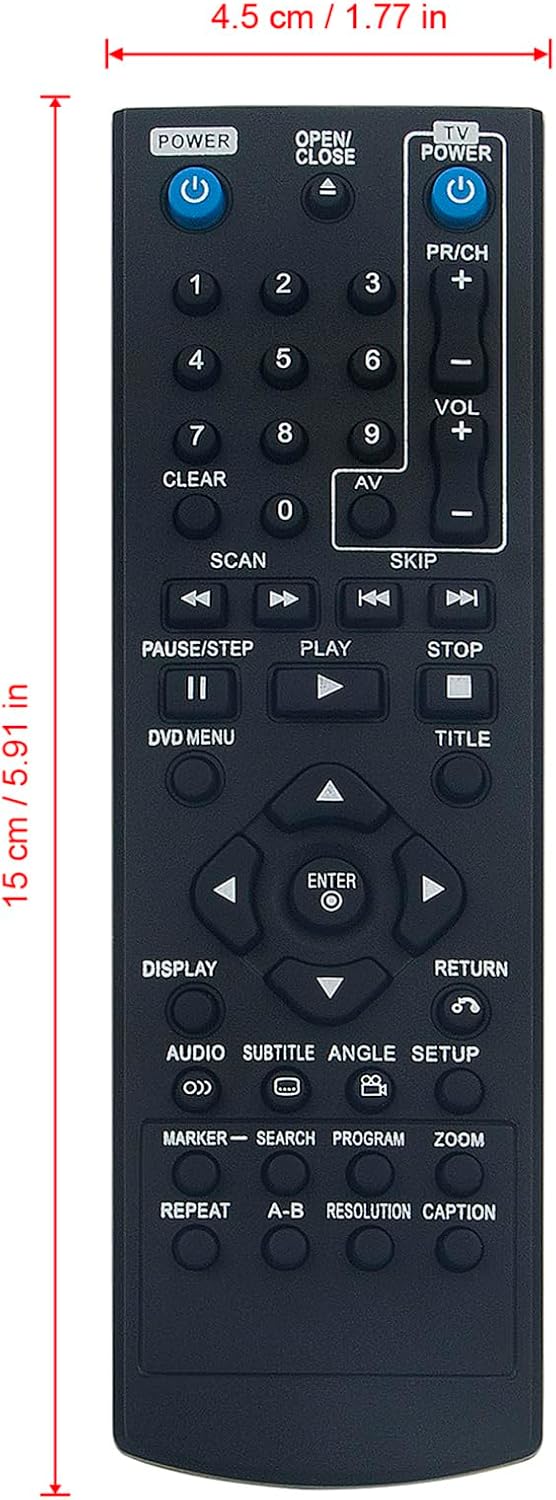
Image: The remote control shown with its approximate length (15 cm / 5.91 in) and width (4.5 cm / 1.77 in) dimensions.
Compatible LG DVD Player Models:
- DP520H, DP132H, DP540H, DP542H, DP132HE, DGK777, DGK778, DK785, DN898, DP522H, DP521H, DP527H, DVX276, DVX640H, DVX642H, DVX692H, DVX647KH, DVX641KH, DVX690H, DVX9900, DZ9500, DZ9800, DV276-E2M, DV276-E1M, DV276-E3M, DVX9900H, DV341, DV341S, DV351, DV381, DV381-P, DV392HN, DV380H-N, DV392H-N, DVX392H, DVX382H, DGK585XB, DGK588XB, DV392H-E, DV382H-E, DV392H-P, DV492H, DV8931H, DVX162, DVX172, DVX286, DVX289H, DVX582H, DVX691KH, DVX697KH, DVX9500, DVX9700, DZ9300, DZ9400, DGK683X, DGK685X.
Гарантыя
This AIDITIYMI remote control typically includes a 1-year warranty from the manufacturer. For specific details regarding warranty coverage, terms, and conditions, please refer to the documentation provided with your purchase or contact your seller directly.
Падтрымка
Should you require further assistance, have questions not covered in this manual, or encounter any issues with your remote control, please contact the seller or manufacturer through the platform where you made your purchase. They will be able to provide specialized support and guidance.