
VGN ATK RS7 PRO
ATK RS7 Pro RGB eSports Edition Hall Effect Keyboard User Manual
Model: ATK RS7 PRO | Brand: VGN
Уводзіны
This manual provides comprehensive instructions for the ATK RS7 Pro RGB eSports Edition Hall Effect Keyboard. It covers setup, operation, maintenance, and troubleshooting to ensure optimal performance and longevity of your device. The ATK RS7 Pro features a Hall Effect design with adjustable 0 dead zone, an 8000Hz polling rate, and ultra-low 0.3ms latency, utilizing Gateron Magnetic Jade Switches (Amethyst Limited Edition).
Асноўныя характарыстыкі
- Hall Effect Keyboard: Utilizes magnetic sensors for key actuation, offering precise and customizable actuation points.
- Adjustable 0 Dead Zone: Allows for fine-tuning of key sensitivity and responsiveness.
- Частата апытання 8000 Гц: Provides extremely fast communication between the keyboard and your computer, reducing input lag.
- 0.3ms Ultra-low Latency: Engineered for competitive gaming, minimizing delay from key press to in-game action.
- Gateron Magnetic Jade Switches: Features Amethyst Limited Edition switches for a unique tactile and auditory experience.
- 75% макет: Compact design retaining essential keys for gaming and productivity.
- Aluminum Alloy Top Case: Durable and premium construction.
- Resilient GAS Structure: Enhances typing feel and sound.
- Adjustable Sensitivity Levels: Customize key actuation to your preference.
- Rapid Trigger/Reset (RT): Advanced feature for competitive play, allowing keys to re-actuate instantly upon reset.
- ATK V HUB Compatibility: Software support for advanced customization.
- NKRO (N-клавішнае націсканне): Ensures all simultaneous key presses are registered.
- Dye-Sub Keycaps: Durable keycap legends that resist fading.
- Advanced Key Functions: Programmable keys and macros for enhanced control.
- Падсвятленне: Equipped with RGB backlighting for customizable aesthetics.
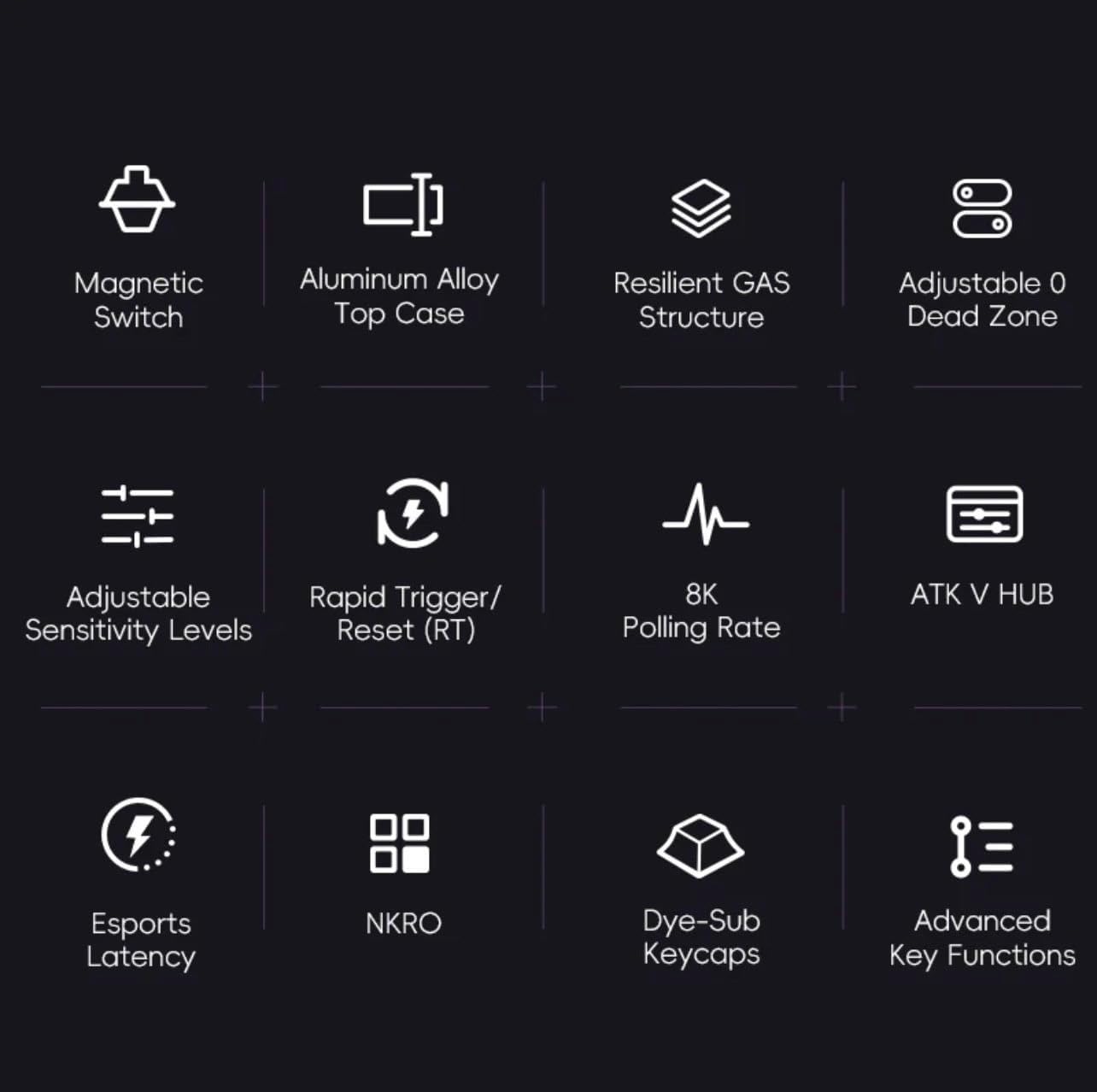
Малюнак 1: Закончанаview of ATK RS7 Pro's advanced features.
Змест пакета
Калі ласка, праверце ўпакоўку на наяўнасць наступных прадметаў:
- ATK RS7 Pro RGB eSports Edition Hall Effect Keyboard
- USB Cable (USB-A connection)
- Кіраўніцтва карыстальніка (гэты дакумент)
Настройка
- Падключэнне клавіятуры: Locate an available USB-A port on your computer. Insert the USB-A end of the provided cable into your computer's USB port and the other end into the keyboard's USB port.
- Ўстаноўка драйвера: The keyboard is typically plug-and-play. Your operating system should automatically detect and install the necessary drivers.
- Ўстаноўка праграмнага забеспячэння (неабавязкова): For advanced customization, such as adjusting actuation points, rapid trigger settings, RGB lighting, and macros, download and install the ATK V HUB software from the official VGN webсайт.

Figure 2: ATK RS7 Pro Keyboard connected via USB-A.
Інструкцыя па эксплуатацыі
Базавае выкарыстанне
The ATK RS7 Pro functions as a standard QWERTY keyboard for typing and general computer use. All keys are fully functional upon connection.
Пашыраныя функцыі і налады
The ATK RS7 Pro offers several advanced features for enhanced performance, particularly in gaming. These features are primarily configured via the ATK V HUB software.
- Рэгуляванне кропкі спрацоўвання: Customize the distance a key needs to travel before registering a press. This can be set individually for each key.
- Хуткі запуск (RT): This feature allows a key to re-actuate immediately upon reset, without needing to return to its full resting position. This is highly beneficial for rapid inputs in games. Configure the activation and deactivation points within the software.
- 0 Dead Zone: Ensure that there is no unresponsive travel distance at the beginning or end of a key press, providing maximum responsiveness.
- Хуткасць галасавання: The keyboard operates at an 8000Hz polling rate by default, providing 0.3ms latency. This setting is fixed for optimal performance.
- RGB асвятленне: Customize lighting effects, colors, and brightness through the ATK V HUB software.
- Macros and Key Remapping: Assign complex sequences of commands to a single key or remap keys to different functions using the software.

Figure 3: The ATK RS7 Pro features ultra-low 0.3ms latency with an 8000Hz polling rate.
Тэхнічнае абслугоўванне
- Уборка: Use a soft, dry cloth to wipe down the keyboard surface. For deeper cleaning, use compressed air to remove dust and debris from between keycaps. Avoid using harsh chemicals or abrasive materials.
- Зняцце каўпачка клавіш: If necessary, keycaps can be carefully removed using a keycap puller (not included) for thorough cleaning. Reinstall them by aligning and gently pressing down until they click into place.
- захоўванне: Калі клавіятура не выкарыстоўваецца, захоўвайце яе ў чыстым, сухім месцы, удалечыні ад прамых сонечных прамянёў і экстрэмальных тэмператур.

Figure 4: Internal components of the ATK RS7 Pro, illustrating its layered construction for durability and sound.
Ліквідацыю непаладак
| праблема | Магчымая прычына | Рашэнне |
|---|---|---|
| Клавіятура не адказвае | Слабае падключэнне USB, няспраўны порт USB, праблема з драйверам. | Ensure USB cable is securely connected. Try a different USB port. Restart your computer. Check Device Manager for driver issues. |
| Ключы не рэгіструюцца належным чынам | Dust/debris under keycap, software settings, switch malfunction. | Clean under the keycap with compressed air. Check ATK V HUB software for actuation point settings. If issue persists, contact support. |
| Не працуе RGB-асвятленне | Праблемы з наладамі праграмнага забеспячэння, з харчаваннем. | Ensure ATK V HUB software is running and lighting is enabled. Check USB connection for sufficient power delivery. |
| Software (ATK V HUB) not detecting keyboard | Software not updated, driver conflict, background processes. | Ensure you have the latest version of ATK V HUB. Reinstall keyboard drivers. Close other background applications that might interfere. |
Тэхнічныя характарыстыкі
| Асаблівасць | Дэталь |
|---|---|
| Марка | VGN |
| Нумар мадэлі | ATK RS7 PRO |
| Апісанне клавіятуры | Гульнявая клавіятура |
| Рэкамендуемае выкарыстанне | Гульнявая |
| Тэхналогія падлучэння | USB-A |
| Сумяшчальныя прылады | Персанальны кампутар |
| Асаблівасць | Падсвятленне |
| Уключаныя кампаненты | Кабель USB |
| Тып перамыкача | Tactile (Gateron Magnetic Jade) |
| Раскладка клавіятуры | QWERTY (75% layout) |
| Рука арыентацыі | Амбідэкстр |
| Стаўка апытання | 8000 Гц |
| Затрымка | 0.3 мс |
| Мёртвая зона | Adjustable 0 Dead Zone |
Гарантыя і падтрымка
The ATK RS7 Pro RGB eSports Edition Hall Effect Keyboard comes with a standard manufacturer's warranty. Please refer to the warranty card included in your package or visit the official VGN webсайт для атрымання падрабязных гарантыйных умоў.
For technical support, troubleshooting assistance, or inquiries regarding your product, please contact VGN customer service through their official website or the contact information provided with your purchase. Ensure you have your product model number (ATK RS7 PRO) and purchase details ready when contacting support.
Звязаныя дакументы - ATK RS7 PRO
 |
VGN UFO 8K Wireless Mouse Receiver User Manual Comprehensive user manual for the VGN UFO 8K Wireless Mouse Receiver, including setup instructions, indicator light functions, and troubleshooting for common connectivity and performance issues. |
 |
Кіраўніцтва карыстальніка DragonFly F1 Pro Max - VGN Падрабязнае кіраўніцтва карыстальніка для бесправадной гульнявой мышы VGN DragonFly F1 Pro Max, якое змяшчае падрабязную інфармацыю аб прадукце, характарыстыкі продажаў, параўнанне параметраў, падрабязныя характарыстыкі, падключэнне, сумяшчальнасць, звесткі аб датчыках, асноўны чып кіравання, батарэю, лапаткі, ролікавы энкодэр, налепкі на ножках, падтрымку праграмнага забеспячэння, упакоўку і папярэджанні FCC. |
 |
VGN V108 Keyboard Product Manual User manual for the VGN V108 gaming keyboard, covering safety instructions, setup, operation, and maintenance guidelines. |
 |
Кіраўніцтва карыстальніка механічнай клавіятуры VGN N75 Pro Інструкцыя карыстальніка для механічнай клавіятуры VGN N75 Pro, у якой апісаны кнопкі, рэжымы падключэння (2.4G, Bluetooth, правадное), кіраванне харчаваннем, функцыі сну, камбінацыі клавіш FN, падсветкавыя эфекты, распаўсюджаныя метады ліквідацыі непаладак і адпаведнасць патрабаванням FCC. |
 |
Кіраўніцтва карыстальніка механічнай клавіятуры VGN V98 Pro V2 Кіраўніцтва карыстальніка для механічнай клавіятуры VGN V98 Pro V2 з падрабязным апісаннем адпаведнасці патрабаванням FCC, функцый і спецыфікацый. |
 |
Кіраўніцтва карыстальніка механічнай клавіятуры VGN S99 Кіраўніцтва карыстальніка для механічнай клавіятуры VGN S99, якое змяшчае апісанні кнопак, кароткае кіраўніцтва па бесправадным падключэнні 2.4G, Bluetooth і правадным падключэнні, кіраванне харчаваннем, функцыю сну, камбінацыі клавіш FN, падсветку і распаўсюджаныя парады па ліквідацыі непаладак. |
Ask a question about this manual
Ask about setup, troubleshooting, compatibility, parts, safety, or missing instructions. Manuals+ will review the question and use this page’s manual context to help answer it.