
1. Уводзіны
Thank you for choosing the Hangrui Kids Camera C3. This digital camera is specifically designed for children, featuring a unique appearance, an HD IPS screen, and a durable soft silicone case. It allows children to capture high-resolution photos and videos, fostering their creativity and imagination. This manual provides essential information for setting up, operating, maintaining, and troubleshooting your camera.
2. Прадукт скончыўсяview
2.1 Змест пакета
- 1 x Hangrui Kids Camera
- 1 х USB-кабель
- 1 х шнурок
- 1 х Кіраўніцтва карыстальніка
- 1 x 32GB Memory Card (pre-installed)
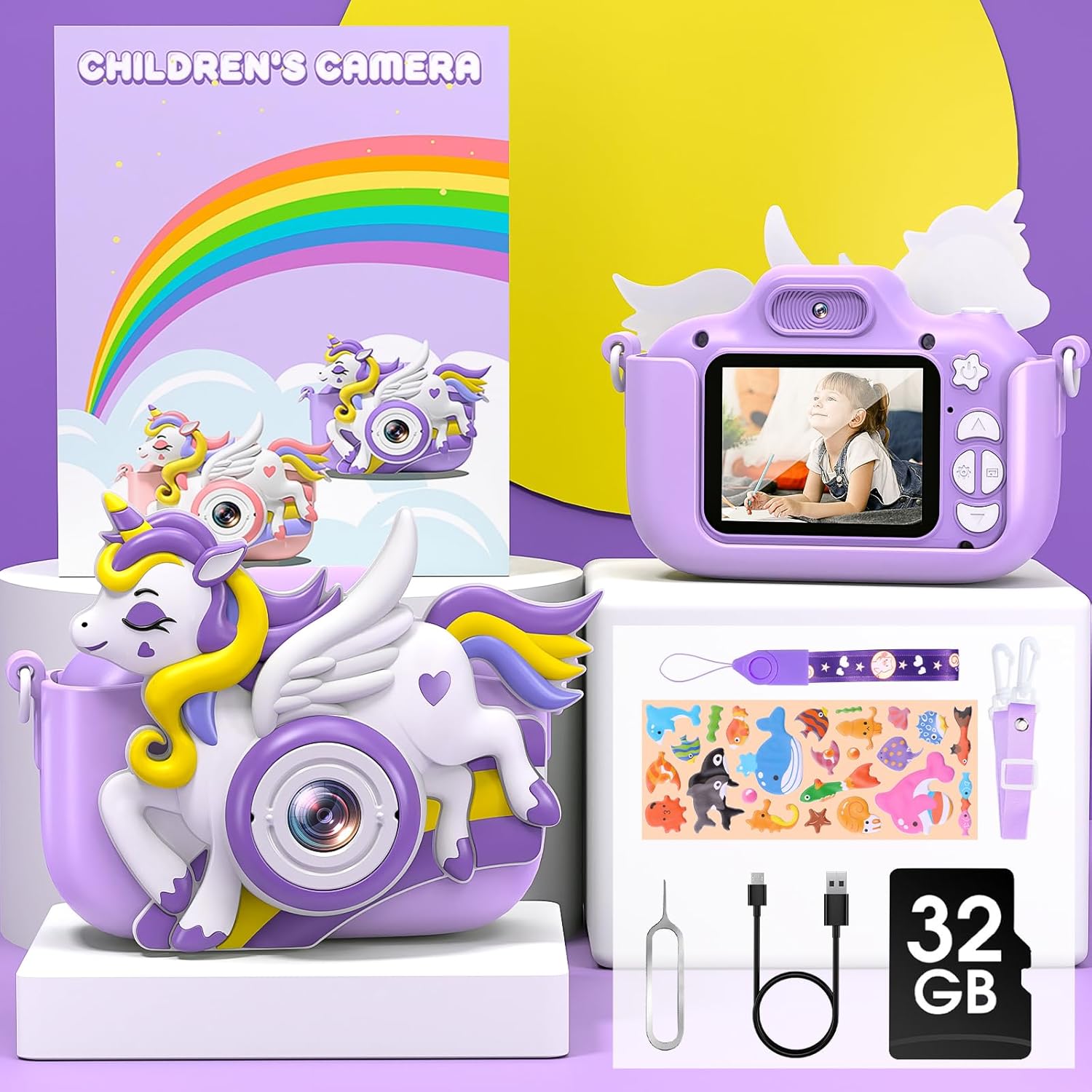
Image: Contents of the Hangrui Kids Camera C3 package.
2.2 Асноўныя магчымасці
- 2.0-цалевы IPS-экран: Ачысціць дысплей для viewфота і відэа.
- 20 Million Pixels (20MP) Photos: Захоп выявы з высокім разрозненнем.
- Запіс відэа ў фармаце HD 1080P: Capture moments in high definition.
- 8-кратны лічбавы зум: Magnify subjects for detailed shots.
- Шматфункцыянальнасць: Supports photo taking, video recording, playback, selfie mode, time-lapse, and includes fun filters, stickers, and built-in puzzle games (Snake, Tetris, Sokoban).
- Акумулятарная батарэя 1000 мАг: Provides 3-5 hours of continuous use on a full charge.
- Карта памяці 32 ГБ: Stores approximately 5,000 photos.
- Трывалы дызайн: Eco-friendly soft silicone case protects against bumps and drops.
- Партатыўны: Includes a durable lanyard for easy carrying.

Выява: Зверхуview of the Hangrui Kids Camera C3 and its main features.
3. Настройка
3.1 Устаноўка карты памяці
The 32GB memory card is typically pre-installed in the camera. If you need to remove or re-install the memory card, ensure the camera is powered off. After re-installing the memory card, you must restart the camera for it to be recognized properly.
3.2 Першапачатковая зарадка
Before first use, fully charge the camera. When the camera indicates a low battery, use the included USB data cable to charge it promptly. Ensure the camera is powered off during charging. Connect the USB cable to a 5V/1A power adapter (not included) or a standard USB power port.
4. Інструкцыя па эксплуатацыі
4.1 Уключэнне/выключэнне сілкавання
Націсніце і ўтрымлівайце кнопку харчавання, каб уключыць або выключыць камеру.
4.2 Фотаздымка
In photo mode, press the shutter button to take a picture. Use the navigation buttons to select from various filters and fun frames to enhance your photos.

Малюнак: Examples of color filters and funny frames available for photos.
4.3 Запіс відэа
Switch to video mode and press the shutter button to start recording. Press it again to stop recording. The camera supports 1080P HD video resolution.
4.4 Selfie Mode
The camera features both front and rear lenses. Switch to selfie mode to use the front-facing camera for self-portraits.

Image: Demonstrating the front and rear selfie camera function.
4.5 Функцыя маштабавання
Use the zoom buttons to apply up to 8X digital zoom while taking photos or recording videos.
4.6 Паскораная здымка
Select the time-lapse function to capture a series of photos at set intervals, creating a time-lapse video.

Image: Illustrating 1080P HD video recording, time-lapse settings, and 8X zoom.
4.7 Гульні
The camera includes three puzzle games: Snake, Tetris, and Sokoban. Navigate to the games menu to select and play.
4.8 Прайграванне музыкі
The camera supports music playback. Transfer audio files to the memory card and access them through the music menu.

Image: The camera's compact design and music feature.
5. Тэхнічнае абслугоўванне і бяспека
5.1 Рэкамендацыі па зарадцы
Always use the provided USB cable for charging. Ensure the camera is turned off during charging. Use a 5V/1A power adapter or a standard USB port. Avoid overcharging the battery.
5.2 Агульныя папярэджанні па бяспецы
- Не разбірайце: Do not attempt to disassemble the camera yourself to avoid potential hazards or damage.
- Асцярожна звяртайцеся: Do not strike or crush the camera, as this can damage internal electronic components.
- Не воданепранікальны: This camera is an electronic product and is not waterproof. Do not expose it to water splashes or immerse it in water.
- Уборка: Use a soft, dry cloth to clean the camera. Avoid using liquid cleaners.
6. Выпраўленне непаладак
If you encounter any issues with your Hangrui Kids Camera C3, please refer to the following common solutions:
- Камера не ўключаецца: Ensure the battery is sufficiently charged. Connect the camera to a power source using the USB cable and try again.
- Памылка карты памяці: If the camera displays a memory card error, ensure the card is correctly inserted. Power off the camera, remove and re-insert the 32GB memory card, then restart the camera. If the issue persists, try formatting the card (this will erase all data) or using a different compatible memory card.
- Нізкая якасць выявы/відэа: Пераканайцеся, што аб'ектыў чысты і без плям. Праверце ўмовы асвятлення.
- Завісанне камеры: If the camera becomes unresponsive, press and hold the power button for an extended period (e.g., 10-15 seconds) to force a shutdown, then restart it.
- Кароткі тэрмін службы батарэі: Ensure the camera is fully charged before use. Reduce screen brightness or turn off unnecessary features to conserve battery.
Калі гэтыя дзеянні не вырашаць праблему, звярніцеся ў службу падтрымкі кліентаў.
7. Тэхнічныя характарыстыкі
| Марка | Хангруй |
| Назва мадэлі | C3 |
| Тып прадукту | Кампактная лічбавая камера |
| Экран | 2.0-цалевы IPS LCD |
| Эфектыўнае рашэнне | 20 мегапікселяў |
| Дазвол відэа | 1080p |
| Лічбавы зум | 8x |
| Ёмістасць батарэі | 1000 мАг літый-палімерны |
| Час зарадкі | 3-4 гадзін |
| Падтрымка захоўвання | 32GB Memory Card (included) |
| Тэхналогія падлучэння | USB |
| Узровень воданепранікальнасці | Не воданепранікальны |
| Мадэльны год | 2024 |
8. Гарантыя і падтрымка
Specific warranty information for the Hangrui Kids Camera C3 is not provided in this manual. For details regarding warranty coverage, terms, and conditions, please refer to the product packaging or contact the retailer where the product was purchased.
For technical support, troubleshooting assistance beyond what is covered in this manual, or inquiries about replacement parts, please contact Hangrui customer service or the authorized distributor.