
Уводзіны
The AliveCor KardiaMobile 1-Lead Personal EKG Monitor is a portable device designed to record medical-grade electrocardiograms (EKGs) in 30 seconds. It is intended for use by patients to record single-channel EKGs and to detect Atrial Fibrillation (AFib), Bradycardia, Tachycardia, and Normal Sinus Rhythm. The device works in conjunction with a compatible smartphone or tablet and the Kardia app.

Image: The KardiaMobile 1-Lead Personal EKG Monitor, showcasing its compact design with two metallic sensor pads for finger placement.
Важная інфармацыя па бяспецы
Before using the KardiaMobile device, please read and understand all safety warnings and instructions. This device is not intended to diagnose, treat, cure, or prevent any disease. Consult with a healthcare professional for any medical concerns.
- The KardiaMobile is not recommended for use with pacemakers and ICDs (Implantable Cardioverter-Defibrillators).
- Гэта прылада does not detect heart attack. If you experience symptoms such as chest pain, shortness of breath, or dizziness, seek immediate medical attention.
- Do not change your medication or treatment plan based solely on the readings from this device without consulting your doctor.
- Прылада прызначана для выкарыстання адным пацыентам.
Змест пакета
Пераканайцеся, што ваш пакет змяшчае наступныя элементы:
- KardiaMobile 1-Lead Personal EKG Monitor
- Кароткае кіраўніцтва па запуску (можа адрознівацца ў залежнасці ад рэгіёна)
Настройка
To begin using your KardiaMobile device, follow these steps:
- Download the Kardia App: The KardiaMobile device requires the Kardia app to function. Download the free Kardia app from the Apple App Store (for iOS devices) or Google Play Store (for Android devices).
- Праверце сумяшчальнасць прылады: Ensure your smartphone or tablet is compatible with the Kardia app and device. A list of compatible devices can be found at alivecor.com/compatibility.
- Install the App and Create an Account: Open the Kardia app and follow the on-screen instructions to create your user account. This typically involves providing basic personal information and agreeing to terms of service.
- Спалучэнне вашай прылады: The app will guide you through the process of pairing your KardiaMobile device. Ensure your phone's volume is turned up, as the device communicates via high-frequency audio.
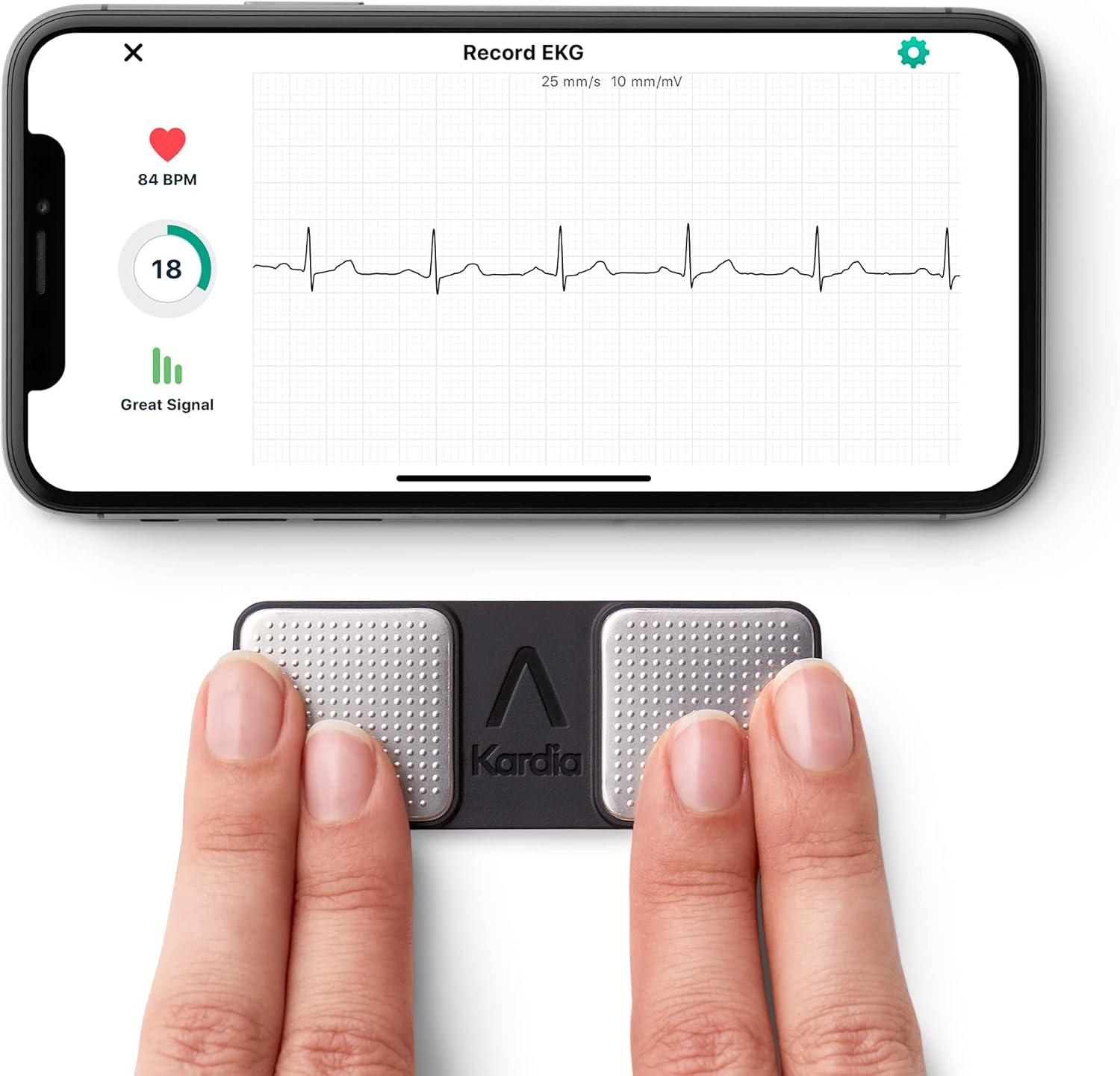
Image: The KardiaMobile device positioned next to a smartphone, illustrating the app's EKG recording screen.
Інструкцыя па эксплуатацыі
The KardiaMobile allows you to record a medical-grade EKG in 30 seconds. Follow these steps for an accurate reading:
- Prepare for Recording: Sit comfortably and relax. Ensure your KardiaMobile device is clean and dry.
- Open the Kardia App: Launch the Kardia app on your compatible smartphone or tablet.
- Start a Recording: Tap the "Record EKG" or similar button within the app.
- Place Your Fingers: Gently place the index and middle fingers of both hands on the metallic sensors of the KardiaMobile device. Ensure full contact with both sensors. Remain still and avoid talking during the recording.
- Monitor the Recording: The app will display a real-time EKG waveform. The recording typically takes 30 seconds.
- Review Вынікі: After 30 seconds, the app will provide an instant analysis, detecting conditions such as Atrial Fibrillation, Bradycardia, Tachycardia, or Normal Sinus Rhythm.

Image: Proper finger placement on the KardiaMobile device for EKG recording.

Image: The Kardia app displaying a live EKG recording with heart rate and signal quality.

Image: The Kardia app displaying an analysis result, indicating possible Atrial Fibrillation.

Image: The EKG History screen within the Kardia app, showing a log of previous recordings.
Saving and Sharing EKGs: All recorded EKGs are automatically saved within the Kardia app. You can easily email your EKG recordings to your doctor or save them to your phone directly from the app, without requiring a subscription.
Тэхнічнае абслугоўванне
Proper maintenance ensures the longevity and accuracy of your KardiaMobile device:
- Уборка: Wipe the device, especially the metallic sensors, with a soft, dry cloth after each use. Do not use abrasive cleaners or immerse the device in water.
- захоўванне: Захоўвайце прыладу ў прахалодным, сухім месцы, удалечыні ад прамых сонечных прамянёў і экстрэмальных тэмператур.
- акумулятар: The KardiaMobile device is powered by a coin cell battery with an estimated life of 12 months under typical usage. The app will notify you when the battery is low. Refer to the in-app instructions for battery replacement.
Ліквідацыю непаладак
If you encounter issues with your KardiaMobile device, consider the following common solutions:
- Няма сігналу/Слабы сігнал:
- Ensure your fingers are making full and firm contact with both metallic sensors.
- Make sure your smartphone's volume is turned up, as the device communicates via audio.
- Clean the sensors with a soft, dry cloth to remove any oils or debris.
- Try recording in a quiet environment away from electronic interference.
- Праграма не падключаецца:
- Verify that your smartphone's operating system is up to date and compatible with the Kardia app.
- Restart the Kardia app and your smartphone.
- Re-pair the device through the app's settings.
- Няправільныя паказанні:
- Ensure you are relaxed and still during the recording. Muscle tremors or movement can affect the reading.
- Avoid talking or moving your fingers during the 30-second recording.
- If readings consistently appear unusual, consult your healthcare provider.
For more detailed troubleshooting guides, tutorials, and additional product support, refer to the help section within the Kardia app or visit the AliveCor support webсайт.
Тэхнічныя характарыстыкі
| Атрыбут | Дэталь |
|---|---|
| Марка | AliveCor |
| Назва мадэлі | KardiaMobile |
| Нумар мадэлі | 1141 |
| Матэрыял | Пластыкавыя |
| Колер | Чорны |
| Сумяшчальныя прылады | Смартфоны |
| Памеры прадукту (ДxШxВ) | 3.27 см Д х 1.26 см Ш х 0.14 см В |
| Вага прадмета | 18 грам |
| Тэрмін службы батарэі | 12 месяцаў |
| Тып батарэі | Lithium-Ion (Coin Cell) |
| Тып датчыка | Аптычны |
| UPC | 850214007049 |
Гарантыя і падтрымка
Інфармацыя аб гарантыі: The KardiaMobile 1-Lead Personal EKG Monitor comes with a 1-year warranty from the manufacturer, AliveCor. Please retain your proof of purchase for warranty claims.
Падтрымка кліентаў: For further assistance, technical support, or warranty inquiries, please utilize the support resources available through the Kardia app. The app provides access to instructions for use, tutorials, and troubleshooting guides. You may also visit the official AliveCor webсайт для комплекснай падтрымкі.
Кіраўніцтва карыстальніка (PDF): Падрабязнае кіраўніцтва карыстальніка ў фармаце PDF даступна для запампоўкі: Спампаваць кіраўніцтва карыстальніка ў фармаце PDF
Афіцыйныя відэа пра прадукт
No official product videos with "Seller" as creator type were found in the provided data to embed. Please refer to the manufacturer's official channels for video resources.