
Уводзіны
This manual provides detailed instructions for the AULCMEET RC80B replacement remote control, designed for use with Edifier R1280DBs active speakers. Please read this manual carefully to ensure proper operation and to maximize your experience with the product.
Прадукт скончаныview
The AULCMEET RC80B remote control offers a comprehensive set of functions for your Edifier R1280DBs speakers. Its ergonomic design ensures comfortable handling and intuitive button placement.
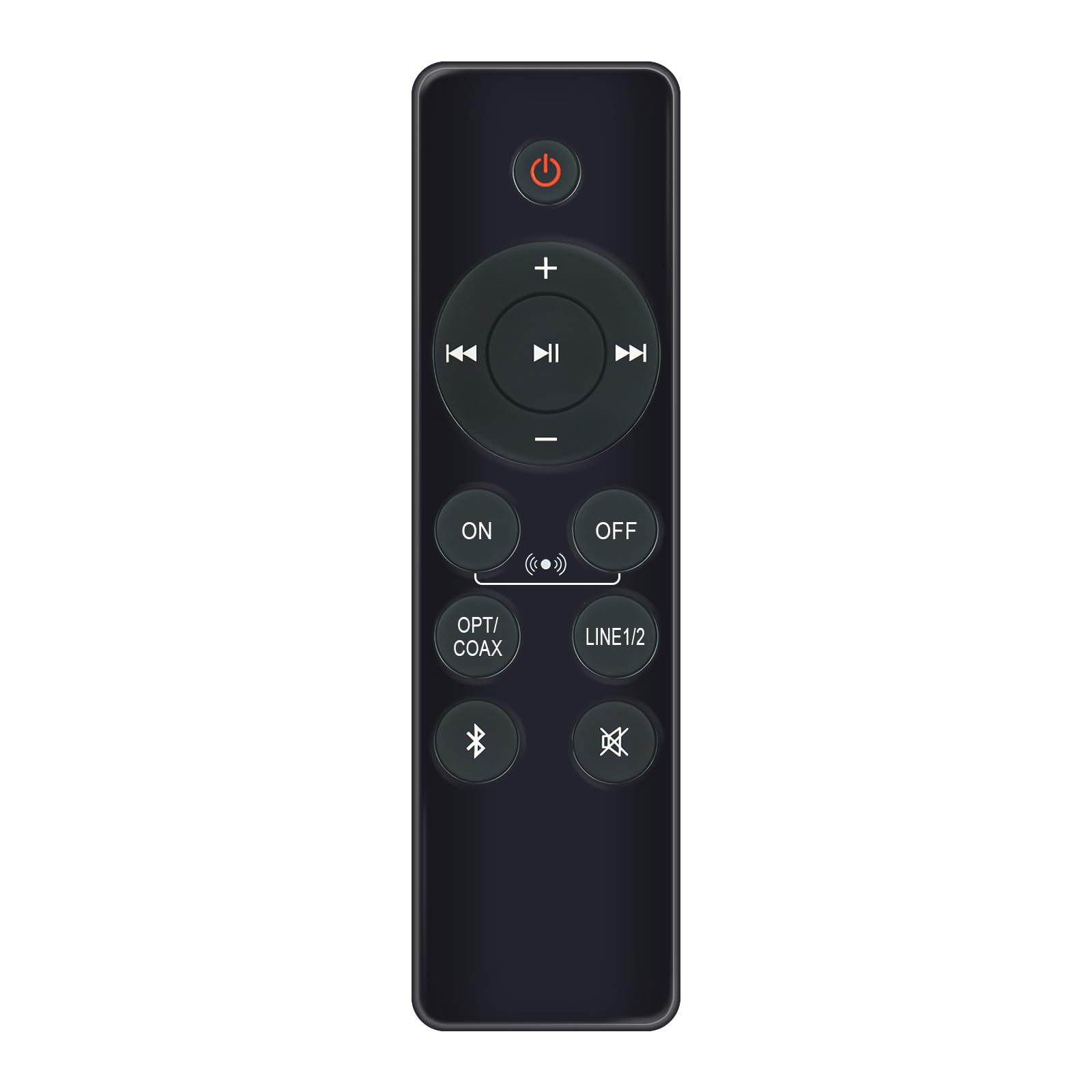
Image: AULCMEET RC80B Replacement Remote Control. The remote measures approximately 13.8 cm (5.43 inches) in length and 3.8 cm (1.5 inches) in width.
Функцыі кнопак:
- Кнопка харчавання (⏻): Turns the speakers ON or OFF.
- Volume Up (+) / Volume Down (-): Adjusts the speaker volume.
- Папярэдні трэк (⏮) / Next Track (⏭): Skips to the previous or next audio track.
- Прайграванне/Пауза (⏯): Прайграе або прыпыніць прайграванне аўдыё.
- ON / OFF (Input Selection): Toggles between different input modes.
- АПТ/КААКС: Selects Optical or Coaxial input.
- ЛІНІЯ 1/2: Selects Line In 1 or Line In 2 input.
- Bluetooth (☋): Activates or selects Bluetooth input.
- Выключыць гук (🛇): Mutes or unmutes the speaker audio.
Настройка
The AULCMEET RC80B remote control is designed for immediate use without complex setup procedures. Simply install the batteries, and it is ready to operate your compatible Edifier R1280DBs speakers.
Ўстаноўка батарэі:
- Знайдзіце батарэйны адсек на задняй частцы пульта дыстанцыйнага кіравання.
- Адкрыйце крышку батарэйнага адсека.
- Insert two AAA alkaline batteries, ensuring the correct polarity (+ and -) as indicated inside the compartment.
- Надзейна зачыніце крышку батарэйнага адсека.
Заўвага: No programming or pairing is required for this replacement remote control. It functions directly with the specified Edifier R1280DBs active speakers.
Інструкцыя па эксплуатацыі
To operate your Edifier R1280DBs speakers using the AULCMEET RC80B remote control, point the remote directly towards the speakers' infrared receiver. Ensure there are no obstructions between the remote and the speakers.
- Уключэнне/выключэнне харчавання: Націсніце ⏻ button to turn the speakers on or off.
- Рэгуляванне гучнасці: Выкарыстоўвайце + і - buttons to increase or decrease the volume.
- Выбар уводу: Націсніце ВКЛ/ВЫКЛ, АПТ/КААКС, ЛІНІЯ 1/2, або Bluetooth buttons to switch between the available audio input sources.
- Кіраванне прайграваннем: When using Bluetooth or other compatible sources, use the ⏮ (Previous), ⏭ (Next), and ⏯ (Play/Pause) buttons to control media playback.
- Функцыя адключэння гуку: Націсніце 🛇 button to temporarily silence the audio. Press it again to restore the sound.
Тэхнічныя характарыстыкі
| Марка | AULCMEET |
| мадэль | RC80B |
| Сумяшчальныя прылады | Edifier R1280DBs Active Speakers |
| Колер | Чорны |
| Асаблівасці | Эрганамічны дызайн |
| Інтэрфейс сувязі | Інфрачырвоны (ВК) |
| Колькасць кнопак | 30 |
| Максімальны дыяпазон | Прыкладна 33 футаў (10 метра) |
| Тып батарэі | 2 шчолачныя батарэйкі тыпу AAA (не ўключаны) |
| Памеры (Д х Ш) | 13.8 см х 3.8 см (5.43 цалі х 1.5 цалі) |
Ліквідацыю непаладак
If you encounter issues with your AULCMEET RC80B remote control, please refer to the following common solutions:
- Пульт дыстанцыйнага кіравання не адказвае: Ensure the batteries are correctly installed and are not depleted. Replace batteries if necessary.
- Кароткі дыяпазон дзеяння: Check for any obstructions between the remote and the speaker's IR receiver. Ensure the remote is pointed directly at the speakers. Low battery power can also reduce range.
- Specific button not working: Clean the remote control surface and buttons. If the issue persists, the button may be faulty, or the remote may require battery replacement.
- Speakers not responding to any remote: Ensure the speakers are powered on and functioning correctly. Try using the manual controls on the speaker unit if available.
Тэхнічнае абслугоўванне
Proper care and maintenance will extend the lifespan of your remote control:
- УборкаПрацірайце пульт дыстанцыйнага кіравання мяккай сухой тканінай. Не выкарыстоўвайце абразіўныя ачышчальнікі або растваральнікі.
- Сыход за батарэяй: Remove batteries if the remote control will not be used for an extended period to prevent leakage.
- Захоўванне: Store the remote control in a cool, dry place, away from direct sunlight and extreme temperatures.
- Пазбягайце кропельАбараняйце пульт ад фізічных удараў, бо падзенні могуць пашкодзіць унутраныя кампаненты.
Гарантыя і падтрымка
Specific warranty information for this AULCMEET RC80B replacement remote control is not provided in the product details. For warranty claims, technical support, or further assistance, please contact the seller or manufacturer directly through your purchase platform. Keep your purchase receipt or order number handy for faster service.