
Уводзіны
The Mesqool MEU-1024 is a versatile digital alarm clock designed to enhance your daily routine. This device combines a digital alarm clock, an FM radio, and a night light into one compact unit. It features a 320-degree rotatable projector to display time on your ceiling or wall, dual alarms with flexible scheduling, a snooze function, and adjustable display brightness. Additionally, it includes a humidity monitor, thermometer, and convenient USB/Type-C charging ports for your mobile devices. A battery backup system ensures your settings are preserved during power interruptions.

Image: The Mesqool MEU-1024 Multifunctional Projection Alarm Clock displaying its various features.
Настройка
Падключэнне сілкавання
Connect the provided power adapter to the DC 5V port on the back of the alarm clock and plug it into a standard electrical outlet. The display will light up, indicating the device is receiving power.

Image: The alarm clock being connected to a power source.
Усталёўка рэзервовага капіявання батарэі
For battery backup, insert two AAA batteries (not included) into the battery compartment located on the bottom of the unit. This ensures that time, date, and alarm settings are retained in case of a power outage.

Image: Installation of AAA batteries for backup power.
Інструкцыя па эксплуатацыі
Ўстаноўка часу і даты
- Press and hold the 'TIME SET' button to enter time setting mode.
- Use the '+' or '-' buttons to adjust the hour, then press 'TIME SET' to confirm.
- Repeat for minutes, year, month, and day. Note: The date format is Month-Day-Year.
- Press the '12/24H' button to switch between 12-hour and 24-hour formats.
- Press the 'DST' button to activate or deactivate Daylight Saving Time.

Image: The alarm clock display illustrating the Day-Month-Year format.
Ўстаноўка будзільнікаў
The clock supports two independent alarms (Alarm 1 and Alarm 2).
- Press and hold the 'ALARM 1' or 'ALARM 2' button to enter alarm setting mode.
- Use the '+' or '-' buttons to set the desired alarm time, then press the respective alarm button to confirm.
- Select the alarm mode: Monday-Sunday, Monday-Friday, Saturday-Sunday, or One Time.
- Choose your alarm sound: FM radio or buzzer.
- To activate/deactivate an alarm, short press the 'ALARM 1' or 'ALARM 2' button. An alarm icon will appear/disappear on the display.
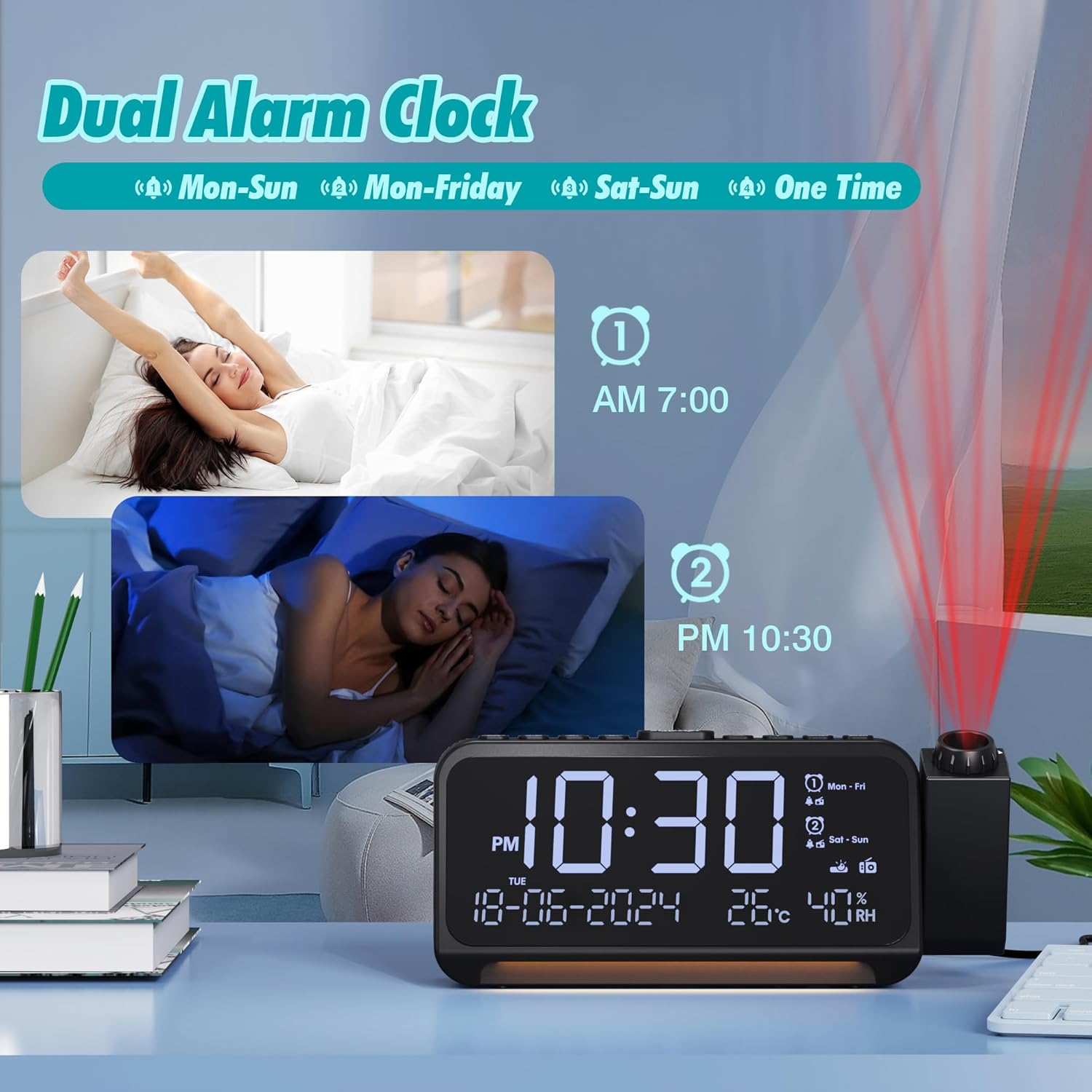
Image: Illustration of setting dual alarms with different schedules.
Функцыя адкладання
When an alarm sounds, press the 'SNOOZE/OK' button on top of the clock to activate the snooze function. The alarm will pause for 9 minutes and then sound again.

Image: Activating the snooze function by pressing the 'SNOOZE/OK' button.
Функцыя праекцыі
The projector can rotate 320 degrees. To activate the projection, press the 'PROJECTOR' button. You can adjust the projection brightness through 5 levels. Rotate the focus ring on the projector lens to sharpen the projected time. The projected time can be flipped 180 degrees for optimal viewінж.

Image: The alarm clock projecting time onto a surface, demonstrating the 180-degree flip feature.
Праца FM-радыё
- Press the 'FM' button to turn on the radio.
- Press and hold the 'FM' button to auto-scan and save available stations (87.5 MHz - 108.0 MHz).
- Use the '+' or '-' buttons to switch between saved stations.
- Adjust the volume using the 'VOL' buttons.
- To set a sleep timer, press the 'SLEEP' button repeatedly to cycle through 15, 30, 60, or 90 minutes. The radio will automatically turn off after the set time.

Image: The alarm clock showing FM radio functionality and the sleep timer feature.
Начнік
The clock features a night light located at its base. Press the 'LIGHT' button to turn it on or off. The warm light provides a soft ambiance and can be completely deactivated for a dark sleeping environment.

Image: The alarm clock's night light feature providing illumination.
Парты для зарадкі
The clock is equipped with a USB-A charging port and a Type-C charging port, allowing you to charge two devices simultaneously. Connect your devices using appropriate charging cables.

Image: The alarm clock's USB and Type-C ports being used to charge devices.
Яркасць дысплея
The main display brightness can be adjusted through 5 levels using the 'DIMMER' button to suit your preference and ambient light conditions.

Image: Various brightness levels of the alarm clock's main display.
Дысплей тэмпературы і вільготнасці
The clock displays indoor temperature and humidity. You can switch between Celsius and Fahrenheit by pressing the 'TEMP' button.
Тэхнічнае абслугоўванне
To maintain your Mesqool MEU-1024 alarm clock, wipe the unit with a soft, dry cloth. Avoid using abrasive cleaners or solvents, as these can damage the surface. Ensure the device is unplugged before cleaning.
Ліквідацыю непаладак
- Incorrect Day of the Week Display: If the day of the week appears incorrect after setting the time, verify that the date format (Month-Day-Year) is correctly entered. The device calculates the day of the week based on the set date.
- Няма дысплея/харчавання: Ensure the power adapter is securely connected to both the clock and a working electrical outlet. Check if the outlet is functional. If using battery backup, ensure batteries are correctly inserted and not depleted.
- Будзільнік не гучыць: Verify that the alarm is activated (alarm icon visible on display) and the volume is set to an audible level. Check that the alarm time and mode are correctly configured.
- Слабы прыём радыё: Extend the FM antenna fully. Try repositioning the clock to improve signal reception. Perform an auto-scan to find stronger stations.
- Projection Unclear: Adjust the focus ring on the projector lens. Ensure the projection distance is within the optimal range (approximately 1.5 to 3 meters).
Тэхнічныя характарыстыкі
| Асаблівасць | Дэталь |
|---|---|
| Нумар мадэлі | MEU-1024 |
| Марка | Мескул |
| Тып дысплея | Лічбавы |
| Асаблівасці | Projection Clock, Adjustable Brightness, USB/Type-C Charging Ports, FM Radio, Adjustable Volume, Night Light, Humidity/Temperature Display |
| Крыніца харчавання | Wired Electric, Battery Powered (2x AAA, not included) |
| Памеры прадукту | 8.7l x 6H centimeters |
| Матэрыял | Акрыланітрыл-бутадыен-стырол (АБС) пластык |
| Тэхналогія падлучэння | USB |
| Функцыя сігналізацыі | Yes, Dual Alarms with Snooze |
| Тып руху | Кварц |
Гарантыя і падтрымка
Mesqool is committed to providing high-quality products. While specific warranty details are not provided in this manual, we assure you that technical support will always be available for your Mesqool MEU-1024 Projection Alarm Clock Radio. For assistance, please refer to the contact information provided with your purchase or visit the official Mesqool webсайт.