
1. Уводзіны
This manual provides essential instructions for the safe and efficient use of your GT POWER 200W AC/DC Adapter, Model 475. This adapter is designed to provide power to compatible portable power stations, such as the Anker Powerhouse II 400 and Anker 533. Please read this manual thoroughly before using the product and retain it for future reference.
2. Інструкцыі па тэхніцы бяспекі
WARNING: Failure to follow these safety instructions may result in fire, electric shock, or other injury.
- Толькі для выкарыстання ў памяшканні: This adapter is designed for indoor use in dry locations. Do not expose it to rain, moisture, or extreme temperatures.
- Правільны Voltage: Пераканайцеся, што ўвод voltage (AC 100-240V) matches your local power supply.
- Вентыляцыя: Do not cover the adapter or place it in an enclosed space during operation. Ensure adequate ventilation to prevent overheating.
- Цэласнасць кабеля: Regularly inspect the power cord and adapter for any damage. Do not use if the cord is frayed or the adapter casing is cracked.
- Адключыць харчаванне: Always unplug the adapter from the power outlet before cleaning or when not in use for extended periods.
- Без разборкі: Do not attempt to open or repair the adapter. It contains no user-serviceable parts. Unauthorized disassembly voids the warranty and poses a safety risk.
- Дзеці і хатнія жывёлы: Keep the adapter and its cables out of reach of children and pets.
- Сумяшчальнасць: Use this adapter only with compatible devices as specified. Using it with incompatible devices may cause damage or malfunction.
- Асаблівасці абароны: This adapter includes Over VoltagАбарона ад электроннай напругі (OVP), абарона ад перагрузкі па току (OCP) і абарона ад кароткага замыкання (SCP) для абароны вашых прылад.
УВАГА: РЫЗЫКА ПАРАЖЭННЯ ЭЛЕКТРЫЧНЫМ УДАРОМ. НЕ АДКРЫЦЬ.
3. Змесціва ўпакоўкі
Праверце, ці ёсць усе прадметы ў вашай упакоўцы:
- GT POWER 200W AC/DC Adapter (Model 475)
- Уваходны шнур сілкавання пераменнага току
4. Прадукт скончыўсяview
The GT POWER 200W AC/DC Adapter is a robust power supply designed for efficient charging of your portable power station.

Малюнак 4.1: Фронт view of the GT POWER 200W AC/DC Adapter, showing the model number (H-200-24), input (AC 100-240V, 1.8A, 50-60Hz), and output (DC 24V, 8A) specifications, along with safety certifications and a "Risk of Electric Shock" warning.

Малюнак 4.2: Топ view of the GT POWER 200W AC/DC Adapter, highlighting the LED indicator light which shows the operational status of the adapter.

Малюнак 4.3: Close-up of the DC output barrel connector, which connects to the portable power station.
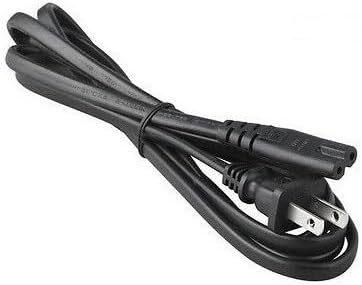
Малюнак 4.4: The AC input power cord, featuring a standard US plug for connecting the adapter to a wall outlet.
Ключавыя кампаненты:
- Adapter Unit: The main body containing the power conversion circuitry.
- Уваходны порт пераменнага току: Where the AC power cord connects to the adapter.
- DC Output Cable with Barrel Connector: Permanently attached cable that delivers power to your device.
- Святлодыёдны індыкатар: Illuminates when the adapter is receiving power and operating correctly.
- Шнур сілкавання: Connects the adapter to a wall outlet.
5. Інструкцыі па ўсталёўцы
Follow these steps to set up your GT POWER AC/DC Adapter:
- Распакуйце: Carefully remove the adapter and AC power cord from the packaging.
- Connect AC Cord: Insert the female end of the AC power cord firmly into the AC input port on the adapter unit.
- Падключэнне да электрастанцыі: Plug the DC barrel connector from the adapter's output cable into the DC input port of your compatible portable power station (e.g., Anker Powerhouse II 400/533). Ensure a secure connection.
- Падключыцеся да разеткі: Plug the male end of the AC power cord into a standard wall outlet (AC 100-240V).
- Праверце магутнасць: The LED indicator on the adapter should illuminate, indicating that it is receiving power and ready to charge.
Заўвага: Always connect the adapter to the device first, then to the wall outlet, and disconnect from the wall outlet first, then from the device.
6. Інструкцыя па эксплуатацыі
Once set up, the adapter operates automatically:
- When connected to a power outlet and a compatible power station, the adapter will begin supplying power for charging.
- The LED indicator will remain lit during operation.
- The adapter features an "Automatic Off" special feature, which implies it will cease charging or power delivery once the connected device is fully charged or if an overload/fault condition is detected. Refer to your power station's manual for specific charging indicators.
- To stop operation, first unplug the AC power cord from the wall outlet, then disconnect the DC barrel connector from your power station.
7. Тэхнічнае абслугоўванне
Правільнае абслугоўванне забяспечвае даўгавечнасць і бяспечную працу вашага адаптара:
- Уборка: Адключыце адаптар ад усіх крыніц сілкавання перад чысткай. Выкарыстоўвайце мяккую сухую тканіну для працірання вонкавага выгляду. Не выкарыстоўвайце вадкія ачышчальнікі або растваральнікі.
- захоўванне: When not in use, store the adapter in a cool, dry place, away from direct sunlight and moisture. Coil the cables loosely to prevent damage.
- агляд: Periodically inspect the adapter casing, cables, and connectors for any signs of wear, cuts, or damage. If damage is found, discontinue use immediately and replace the adapter.
8. Выпраўленне непаладак
Калі ў вас узніклі праблемы з адаптарам, звярніцеся да наступных распаўсюджаных праблем і іх рашэнняў:
| праблема | Магчымая прычына | Рашэнне |
|---|---|---|
| Adapter LED is off, no power output. |
|
|
| Power station not charging. |
|
|
| Адаптар занадта гарачы. |
|
|
Калі праблема не знікне пасля выкарыстання гэтых рашэнняў, звярніцеся ў службу падтрымкі кліентаў.
9. Тэхнічныя характарыстыкі
| Нумар мадэлі | 475 (H-200-24) |
| Уваходны кнtage | Пераменны ток 100-240 В, 1.8 А, 50-60 Гц |
| Выхад Voltage | 24 В пастаяннага току |
| Выхадны ток | 8A |
| Ватtage | 200 Вт |
| Тып раздыма | Злучальнік бочкі |
| Функцыі абароны | OVP (над тымtagабарона ад электрычнай напругі), OCP (абарона ад перагрузкі па току), SCP (абарона ад кароткага замыкання) |
| Асаблівасць | Аўтаматычнае адключэнне |
| Сумяшчальныя прылады | Anker Powerhouse II 400, Anker 533 Portable Power Stations (and other devices requiring 24V, 8A DC input with compatible barrel connector) |
| Памеры (прыбл.) | 7 х 5 х 3 цаляў (памеры ўпакоўкі) |
| Вага (прыбл.) | 14 унцыі |
10. Падтрымка кліентаў і гарантыя
For technical assistance, warranty information, or to report any issues with your GT POWER 200W AC/DC Adapter, please contact your retailer or the manufacturer directly.
Калі ласка, падрыхтуйце нумар мадэлі вашага прадукту (475) і інфармацыю аб пакупцы перад зваротам у службу падтрымкі.
Warranty details are typically provided at the point of purchase or on the manufacturer's official webсайт.