
1. Уводзіны
This manual provides detailed instructions for the installation, operation, and maintenance of your Reobiux D20-1P 2K Outdoor Surveillance Camera. Please read this manual thoroughly before using the product to ensure proper functionality and safety.
2. Змесціва ўпакоўкі
Праверце, ці ўсе пералічаныя ніжэй прадметы ўваходзяць у камплект. Калі якія-небудзь прадметы адсутнічаюць або пашкоджаныя, звярніцеся ў службу падтрымкі кліентаў.
- 1x Reobiux D20-1P Solar PTZ Camera
- 1x Solar Collector
- 1x Кіраўніцтва карыстальніка
- 1x Мантажная база
- 1x Power Supply (for initial charging)
- 1x Screws Bag (for installation)
- 1x Type-C Charging Line
3. Прадукт скончыўсяview
The Reobiux D20-1P is a 2K outdoor surveillance camera designed for comprehensive home security. It features dual lenses, 360° Pan-Tilt-Zoom (PTZ) capabilities, and operates wirelessly via Wi-Fi. Key features include PIR motion detection, color night vision, two-way audio, and an IP66 weatherproof rating, powered by a solar panel and rechargeable battery.
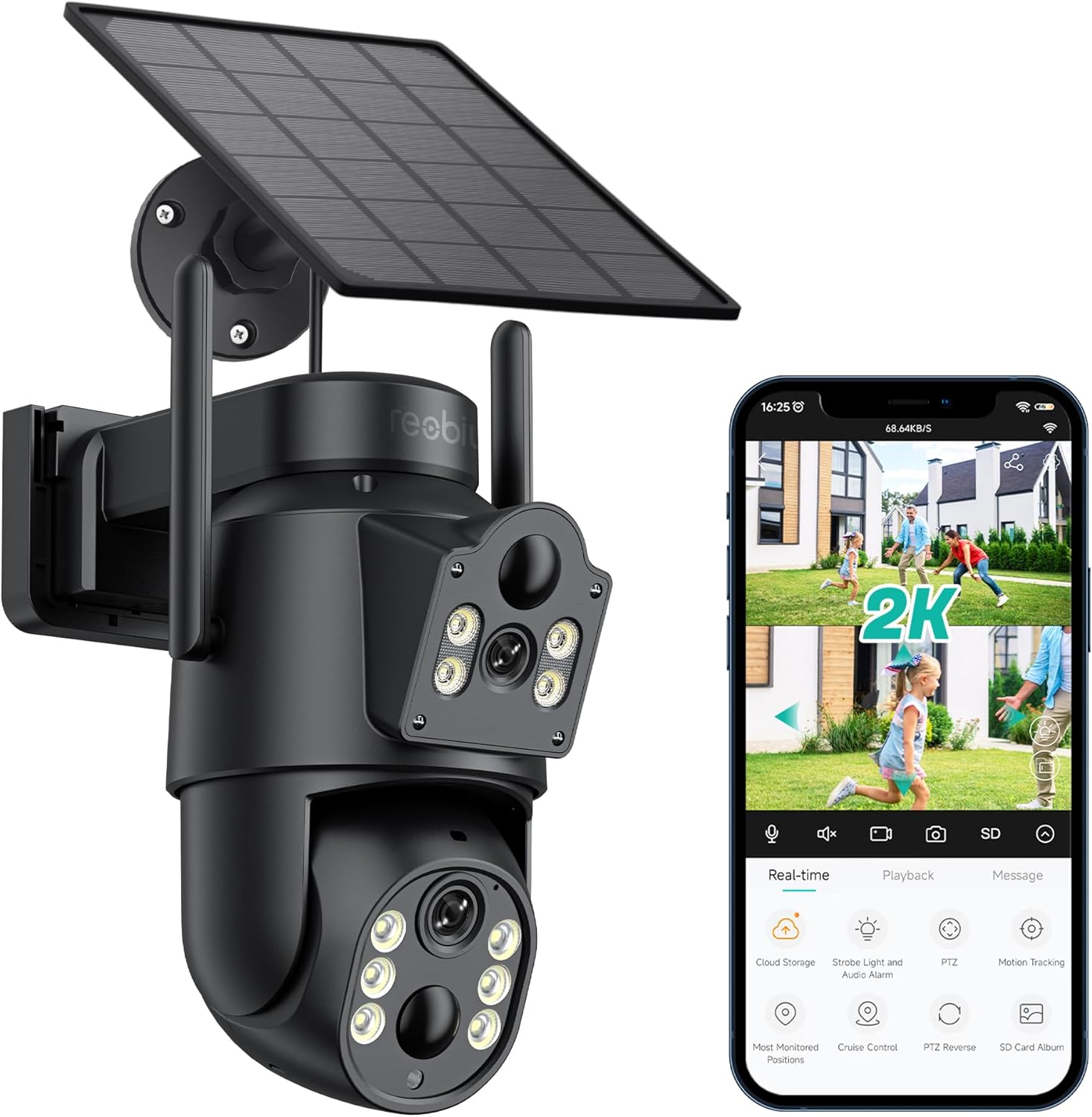
Малюнак 3.1: Reobiux D20-1P Solar PTZ Camera and its mobile application interface showing real-time monitoring, playback, and various control options.
Асноўныя характарыстыкі:
- 2K QHD High Resolution: Забяспечвае выразнае і падрабязнае відэа footage.
- Дызайн з падвойнай лінзай: Combines a fixed lens with a rotating lens for comprehensive coverage.
- 360° PTZ Functionality: Allows remote control of pan, tilt, and zoom for flexible viewныя вуглы.
- Solar Powered with Rechargeable Battery: Ensures continuous operation with minimal manual charging.
- Выяўленне руху PIR: Intelligently detects human movement to reduce false alarms.
- Каляровы начны бачанне: Offers full-color video even in low-light conditions, alongside infrared night vision.
- Двухбаковы аўдыё: Enables communication with visitors or deterrence of intruders.
- IP66 Воданепранікальнасць: Распрацаваны, каб вытрымліваць розныя ўмовы надвор'я на вуліцы.
- Бесправадное падключэнне да Wi-Fi: Easy setup and remote access via smartphone.
4. Кіраўніцтва па наладцы
4.1 Першапачатковая зарадка
Before first use, fully charge the camera's internal battery using the provided Type-C charging line and power supply. This ensures the camera has sufficient power for initial setup and operation, especially if solar charging conditions are not optimal immediately after installation.
4.2 Усталёўка праграмы і стварэнне ўліковага запісу
- Спампаваць iCSee app from your smartphone's app store (iOS App Store or Google Play Store).
- Усталюйце праграму і адкрыйце яе.
- Follow the on-screen instructions to create a new account or log in if you already have one.
4.3 Camera Connection to Wi-Fi
- Ensure your camera is powered on.
- In the iCSee app, tap the "+" icon to add a new device.
- Select the option for "Wi-Fi Camera" or "Add Device by AP Hotspot" (refer to app for exact wording).
- Follow the app's instructions to connect the camera to your 2.4GHz Wi-Fi network. You may need to scan a QR code displayed on your phone with the camera, or listen for a sound prompt.
- Пасля падключэння вы можаце даць назву камеры і пачаць маніторынг.
4.4 Мантаж камеры
Choose a location that provides optimal surveillance coverage and receives direct sunlight for the solar panel. Ensure the camera is within range of your Wi-Fi network.
- Выберыце месцазнаходжанне: Identify a suitable wall or surface for mounting. Consider the camera's viewing angle (355° pan, 90° tilt) and the solar panel's exposure to sunlight.
- Адзначыць кропкі свідравання: Use the mounting base as a template to mark the screw holes on the wall.
- Свідраваць адтуліны: Прасвідруйце адтуліны ў пазначаных месцах. Пры неабходнасці ўстаўце анкеры ў сцяну.
- Attach Mounting Base: Secure the mounting base to the wall using the provided screws.
- Прымацаваць камеру: Mount the camera onto the secured base.
- Адрэгуляваць панэль сонечных батарэй: Размясціце сонечную панэль так, каб максімальна атрымліваць сонечнае святло на працягу дня.

Малюнак 4.1: Illustration of the camera mounted with its solar panel, highlighting the fixed and rotating lenses and the benefit of continuous solar power.
5. Інструкцыя па эксплуатацыі
5.1 У прамым эфіры View і прайграванне
Open the iCSee app and select your camera to access the live view. From here, you can:
- Маніторынг у рэжыме рэальнага часу: View жывая відэастужка.
- Кантроль PTZ: Use the on-screen joystick to pan (355°) and tilt (90°) the camera.
- Лічбавае павелічэнне: Pinch to zoom on the live feed.
- Прайграванне: Доступ да запісанага footage stored on the SD card or cloud storage.

Малюнак 5.1: Demonstrates the superior clarity of 2K QHD resolution compared to 1080P, providing more details for monitoring.
5.2 Выяўленне руху і абвесткі
The camera utilizes PIR (Passive Infrared) intelligent detection to identify human movement, minimizing false alarms from pets or swaying branches.
- Уключыць/Выключыць: Activate or deactivate motion detection in the app settings.
- Рэгуляванне адчувальнасці: Adjust the PIR sensor's sensitivity to suit your environment.
- Апавяшчэнні будзільніка: Receive instant push notifications on your smartphone when motion is detected.
- Гукавая і светлавая сігналізацыя: Configure the camera to trigger a strobe light and audible alarm upon detection.

Малюнак 5.2: The camera's PIR intelligent detection distinguishes human movement from other objects, reducing unnecessary alerts.

Малюнак 5.3: When motion is detected, the camera can send real-time push notifications and activate a sound and light alarm to deter intruders.
5.3 Рэжымы начнога бачання
The camera offers two night vision modes for clear visibility in the dark:
- Spotlight Full Color Night Vision: Utilizes built-in spotlights to provide full-color video in low-light conditions.
- Spotlight Infrared Night Vision: Uses infrared LEDs for black-and-white video in complete darkness, with a range of up to 30 meters.
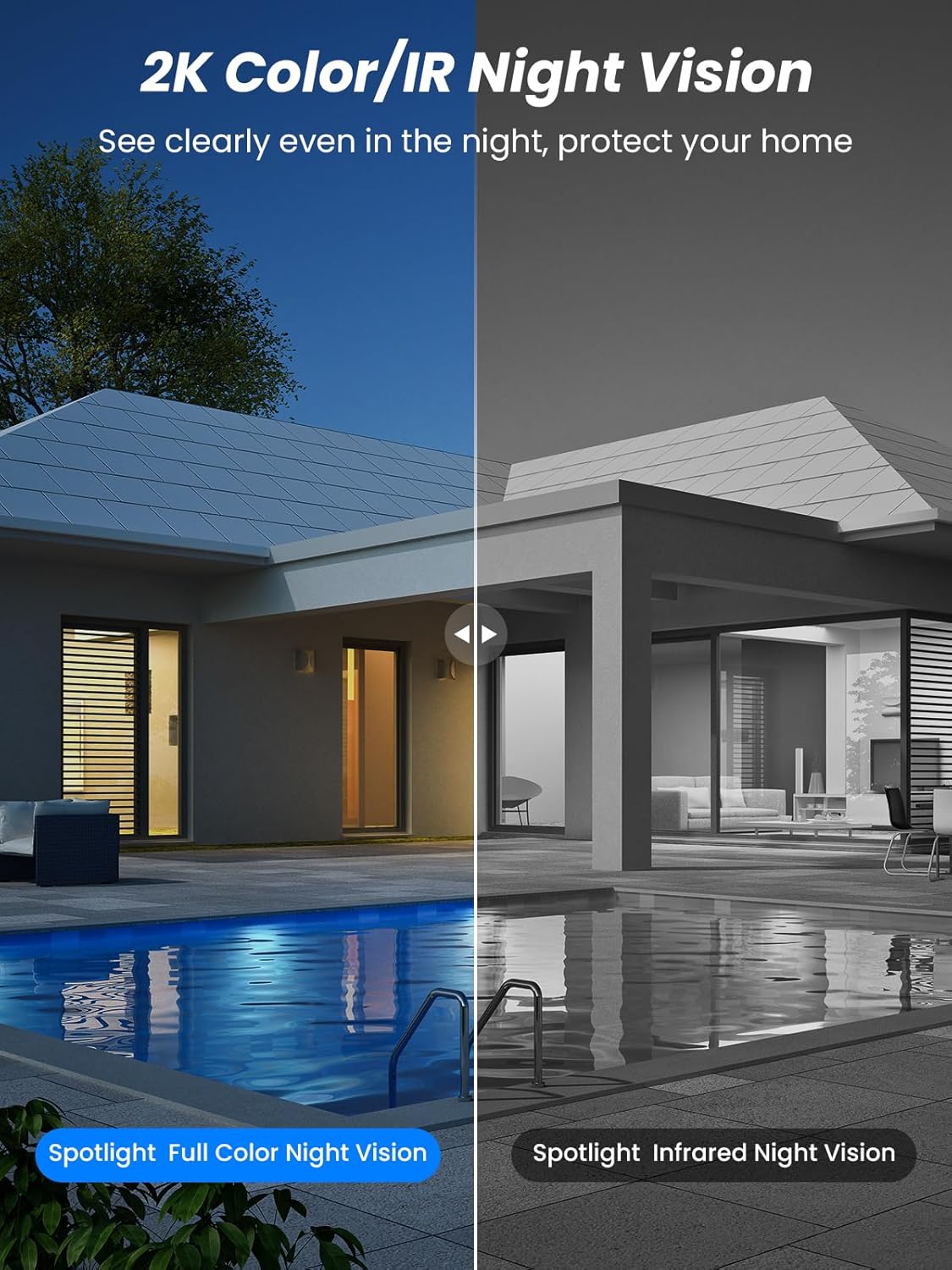
Малюнак 5.4: Illustrates the difference between full-color night vision, enabled by spotlights, and traditional infrared night vision.
5.4 Двухбаковае аўдыё
The integrated microphone and speaker allow for two-way communication.
- гаварыць: Націсніце на значок мікрафона ў дадатку, каб гаварыць праз дынамік камеры.
- Слухай: The camera's microphone captures audio from its surroundings.

Малюнак 5.5: The two-way audio function allows for direct communication through the camera, useful for interacting with visitors or delivery personnel.
6. Тэхнічнае абслугоўванне
- Уборка: Перыядычна чысціце аб'ектыў камеры і сонечную панэль мяккай губкайamp cloth to ensure optimal performance and clear image quality. Avoid abrasive cleaners.
- Зарад батарэі: While solar-powered, extreme weather or prolonged periods of low sunlight may require manual charging. Monitor battery levels via the app.
- Абнаўленні прашыўкі: Check the iCSee app regularly for available firmware updates to ensure your camera has the latest features and security enhancements.
- Абарона ад надвор'я: The camera is IP66 weatherproof, designed to withstand rain, snow, and sun. However, ensure all connections are secure to maintain water resistance.

Малюнак 6.1: The IP66 rating ensures the camera's durability and functionality in various outdoor weather conditions, including snow, rain, and direct sunlight.
7. Выпраўленне непаладак
- Камера не падключаецца да Wi-Fi:
- Ensure the camera is within range of your 2.4GHz Wi-Fi network. 5GHz networks are not supported.
- Праверце правільны пароль ад Wi-Fi.
- Перазагрузіце маршрутызатар і камеру.
- If issues persist, try resetting the camera (refer to app or product for reset button location).
- Battery not charging or draining quickly:
- Ensure the solar panel is clean and receives direct sunlight for several hours daily.
- Праверце злучэнне паміж сонечнай панэллю і камерай.
- If in a low-light environment, manually charge the camera using the Type-C cable.
- Частыя падзеі выяўлення руху або жывыя view streaming can consume battery faster. Adjust settings if needed.
- False motion detection alarms:
- Adjust the PIR motion detection sensitivity in the iCSee app.
- Ensure the camera is not pointed at areas with constant movement (e.g., busy roads, swaying trees) if not intended for monitoring.
- Дрэнная якасць выявы:
- Ачысціце аб'ектыў камеры.
- Ensure sufficient lighting for optimal image capture, especially at night.
- Check your Wi-Fi signal strength; a weak signal can affect video streaming quality.
8. Тэхнічныя характарыстыкі
| Асаблівасць | Дэталь |
|---|---|
| Назва мадэлі | Д20-1П |
| Дазвол відэазахопу | 2.5 тыс |
| Эфектыўнае дазвол відэа | 2K QHD |
| Тэхналогія бесправадной сувязі | Wi-Fi (2.4 ГГц) |
| Формаў-фактар | Купал |
| Viewing кут | 355 градусаў (панарамаванне), 90 градусаў (нахіл) |
| Тып ўстаноўкі | Насценныя |
| Дыяпазон начнога бачання | 30 метраў |
| Частата кадраў | 25 кадраў у секунду |
| Матэрыял | Пластыкавыя |
| тtage | 12 В (пастаянны ток) |
| Ватtage | 5 ват |
| Крыніца харчавання | Батарэйнае харчаванне, сонечная энергія |
| Батарэі | 3 літый-іённы акумулятар (у камплекце) |
| Пратакол злучэння | Wi-Fi |
| Тып кантролера | Дадатак iCSee |
| Асаблівасці | Night Vision (Color/IR), PIR Motion Detection, Two-Way Audio, IP66 Weatherproof |
| Вага прадмета | 1.06 кг |
| Памеры пасылкі | 21.7 х 19.5 х 13.8 см |
9. Гарантыя і падтрымка
Reobiux offers a Гарантыя 1 год for this product. For any issues or inquiries, please do not hesitate to reach out to our customer service. We provide 20 hours of online service to assist you.
For support, please refer to the contact information provided with your purchase or within the iCSee application.