
1. Уводзіны
Thank you for choosing the Riksion Walking Pad Electric Treadmill. This manual provides essential information for the safe and effective use of your new fitness equipment. Please read this manual thoroughly before operation and retain it for future reference.
2. Важныя інструкцыі па бяспецы
- Заўсёды кладзіце падкладку для хады на роўную, устойлівую паверхню.
- Ensure there is adequate clear space (at least 1 meter) around the walking pad during use.
- This walking pad is designed for adult use. Keep children and pets away from the equipment during operation.
- Пракансультуйцеся з лекарам, перш чым пачынаць любую новую праграму фізічных практыкаванняў, асабліва калі ў вас ёсць ранейшыя захворванні.
- Падчас выкарыстання апранайце адпаведны спартыўны абутак.
- The maximum user weight capacity for this device is 120.2 kg (265 lbs). Do not exceed this limit.
- Do not use the walking pad if it is damaged or malfunctioning. Contact customer support for assistance.
- Адключайце падкладку для хады ад разеткі, калі яна не выкарыстоўваецца або перад чысткай.
3. Змесціва ўпакоўкі
Your Riksion Walking Pad Electric Treadmill comes fully assembled. Please check the package for the following items:
- Riksion Walking Pad Electric Treadmill (fully assembled)
- Пульт дыстанцыйнага кіравання
- Шнур харчавання
- Кіраўніцтва карыстальніка

Image: The Riksion Walking Pad Electric Treadmill as it appears in its shipping box, indicating its compact packaging.
4. Настройка
The Riksion Walking Pad is designed for immediate use with no assembly required.
- Распакуйце: Асцярожна дастаньце падкладку для хады з упакоўкі.
- Размяшчэнне: Place the walking pad on a firm, level surface in your desired exercise area. Ensure there is sufficient space around the unit for safe operation.
- Падключэнне сілкавання: Plug the power cord into the walking pad and then into a standard electrical outlet.
5. Інструкцыя па эксплуатацыі
5.1. LED Display and Remote Control
The walking pad features an integrated LED display and is controlled via a wireless remote. The display shows key workout metrics.

Выява: Крупны план view of the walking pad's LED display showing speed, time, distance, and calories, alongside the remote control for operation.
5.2. Запуск і прыпынак
- Пачаць: Press the 'Start' button on the remote control. The walking pad will begin at a low speed.
- Спыніць: Press the 'Stop' button on the remote control. The walking pad will gradually slow down and come to a complete stop.
5.3. Рэгуляванне хуткасці
- Use the '+' and '-' buttons on the remote control to increase or decrease the walking speed.
- The speed range is from 1 km/h to 6 km/h. Adjust the speed to a comfortable and safe level for your workout.
5.4. Monitoring Your Workout
Святлодыёдны дысплей паказвае зваротную сувязь у рэжыме рэальнага часу па ходзе трэніроўкі:
- Час: Працягласць вашай трэніроўкі.
- хуткасць: Бягучая хуткасць хады.
- Адлегласць: Агульная адлегласць, пройдзеная падчас сесіі.
- Калорыі: Прыблізная колькасць спаленых калорый.
6. Асаблівасці
6.1. Compact and Portable Design
The Riksion Walking Pad is designed for space-saving convenience. Its ultra-thin profile allows for easy storage under furniture like sofas or beds. Integrated transport wheels enable effortless relocation.
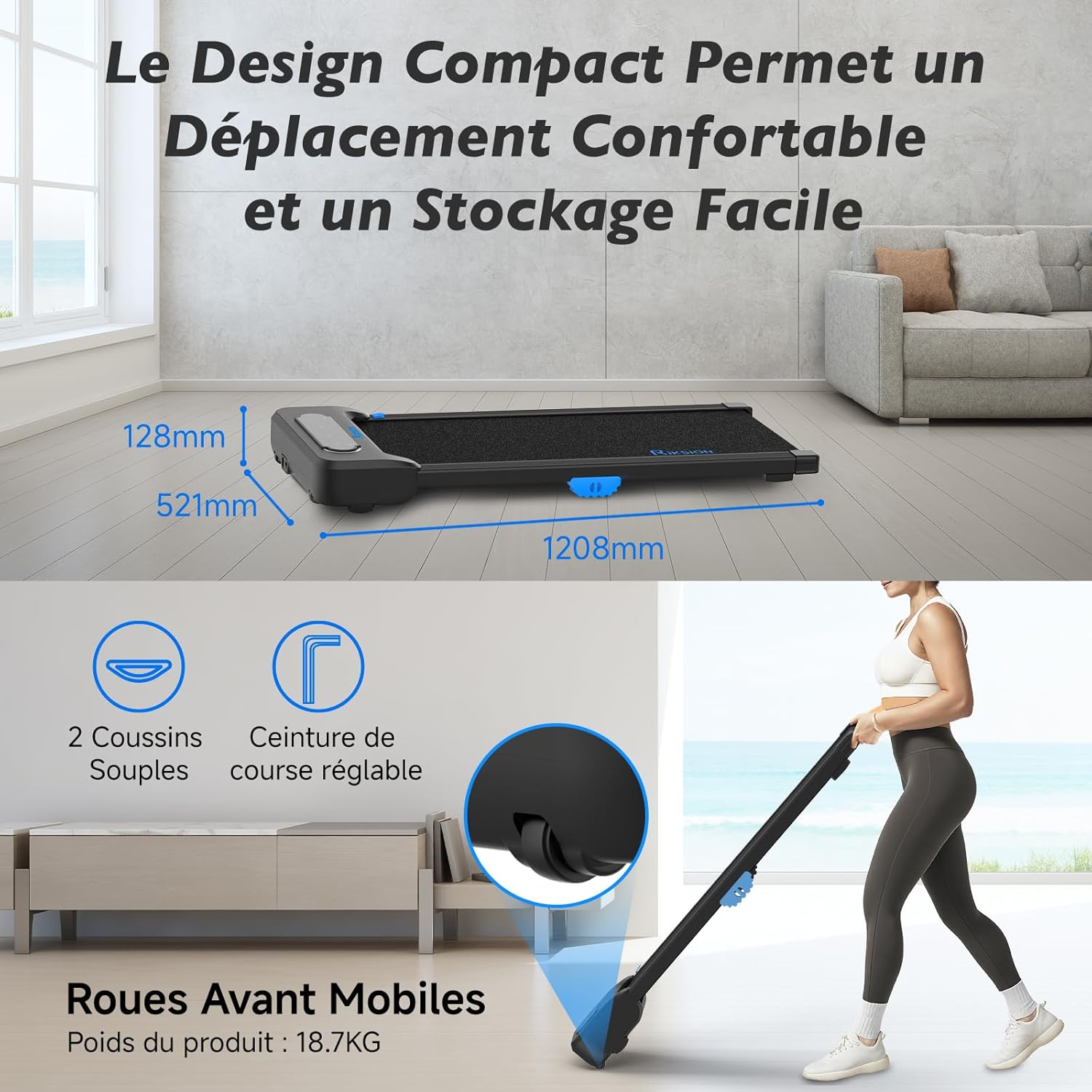
Image: Illustration of the walking pad's compact dimensions (1208mm length, 521mm width, 128mm height) and the front mobile wheels for easy movement.
6.2. Advanced Shock Absorption System
Equipped with a 5-layer running belt and two soft cushions, the dual-layer shock absorption system protects your knees and joints during exercise, providing a comfortable walking experience.

Image: Visual representation of the walking pad's shock absorption technology, highlighting the protection for knees and joints, and an exploded view of the 5-layer running belt construction.
6.3. Silent and Powerful Motor
The walking pad features a silent and powerful 2 HP motor, allowing for quiet operation suitable for home or office environments without disturbing others. It supports speeds from 1 to 6 km/h and a maximum user weight of 120.2 kg.

Image: An internal diagram illustrating the powerful and quiet motor, along with icons indicating the 1-6 km/h speed range, 2 HP motor power, and 120 kg / 265 lbs weight capacity.
6.4. Wide Walking Surface
The 400mm wide running belt provides ample space for comfortable walking or jogging, ensuring a natural stride.

Image: A person using the walking pad, illustrating its use for both active work and exercise, with an overlay showing the 400mm belt width and 1000mm walking length.
7. Тэхнічнае абслугоўванне
Рэгулярнае абслугоўванне забяспечвае даўгавечнасць і аптымальную прадукцыйнасць вашай падкладкі для хады.
- Уборка: Працярыце хадунку рэкламайamp анучай пасля кожнага выкарыстання, каб выдаліць пот і пыл. Не выкарыстоўвайце абразіўныя ачышчальныя сродкі.
- Змазка рамяня: Periodically check the running belt for proper lubrication. Refer to the specific instructions for your model regarding lubrication frequency and type of lubricant.
- захоўванне: When not in use, store the walking pad in a dry, cool place, away from direct sunlight and moisture. Utilize its compact design for convenient storage.
- агляд: Regularly inspect all parts for wear and tear. Tighten any loose screws or bolts.
8. Выпраўленне непаладак
If you encounter any issues with your Riksion Walking Pad, please refer to the following common troubleshooting steps:
- Walking Pad Not Turning On:
- Ensure the power cord is securely plugged into both the walking pad and a working electrical outlet.
- Check if the power switch on the walking pad (if present) is in the 'ON' position.
- Праверце працаздольнасць разеткі, падключыўшы да яе іншую прыладу.
- Пульт дыстанцыйнага кіравання не адказвае:
- Праверце і заменіце батарэйкі ў пульце дыстанцыйнага кіравання.
- Ensure there are no obstructions between the remote control and the walking pad's receiver.
- Running Belt Slipping or Sticking:
- The belt may require lubrication. Refer to the maintenance section.
- The belt tension may need adjustment. Consult customer support if you suspect this is the issue.
- Незвычайныя шумы:
- Stop the walking pad immediately.
- Inspect for any foreign objects caught in the belt or motor area.
- Калі шум не знікае, спыніце выкарыстанне і звярніцеся ў службу падтрымкі кліентаў.
If these steps do not resolve the issue, please contact Riksion customer support for further assistance.
9. Тэхнічныя характарыстыкі
| Асаблівасць | Спецыфікацыя |
|---|---|
| Марка | Рыксіён |
| мадэль | JF-H-40J-4 |
| Колер | Чорны |
| Памеры прадукту (Д х Ш х У) | 120.8P x 52.1L x 12.8H сантыметраў |
| Матэрыял | Легаваная сталь |
| Максімальная хуткасць | 6 Kilometers per hour |
| Асаблівасці | Shock Absorbing, With Wheels, Compact Design, Portable |
| Мэтавая аўдыторыя | Дарослы |
| Максімальная магутнасць | 2 конскіх сіл |
| Патрабуецца зборка | няма |
| Тып дысплея | святлодыёд |
| Шырыня бегавога пояса | 400 мм |
| Максімальная вага карыстальніка | 120.2 кг (265 фунтаў) |
10. Гарантыя і падтрымка
For warranty information or technical support, please refer to the documentation included with your purchase or contact Riksion customer service directly. Ensure you have your product model number (JF-H-40J-4) and purchase details available when seeking support.