
Уводзіны
Thank you for choosing the Oakcastle HIFI150 Stereo System. This manual provides essential information for setting up, operating, and maintaining your device. Please read it thoroughly before use and retain it for future reference.
Інфармацыя па бяспецы
Каб забяспечыць бяспечную працу і пазбегнуць пашкоджанняў, калі ласка, выконвайце наступныя меры бяспекі:
- Не падвяргайце прыладу ўздзеянню дажджу, вільгаці або экстрэмальных тэмператур.
- Не адчыняйце casing. Па ўсіх пытаннях тэхнічнага абслугоўвання звяртайцеся да кваліфікаванага персаналу.
- Забяспечце належную вентыляцыю вакол прылады. Не блакуйце вентыляцыйныя адтуліны.
- Выкарыстоўвайце толькі адаптар сілкавання, які пастаўляецца з прыладай.
- Keep the unit away from heat sources such as radiators, stoves, or other heat-producing appliances.
- Чысціце прыладу толькі сухой тканінай.
Змест пакета
Калі ласка, праверце наяўнасць усіх прадметаў у вашай упакоўцы:
- Oakcastle HIFI150 Stereo System
- Пульт дыстанцыйнага кіравання
- Батарэі для пульта дыстанцыйнага кіравання
- Сілавы кабель
- Кіраўніцтва карыстальніка
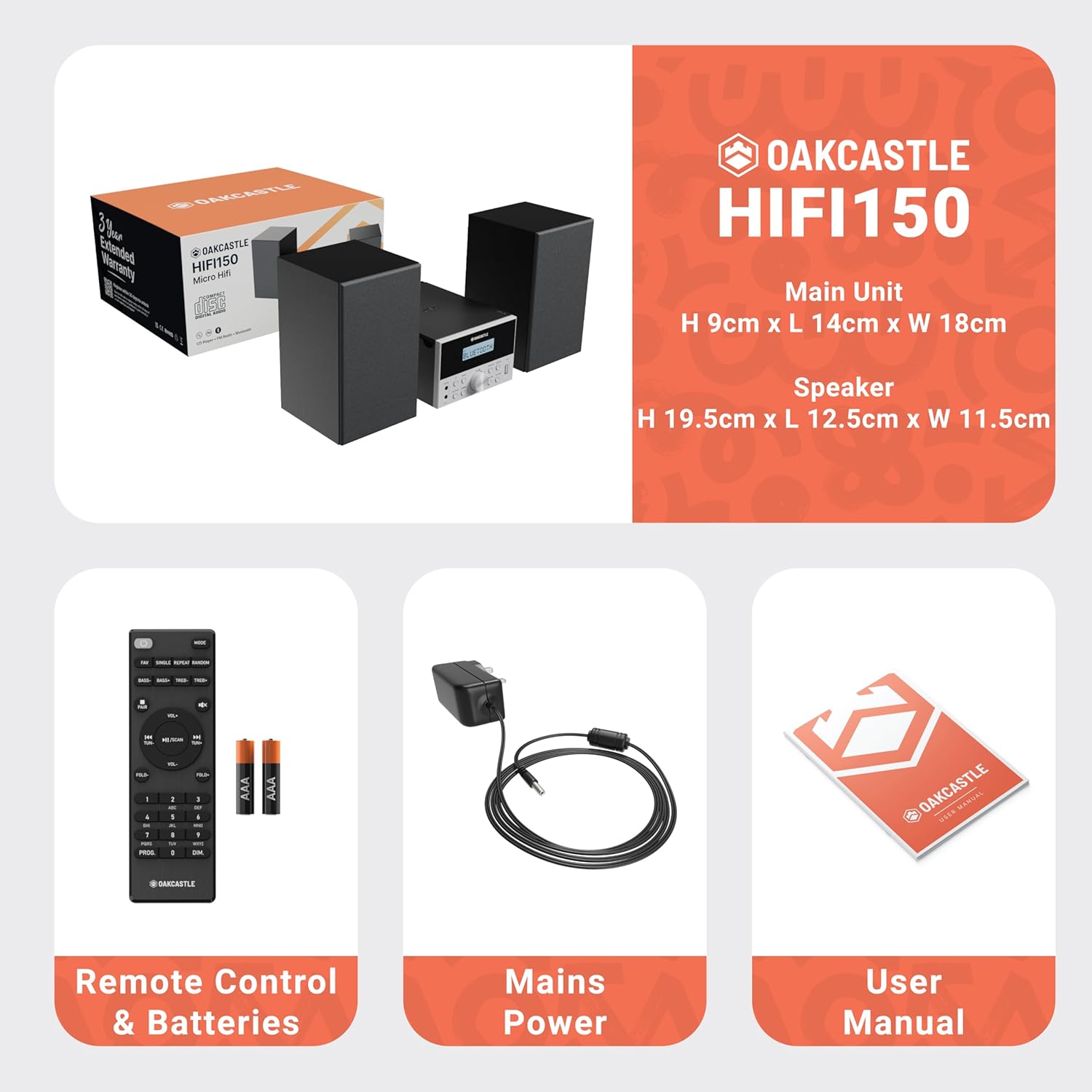
Image: The Oakcastle HIFI150 package contents, showing the main unit, two speakers, remote control with batteries, power adapter, and user manual.
Прадукт скончаныview
The Oakcastle HIFI150 features a compact design with intuitive controls and multiple connectivity options.
Элементы кіравання і дысплей на пярэдняй панэлі

Image: A close-up of the Oakcastle HIFI150 main unit's front panel, highlighting the digital display, central volume knob, mode selection buttons, and front-facing AUX In and USB ports. The display shows 'BLUETOOTH'.
- Дысплей: Паказвае бягучы рэжым, інфармацыю пра трэк і радыёчастоту.
- Кнопка харчавання: Уключае або выключае прыладу.
- Кнопка рэжыму: Cycles through input sources (CD, FM, Bluetooth, AUX, USB).
- Рэгулятар гучнасці: Рэгулюе галоўную гучнасць.
- Кнопка прайгравання/паўзы: Кіруе прайграваннем з CD, USB і Bluetooth.
- Skip/Tune Buttons: Навігацыя па трэках або налада радыёчастот.
- Уваходны порт AUX: Для падлучэння знешніх аўдыёпрылад праз кабель 3.5 мм.
- Порт USB: Для прайгравання аўдыё files з USB-дыска.
Злучэнні задняй панэлі
The rear panel includes connections for speakers and power.
Настройка
1. Падключэнне дынамікаў
Connect the included speakers to the speaker terminals on the rear of the main unit. Ensure correct polarity (red to red, black to black) for optimal sound quality.
2. Падключэнне сілкавання
Падключыце кабель сілкавання да разеткі пераменнага току на задняй панэлі асноўнага блока, а затым падключыце другі канец да стандартнай разеткі.
Інструкцыя па эксплуатацыі
Уключэнне/выключэнне харчавання
Націсніце Магутнасць кнопку на пярэдняй панэлі або пульце дыстанцыйнага кіравання, каб уключыць або выключыць прыладу.
Выбар рэжыму
Націсніце Рэжым button on the front panel or remote control repeatedly to cycle through the available input sources: CD, FM-радыё, Bluetooth, ДАП, і USB.
Аперацыя Bluetooth
- Выберыце Bluetooth mode using the Mode button. The display will show 'BLUETOOTH' and the unit will enter pairing mode.
- На вашым смартфоне або іншай прыладзе Bluetooth уключыце Bluetooth і знайдзіце даступныя прылады.
- Select 'OAKCASTLE HIFI150' from the list. Once connected, the unit will confirm the connection.
- You can now stream audio wirelessly from your device to the HIFI150.
Прайграванне кампакт-дыскаў

Image: The Oakcastle HIFI150 with its top-loading CD player mechanism open, revealing a compact disc placed inside. The display shows 'CD'.
- Адкрыйце вечка адсека для кампакт-дыскаў.
- Place a CD (MP3, CD, WMA, or CD-R format) onto the spindle with the label side facing up.
- Зачыніце вечка аддзялення для CD.
- Выберыце CD mode. The unit will read the disc and begin playback automatically.
- Выкарыстоўвайце кнопкі прайгравання/паўзы і прапускання для кіравання прайграваннем.
Праца FM-радыё

Image: The Oakcastle HIFI150 main unit with its telescopic antenna extended, displaying an FM radio frequency on its screen. The unit is placed between two speakers.
- Выберыце FM-радыё рэжым.
- Для лепшага прыёму выцягніце тэлескапічную антэну.
- Аўтаматычнае сканаванне: Press and hold the Play/Pause button to automatically scan and save available FM stations (up to 30 presets).
- Ручная настройка: Use the Skip/Tune buttons to manually adjust the frequency.
- Адклікаць перадусталёўкі: Use the 'FAV/PROG' button on the remote to cycle through saved stations.
Прайграванне з USB
- Устаўце USB -дыск у порт USB на пярэдняй панэлі.
- Выберыце USB mode. The unit will automatically detect and begin playing compatible audio files (MP3, WMA).
- Выкарыстоўвайце кнопкі прайгравання/паўзы і прапускання для кіравання прайграваннем.
AUX ўваход
- Падключыце знешнюю аўдыёпрыладу (напрыклад, MP3-плэер, смартфон) да AUX ўваход port on the front panel using a 3.5mm audio cable (not included).
- Выберыце ДАП рэжым.
- Кіруйце прайграваннем з падлучанай знешняй прылады.
Рэгулятар гучнасці
Павярнуць Ручка гучнасці on the front panel or use the VOL +/- кнопкі на пульце дыстанцыйнага кіравання для рэгулявання ўзроўню гуку.
Выкарыстанне дыстанцыйнага кіравання
The included remote control provides full functionality for the HIFI150. Ensure batteries are correctly inserted. Point the remote control towards the front panel of the main unit for optimal response.
Тэхнічнае абслугоўванне
Уборка
- Працярыце прыладу мяккай сухой тканінай.
- Не выкарыстоўвайце абразіўныя ачышчальнікі, воск або растваральнікі, бо яны могуць пашкодзіць пакрыццё.
Захоўванне
Калі прылада не выкарыстоўваецца працяглы час, адключыце яе ад электрычнай разеткі і захоўвайце ў прахалодным, сухім месцы.
Ліквідацыю непаладак
If you encounter issues with your HIFI150, please refer to the following common problems and solutions:
| праблема | Магчымая прычына | Рашэнне |
|---|---|---|
| Няма ўлады | Сеткавы кабель не падключаны; разетка няспраўная | Пераканайцеся, што кабель харчавання надзейна падключаны; паспрабуйце іншую разетку. |
| Няма гуку | Volume too low; Incorrect input mode; Speakers not connected | Increase volume; Select correct input mode; Check speaker connections. |
| Кампакт-дыск не прайграваецца | CD inserted incorrectly; Disc scratched/dirty; Incorrect format | Reinsert CD correctly; Clean or replace disc; Ensure disc is compatible (MP3, CD, WMA, CD-R). |
| Bluetooth не падключаецца | Bluetooth mode not selected; Device too far; Device already connected to another unit | Select Bluetooth mode; Move device closer; Disconnect from other devices and try again. |
| Дрэнны прыём FM | Антэна не выцягнута; слабы сігнал | Fully extend the telescopic antenna; Try repositioning the unit. |
Тэхнічныя характарыстыкі
| Нумар мадэлі | 1000002971 |
| Марка | Дубовы замак |
| Сувязь | Bluetooth 5.2, USB, AUX |
| Аўдыёвыхад | 20 Вт |
| Носьбіты, якія падтрымліваюцца | CD, MP3, WMA, CD-R, USB |
| радыё | FM Radio with 30 Presets |
| Сумяшчальныя прылады | MP3-плэер, смартфон, планшэт |
| Матэрыял шафы | Вуд |
| Колер | Чорны |
| Памеры прадмета (Д х Ш х У) | 13.7 х 17.8 х 9 см |
| Вага прадмета | 2 кілаграма |
Гарантыя і падтрымка
The Oakcastle HIFI150 comes with an extended 3-year warranty. Registration is required to activate the full warranty period. Please refer to the warranty card included in your package or visit the official Oakcastle website for registration details and support information.
For technical assistance or further inquiries, please contact Oakcastle customer support through their official channels.