
1. Уводзіны
This eRapta Magnetic Wireless Backup Camera (Model A1CT501(T)) is an accessory camera intended to expand the capabilities of your existing eRapta ACT501 wireless backup camera system. It is not a standalone product and requires the ACT501 monitor and receiver for operation. This manual will guide you through the setup, operation, and maintenance of this additional camera.
Важная заўвага: This camera is designed to work exclusively with the eRapta ACT501 system. It is not compatible with other systems or for standalone use.
2. Прадукт скончыўсяview
2.1. Змесціва ўпакоўкі
- eRapta Magnetic Wireless Backup Camera (Model A1CT501(T))
Note: The main ACT501 system, including the monitor, is sold separately.
2.2. Асноўныя магчымасці
- Акумулятар высокай ёмістасці: Built-in 9600mAh rechargeable battery for extended operation without external power.
- Магнітная база: Strong magnetic base allows for quick and portable attachment to any metal surface.
- Стабільны лічбавы сігнал: Upgraded signal chip provides stable transmission up to 320ft in open areas and 40ft on vehicles.
- 1080P HD Image: Features a Sunrest sensor for clear 1080P high-definition video.
- Інфрачырвонае начное бачанне: Equipped with 16 infrared LED lights for clear color images in low-light conditions.
- IP69K Waterproof: Constructed with high-quality waterproof materials and a sealed charging port for durability in harsh weather.
- Шырыня 150° View кут: Забяспечвае шырокае поле view to minimize blind spots.
- Рэгуляваны кут: Features an adjustable screw design for precise camera angle positioning.
2.3. Кампаненты камеры
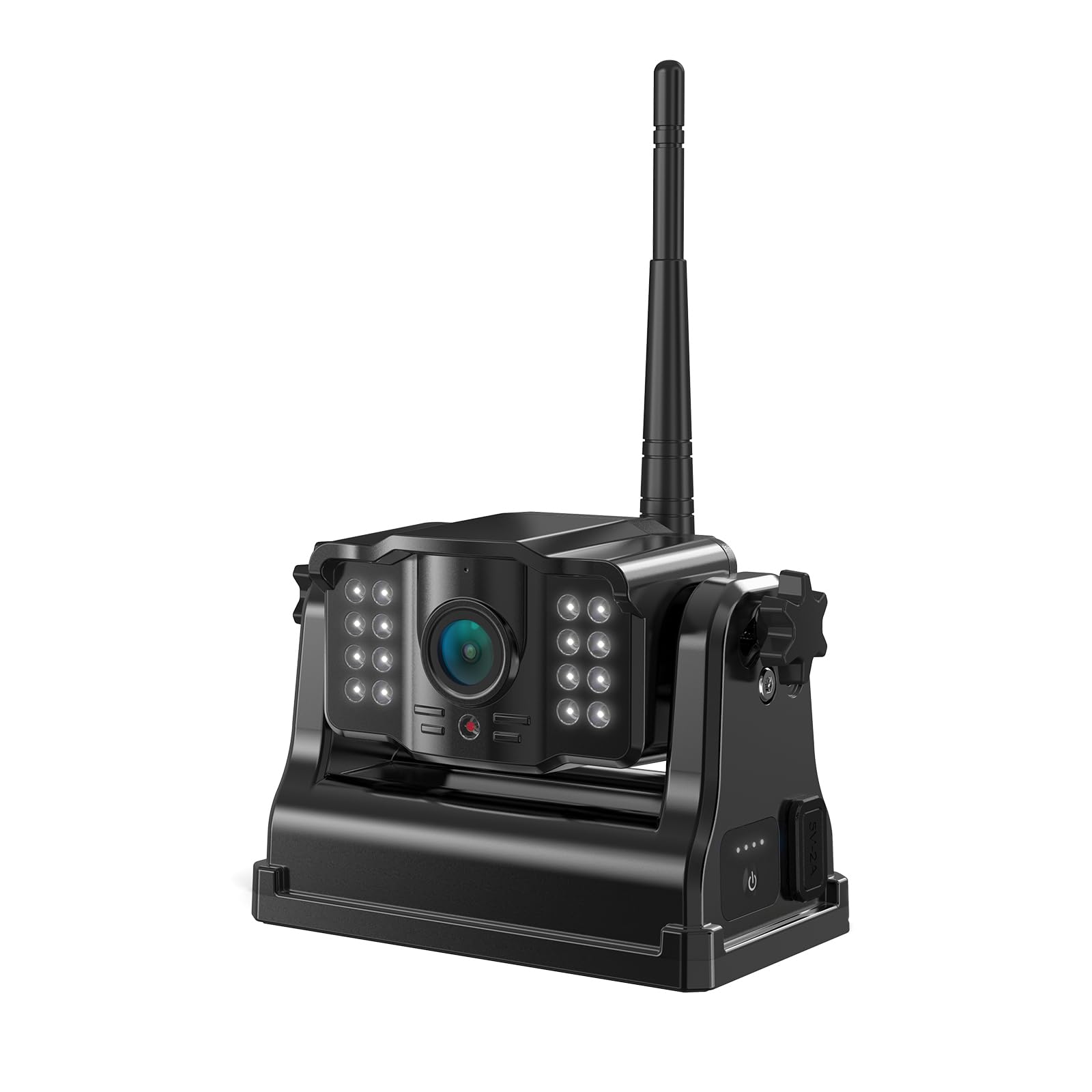
Малюнак 1: Фронт view of the eRapta Magnetic Wireless Backup Camera, showing the lens, infrared LEDs, antenna, and magnetic base.
- Аб'ектыў камеры: Захоплівае відэастужку.
- Інфрачырвоныя святлодыёды: Забяспечце падсветку для начнога бачання.
- Антэна: For wireless signal transmission to the ACT501 monitor.
- Магнітная база: Allows for secure attachment to metal surfaces.
- Зарадны порт (Type-C): Для падзарадкі ўнутранай батарэі.
- Індыкатар харчавання: Show battery charge level.
- Кнопка харчавання: Каб уключыць/выключыць камеру.
3. Настройка і ўстаноўка
3.1. Зарадка камеры
- Знайдзіце порт зарадкі Type-C на камеры.
- Connect the camera to a 5V phone charger or a Type-C power cord (not included).
- The power indicator lights will illuminate to show charging status. Ensure the camera is fully charged before first use.
3.2. Мантаж камеры
The camera features a strong magnetic base for easy, wire-free installation on any metal surface of your vehicle (e.g., rear bumper, trailer hitch, side panel). The base is designed with a rubber wrap to prevent scratching vehicle paint.
- Identify a suitable metal surface on your vehicle where the camera can provide the desired view. Ensure the surface is clean and dry.
- Place the magnetic base of the camera firmly onto the chosen metal surface. The strong magnet will secure it in place.
- Adjust the camera's angle using the adjustable screw mechanism to achieve the optimal viewкут нахілу.
- Ensure the camera is securely attached and will not shift during vehicle movement.
Tip: The portable design allows for easy removal and reinstallation on different vehicles or locations as needed.
3.3. Pairing with ACT501 System
This camera is designed to automatically pair with your eRapta ACT501 system. If pairing does not occur automatically, refer to your ACT501 system's instruction manual for specific pairing procedures for additional cameras.
4. Аперацыя
4.1. Уключэнне / выключэнне харчавання
- To turn on the camera, press and hold the power button until the indicator lights illuminate.
- To turn off the camera, press and hold the power button until the indicator lights turn off.
4.2. Viewing the Feed
Once powered on and paired, the camera's video feed will be transmitted wirelessly to your ACT501 monitor. Refer to your ACT501 system's manual for instructions on switching between multiple camera views (if applicable) and utilizing features like split-screen or full-screen display.
- 1080P HD Image: The camera provides a clear 1080P resolution image for detailed viewінж.
- Інфрачырвонае начное бачанне: In low-light conditions, the infrared LEDs will automatically activate, providing clear color night vision.
- 150° шырокавугольны: The wide-angle lens offers an expansive view, helping to eliminate blind spots when reversing or maneuvering.
5. Тэхнічнае абслугоўванне
- Уборка: Выкарыстоўвайце мяккі, damp тканінай для чысткі аб'ектыва і корпуса камеры. Пазбягайце выкарыстання абразіўных ачышчальнікаў або растваральнікаў.
- Воданепранікальны дызайн: The camera is IP69K waterproof. Ensure the charging port cover is securely closed when not charging to maintain water resistance.
- Дыяпазон тэмператур: The camera is designed to operate in temperatures ranging from -6°F to 151°F (-21°C to 66°C). Avoid prolonged exposure to temperatures outside this range.
- Сыход за батарэяй: For optimal battery life, avoid fully discharging the battery frequently. Recharge the camera regularly, especially if stored for extended periods.
6. Выпраўленне непаладак
| праблема | Магчымая прычына | Рашэнне |
|---|---|---|
| No image on ACT501 monitor. | Camera is off or battery is low. Camera not paired with ACT501 system. Перашкоды сігналу. | Ensure camera is charged and powered on. Refer to ACT501 manual for pairing instructions. Reposition camera or monitor to reduce interference. Ensure no large metal objects are blocking the signal path. |
| Выява размытая або скажоная. | Аб'ектыў камеры брудны. Слабая магутнасць сігналу. | Ачысціце аб'ектыў камеры мяккай тканінай. Move camera closer to the ACT501 monitor or adjust antenna position. |
| Камера не зараджаецца. | Няспраўны кабель для зарадкі або адаптар. Зарадны порт заблакаваны. | Try a different Type-C cable and 5V adapter. Check charging port for debris. |
| Camera falls off metal surface. | Surface is not metal or is uneven. Празмерная вібрацыя. | Ensure camera is mounted on a flat, ferrous metal surface. Re-secure the camera or choose a more stable mounting location. |
7. Тэхнічныя характарыстыкі
| Нумар мадэлі | A1CT501(T) |
| Марка | эРапта |
| Памеры прадукту | 0.7"Д х 1.5"Ш х 0.8"В (1.78 см Д х 3.81 см Ш х 2.03 см В) |
| Вага прадмета | 1.68 фунта (0.76 кг) |
| Дазвол відэазахопу | 1080p |
| View Вугал | 150 градусаў |
| Рэйтынг воданепранікальнасці | IP69K |
| Ёмістасць батарэі | 9600 мАг |
| Аперацыйная Voltage | 5 вольт |
| Працоўная тэмпература | Ад -6°F да 151°F (ад -21°C да 66°C) |
| Сувязь | Бесправадная сувязь |
| Сумяшчальныя прылады | eRapta ACT501 monitor system |
8. Гарантыя і падтрымка
For warranty information and customer support, please refer to the documentation included with your original eRapta ACT501 system or visit the official eRapta website. If you encounter any issues not covered in this manual, please contact eRapta customer service for assistance.
Інтэрнэт-падтрымка: Visit the eRapta Store on Amazon