
1. Уводзіны
The Triplett WS230 Wall Scanner is a versatile and compact tool designed for accurately detecting hidden objects behind walls. It features advanced capabilities to locate wood studs, metal objects (ferrous and non-ferrous), and live AC wiring, providing essential information for construction, home improvement, and maintenance tasks. This manual provides detailed instructions for safe and effective use of your WS230 Wall Scanner.
2. Інфармацыя па бяспецы
Please read all safety warnings and instructions carefully before using the device. Failure to follow these instructions may result in electric shock, fire, or serious injury.
- Always assume that live electrical wires are present behind walls. Exercise extreme caution.
- Do not rely solely on the detection results. Always verify findings through other means if possible.
- Захоўвайце прыладу сухім і чыстым. Не падвяргайце яе ўздзеянню вільгаці або экстрэмальных тэмператур.
- Не спрабуйце адкрываць або мадыфікаваць прыладу. Звяртайцеся па ўсё абслугоўванне да кваліфікаванага персаналу.
3. Змесціва ўпакоўкі
Праверце, ці ёсць усе прадметы ў вашай упакоўцы:
- Triplett WS230 Wall Scanner
- 3.7V/300mAh Lithium Ion Battery (pre-installed)
- Soft Protective Pouch Case
- Кіраўніцтва карыстальніка (гэты дакумент)
- Кабель для зарадкі USB Type C

Figure 3.1: WS230 Wall Scanner with Pouch and USB-C Cable
4. Прадукт скончыўсяview
Familiarize yourself with the components of your Triplett WS230 Wall Scanner.

Малюнак 4.1: Спераду View of WS230 Wall Scanner

Малюнак 4.2: Назад View of WS230 Wall Scanner (QR Code: C242594011)
4.1 Асноўныя кампаненты
- Каляровы ВК-экран: Displays detection mode, depth, battery status, and object location.
- Кнопка харчавання: Уключае/выключае прыладу.
- Кнопкі выбару рэжыму: Allows switching between Stud, Metal, and AC Voltage detection modes.
- Плошча датчыка: Located on the back of the device, this area must be in contact with the wall for accurate scanning.
- Порт для зарадкі USB-C: For recharging the internal Lithium-ion battery.
5. Настройка і зарадка
5.1 Зарадка акумулятара
The WS230 is equipped with a rechargeable 3.7V/300mAh Lithium-ion battery. Before first use, ensure the device is fully charged.
- Connect the provided USB Type C charging cable to the charging port on the device.
- Падключыце другі канец USB-кабеля да стандартнага USB-адаптара харчавання (не ўваходзіць у камплект) або USB-порта кампутара.
- The battery indicator on the LCD screen will show charging status. A full charge typically takes a few hours.
5.2 Уключэнне/выключэнне
- Каб уключыць, націсніце і ўтрымлівайце Кнопка харчавання (red button) until the screen illuminates.
- Каб выключыць харчаванне, націсніце і ўтрымлівайце Кнопка харчавання зноў, пакуль экран не выключыцца.
6. Аперацыя
6.1 Агульныя рэкамендацыі па выкарыстанні
- Пераканайцеся, што паверхня сцяны чыстая і сухая.
- Avoid scanning over freshly painted or wallpapered surfaces until they are completely dry, as moisture can affect accuracy.
- Hold the scanner flat against the wall, ensuring the sensor area is in full contact.
- Move the scanner slowly and steadily across the surface.
6.2 Аўтаматычная каліброўка
The WS230 features automatic calibration for accurate results. Calibration occurs automatically upon power-on or when switching detection modes.
- Place the scanner flat against the wall in an area where you are certain there are no studs, metal, or live wires.
- Націсніце Кнопка харчавання or select your desired mode. The screen will display "Calibrating, please wait."
- Keep the device still against the wall until calibration is complete.

Figure 6.1: Calibration in Progress
6.3 Рэжымы выяўлення
The WS230 offers three primary detection modes:

Figure 6.2: Multiple Detection Mode Displays
6.3.1 Stud Detection
This mode locates the center and edges of wood or metal studs behind walls.
- Select the Stud Detection mode using the appropriate button.
- Place the scanner flat against the wall and slowly move it horizontally.
- The display will indicate the presence of a stud, its center, and depth (up to 1.5 inches / 38mm). Audio alerts will also sound.

Figure 6.3: Wood Stud Detection
6.3.2 Выяўленне металу
This mode identifies ferrous and non-ferrous metals, such as pipes and electrical wiring (even if not live).
- Select the Metal Detection mode.
- Scan the wall slowly. The display will show "Detect metal" and indicate the object's location and type (magnetic/non-magnetic).
- Maximum detection depth is 4.0 inches (100mm).

Figure 6.4: Metal Detection

Figure 6.5: Non-Magnetic Metal Detection
6.3.3 AC Voltage Выяўленне
This mode specifically detects live AC wires behind walls, providing an essential safety feature.
- Select the AC Voltage Detection mode.
- Scan the wall slowly. The display will show a lightning bolt icon and indicate the presence of live AC wiring.
- Maximum detection depth is 2 inches (50mm).
7. Тэхнічнае абслугоўванне
- Працірайце прыладу мяккай сухой тканінай. Не выкарыстоўвайце абразіўныя ачышчальнікі або растваральнікі.
- Store the device in its protective pouch in a cool, dry place when not in use.
- Regularly charge the battery to maintain its health, even if the device is not used frequently.
8. Выпраўленне непаладак
If you encounter issues with your WS230 Wall Scanner, try the following:
- Няправільныя паказанні: Ensure the device is properly calibrated on a clear section of the wall. Check for moisture on the wall surface.
- Няма харчавання: Verify the battery is charged. Connect the USB-C cable and allow it to charge for at least 30 minutes before attempting to power on again.
- Перыядычнае выяўленне: Ensure the sensor area is in full contact with the wall and you are moving the device slowly and steadily.
If problems persist, contact Triplett customer support.
9. Тэхнічныя характарыстыкі
| Асаблівасць | Спецыфікацыя |
|---|---|
| Памеры прадукту | 4.8 х 1 х 2.4 цалі |
| Вага прадмета | 4 унцый |
| Нумар мадэлі | WS230 |
| Батарэі | 1 літый-іённы акумулятар (у камплекце) |
| Крыніца харчавання | Харчаванне ад батарэі |
| Глыбіня выяўлення шпількі | Да 1.5 цалі (38 мм) |
| Глыбіня выяўлення металу | Да 4.0 цалі (100 мм) |
| Пераменнага токуtage Detection Depth | Да 2 цалі (50 мм) |
| Аптымальная рабочая тэмпература | ад 0 да 40°C |
| Тэмпература захоўвання | -20 да 60°C |
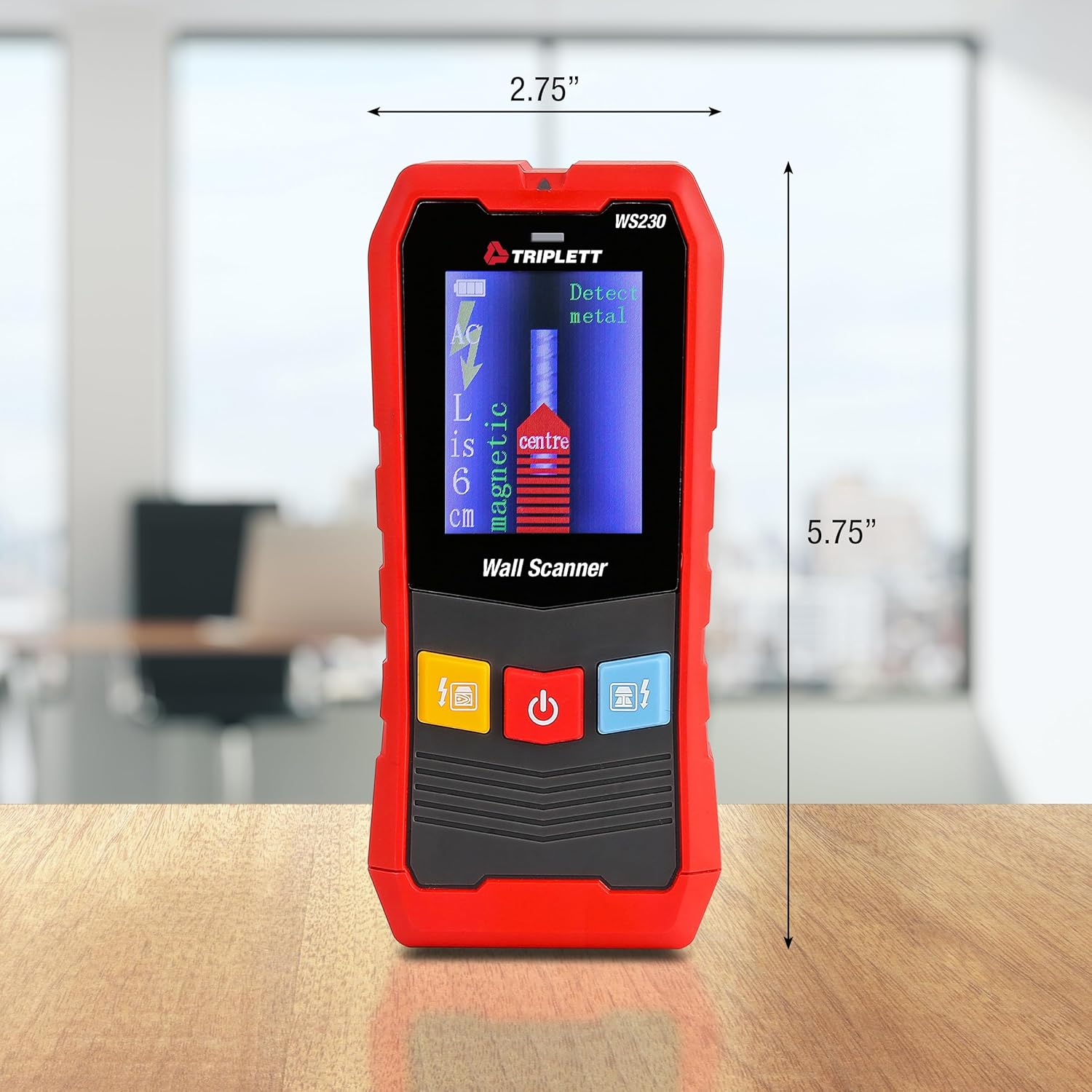
Figure 9.1: WS230 Dimensions
10. Гарантыя і падтрымка
For warranty information or technical support, please refer to the official Triplett webсайт або звярніцеся ў службу падтрымкі кліентаў. Захоўвайце чэк аб куплі як пацверджанне пакупкі.
Visit the official Triplett Store: Крама Triplett на Amazon