
1. Уводзіны
The BUSICOM PC-SeaV15c is a 15-inch Windows IoT touch panel PC designed for commercial and industrial applications. This manual provides essential information for the safe and efficient setup, operation, and maintenance of your device. Please read this manual thoroughly before using the product and retain it for future reference.
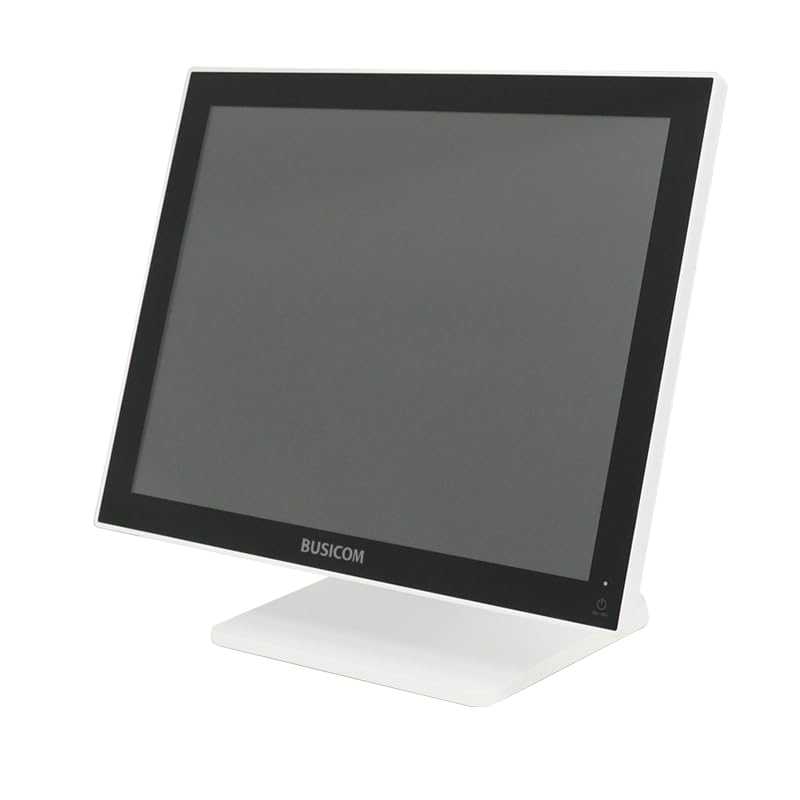
Малюнак 1: Спераду view of the BUSICOM PC-SeaV15c Touch Panel PC.
2. Прадукт скончыўсяview
2.1 Асноўныя магчымасці
- Пашыраны дызайн: Features an ultra-thin bezel and a highly durable 7H reinforced display for enhanced aesthetics and protection.
- Найвышэйшая прадукцыйнасць: Equipped with Microsoft Windows 10 IoT Enterprise, ensuring long-term support and reliable operation.
- Інтуітыўна зразумелая сэнсарная панэль: Utilizes a capacitive touch method, offering a familiar and responsive touch experience similar to smartphones and tablets.
- Лёгкае абслугоўванне: Designed for simple RAM and SSD replacement, facilitating upgrades and servicing.
- Versatile Interfaces: Provides a wide range of connectivity options to integrate with various peripherals.
- Эфектыўнае захоўванне: SSD storage ensures fast processing speeds, quiet operation, and excellent shock resistance.
2.2 Кампаненты
The package typically includes the BUSICOM PC-SeaV15c unit and a power adapter. Additional accessories may vary.

Figure 2: Front and side profile of the PC-SeaV15c unit.

Малюнак 3: Задняя частка view showing access panels for RAM and SSD components.
3. Інструкцыі па ўсталёўцы
3.1 Распакаванне
- Carefully remove the PC-SeaV15c from its packaging.
- Check for any visible damage. If damaged, contact your vendor immediately.
- Пераканайцеся, што ўсе пералічаныя кампаненты прысутнічаюць.
3.2 Падключэнне перыферыйных прылад
Refer to the interface diagram below for port locations and types.

Figure 4: Detailed diagram of the PC-SeaV15c's rear and bottom interfaces.
- Падключэнне сілкавання: Connect the provided power adapter to the DC In port and then to a power outlet.
- USB прылады: Use the USB 2.0 (4 ports) and USB 3.0 (2 ports) for connecting keyboards, mice, printers, and other USB peripherals.
- Падключэнне да сеткі: Connect an Ethernet cable to the LAN port for wired network access.
- Аўдыявыхад: Connect external speakers or headphones to the Audio Out port.
- Serial Ports (RJ45): Utilize COM1, COM2, COM3, and COM6 for connecting specialized POS peripherals such as barcode scanners or receipt printers.
- Cash Drawer (RJ11): Connect a compatible cash drawer to the RJ11 port.
- Знешні дысплей: If an external monitor is required, connect it to the Mini DisplayPort.
- USB Type-C: Для сумяшчальных прылад.
3.3 Уключэнне/выключэнне
- Уключэнне: Press the power button located on the upper right side of the display bezel or the power mark on the rear panel.
- Выключэнне: To safely shut down the system, use the standard Windows shutdown procedure. Avoid direct power disconnection during operation to prevent data loss.
4. Інструкцыя па эксплуатацыі
4.1 Windows 10 IoT Enterprise
The PC-SeaV15c operates on Windows 10 IoT Enterprise 2021. Familiarize yourself with the Windows operating system for basic navigation, application management, and system settings.
4.2 Touch Panel Usage
The capacitive touch screen supports multi-touch gestures.
- Націсніце: Эквівалентна кліку мышшу.
- Двойчы націсніце: Эквівалентна падвойнаму кліку.
- Націсніце і ўтрымлівайце: Эквівалентна пстрычцы правай кнопкай мышы.
- Правядзіце пальцам: Для пракруткі або навігацыі.
- Звядзенне пальцамі для павелічэння: Выкарыстоўвайце два пальцы, каб павялічыць або паменшыць маштаб.
5. Тэхнічнае абслугоўванне
5.1 Ачыстка прылады
- Заўсёды выключайце прыладу з сеткі перад чысткай.
- Выкарыстоўвайце мяккую безворсовую тканіну, злёгку dampвадой або неабразіўным ачышчальнікам для экрана.
- Do not spray liquids directly onto the screen or device.
- Пазбягайце выкарыстання агрэсіўных хімікатаў, растваральнікаў або абразіўных матэрыялаў.
5.2 RAM and SSD Replacement
The PC-SeaV15c is designed for easy replacement of RAM and SSD components. Refer to Figure 3 for the access panel location. For detailed instructions on component replacement, consult a qualified technician or the BUSICOM support webсайт.
6. Выпраўленне непаладак
У гэтым раздзеле прадстаўлены рашэнні распаўсюджаных праблем, з якімі вы можаце сутыкнуцца.
- Прылада не ўключаецца:
- Пераканайцеся, што адаптар сілкавання надзейна падключаны як да прылады, так і да спраўнай разеткі.
- Праверце працаздольнасць разеткі, падключыўшы да яе іншую прыладу.
- Touch screen is unresponsive:
- Перазапусціце прыладу.
- Пераканайцеся, што экран чысты і без перашкод.
- Няма адлюстравання:
- Праверце, ці ўключана прылада.
- If an external display is connected, ensure the correct input source is selected on the external display.
- Peripheral not detected:
- Ensure the peripheral is correctly connected to the appropriate port (USB, LAN, COM).
- Паспрабуйце падключыць перыферыйную прыладу да іншага порта.
- Check the peripheral's own power supply, if applicable.
For further assistance, please contact BUSICOM customer support.
7. Тэхнічныя характарыстыкі
| Асаблівасць | Дэталь |
|---|---|
| Марка | БУСІКОМ |
| Назва мадэлі | PC-SeaV15c |
| Колер | Белы |
| Памер экрана | 15 цаляў |
| дазвол | 1024x768 |
| Аперацыйная сістэма | Windows 10 IoT Enterprise 2021 |
| Марка працэсара | Intel |
| Разетка працэсара | Intel® N97 |
| Хуткасць працэсара | 3.6 ГГц |
| Тып памяці | DDR4 |
| Усталяваная аператыўная памяць | 4 ГБ |
| Тып жорсткага дыска | SSD |
| Ёмістасць SSD | 128 ГБ (як пазначана ў назве прадукту) |
| Тып відэакарты | Інтэграваны |
| VRAM Type | DDR4 SDRAM |
| Ёмістасць відэапамяці | 4 ГБ |
| Парты USB 2.0 | 4 |
| Парты USB 3.0 | 2 |
| Аптычны прывад | Няма |
| Вага прадукту | 6 кілаграма |
| Вышыня (прыбл.) | 307.5 mm (as per dimension diagram) |

Малюнак 5: Задняя частка view of the PC-SeaV15c with approximate height dimension.
8. Гарантыя і падтрымка
For warranty information and technical support, please refer to the warranty card included with your product or visit the official BUSICOM webсайт. Захоўвайце чэк аб куплі як пацвярджэнне пакупкі для гарантыйных прэтэнзій.
BUSICOM Official Webсайт: BUSICOM Store on Amazon.co.jp