
Thomson 145G
Thomson Streaming Stick 4K 145G User Manual
Мадэль: 145G
Уводзіны
This user manual provides comprehensive instructions for the setup, operation, maintenance, and troubleshooting of your Thomson Streaming Stick 4K 145G. Please read this manual carefully before using the device to ensure proper functionality and to avoid damage.

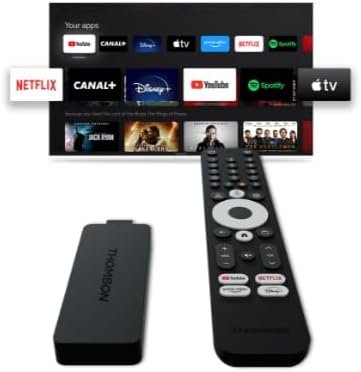
Image: The Thomson Streaming Stick 4K 145G alongside its remote control, illustrating the main components of the product.
Што ў скрынцы
Upon unboxing your Thomson Streaming Stick 4K 145G, please verify that all components are present:
- Thomson Streaming Stick 4K 145G
- Пульт дыстанцыйнага кіравання
- Адаптар харчавання
- USB-кабель (для харчавання)
- HDMI Extender (optional, may be included)
- Кароткае кіраўніцтва
Кіраўніцтва па ўстаноўцы
Follow these steps to set up your Thomson Streaming Stick 4K 145G:
- Connect the Streaming Stick: Plug the Thomson Streaming Stick 4K 145G directly into an available HDMI port on your television. If space is limited, use an HDMI extender if provided.
- Падключыце харчаванне: Connect the provided USB cable to the power input port on the streaming stick and then connect the other end to the power adapter. Plug the power adapter into a wall outlet.
- Power On TV and Select Input: Turn on your television and select the HDMI input to which the streaming stick is connected.
- Першапачатковая ўстаноўка: The device will boot up and guide you through the initial setup process on your TV screen. This typically includes:
- Выбар мовы.
- Падключэнне да сеткі Wi-Fi.
- Signing in with your Google account (required for Google TV features and app downloads).
- Прыняцце ўмоў і палажэнняў.
- Спалучэнне пульта дыстанцыйнага кіравання: The remote control should automatically pair with the device. If not, follow the on-screen instructions or press and hold the Home and Back buttons simultaneously on the remote until pairing is complete.
Выява: Падрабязны view of the Thomson Streaming Stick 4K 145G, highlighting its HDMI connector for TV input and the power input port.
Інструкцыя па эксплуатацыі
Once set up, you can begin using your Thomson Streaming Stick 4K 145G to access various streaming services and content.
Функцыі дыстанцыйнага кіравання
Азнаёмцеся з кнопкамі пульта дыстанцыйнага кіравання:
- Кнопка харчавання: Turns the device on or off (standby).
- Кнопка Памочніка Google: Актывуе галасавыя каманды для пошуку і кіравання.
- Навігацыйная панэль (круг): Use up, down, left, right to navigate menus.
- Кнопка OK/Выбраць: Пацвярджае выбар.
- Кнопка "Назад": Вяртае да папярэдняга экрана.
- Кнопка дадому: Вяртаецца на галоўны экран Google TV.
- Кнопкі рэгулявання гучнасці (+/-): Рэгулюе гучнасць тэлевізара.
- Кнопка адключэння: Mutes TV volume.
- Кнопкі хуткага доступу да праграм: Dedicated buttons for Netflix, Disney+, YouTube, and Prime Video for quick access.

Image: The Thomson Streaming Stick 4K 145G and its remote control, showing the layout of the buttons on the remote.
Навігацыя Google TV
The Google TV interface organizes content from your streaming services into a single, personalized experience.
- Галоўны экран: Displays recommended content, installed apps, and your watchlist.
- Праграмы: Access all your installed applications. You can download more from the Google Play Store.
- Бібліятэка: Find your purchased movies and TV shows from Google Play.
- Пошук: Use the search icon or Google Assistant button to find content by title, genre, or actor.
To stream content, simply select an app or a recommended title from the home screen. Ensure you have an active subscription for paid services.
Тэхнічнае абслугоўванне
Proper maintenance ensures the longevity and optimal performance of your streaming stick.
- Уборка: Use a soft, dry, lint-free cloth to clean the device and remote control. Do not use liquid cleaners or aerosols.
- Вентыляцыя: Ensure the streaming stick is placed in a well-ventilated area and not covered, as proper airflow prevents overheating.
- Абнаўленні праграмнага забеспячэння: The device will automatically check for and install software updates. Ensure it remains connected to the internet for these updates.
- захоўванне: Калі прылада не выкарыстоўваецца працяглы час, захоўвайце яе ў прахалодным, сухім месцы, удалечыні ад прамых сонечных прамянёў.
Ліквідацыю непаладак
If you encounter issues with your Thomson Streaming Stick 4K 145G, refer to the following common problems and solutions:
| праблема | Магчымая прычына | Рашэнне |
|---|---|---|
| Няма харчавання/Прылада не ўключаецца | Power adapter not connected, faulty outlet, or damaged cable. | Ensure power adapter is securely plugged into the device and a working wall outlet. Try a different outlet. |
| Няма сігналу на тэлевізары | Incorrect HDMI input selected, loose HDMI connection, or device not powered on. | Verify the TV is on the correct HDMI input. Re-seat the HDMI cable. Ensure the streaming stick has power. |
| Пульт дыстанцыйнага кіравання не адказвае | Batteries low/dead, remote not paired, or obstruction. | Replace batteries. Re-pair the remote by holding Home and Back buttons. Ensure no obstructions between remote and device. |
| Буферызацыя або нізкая якасць струменевай перадачы | Weak Wi-Fi signal, internet speed issues, or network congestion. | Move the device closer to the Wi-Fi router. Restart your router. Check your internet speed. Reduce other network activity. |
| Збоі або завісанні праграм | Outdated app, insufficient memory, or software glitch. | Restart the device. Check for app updates in the Google Play Store. Clear app cache (Settings > Apps > [App Name] > Clear cache). |
If the issue persists after trying these solutions, you may need to perform a factory reset (Settings > System > About > Factory reset). Note that a factory reset will erase all data and settings on the device.
Тэхнічныя характарыстыкі
Key technical specifications for the Thomson Streaming Stick 4K 145G:
- Назва мадэлі: STREAMING STICK 4K THOMSON 145G
- Нумар мадэлі: 145G
- дазвол: 4K UHD
- Падключэнне: Wi-Fi, USB, Ethernet (via adapter), HDMI, IR
- Тып раздыма: HDMI
- Інтэрнэт-сэрвісы, якія падтрымліваюцца: Netflix, Disney+, Prime Video, YouTube, Spotify (and others via Google Play Store)
- Тып кантролера: Пульт дыстанцыйнага кіравання
- Формаў-фактар: TV Stick
- Колер: Чорны
- Памеры прадукту: 1.3 х 9.3 х 3.4 см
- Вага: 460 г
- вытворца: Томсан
- Першыя даступныя: 8 жніўня 2024 г.
Гарантыя і падтрымка
For warranty information and technical support, please refer to the documentation included with your purchase or visit the official Thomson support webсайт. Захоўвайце пацвярджэнне пакупкі для прэтэнзій па гарантыі.
вытворца: Томсан
Гарантаваныя абнаўленні праграмнага забеспячэння да: Невядома (паводле дадзеных аб прадукце)
Ask a question about this manual
Ask about setup, troubleshooting, compatibility, parts, safety, or missing instructions. Manuals+ will review the question and use this page’s manual context to help answer it.