
1. Уводзіны і большview
The Infinity Smart Watch for Women is designed to seamlessly integrate into your daily life, offering a blend of elegance and advanced functionality. Featuring a vibrant AMOLED 1.1" screen, this smartwatch provides comprehensive health and fitness tracking, communication features, and smart notifications. It is compatible with both iOS and Android phones.

Малюнак 1: Спераду view of the Infinity Smart Watch for Women, showcasing its elegant design and vibrant AMOLED display.
2. Што ў скрынцы
- Infinity Smart Watch (Model WS_BLK)
- Зарадны кабель
- Кіраўніцтва карыстальніка
3. Настройка
3.1 Першапачатковая зарадка
Before first use, fully charge your smartwatch. Connect the magnetic charging cable to the charging points on the back of the watch and plug the USB end into a compatible power adapter (not included) or computer USB port. The watch display will indicate charging status.

Figure 2: The smartwatch connected to its magnetic charging cable, showing the battery charging indicator.
3.2 Усталёўка і спалучэнне праграм
- Scan the QR code provided in the manual or on the watch screen (if available) to download the companion app. Alternatively, search for the app name (e.g., 'VeryFit' or 'FitCloudPro' as seen in related videos) in your smartphone's app store (iOS App Store or Google Play Store).
- Усталюйце праграму на свой смартфон.
- Адкрыйце праграму і выконвайце інструкцыі на экране, каб стварыць уліковы запіс і наладзіць свой прафесійны...file.
- Пераканайцеся, што Bluetooth уключаны на вашым смартфоне.
- In the app, navigate to the device pairing section and select your Infinity Smart Watch from the list of available devices.
- Пацвердзіце запыт на спалучэнне як на смартфоне, так і на разумным гадзінніку.
Video 1: Official product video demonstrating the Infinity Smart Watch for Women, including its features and design. This video provides a visual guide to the watch's capabilities.
4. Інструкцыя па эксплуатацыі
4.1 Асноўная навігацыя
- Правядзіце пальцам уверх: View recent notifications/messages.
- Правядзіце пальцам уніз: Access quick settings (brightness, Do Not Disturb, flashlight, phone finder, settings).
- Правядзіце пальцам улева/управа: Scroll through main features like activity data, heart rate, sleep tracking, and weather.
- Націсніце бакавую кнопку: Вярніцеся да цыферблата гадзінніка або адкрыйце галоўнае меню.
4.2 Здзяйсненне і адказ на званкі
Once paired with your smartphone, you can make and answer calls directly from your smartwatch.
- Каб зрабіць званок: Access the phone function from the main menu, use the dial pad or select a contact from your synced phonebook.
- Каб адказаць на званок: Пры паступленні званка гадзіннік адлюстроўвае ідэнтыфікатар абанента. Націсніце зялёны значок, каб адказаць, або чырвоны значок, каб адхіліць званок.
4.3 Разумныя апавяшчэнні
Receive alerts for incoming calls, text messages, and app notifications directly on your wrist. Configure notification preferences within the companion app.

Figure 3: The smartwatch interface showing options for Bluetooth calls, smart notifications, and voice assistant.
4.4 Налада цыферблатаў гадзінніка
The smartwatch offers a variety of customizable watch faces to suit your style. You can change them directly on the watch or through the companion app, which provides over 200 options.
5. Функцыі маніторынгу здароўя
The Infinity Smart Watch is equipped with a comprehensive suite of health and fitness tracking features:
- Маніторынг сардэчнага рытму: Бесперапынна адсочвае частату сардэчных скарачэнняў на працягу дня.
- Маніторынг артэрыяльнага ціску: Забяспечвае вымярэнне артэрыяльнага ціску па патрабаванні.
- Маніторынг сну: Аналізуе вашы рэжымы сну, у тым ліку глыбокі сон, лёгкі сон і час няспання.
- Шагомер: Counts your steps, distance traveled, and calories burned.
- Некалькі спартыўных рэжымаў: Supports over 100 sports modes, allowing you to track specific workouts like walking, running, cycling, and swimming.
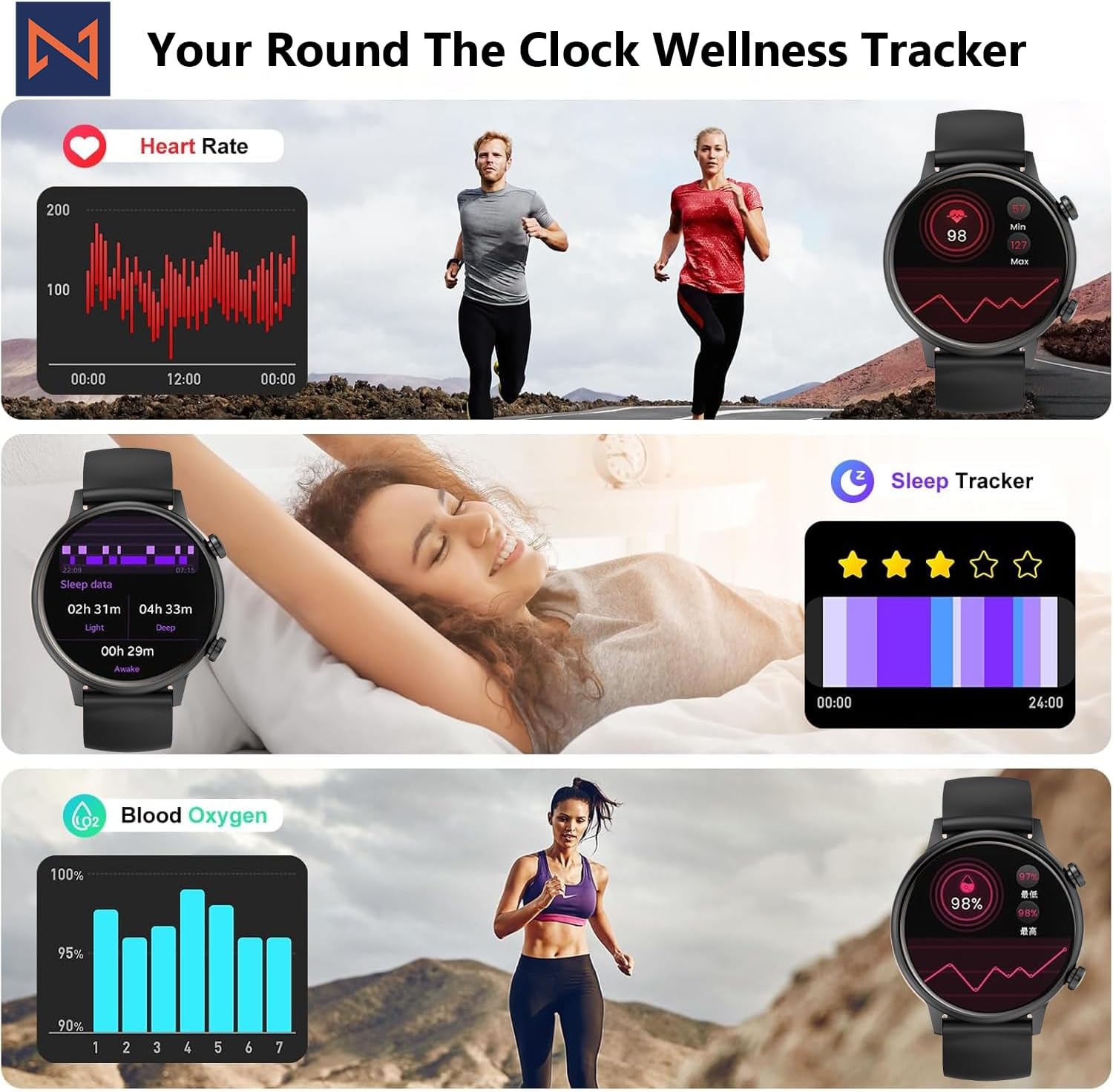
Figure 4: The smartwatch interface showing real-time heart rate, sleep tracking, and blood oxygen levels.

Figure 5: The smartwatch showing a selection of its multiple sports tracking modes.
6. Воданепранікальнасць
The Infinity Smart Watch has an IP68 waterproof rating, making it resistant to dust, sweat, and water. It is suitable for daily wear, including hand washing, face washing, and swimming. Заўвага: Avoid using the watch in hot water (e.g., hot showers, saunas) or for deep-sea diving, as extreme temperatures or high-pressure water may compromise its water resistance.

Figure 6: The smartwatch demonstrating its IP68 waterproof capability during water exposure.
7. Акумулятар і зарадка
The smartwatch features a 200 mAh Lithium Polymer battery. A full charge typically takes approximately 2 hours, providing 3-5 days of working time and up to 30 days of standby time, depending on usage.
8. Тэхнічныя характарыстыкі
| Асаблівасць | Дэталь |
|---|---|
| Нумар мадэлі | WS_BLK |
| Памер экрана | 1.1 цалі AMOLED |
| Рэйтынг воданепранікальнасці | IP68 |
| Ёмістасць батарэі | 200 Міліamp Гадзіны (літый-палімерны) |
| Сувязь | Bluetooth |
| Аперацыйная сістэма | Android (сумяшчальны з iOS) |
| Ёмістасць памяці | 128 Мб |
| Вага прадмета | 5 унцыі |
| Вытворца | Kizzy Enterprises Inc |
9. Выпраўленне непаладак
- Гадзіннік не ўключаецца: Ensure the watch is fully charged. Long-press the side button to power on.
- Немагчыма спалучыць прыладу з тэлефонам: Ensure Bluetooth is enabled on your phone and the watch is within range. Restart both devices and try pairing again through the app.
- Апавяшчэнні не атрыманы: Check app settings on your phone to ensure notification permissions are granted for the smartwatch app. Also, verify that 'Do Not Disturb' mode is not active on the watch.
- Няправільныя паказанні стану здароўя: Ensure the watch is worn snugly on your wrist, not too tight or too loose. Clean the sensors regularly. Note that the blood pressure monitor may not be medically accurate and is for reference only.
- Замарозка экрана: Restart the smartwatch by long-pressing the side button until it powers off, then power it back on. If the issue persists, check for app updates.
10. Гарантыя і падтрымка
For warranty information, technical support, or service inquiries, please refer to the contact details provided on the product packaging or the manufacturer's official webсайт. Захоўвайце чэк аб куплі як пацвярджэнне пакупкі для гарантыйных прэтэнзій.