
1. Уводзіны
Thank you for choosing the VolkanoX VXH300 Hybrid Active Noise Cancelling Bluetooth Headphones. These headphones are designed to provide a high-quality audio experience with the convenience of wireless connectivity and effective noise cancellation. This manual will guide you through the setup, operation, and maintenance of your new headphones.
2. Інфармацыя па бяспецы
- Не выкарыстоўвайце навушнікі на высокай гучнасці працяглы час, каб пазбегнуць пашкоджання слыху.
- Do not use the headphones in situations where inability to hear ambient sounds could be dangerous, such as while driving or cycling.
- Трымайце навушнікі далей ад вады, вільгаці і экстрэмальных тэмператур.
- Не спрабуйце разбіраць або мадыфікаваць навушнікі. Гэта прывядзе да анулявання гарантыі.
- Charge the headphones using a compatible USB power source.
3. Змесціва ўпакоўкі
Калі ласка, пераканайцеся, што ўсе прадметы прысутнічаюць у вашай упакоўцы:
- 1 x VolkanoX VXH300 Hybrid Active Noise Cancelling Bluetooth Headphones
- 1 х зарадны кабель USB Type-C
- 1 х 3.5 мм аўдыякабель
- 1 х футляр для пераноскі
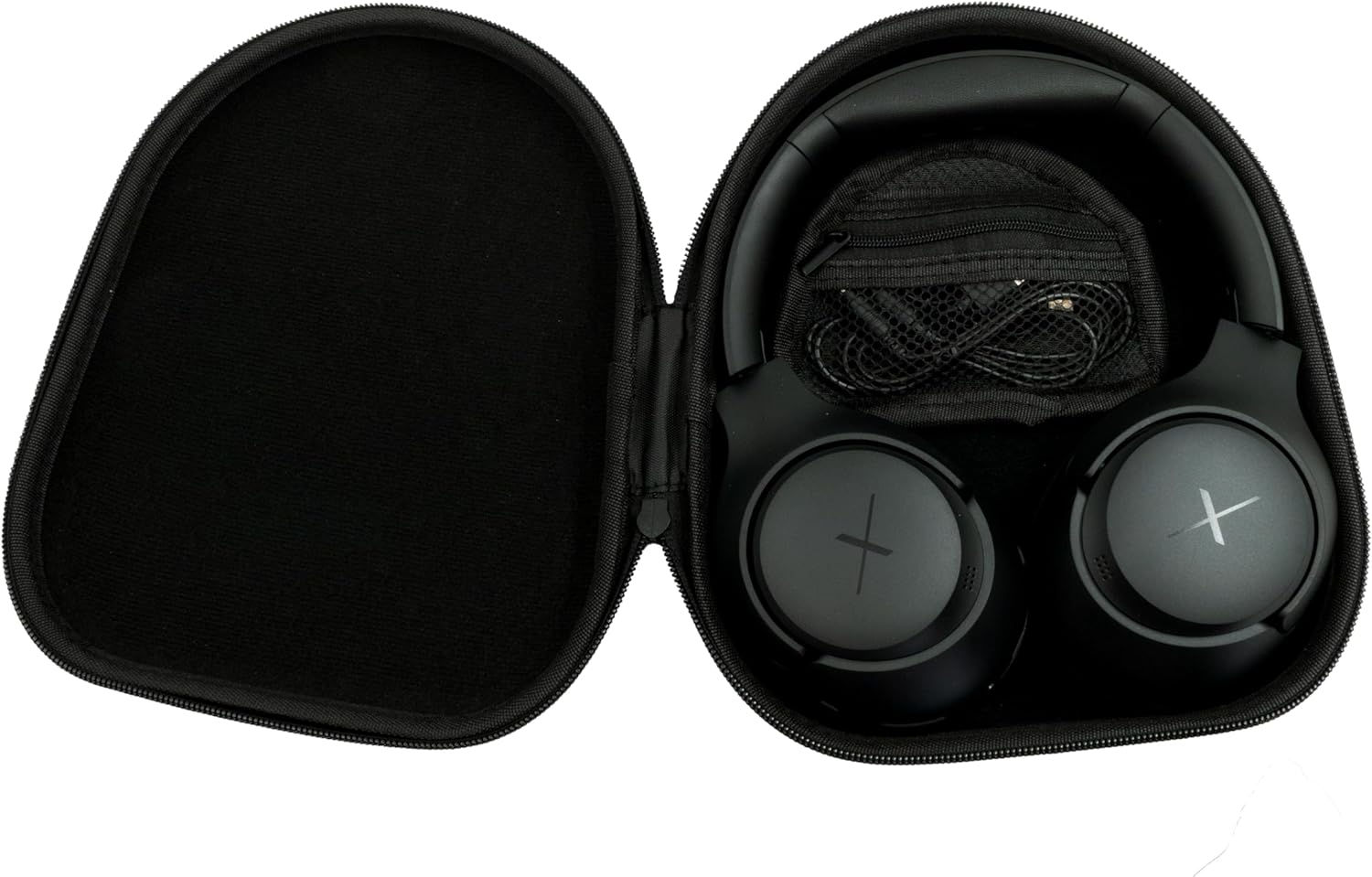
Image: VolkanoX VXH300 Headphones neatly stored in their carrying case, alongside the included charging and audio cables.
4. Прадукт скончыўсяview
Familiarize yourself with the various parts and controls of your VolkanoX VXH300 headphones:

Выява: Падрабязны view of the right earcup, highlighting the control buttons, the 3.5mm Aux Input, and the USB Type-C Charging Port.
- Кнопкі кіравання: Power On/Off, Volume Up/Down, Play/Pause, Track Skip, Call Answer/End.
- Увод Aux: Для праваднога падлучэння аўдыё выкарыстоўвайце аўдыёкабель 3.5 мм.
- Порт для зарадкі Type-C: Для зарадкі ўнутранай батарэі.
- Пераключальнік ANC: Dedicated button or switch for Active Noise Cancelling function.
- Мікрафон: Убудаваная функцыя для званкоў у рэжыме hands-free.
5. Настройка
5.1 Зарадка навушнікаў
- Connect the supplied USB Type-C charging cable to the charging port on the headphones.
- Падключыце другі канец кабеля да адаптара харчавання USB (не ўваходзіць у камплект) або да USB-порта кампутара.
- The LED indicator will show charging status (e.g., red for charging, blue/off for fully charged).
- Поўная зарадка займае прыблізна 1 гадзіну.
5.2 Уключэнне/выключэнне
- Каб уключыць: Націсніце і ўтрымлівайце кнопку харчавання прыблізна 3 секунды, пакуль не пачне міргаць святлодыёдны індыкатар.
- Каб выключыць: Націсніце і ўтрымлівайце кнопку харчавання прыблізна 3 секунды, пакуль не пагасне святлодыёдны індыкатар.
5.3 Спалучэнне па Bluetooth
- Пераканайцеся, што навушнікі адключаны.
- Націсніце і ўтрымлівайце кнопку харчавання прыблізна 5-7 секунд, пакуль святлодыёдны індыкатар не пачне міргаць па чарзе чырвоным і сінім колерамі, паказваючы рэжым спалучэння.
- На вашай прыладзе (смартфоне, планшэце, камп'ютары) уключыце Bluetooth і пачніце пошук новых прылад.
- Select "VolkanoX VXH300" from the list of available devices.
- Once paired, the LED indicator will flash blue slowly, and you will hear an audible confirmation.
- Навушнікі аўтаматычна падключацца да апошняй спалучанай прылады пасля ўключэння, калі яна знаходзіцца ў зоне дзеяння (да 10 метраў).
5.4 Wired Connection (Duo Mode)
For ultimate flexibility, you can use the headphones in wired mode:
- Connect one end of the 3.5mm audio cable to the Aux Input port on the headphones.
- Connect the other end of the cable to the 3.5mm audio jack on your audio device.
- Навушнікі аўтаматычна пераключацца ў правадны рэжым. Функцыя Bluetooth будзе адключана.
6. Інструкцыя па эксплуатацыі
6.1 Прайграванне музыкі
- Прайграванне/Паўза: Націсніце кнопку харчавання/шматфункцыянальнай функцыі адзін раз.
- Павялічыць гучнасць: Націсніце кнопку павелічэння гучнасці (+).
- Паменшыць гучнасць: Націсніце кнопку памяншэння гучнасці (-).
- Наступны трэк: Націсніце і ўтрымлівайце кнопку павелічэння гучнасці (+).
- Папярэдні трэк: Націсніце і ўтрымлівайце кнопку памяншэння гучнасці (-).
6.2 Кіраванне выклікамі
- Адказ/завяршэнне выкліку: Націсніце кнопку харчавання/шматфункцыянальнай функцыі адзін раз.
- Адхіліць выклік: Націсніце і ўтрымлівайце кнопку харчавання/шматфункцыянальную кнопку на працягу 2 секунд.
- Паўторны набор апошняга нумара: Двойчы націсніце кнопку харчавання/шматфункцыянальнай функцыі.
6.3 Active Noise Cancelling (ANC) Function
The VolkanoX VXH300 features Hybrid Active Noise Cancelling technology to reduce ambient noise.

Image: A visual representation of Hybrid Active Noise Cancelling, showing how external noise is filtered to enhance the listening experience.
- Актываваць ANC: Locate the dedicated ANC switch or button (refer to Product Overview) and slide/press it to the ON position. The ANC indicator light will illuminate.
- Адключыць ANC: Slide/press the ANC switch or button to the OFF position. The ANC indicator light will turn off.
- ANC can be used independently or simultaneously with Bluetooth audio.
7. Тэхнічнае абслугоўванне
7.1 Ачыстка
- Працярыце навушнікі мяккай сухой тканінай.
- Не выкарыстоўвайце абразіўныя ачышчальнікі, растваральнікі або агрэсіўныя хімікаты.
- Пазбягайце траплення вільгаці ў любыя адтуліны.
7.2 Захоўванне
The VolkanoX VXH300 headphones feature a twist and folding design for compact storage.

Image: The headphones folded for portability, highlighting their space-saving design.
- When not in use, fold the headphones and store them in the provided carrying case to protect them from dust and damage.
- Захоўваць у прахалодным, сухім месцы, удалечыні ад прамых сонечных прамянёў і экстрэмальных тэмператур.
8. Выпраўленне непаладак
Калі ў вас узніклі праблемы з навушнікамі, звярніцеся да наступных распаўсюджаных праблем і рашэнняў:
| праблема | Магчымае рашэнне |
|---|---|
| Навушнікі не ўключаюцься. | Пераканайцеся, што навушнікі цалкам зараджаныя. Падключыце іх да крыніцы харчавання і паспрабуйце яшчэ раз. |
| Немагчыма спалучыцца з прыладай Bluetooth. | Ensure headphones are in pairing mode (LED flashing red/blue). Turn off and on Bluetooth on your device. Move headphones closer to the device. Clear previous pairings on your device. |
| Няма гуку або нізкі ўзровень гучнасці. | Check volume levels on both headphones and your connected device. Ensure headphones are properly paired or the 3.5mm cable is fully inserted. |
| АНК неэфектыўны. | Ensure the ANC function is switched on. ANC is most effective against low-frequency, constant noise. |
| Не працуе мікрафон. | Ensure headphones are connected via Bluetooth. Check microphone settings on your device. |
9. Тэхнічныя характарыстыкі
| Асаблівасць | Дэталь |
|---|---|
| Назва мадэлі | VXH300 |
| Нумар мадэлі | VKX-2104-BK |
| Сувязь | Bluetooth 5.0, Wired (3.5mm Aux) |
| Дыяпазон Bluetooth | Да 10 метраў |
| Кантроль шуму | Гібрыднае актыўнае падаўленне шуму |
| Размяшчэнне вушэй | Надвушная |
| Адчувальнасць | 105 дБ |
| Час зарадкі акумулятара | Прыкладна 1 гадзіна |
| Убудаваны мікрафон | так |
| Вага | 300 грам |
| Колер | Чорны |
10. Гарантыя і падтрымка
10.1 Інфармацыя аб гарантыі
Your VolkanoX VXH300 headphones are covered by a 1-гадовая абмежаваная гарантыя. This warranty covers manufacturing defects and ensures dependable performance.
You can extend your coverage by an additional 12 months, for a total of 24 months coverage, by registering your product. Please visit the official Volkano webсайт для атрымання падрабязнай інфармацыі аб рэгістрацыі прадукту.
10.2 Падтрымка кліентаў
Should you have any questions, require assistance, or need to claim warranty support, please contact Volkano customer service. You can message us via the official Volkano Page або звярніцеся да кантактнай інфармацыі, указанай на ўпакоўцы прадукту.