
1. Уводзіны
This manual provides essential instructions for the safe and efficient use of your Meizu Note 21 Pro smartphone. Please read this manual thoroughly before operating the device and retain it for future reference.
2. Што ў скрынцы
- Meizu Note 21 Pro Smartphone
- Адаптар сілкавання
- (Other accessories such as USB cable, SIM ejector tool, and documentation may vary by region.)
3. Схема прылады
Familiarize yourself with the physical components of your Meizu Note 21 Pro.
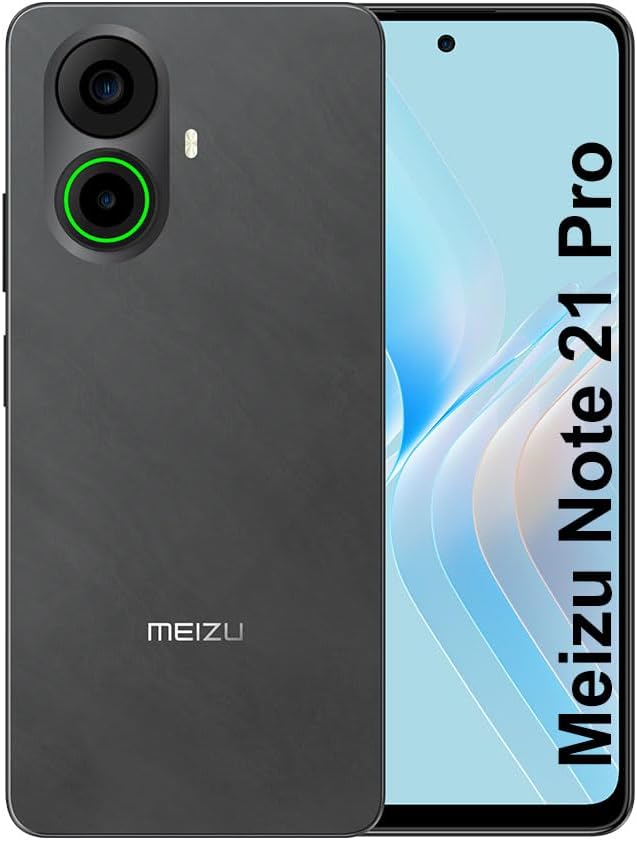
Малюнак 3.1: Спераду і ззаду view of the Meizu Note 21 Pro. The front displays the screen with a punch-hole camera. The rear shows the dual camera module with a green accent ring on one lens, a flash, and the "MEIZU" logo at the bottom.
- Пярэдні дысплей: 6.78-inch FHD+ screen with a 120Hz refresh rate.
- Пярэдняя камера: Размешчаны ўверсе па цэнтры дысплея.
- Заднія камеры: Dual camera system, including a 64MP main camera.
- Бакавы датчык адбіткаў пальцаў: Integrated for secure access.
- Порт USB: Для зарадкі і перадачы дадзеных.
- 3.5 мм аўдыяраз'ём: Для навушнікаў.
- Латок для SIM-карты/MicroSD: Supports Dual Nano SIM and MicroSD cards.
4. Настройка
4.1. Устаўка SIM-карт і карт MicroSD
- Знайдзіце латок для SIM-карты на бакавой частцы прылады.
- Устаўце інструмент для выцягвання SIM-карты ў невялікую адтуліну побач з латком і акуратна націсніце, пакуль латок не выскочыць.
- Place your Nano SIM card(s) and/or MicroSD card into the designated slots on the tray. Ensure the gold contacts face downwards.
- Асцярожна ўстаўце латок назад у прыладу, пакуль ён не зафіксуецца на месцы з пстрычкай.
4.2. Пачатковае ўключэнне і налада
- Press and hold the Power button until the Meizu logo appears.
- Выконвайце падказкі на экране, каб выбраць мову, падключыцца да сеткі Wi-Fi і наладзіць свой уліковы запіс Google.
- During setup, you will be guided to configure security features such as a PIN, pattern, or password.
4.3. Fingerprint Recognition Setup
- Перайсці да Налады > Бяспека і прыватнасць > Разблакіроўка адбіткам пальца.
- Follow the on-screen instructions to register your fingerprint by repeatedly touching the side-mounted sensor.
- Ensure your finger covers the entire sensor area during registration for optimal performance.
5. Кіраванне прыладай
5.1. Дысплей і навігацыя
- The 6.78-inch FHD+ display operates at a 120Hz refresh rate for smooth visuals.
- Navigate the Android 14 operating system using touch gestures: tap, swipe, pinch-to-zoom.
- Каб атрымаць доступ да хуткіх налад, правядзіце пальцам па экране зверху ўніз.
5.2. Функцыі камеры
- Адкрыйце праграму «Камера» на галоўным экране або ў панэлі праграм.
- The rear camera system features a 64MP main sensor for high-resolution photos and a 2MP depth-of-field camera for portrait effects.
- The 13MP front-facing camera is suitable for selfies and video calls.
- Tap on the screen to focus, and use the on-screen shutter button to capture images. Explore various modes like Portrait, Night, and Pro within the camera app.
5.3. Прадукцыйнасць і захоўванне
- The MediaTek G99 Octa Core processor ensures efficient performance for applications and multitasking.
- The device comes with 256GB of internal storage and 8GB of RAM.
- Storage can be expanded using a MicroSD card (sold separately).
5.4. Акумулятар і зарадка
- The Meizu Note 21 Pro is equipped with a 5000mAh battery.
- Use the provided Power Adapter for 30W fast charging.
- To charge, connect the USB cable to the phone's USB port and the power adapter, then plug the adapter into a wall outlet.
5.5. Сувязь
- 4G LTE: Supports various LTE FDD and TDD bands for cellular data. Note: This international version works on T-Mobile in the USA and globally with other carriers.
- Wi-Fi 5: Падключыцеся да бесправадных сетак для доступу ў Інтэрнэт.
- Bluetooth: Спалучайце з бесправаднымі аксэсуарамі, такімі як навушнікі і дынамікі.
- NFC: Для бескантактавых плацяжоў і хуткага спалучэння з сумяшчальнымі прыладамі.
- GPS: Для службаў геалакацыі і навігацыі.
6. Тэхнічнае абслугоўванне
- Уборка: Use a soft, lint-free cloth to clean the screen and body of the device. Avoid harsh chemicals or abrasive materials.
- Сыход за батарэяй: Avoid extreme temperatures. Do not fully discharge the battery frequently. For optimal battery longevity, keep the charge between 20% and 80%.
- Абнаўленні праграмнага забеспячэння: Рэгулярна правярайце наяўнасць абнаўленняў сістэмы і ўсталёўвайце іх, каб забяспечыць аптымальную прадукцыйнасць і бяспеку. Перайдзіце па спасылцы Налады > сістэма > Абнаўленне сістэмы.
7. Выпраўленне непаладак
| выпуск | Магчымае рашэнне |
|---|---|
| Прылада не ўключаецца | Ensure the battery is charged. Connect the device to the power adapter and try again. If unresponsive, press and hold the Power button for 10-15 seconds to force a restart. |
| Дрэнны сігнал сеткі | Check if the SIM card is correctly inserted. Move to an area with better network coverage. Restart the device. Verify with your carrier that your plan is active. |
| Праграмы працуюць павольна або збоі | Закрыйце фонавыя праграмы. Ачысціце кэш праграм (Налады > Праграмы > выберыце праграму > Сховішча і кэш > Ачысціць кэш). Перазапусціце прыладу. Забяспечце дастаткова месца для захоўвання. |
| Датчык адбіткаў пальцаў не працуе | Ensure your finger and the sensor are clean and dry. Re-register your fingerprint in settings. |
8. Тэхнічныя характарыстыкі
- мадэль: Meizu Note 21 Pro
- Аперацыйная сістэма: Android 14
- Працэсар: MediaTek G99 Octa Core (2.2GHz)
- Дысплей: 6.78 inches FHD+ (1080 x 2160 resolution), 120Hz Refresh Rate
- Аператыўная памяць: 8 ГБ
- Унутраная памяць: 256 ГБ
- Задняя камера: 64 Мп асноўная камера + 2 Мп глыбіня
- Пярэдняя камера: 13 МП
- акумулятар: 5000 мАг, хуткая зарадка 30 Вт
- Падключэнне: 4G LTE (FDD:1,2,3,4,5,7,8,12,17,18,19,20,26,28,66; TDD:38,40,41), 3G WCDMA, 2G Quad Band, Wi-Fi 5, Bluetooth, NFC, GPS
- Аўдыёраз'ём: 3.5 мм
- Памеры: 6.64 х 2.96 х 0.33 цалі
- Вага: 1.1 фунта
9. Гарантыя і падтрымка
For warranty information and technical support, please refer to the warranty card included with your product or visit the official Meizu webсайт. Захоўвайце пацвярджэнне пакупкі для прэтэнзій па гарантыі.
For further assistance, you may contact Meizu customer service through their official channels.