
FONGWAH U1-CU-71
FONGWAH UHF RFID Reader/Writer Model U1-CU-71 Instruction Manual
Model: U1-CU-71 | Brand: FONGWAH
1. Уводзіны
This manual provides comprehensive instructions for the FONGWAH UHF RFID Reader/Writer, Model U1-CU-71. This device is designed for efficient reading and writing of UHF RFID tags, supporting both keyboard emulation and advanced read-write integration modes. It is compliant with ISO18000-6C and EPC C1 Gen 2 protocols, making it suitable for various applications such as inventory management, asset tracking, and access control.
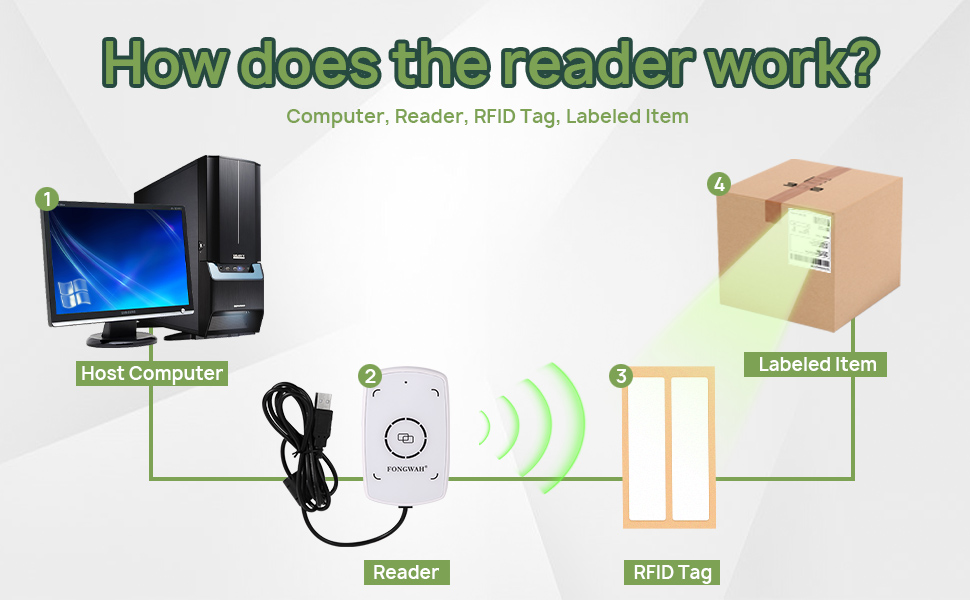
Figure 1: Basic operation diagram of the FONGWAH UHF RFID Reader/Writer.
2. Асаблівасці прадукту
- Plug-and-Play Keyboard Emulation: Automatically recognized by Windows and Linux as a Human Interface Device (HID), allowing direct data input into applications like Excel or Notepad without driver installation.
- Exceptional 50cm Long-Range Reading: Equipped with a high-gain antenna for a reading distance of up to 50cm (approximately 20 inches).
- Flexible Modes & Software Support: Easily switch between Keyboard Emulator and Read-Write Integration modes using the provided configuration tool. Technical libraries and SDK are available for developers.
- Adjustable Power for Precision: Output power is adjustable from 0 to 20dBm with 1dB accuracy, enabling fine-tuning of detection range to prevent interference.
- Wide Protocol Support: Fully compatible with ISO18000-6C and EPC Gen2 (C1G2) protocols, supporting reading and writing of various UHF tags.

Figure 2: The FONGWAH UHF RFID Reader/Writer demonstrating its 50cm reading distance.
3. Інструкцыі па ўсталёўцы
3.1 Змест пакета
Перад тым, як працягнуць, пераканайцеся, што ўсе кампаненты наяўныя:
- FONGWAH UHF RFID Reader/Writer (Model U1-CU-71)
- USB-кабель (інтэграваны)
- Sample UHF RFID Tags (typically 2)
- Mini CD with Configuration Tool and Drivers (or download link)
3.2 Падключэнне прылады
- Connect the USB cable from the U1-CU-71 reader to an available USB port on your computer (Windows or Linux).
- The operating system should automatically detect the device and install necessary drivers for keyboard emulation mode. No manual driver installation is typically required for this mode.
- For advanced features or Read-Write Integration mode, install the provided configuration tool and SDK from the mini CD or the manufacturer's webсайт.

Figure 3: FONGWAH UHF RFID Reader/Writer connected via USB.
4. Інструкцыя па эксплуатацыі
4.1 Keyboard Emulation Mode (Default)
In this mode, the reader acts like a keyboard, inputting the RFID tag's data directly into any active text field.
- Ensure the reader is connected to your computer.
- Open any text-editing application (e.g., Notepad, Microsoft Excel, Word).
- Place an RFID tag within the reading range (up to 50cm) of the device. The tag's data will automatically appear in the active text field.
Video 1: Demonstration of the Fongwah UHF Reader U1-CU-71 in keyboard emulation mode, showing RFID tag data being entered into an Excel spreadsheet.
4.2 Read-Write Integration Mode
For advanced operations like writing data to tags or integrating with custom software, you need to switch to Read-Write Integration mode using the configuration tool.
- Install and launch the FONGWAH Configuration Tool on your Windows computer.
- In the software interface, navigate to the 'Settings' section.
- Locate the 'Read card mode' options. To disable keyboard emulation, uncheck the 'Auto' checkbox and click 'Set'. This will enable the device for command-based read/write operations.
- Refer to the SDK documentation for programming instructions to interact with the reader in this mode.

Figure 4: Disabling Keyboard Emulation in the Configuration Tool.
4.3 Adjusting UHF RFID Power
The output power can be adjusted to control the reading range and minimize interference in dense environments.
- In the FONGWAH Configuration Tool, navigate to the 'Settings' section.
- Find the 'Set UHF RFID Power' option.
- Adjust the power value (0-20dBm) as needed and click 'Set' to apply the changes. Lower power reduces read range, higher power increases it.
5. Тэхнічнае абслугоўванне
To ensure optimal performance and longevity of your FONGWAH UHF RFID Reader/Writer, follow these simple maintenance guidelines:
- Уборка: Use a soft, dry, lint-free cloth to clean the device. Do not use abrasive cleaners, solvents, or harsh chemicals, as these can damage the surface or internal components.
- захоўванне: Захоўвайце прыладу ў прахалодным, сухім месцы, удалечыні ад прамых сонечных прамянёў і экстрэмальных тэмператур.
- Апрацоўка: Не кідайце прыладу і не падвяргайце яе моцным ударам.
6. Выпраўленне непаладак
| выпуск | Магчымая прычына | Рашэнне |
|---|---|---|
| Прылада не распазнаецца камп'ютарам. | Loose USB connection, faulty USB port, or driver issue. | Ensure the USB cable is securely connected. Try a different USB port. Restart your computer. For advanced modes, ensure the configuration tool/SDK is correctly installed. |
| No data output in keyboard emulation mode. | No active text field, tag out of range, or device in Read-Write Integration mode. | Click into a text field (e.g., Notepad). Ensure the RFID tag is within 50cm of the reader. Check the configuration tool to ensure keyboard emulation ('Auto' in 'Read card mode') is enabled. |
| Cannot write data to RFID tags. | Device in keyboard emulation mode, incorrect software usage, or incompatible tag. | Switch the device to Read-Write Integration mode using the configuration tool. Refer to the SDK documentation for proper writing procedures. Ensure the tag is a writable UHF tag compatible with ISO18000-6C/EPC Gen2. |
| Reading range is shorter than expected. | Low output power setting, environmental interference, or tag арыентацыя. | Increase the UHF RFID power setting in the configuration tool. Minimize electromagnetic interference from other devices. Adjust the orientation of the RFID tag relative to the reader. |
7. Тэхнічныя характарыстыкі
| Атрыбут | Дэталь |
|---|---|
| мадэль | U1-CU-71 |
| Марка | FONGWAH |
| Сумяшчальныя прылады | Desktop (Windows, Linux) |
| Крыніца харчавання | Харчаванне ад USB |
| Тэхналогія падлучэння | Кабель USB |
| Вытворца | Shenzhen Fongwah Technology Company |
| Пратаколы, якія падтрымліваюцца | ISO18000-6C, EPC Global C1 Gen 2 |
| Частата | 860-960 МГц |
| Дыстанцыя чытання | Да 50 см (20 цаляў) |
| Writing Distance | 0-20 cm (depending on tag і навакольнае асяроддзе) |
| Выходная магутнасць | Adjustable 0-20dBm (1dB accuracy) |

Figure 5: FONGWAH U1-CU-71 Key Specifications.
8. Гарантыя і падтрымка
FONGWAH products are designed for reliability and performance. For technical support, SDK inquiries, or any questions regarding your U1-CU-71 reader/writer, please contact the manufacturer directly. Information regarding specific warranty terms may be available through your point of purchase or the official FONGWAH webсайт.
For SDK files and programming examples, please refer to the resources provided on the manufacturer's website or the included mini CD.