
Xtorm FS405
Сонечны знешні акумулятар Xtorm FS405 20 Вт – 10 000 мАг. Інструкцыя карыстальніка
Мадэль: FS405
Уводзіны
The Xtorm FS405 Fuel Series Solar Powerbank 20W – 10.000 mAh is designed to provide portable power for your electronic devices, offering the flexibility to charge via USB-C or its integrated solar panel. This power bank is built for outdoor adventures, featuring a durable, splash-resistant design and a powerful LED flashlight.
Інфармацыя па бяспецы
- Do not expose the power bank to extreme temperatures (above 45°C or below -10°C).
- Пазбягайце падзення, разборкі або спроб самастойнага рамонту прылады.
- Keep away from water, except for the specified splash resistance (IPX4). Do not submerge.
- Выкарыстоўвайце толькі сертыфікаваныя зарадныя кабелі і адаптары.
- Захоўваць у месцах, недаступных дзецям.
- Утылізуйце прадукт адказна ў адпаведнасці з мясцовымі правіламі.
Змест пакета
Калі ласка, праверце ўпакоўку на наяўнасць наступных прадметаў:
- Xtorm FS405 Solar Powerbank
- Зарадны кабель USB-C (0.30 м)
- Кіраўніцтва карыстальніка
Прадукт скончаныview

Фронт View: Shows the main solar charging panel and the Xtorm logo. The robust casing is visible around the edges.

Назад View (LED Off): Displays the textured back casing and the integrated LED light panel in its off state.
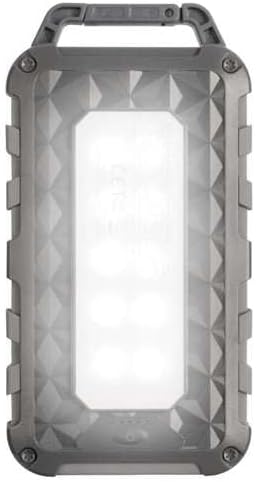
Назад View (LED On): Shows the powerful LED light panel fully illuminated, indicating the flashlight function is active.

Топ View: Highlights the sturdy integrated carabiner handle, designed for easy attachment to bags or gear.
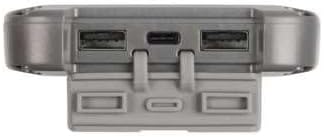
Знізу View: Displays the USB-C PD input/output port and two USB-A Quick Charge 3.0 output ports, protected by a cover.
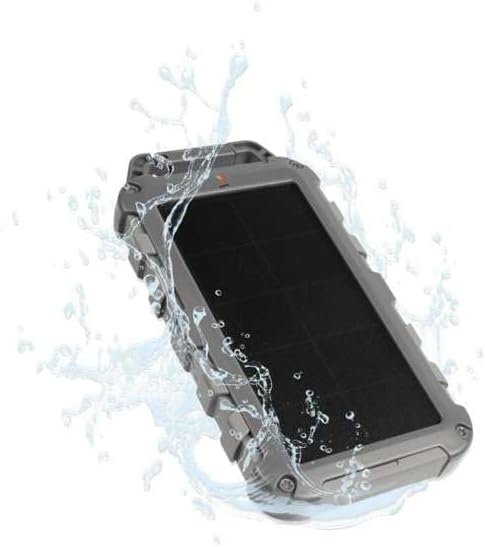
Durability Feature: Illustrates the power bank's splash-resistant design, suitable for outdoor conditions (IPX4 rated).
Настройка
Першапачатковая плата
Before first use, it is recommended to fully charge the Xtorm FS405 Solar Powerbank via the USB-C port for optimal performance.
- Падключыце кабель USB-C з камплекта да порта USB-C на знешнім акумулятары.
- Connect the other end of the USB-C cable to a compatible USB wall adapter (not included) or a computer's USB port.
- The LED indicators on the power bank will show the charging status. A full charge via USB-C typically takes approximately 2 hours.
Інструкцыя па эксплуатацыі
Зарадка Power Bank
The Xtorm FS405 can be charged using two methods:
1. Via USB-C (Recommended for Fast Charging)
- Connect the power bank to a USB-C power source using the included cable.
- The power bank will begin charging. This method provides the fastest charging speed for the power bank itself.
2. Via Solar Panel
The integrated solar panel allows for convenient charging when outdoors. For best results, place the power bank directly under strong sunlight.
- Place the solar panel facing direct sunlight.
- A small indicator light (usually green) will illuminate when solar charging is active.
- Note on Solar Charging Speed: Solar charging is a supplementary method and is significantly slower than USB-C charging. Factors like season, location, time of day, and cloud cover heavily influence charging speed.
Approximate solar charging times for a full charge:
- Spring/Summer (mostly sunny day): Прыкладна 10 дзён
- Autumn/Winter (mostly sunny day): Прыкладна 20 дзён
Solar charging is not effective on mostly cloudy days.
Зарадка знешніх прылад
The power bank features one USB-C PD (Power Delivery) output and two USB-A Quick Charge 3.0 outputs.

Магчымасць хуткай зарадкі: The power bank can charge compatible smartphones, such as an iPhone 14 or 12/13, up to 50% in approximately 30 minutes using the 20W USB-C PD output.
- Падключыце зарадны кабель прылады да аднаго з даступных выходных партоў (USB-C або USB-A) на знешнім акумулятары.
- Падключыце іншы канец кабеля да прылады.
- Паўэрбанк аўтаматычна пачне зараджаць вашу прыладу.
- Святлодыёдныя індыкатары на знешнім акумулятары будуць паказваць пакінуты ўзровень зарада батарэі.
The 10,000mAh capacity is sufficient to charge most smartphones at least 2 times.
Выкарыстанне святлодыёднага ліхтарыка
The Xtorm FS405 includes a powerful integrated LED flashlight on its back.
- Locate the power button (usually on the side or near the ports).
- Press and hold the power button for a few seconds to turn the flashlight ON.
- Press and hold the power button again to turn the flashlight OFF.
Тэхнічнае абслугоўванне
- Працірайце знешні акумулятар мяккай сухой тканінай. Не выкарыстоўвайце агрэсіўныя хімічныя рэчывы або абразіўныя матэрыялы.
- Захоўвайце павербанк у прахалодным сухім месцы, калі ён не выкарыстоўваецца.
- For long-term storage, charge the power bank to about 50-70% every 3-6 months to preserve battery health.
- Ensure the port covers are properly sealed when exposed to water splashes.
Ліквідацыю непаладак
Power Bank не зараджаецца
- Праверце кабель: Ensure the USB-C cable is securely connected to both the power bank and the power source. Try a different cable.
- Праверце крыніцу харчавання: Verify that the wall adapter or USB port is functioning correctly.
- Сонечная зарадка: For solar charging, ensure the panel is in direct, strong sunlight. Remember solar charging is slow and not effective in low light or cloudy conditions.
Прылада не зараджаецца ад паўэрбанка
- Праверце зарад паўэрбанка: Пераканайцеся, што знешні акумулятар мае дастатковы зарад.
- Праверце кабелі: Use the original charging cable for your device and ensure it's properly connected to both the power bank and your device. Try a different cable.
- Сумяшчальнасць: Verify that your device is compatible with USB charging.
- Перазапуск: Disconnect and reconnect the device.
Ліхтарык не працуе
- Праверце зарад паўэрбанка: Ensure the power bank has some charge remaining.
- Правільная праца: Ensure you are pressing and holding the power button correctly to activate the flashlight.
Тэхнічныя характарыстыкі
| Асаблівасць | Дэталь |
|---|---|
| мадэль | FS405 |
| Марка | Xtorm |
| серыял | Fuel Series 4 |
| Ёмістасць батарэі | 10,000 мАг (літый-палімерны) |
| Максімальная выхадная магутнасць | 20 Вт |
| Output 1 (USB-C PD) | 20 Вт |
| Output 2 (USB-A QC 3.0) | 18 Вт |
| Output 3 (USB-A QC 3.0) | 18 Вт |
| Колькасць выхадаў | 3 |
| Тып уводу | USB-C PD |
| Магутнасць сонечных батарэй | 1 W (SunPower cells) |
| Памеры (Д х Ш х У) | 17 см х 9 см х 2 см |
| Вага | 289 г |
| Матэрыял | ПК, АБС |
| Воданепранікальнасць | IPX4 (брызгаабаронены) |
| Убудаваны ліхтарык | так |
| Battery Charge Time (USB-C) | Прыбл. 2 гадзіны |
Гарантыя і падтрымка
For warranty information and customer support, please refer to the Xtorm official webсайт або звярніцеся да мясцовага прадаўца. Захоўвайце пацвярджэнне пакупкі для прэтэнзій па гарантыі.
Інтэрнэт-падтрымка: www.xtorm.eu
Ask a question about this manual
Ask about setup, troubleshooting, compatibility, parts, safety, or missing instructions. Manuals+ will review the question and use this page’s manual context to help answer it.