
Headwolf FPad6
Headwolf FPad6 Android Tablet Instruction Manual
Brand: Headwolf | Model: FPad6
1. Уводзіны
Welcome to the Headwolf FPad6 Android Tablet. This manual provides comprehensive instructions for setting up, operating, and maintaining your device. The FPad6 is an 8-inch tablet featuring the latest Android 15 operating system, a powerful Helio G99 processor, a high-resolution 2.5K display, and 4G LTE connectivity, designed for a versatile and efficient user experience.

Figure 1.1: Headwolf FPad6 Tablet with key specifications highlighted.
Відэа 1.1: Оверview of the Headwolf FPad6 tablet's features and design. This video demonstrates the tablet's sleek profile, display quality, and general usage scenarios.
2. Настройка
2.1 Змест пакета
Праверце наяўнасць усіх прадметаў у камплекце:
- Headwolf FPad6 Tablet
- USB-кабель Type-C
- Адаптар сілкавання
- PIN-код SIM-карты
- Кіраўніцтва карыстальніка (японская)

Figure 2.1: Contents of the Headwolf FPad6 package and device port layout.
2.2 Першапачатковае ўключэнне і зарадка
To power on your tablet for the first time, press and hold the Power button located on the side of the device until the Headwolf logo appears. If the battery is low, connect the tablet to the power adapter using the provided Type-C cable and charge it fully before first use.

Figure 2.2: Charging the Headwolf FPad6 tablet with the Type-C cable.
2.3 SIM Card and Storage Expansion
The FPad6 supports dual SIM cards or one SIM card and one microSD card for expanded storage up to 2TB. Use the provided SIM card pin to open the SIM tray. Insert your nano-SIM card(s) and/or microSD card into the appropriate slots as indicated on the tray.

Figure 2.3: Inserting SIM cards and understanding 4G LTE capabilities.
3. Кіраванне планшэтам
3.1 Функцыі Android 15
The FPad6 runs on the latest Android 15, offering enhanced privacy, productivity, and AI capabilities. Key features include:
- Прыватная прастора: Secure sensitive apps and data with dual authentication.
- Single App Recording: Record specific app screens without capturing the entire display.
- Пара праграм: Pin app combinations to your home screen for quick split-screen multitasking.
- Штучны інтэлект Блізнят: Google's advanced AI assists with text input, search, and translation.

Figure 3.1: New features available with Android 15 on the FPad6.
3.2 Дысплей і візуальныя элементы
Experience stunning visuals on the 8.4-inch 2.5K (2560x1600) In-Cell IPS display. With 500 Nits brightness, images are vibrant and clear from any angle. The tablet also supports Widevine L1, allowing you to stream 1080P HD content from major platforms like Netflix, Amazon Prime Video, and Disney+.

Figure 3.2: The FPad6's 2.5K In-Cell IPS display with Widevine L1 support.
3.3 Прадукцыйнасць і захоўванне
Powered by the MTK Helio G99 octa-core processor and Mali G57 GPU, the FPad6 delivers smooth performance for gaming and graphic-intensive applications. It comes with 16GB (8GB physical + 8GB virtual) RAM and 128GB UFS 2.1 ROM, expandable up to 2TB via microSD card, providing ample space for all your apps, videos, and files.
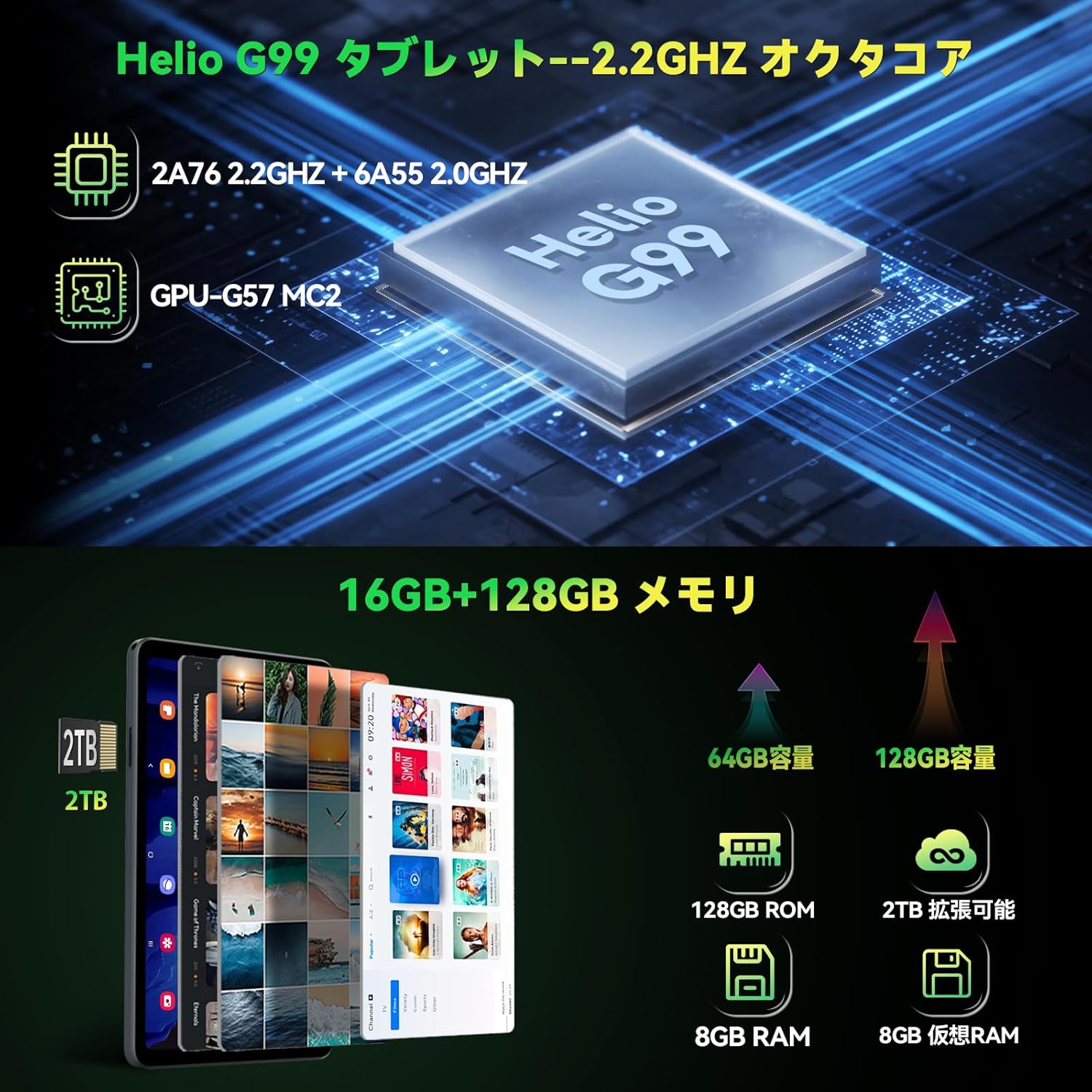
Figure 3.3: Helio G99 processor and memory specifications.
3.4 Функцыі камеры
The FPad6 is equipped with an 8MP front camera for video calls and face recognition, and a 16MP rear camera with autofocus and background blur support for capturing clear photos and videos.

Figure 3.4: Front and rear camera capabilities.
3.5 Падключэнне
Stay connected with 4G LTE communication, 2.4/5G WiFi, and Bluetooth 5.2. The tablet also features a quad-satellite positioning system (GPS) for accurate navigation.

Figure 3.5: GPS navigation on the FPad6 tablet.
3.6 Кіраванне батарэяй
The 6500mAh cobalt acid lithium battery provides extended usage time. Charge your device using the Type-C port. The tablet also includes a 3.5mm headphone jack for audio connectivity.

Figure 3.6: Battery capacity and charging interface.
3.7 Gaming and Sensors
Enhance your gaming experience with the 6-axis gyroscope and geomagnetic sensor, providing precise control and improved immersion. These sensors also contribute to accurate navigation and orientation.

Figure 3.7: Gaming with the 6-axis gyroscope.
3.8 Basic Operations and Accessibility
The FPad6 offers convenient features such as screen splitting for multitasking, lift-to-wake functionality, and a three-finger screenshot gesture. Its lightweight (385g) and thin (8.5mm) metal body make it comfortable for one-handed use and highly portable.
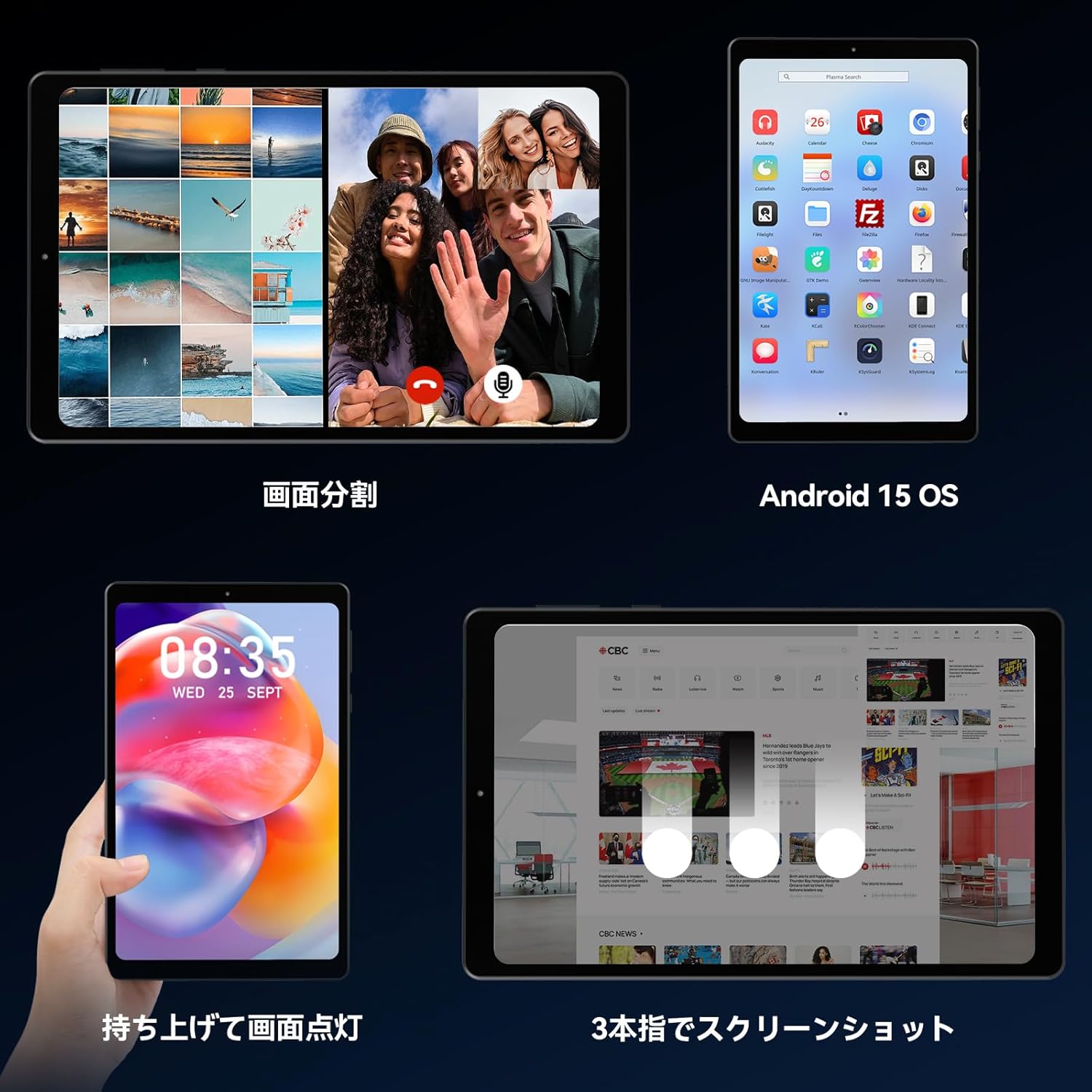
Figure 3.8: Various operational features of the FPad6.

Figure 3.9: Physical design and portability of the FPad6.
4. Тэхнічнае абслугоўванне
To ensure the longevity of your Headwolf FPad6 tablet, follow these maintenance guidelines:
- Уборка: Для чысткі экрана і корпуса выкарыстоўвайце мяккую тканіну без ворса. Пазбягайце абразіўных матэрыялаў або агрэсіўных хімічных рэчываў.
- захоўванне: Захоўвайце таблетку ў прахалодным, сухім месцы, удалечыні ад прамых сонечных прамянёў і экстрэмальных тэмператур.
- Сыход за батарэяй: Avoid fully discharging the battery frequently. For long-term storage, charge the battery to about 50% to prevent deep discharge.
- Абнаўленні праграмнага забеспячэння: Рэгулярна правярайце наяўнасць абнаўленняў сістэмы і ўсталёўвайце іх, каб забяспечыць аптымальную прадукцыйнасць і бяспеку.
5. Выпраўленне непаладак
This section addresses common issues you might encounter with your Headwolf FPad6 tablet. If you experience problems not listed here, please refer to the support section.
| праблема | Магчымая прычына | Рашэнне |
|---|---|---|
| Планшэт не ўключаецца. | Нізкі зарад батарэі; збой сістэмы. | Зараджайце планшэт не менш за 30 хвілін. Націсніце і ўтрымлівайце кнопку харчавання на працягу 10-15 секунд, каб прымусова перазагрузіць яго. |
| Экран не рэагуе. | Software glitch; screen protector interference. | Restart the tablet. Ensure screen protector is properly applied and not damaged. |
| Немагчыма падключыцца да Wi-Fi. | Няправільны пароль; праблема з маршрутызатарам; Wi-Fi адключаны. | Verify Wi-Fi password. Restart router. Ensure Wi-Fi is enabled in settings. |
| Праграмы завісаюць або выходзяць з ладу. | Insufficient memory; app bug; outdated app. | Close background apps. Clear app cache. Update the app or reinstall it. |
| Павольная прадукцыйнасць. | Занадта шмат запушчаных праграм; мала месца для захоўвання; састарэлае праграмнае забеспячэнне. | Close unused apps. Free up storage space. Check for system updates. |
6. Тэхнічныя характарыстыкі
| Асаблівасць | Дэталь |
|---|---|
| Марка | Ваўкалак |
| Назва мадэлі | FPad6 |
| Аперацыйная сістэма | Android 15 |
| Памер экрана | 8.4 цалі |
| Дазвол дысплея | 2560x1600 пікселяў (2.5K) |
| Працэсар | Helio G99 |
| АЗП | 16 ГБ (8 ГБ + 8 ГБ пашырэння) |
| Унутраная памяць | 128 ГБ UFS 2.1 |
| Сховішча з магчымасцю пашырэння | Да 2 ТБ (microSD) |
| Ёмістасць батарэі | 6500 мАг |
| Пярэдняя камера | 8 МП |
| Задняя камера | 16 МП |
| Сувязь | 4G LTE, 2.4/5G WiFi (802.11n), Bluetooth 5.2 |
| Датчыкі | 6-axis Gyroscope, Geomagnetic Sensor, GPS |
| Памеры | 21.8 х 13.8 х 4.9 см |
| Вага | 320 г |
7. Гарантыя і падтрымка
Headwolf provides customer support for its products. For warranty information, technical assistance, or service inquiries, please visit the official Headwolf store on Amazon or contact their customer service directly.
Official Headwolf Store: Headwolf Japan Official Store
Калі ласка, захавайце доказы пакупкі для прэтэнзій па гарантыі.