
1. Уводзіны
The Roar Pedal Throttle Response Controller RP913 is an advanced electronic device designed to modify the throttle signal in your vehicle, providing a more immediate and customizable acceleration experience. This controller aims to reduce throttle lag, offering enhanced responsiveness without altering the vehicle's Engine Control Unit (ECU).

Image: Roar Pedal Throttle Response Controller RP913, showing the main unit, remote control, and product packaging.
2. Сумяшчальнасць з транспартнымі сродкамі
The Roar Pedal Throttle Response Controller is compatible with a wide range of vehicle makes and models. It is crucial to verify compatibility with your specific vehicle's year, make, and model before installation. Please refer to the detailed compatibility list provided in the product images or contact customer support for assistance.

Image: A comprehensive list detailing compatible vehicle makes, models, and years for the Roar Pedal RP913. This list includes various models from Dodge, Ram, Ford, Jeep, Chevrolet, Chrysler, GMC, Maserati, Mazda, Lincoln, and Land Rover.
3. Змесціва ўпакоўкі
Upon opening your Roar Pedal package, please ensure all the following items are present:
- Roar Pedal Throttle Response Controller Unit
- Бесправадны пульт дыстанцыйнага кіравання
- Электраправодка
- User's Guide (English Manual)
- 2 х клейкая стужка
- 2 х Кабельныя сцяжкі

Image: Display of the Roar Pedal package contents, including the main controller, remote, wiring harness, user manual, adhesive tape, and cable ties.
4. Усталёўка і налада
The Roar Pedal Throttle Response Controller is designed for a plug-and-play installation, typically taking around 10 minutes. No specialized tools or modifications to your vehicle's wiring are required. The installation connects directly to your gas pedal sensor, eliminating the need to open the hood.
Этапы ўстаноўкі:
- Locate the Accelerator Pedal Sensor: Identify the position of the accelerator pedal sensor, typically found on the top or side of the accelerator pedal assembly.
- Unplug Original Cable: Carefully unplug the original wiring harness from the accelerator pedal sensor.
- Connect Roar Pedal Wiring Harness: Connect one end of the Roar Pedal's wiring harness to the accelerator pedal sensor. Connect the other end of the Roar Pedal's wiring harness to the original cable that was unplugged from the pedal. Ensure secure connections.
- Замацуйце прыладу: Use the provided adhesive tape and cable ties to secure the Roar Pedal unit and any excess wiring in a safe location, away from moving parts or heat sources.
- Уключэнне: Once connected, the unit should power on, indicated by a green light.

Image: A visual guide illustrating the simple plug-and-play installation process, connecting the Roar Pedal unit between the accelerator pedal sensor and the vehicle's original wiring.

Image: The Roar Pedal unit connected in-line with the accelerator pedal wiring, emphasizing its easy DIY upgrade, app/remote control, and non-ECU modifying nature.
Відэакіраўніцтва па ўсталёўцы:
Video: A user-generated video demonstrating the installation process of the Roar Pedal in a Silverado truck, showing how to unplug the original accelerator pedal connector and insert the Roar Pedal unit. (Note: This video is from a third-party creator, Patrick Griffin, but provides relevant installation steps.)
5. Інструкцыя па эксплуатацыі
The Roar Pedal controller offers versatile control options via its dedicated wireless remote or a smartphone application. Both methods allow you to select from various driving modes and adjust sensitivity levels.
5.1. Бесправадны пульт дыстанцыйнага кіравання
The included wireless remote features a 1.47" HD color IPS screen and a built-in 500mAh rechargeable battery. It provides direct control over the Roar Pedal settings without needing a smartphone.
- Кнопка харчавання: Press and hold for 3 seconds to turn on/off. A single press switches the screen ON/OFF.
- Кнопка «М»: Short press to change the driving mode. Long press for 5 seconds to activate 'Learn Mode'.
- Кнопка «+»: Short press to increase the sensitivity level. Long press for 5 seconds to activate 'Lock Mode'.
- Кнопка «-»: Short press to decrease the sensitivity level. Long press for 5 seconds to switch between R/P System.
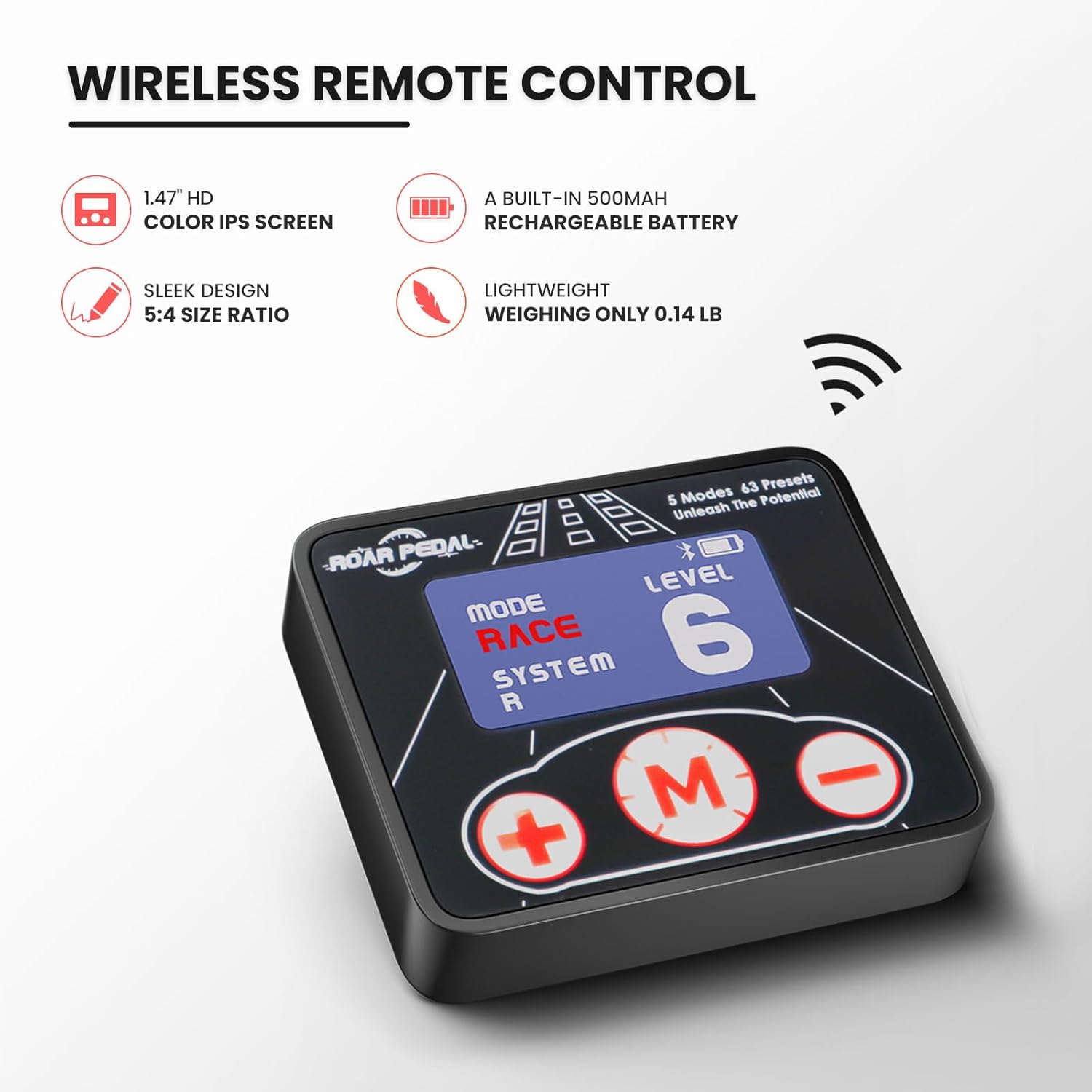
Image: The wireless remote control unit, detailing its 1.47" HD color IPS screen, built-in rechargeable battery, sleek design, and lightweight nature.
5.2. Smartphone App Control
Download the "Roar Pedal" app from the App Store (iOS) or Google Play (Android). The app provides a user-friendly interface to manage all controller settings. Ensure Bluetooth is enabled on your smartphone to connect to the Roar Pedal unit.
- Выбар рэжыму: Tap on the desired mode (ECO, NORMAL, SPORT, SPORT+, RACE) to switch between them.
- Рэгуляванне адчувальнасці: Use the slider or +/- buttons within the app to fine-tune the sensitivity level (1-9) for each mode.
- Рэжым блакіроўкі: Activate the anti-theft 'Lock Mode' by setting a password in the app. This immobilizes the vehicle by disabling accelerator input.
- Рэжым навучання: Utilize the 'Learn Mode' for initial calibration to precisely match the throttle response to your vehicle's specific parameters.

Image: The Roar Pedal smartphone app interface, displaying the five driving modes (ECO, NORMAL, SPORT, SPORT+, RACE) and sensitivity adjustment, along with Lock and Learn functions.
5.3. Рэжымы кіравання:
- НАРМАЛЬНЫ рэжым: Restores the vehicle's original throttle settings.
- Рэжым ECO: Designed for fuel efficiency, offering a milder throttle response. Adjustable sensitivity levels from 1 to 9.
- СПАРТЫЎНЫ рэжым: Provides immediate throttle response, similar to a traditional cable throttle. Adjustable sensitivity levels from 1 to 9.
- SPORT+ Mode: Offers a more aggressive throttle response than Sport mode, suitable for enthusiastic driving. Adjustable sensitivity levels from 1 to 9.
- RACE Mode: The highest performance mode, delivering the most aggressive and rapid acceleration. Adjustable sensitivity levels from 1 to 9.
5.4. Operating Video Guide:
Video: An official product video from Roar Pedal Direct demonstrating the various modes (ECO, SPORT, SPORT+, RACE, NORMAL) and sensitivity adjustments of the Roar Pedal Throttle Response Controller via the remote and app, including a demonstration of the anti-theft lock mode.
6. Features & Advantages
- Improved Acceleration: Significantly reduces throttle lag, leading to more rapid acceleration and instant response.
- Multiple Driving Modes: Offers 5 distinct modes (ECO, SPORT, SPORT+, RACE, NORMAL) with 9 adjustable sensitivity levels each, providing a total of 63 unique parameters for a customized driving experience.
- Remote or App Control: Conveniently adjust settings using either the wireless remote control with an HD color IPS screen or a smartphone application.
- Лёгкая ўстаноўка: Plug-and-play design allows for quick setup in approximately 10 minutes, connecting directly to the gas pedal without requiring engine bay access.
- Anti-Theft Lock Mode: A free security feature that immobilizes the vehicle by disabling accelerator input when activated via the app or remote.
- Unique Learn Mode: Facilitates initial calibration to precisely match the throttle response to your vehicle's specific parameters.
- Built-in Memory Function: Retains your last selected mode and settings, eliminating the need to reconfigure after each ignition cycle.
- Backup Safety Circuit Design: Incorporates a safety circuit that automatically switches to the original pedal signal in case of abnormality, preventing a dead pedal and ensuring reliable performance.
- Дызайн з ультранізкім энергаспажываннем: Engineered for long-term stable operation with minimal power consumption.

Image: Visual representation of the Roar Pedal's key advantages: Unique Calibration Function, Memory Function, Backup Circuit, and Ultra-Low Power design.
7. Safety & Maintenance
- Non-ECU Interference: The Roar Pedal is a signal controller that fine-tunes throttle sensitivity and does not modify or reprogram your vehicle's ECU. This ensures that it will not void your car's service warranty related to the ECU.
- Anti-Theft Feature: Utilize the 'Lock Mode' to immobilize your vehicle, providing an additional layer of security.
- Рэгулярныя праверкі: Periodically inspect the connections to ensure they remain secure and free from damage.
- Уборка: Keep the remote control and main unit clean and free from dust or debris using a soft, dry cloth.
8. Выпраўленне непаладак
If you encounter any issues with your Roar Pedal Throttle Response Controller, please consider the following general troubleshooting steps:
- No Power/Green Light Off: Ensure all connections are firmly seated. Check the remote's battery level and recharge if necessary.
- Няма адказу: Verify that the unit is properly connected and powered on. Ensure the app or remote is correctly paired via Bluetooth. Try restarting your vehicle and the Roar Pedal unit.
- Нечаканая паводзіна: If the vehicle exhibits unexpected throttle behavior, immediately switch the Roar Pedal to NORMAL mode or disconnect it. Re-check all connections and consider performing the 'Learn Mode' calibration again.
- Праблемы з падключэннем праграмы: Ensure Bluetooth is active on your phone and the app has necessary permissions. Close and reopen the app, or restart your phone.
For persistent issues, please refer to the detailed troubleshooting section in the included User's Guide or contact Roar Pedal customer support.
9. Тэхнічныя характарыстыкі
| Асаблівасць | Дэталь |
|---|---|
| Марка | Roar Pedal |
| Нумар мадэлі | RP913 |
| Вага прадмета | 10.2 унцыі |
| Памеры прадукту | 2.3 х 2.3 х 0.6 цалі |
| Батарэі | Патрабуецца 1 літый-палімерная батарэя (у камплекце) |
| Метад кантролю | Wireless Remote or Smartphone App (Bluetooth) |
| Рэжымы ваджэння | 5 (ECO, NORMAL, SPORT, SPORT+, RACE) |
| Узровень адчувальнасці | 9 на рэжым |
10. Гарантыя і падтрымка
The Roar Pedal Throttle Response Controller is designed to be a reliable and durable product. It is important to note that the installation and use of this device will not void your vehicle's service warranty, as it functions as a signal controller and does not alter the ECU.
For any product-related inquiries, technical support, or warranty claims, please refer to the contact information provided in your physical User's Guide or visit the official Roar Pedal webсайт.