
Glorious GMMK 3 PRO
Glorious Gaming GMMK 3 PRO TKL Wired Mechanical Keyboard User Manual
Model: GMMK 3 PRO | Brand: Glorious
1. Уводзіны
This manual provides detailed instructions for the Glorious GMMK 3 PRO TKL Wired Mechanical Keyboard. It covers initial setup, operational guidance, customization options, maintenance, and troubleshooting to ensure optimal performance and user experience.
Асноўныя характарыстыкі:
- Full Aluminum Body: Features CNC-machined top and bottom cases for durability and a premium aesthetic.
- 9 Points of Modularity: Designed for easy swapping of components to tailor appearance, sound, and feel.
- Modular Gasket System (MGS): Allows customization of internal gaskets for a firmer or more flexible typing experience.
- 5-pin MX Hotswap Support: Compatible with a wide range of Glorious MX switch styles for personalized typing, without requiring soldering.
- Гук-ДampПена для ўвільгатнення: Includes two layers of dense foam to absorb unwanted resonance and enhance acoustic profile.
2. Змесціва ўпакоўкі
Verify that all items listed below are included in your GMMK 3 PRO TKL package:
- 1 x GMMK 3 PRO Keyboard
- 1 x Braided USB-C Cable
- 4 x macOS Alternate Keycaps
- 3 х S.ample Switches
- 6 x Extra Screws and O-Rings
- 1 х здымнік выключальніка
- 1 х здымнік каўпачкоў
- 1 х адвёртка
- 1 x Quick Start Booklet
3. Пачатковая налада
Follow these steps to set up your Glorious GMMK 3 PRO TKL keyboard:
- Дастаньце клавіятуру і ўсе аксэсуары з скрынкі.
- Connect the braided USB-C cable to the USB-C port on the keyboard and to an available USB port on your computer.
- Клавіятура будзе аўтаматычна распазнана вашай аперацыйнай сістэмай.
- For advanced customization and firmware updates, download and install the Glorious CORE 2.1 software from the official Glorious webсайт.

The Glorious GMMK 3 PRO TKL Wired Mechanical Keyboard, featuring customizable RGB backlighting and a durable black aluminum body.
4. Параметры налады
The GMMK 3 PRO TKL is designed for extensive customization, allowing users to modify its components to suit individual preferences.
4.1 Модульная канструкцыя
The keyboard features a highly modular design, enabling easy replacement of keycaps, switches, and other components.

An illustration detailing the modular components of the GMMK 3 PRO, including keycaps, badge, rotary knob, top case, bottom case, and coiled cable, highlighting its customizable nature.
4.2 Hotswappable Switches
The GMMK 3 PRO supports 5-pin MX hotswappable mechanical switches, allowing users to change switches without soldering. Use the included switch puller to carefully remove and insert switches.

An illustration demonstrating the GMMK 3 PRO's compatibility with both 5-pin and 3-pin mechanical switches, allowing for easy customization without soldering.

Падрабязны view of the Glorious Fox Linear Switches, preloaded in the GMMK 3 PRO for smooth and precise keystrokes.
4.3 Modular Gasket System (MGS)
The MGS allows for adjustment of the keyboard's internal gaskets to achieve a desired typing feel, ranging from firmer to more flexible. Refer to the Quick Start Booklet for detailed instructions on adjusting the gaskets.

A diagram illustrating the internal structure of the GMMK 3 PRO, showing the swappable switch plate, sound-dampening foam, and modular gaskets designed to adjust typing sound and flexibility.
4.4 Клавішы
The GMMK 3 PRO comes with standard ANSI layout keycaps. Users can replace these with custom keycaps using the included keycap puller to personalize the keyboard's appearance.
5. Інструкцыя па эксплуатацыі
Once connected, the GMMK 3 PRO TKL functions as a standard mechanical keyboard. Key functions are as labeled. For advanced features and customization, utilize the Glorious CORE 2.1 software.
- RGB асвятленне: Customize lighting effects, colors, and brightness through the Glorious CORE 2.1 software.
- Пераназначэнне клавіш: Assign custom functions or macros to keys using the Glorious CORE 2.1 software.
- профіfile Кіраванне: Стварэнне і пераключэнне паміж некалькімі прафесійныміfiles for different applications or games via the software.
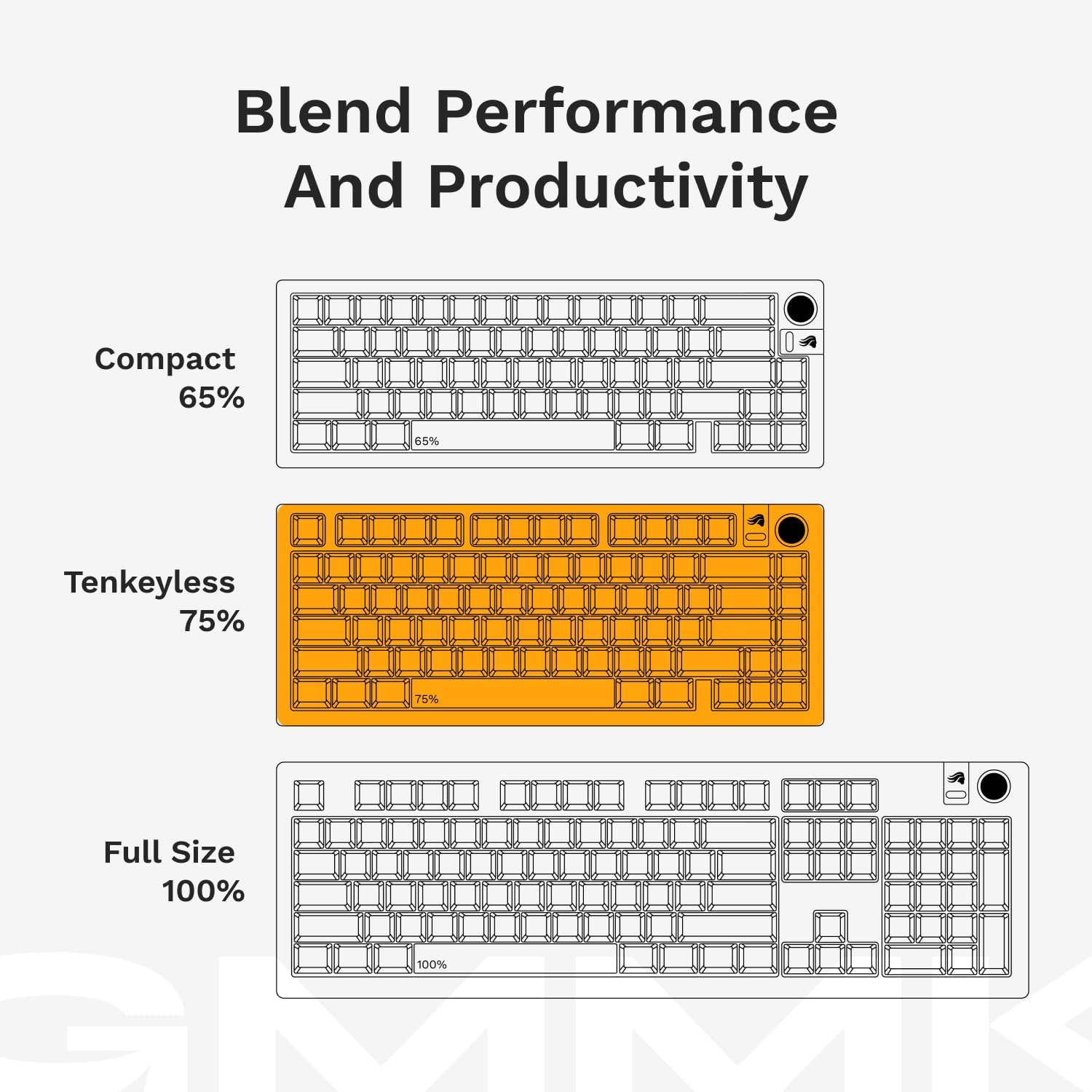
Visual representations of different keyboard layouts: Compact (65%), Tenkeyless (75%), and Full Size (100%), demonstrating the GMMK 3 PRO's 75% Tenkeyless form factor.
6. Догляд і абслугоўванне
To ensure the longevity and optimal performance of your GMMK 3 PRO TKL keyboard, follow these maintenance guidelines:
- Уборка: Regularly clean the keyboard with a soft, dry cloth. For deeper cleaning, remove keycaps using the keycap puller and use compressed air to clear debris from between switches.
- Пазбягайце вадкасці: Keep liquids away from the keyboard to prevent damage to electronic components.
- Кабельнае кіраванне: Avoid sharp bends or excessive pulling on the USB-C cable to prevent internal wire damage.
- захоўванне: Store the keyboard in a clean, dry environment when not in use.
7. Выпраўленне непаладак
If you encounter issues with your GMMK 3 PRO TKL, refer to the following common troubleshooting steps:
- Клавіятура не адказвае:
- Пераканайцеся, што кабель USB-C надзейна падключаны як да клавіятуры, так і да кампутара.
- Паспрабуйце падключыць клавіятуру да іншага USB-порта на вашым кампутары.
- Праверце клавіятуру на іншым кампутары, каб выключыць праблемы, характэрныя для сістэмы.
- Ключы не рэгіструюцца:
- Carefully remove the keycap and switch for the affected key. Inspect for any debris or damage.
- Re-insert the switch firmly. If the issue persists, try swapping it with a known working switch.
- Праблемы з RGB-падсветкай:
- Ensure the Glorious CORE 2.1 software is installed and updated.
- Праверце налады асвятлення ў праграме.
- Update the keyboard firmware via the Glorious CORE 2.1 software.
- Праграмнае забеспячэнне не распазнае клавіятуру:
- Restart your computer and the Glorious CORE 2.1 software.
- Пераканайцеся, што праграмнае забеспячэнне мае апошнюю версію.
- Temporarily disable any antivirus or firewall software that might interfere.
For persistent issues or further assistance, please contact Glorious customer support.
8. Тэхнічныя характарыстыкі прадукту
| Асаблівасць | Дэталь |
|---|---|
| Марка | Слаўны |
| Нумар мадэлі | GLO-KB-GMMK3-PRO-75-PB-FOX-W-BLK-US |
| Апаратная платформа | Ноўтбук, ПК |
| Вага прадмета | 3.9 фунта |
| Памеры прадукту | 13.3 х 6 х 1.8 цалі |
| Колер | Чорны |
| Крыніца харчавання | USB харчаванне |
| Тэхналогія падлучэння | USB-C |
| Апісанне клавіятуры | USB C Fox Switch Mechanical Keyboard |
| Рэкамендуемае выкарыстанне | Everyday Use, Gaming, Programming, Student, Video Editing |
| Асаблівасць | Fox Switches, Hot-Swappable, Mechanical Keyboard, Tenkeyless 75% Layout, Wired |
| Падсвятленне клавіятуры | RGB |
| стыль | GMMK 3 Pro |
9. Гарантыя і падтрымка кліентаў
9.1 Інфармацыя аб гарантыі
The Glorious GMMK 3 PRO TKL Mechanical Keyboard is covered by a Гарантыя 2 год. This warranty covers manufacturing defects and ensures hassle-free return and replacement for eligible Glorious electronic devices. Please retain your proof of purchase for warranty claims.
9.2 Падтрымка кліентаў
For technical support, warranty claims, or any questions regarding your Glorious GMMK 3 PRO TKL keyboard, please visit the official Glorious website or contact their customer service department. Detailed contact information can be found on the Glorious webсайт.