
1. Уводзіны
Дзякуй за пакупкуasing the RCA SP550BT Portable Speaker. This manual provides important information regarding the setup, operation, and maintenance of your new speaker. Please read it thoroughly before use and keep it for future reference.
The RCA SP550BT is a versatile portable speaker featuring 50W output, Bluetooth connectivity, USB playback, FM radio, AUX input, True Wireless Stereo (TWS) function, LED lights, and a microphone input for an enhanced audio experience.
2. Змесціва ўпакоўкі
Калі ласка, праверце ўпакоўку на наяўнасць наступных прадметаў:
- RCA SP550BT Portable Speaker
- Пульт дыстанцыйнага кіравання
- Сілавы кабель
- Кіраўніцтва карыстальніка (гэты дакумент)
3. Прадукт скончыўсяview
Familiarize yourself with the main components and features of your RCA SP550BT speaker.

Малюнак 3.1: Фронт view of the RCA SP550BT portable speaker. This image displays the speaker in an upright position, highlighting the top control panel and the three prominent speaker cones with red illumination.

Малюнак 3.2: Збоку view of the RCA SP550BT portable speaker. This perspective shows the depth of the speaker and the integrated handle for portability.

Малюнак 3.3: Гарызантальны view of the RCA SP550BT portable speaker. This image illustrates the speaker's design when placed on its side, emphasizing the speaker grille and LED lighting.
3.1 Пульт дыстанцыйнага кіравання
The included remote control allows for convenient operation of the speaker from a distance.
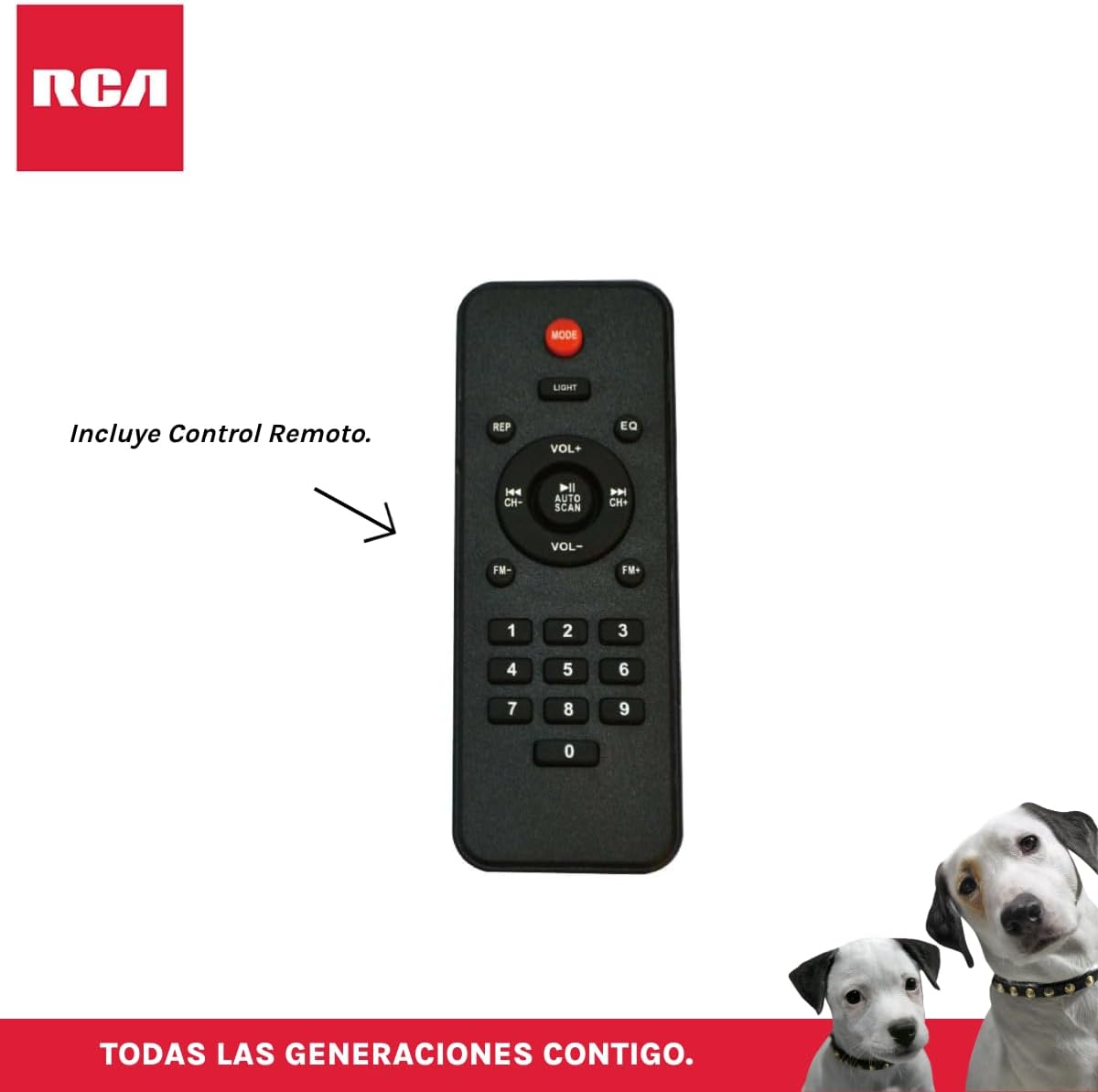
Малюнак 3.4: RCA SP550BT Remote Control. This image displays the full layout of the remote control, including buttons for power, mode selection, volume adjustment, track navigation, equalizer settings, and a numeric keypad.
4. Настройка
4.1 Падключэнне харчавання
- Ensure the speaker is placed on a stable, flat surface.
- Connect the power cable to the speaker's power input port.
- Plug the other end of the power cable into a standard electrical outlet (AC 100-240V, 50/60Hz).
- Націсніце кнопку харчавання на дынаміку або пульце дыстанцыйнага кіравання, каб уключыць яго.
5. Інструкцыя па эксплуатацыі
5.1 Уключэнне/выключэнне сілкавання
- Каб уключыць дынамік, націсніце кнопку УЛАДА button on the control panel or the remote control.
- Каб выключыць дынамік, націсніце кнопку УЛАДА кнопку зноў.
5.2 Выбар рэжыму
Націсніце РЭЖЫМ button on the control panel or remote control to switch between Bluetooth, USB, FM, and AUX input modes.
5.3 Спалучэнне па Bluetooth
- Уключыце дынамік і абярыце рэжым Bluetooth з дапамогай РЭЖЫМ button. The display will show "BLUE" and a pairing indicator will flash.
- Уключыце Bluetooth на мабільнай прыладзе (смартфоне, планшэце і г.д.).
- Пошук "RCA SP550BT" in your device's Bluetooth list and select it to pair.
- Once paired, the speaker will emit a confirmation sound, and the Bluetooth indicator will stop flashing.
- Цяпер вы можаце прайграваць аўдыё з прылады праз дынамік.
5.4 Прайграванне з USB
- Insert a USB flash drive (FAT32 format, max 32GB) containing MP3 audio files у порт USB.
- Дынамік аўтаматычна пераключыцца ў рэжым USB і пачне прайграваць першую кампазіцыю. Калі не, націсніце кнопку РЭЖЫМ кнопка для выбару рэжыму USB.
- Выкарыстоўвайце ПРАЙГРАЦЬ/Паўза, ПАПЕРАДНІ, і ДАЛЕЙ buttons on the control panel or remote to control playback.
5.5 FM -радыё
- Turn on the speaker and select FM mode using the РЭЖЫМ кнопка.
- Націсніце і ўтрымлівайце ПРАЙГРАЦЬ/Паўза кнопка (ці Аўтаматычнае сканаванне on remote) to automatically scan and save available FM stations.
- Выкарыстоўвайце ПАПЕРАДНІ і ДАЛЕЙ кнопкі для навігацыі па захаваных станцыях.
5.6 AUX ўваход
- Падключыце знешнюю аўдыёпрыладу (напрыклад, MP3-плэер, ноўтбук) да ўваходнага порта AUX дынаміка з дапамогай аўдыёкабеля 3.5 мм (не ўваходзіць у камплект).
- Выберыце рэжым AUX з дапамогай РЭЖЫМ кнопка.
- Кіруйце прайграваннем і гучнасцю з падлучанай прылады.
5.7 Функцыя TWS (сапраўднае бесправадное стэрэа)
The TWS function allows you to connect two RCA SP550BT speakers wirelessly for a stereo sound experience.
- Ensure both SP550BT speakers are powered on and in Bluetooth mode, but not yet paired with any device.
- На адным з дынамікаў націсніце і ўтрымлівайце TWS button (if available, or a dedicated TWS pairing button) until you hear a confirmation tone. The speakers will attempt to pair with each other.
- Пасля паспяховага спалучэння адзін дынамік будзе выступаць у якасці галоўнага (левы канал), а другі — падпарадкаванага (правы канал).
- Now, pair your mobile device with the master speaker via Bluetooth as described in section 5.3.
5.8 святлодыёдныя лямпы
Націсніце СВЯТЛО button on the control panel or remote control to cycle through different LED light modes or to turn them off.
5.9 Выкарыстанне мікрафона
Connect a wired microphone (not included) to the microphone input port on the speaker. Adjust the microphone volume using the dedicated knob (if available) or the main volume control.
6. Тэхнічнае абслугоўванне
- Уборка: Выкарыстоўвайце мяккую сухую тканіну для чысткі вонкавага боку дынаміка. Не выкарыстоўвайце абразіўныя ачышчальнікі або растваральнікі.
- захоўванне: Калі дынамік не выкарыстоўваецца працяглы час, захоўвайце яго ў прахалодным, сухім месцы, удалечыні ад прамых сонечных прамянёў і экстрэмальных тэмператур.
- Ўздзеянне вады: Гэты дынамік не воданепранікальны. Пазбягайце ўздзеяння вады або празмернай вільгаці.
7. Выпраўленне непаладак
Калі ў вас узніклі праблемы з дынамікам, звярніцеся да наступных распаўсюджаных праблем і іх рашэнняў:
| праблема | Магчымая прычына | Рашэнне |
|---|---|---|
| Няма ўлады | Power cable not connected; Power outlet not working; Speaker off. | Праверце падключэнне кабеля харчавання; паспрабуйце іншую разетку; націсніце кнопку POWER. |
| Няма гуку | Занадта ціхая гучнасць; выбраны няправільны рэжым; прылада падключана няправільна. | Increase volume; Select correct input mode (Bluetooth, USB, AUX); Reconnect device. |
| Збой спалучэння Bluetooth | Speaker not in pairing mode; Device Bluetooth off; Speaker already paired. | Ensure speaker is in Bluetooth pairing mode; Turn on device Bluetooth; Disconnect from other devices. |
| Прайграванне з USB не працуе | USB drive format incompatible; Corrupt files; USB drive not inserted correctly. | Ensure USB is FAT32 format; Check file integrity; Reinsert USB drive. |
| Слабы прыём FM-радыё | Слабы сігнал; перашкоды. | Relocate speaker; Extend antenna (if applicable). |
8. Тэхнічныя характарыстыкі
| Асаблівасць | Спецыфікацыя |
|---|---|
| мадэль | SP550BT |
| Марка | RCA |
| Выходная магутнасць дынаміка | 50 Вт (максімум) |
| Тэхналогія падлучэння | Bluetooth, USB, AUX |
| Бесправадныя тэхналогіі | Bluetooth |
| Рэжым выхаду гуку | Стэрэа |
| Тып дынаміка | Партатыўны, вулічны |
| Тып мацавання | Настольнае мацаванне |
| Метад кантролю | Пульт дыстанцыйнага кіравання |
| Памер дынаміка | 6.5 цалі |
| Дыяметр НЧ-дынаміка | 6.5 цалі |
| Ёмістасць батарэі | 4400 Міліamp Гадзіны |
| Крыніца харчавання | Электрычны кабель |
| Сумяшчальныя прылады | Ноўтбук, MP3-плэер, смартфон, планшэт |
| GTIN / UPC | 044476152061 |
9. Гарантыя і падтрымка
This product comes with a limited warranty. Please refer to the warranty card included in your package for specific terms and conditions. For technical support or service inquiries, please contact RCA customer service through their official webсайт або кантактную інфармацыю, прадастаўленую пры пакупцы.
Заўвага: Умовы гарантыі могуць адрознівацца ў залежнасці ад рэгіёна. Захоўвайце пацвярджэнне пакупкі для прэтэнзій па гарантыі.