
WIITHINK WTB-777
WIITHINK WTB-777 Portable Cassette Player and Recorder User Manual
Мадэль: WTB-777
Your comprehensive guide to operating and maintaining your WIITHINK Cassette Player and Recorder.
Уводзіны
Дзякуй за пакупкуasing the WIITHINK WTB-777 Portable Cassette Player and Recorder. This versatile device combines the classic charm of a cassette player and recorder with modern features such as Bluetooth connectivity, USB playback, and AM/FM radio. Designed for ease of use and portability, it allows you to enjoy your favorite audio content wherever you go. Please read this manual thoroughly before operating the device to ensure proper use and to maximize its lifespan.

Figure 1: WIITHINK WTB-777 Portable Cassette Player and Recorder
Прадукт скончаныview
The WIITHINK WTB-777 is an all-in-one audio solution, offering multiple playback and recording options. Its compact design and dual power capabilities make it ideal for both home and portable use.
- Classical Tape Radio Player: Enjoy music, radio, and cassette tapes with this all-in-one portable player featuring AM/FM radio, Bluetooth connectivity, USB port, and recording from radio to cassette.
- Retro Nostalgia: Relive the nostalgia of cassette tapes while enjoying modern features like Bluetooth. Built-in cassette player and recorder to record radio to blank tapes.
- AM/FM Radio Stereo: Equipped with a long antenna and upgraded chip for great reception of AM/FM stations. Features a big speaker for clear stereo sound. Frequency range: FM 87 - 108 MHz, AM 520 - 1710 kHz.
- Паток Bluetooth: Stream your favorite music wirelessly from your smartphone, tablet, or other Bluetooth-enabled devices.
- Партатыўны дызайн: Compact and lightweight for easy portability, perfect for on-the-go listening or use at home. Includes an earphone jack and DC/AC power options.

Figure 2: Key Features of the WTB-777
Што ў скрынцы
Пасля распакавання пераканайцеся, што ўсе пералічаныя ніжэй прадметы наяўныя і знаходзяцца ў добрым стане:
- WTB-777 Cassette Player Boombox
- Шнур харчавання
- Кіраўніцтва карыстальніка (гэты дакумент)
Настройка
Харчаванне прылады
The WIITHINK WTB-777 can be powered by either AC power or batteries.
- Магутнасць пераменнага току: Connect the included power cord to the AC input jack on the back of the unit and plug the other end into a standard wall outlet (AC 120V/60Hz).
- Магутнасць батарэі: For portable use, open the battery compartment on the bottom of the unit and insert 4 x 'C' size batteries (not included), ensuring correct polarity (+/-). Close the battery compartment securely.
Заўвага: When using AC power, batteries are automatically disconnected. Remove batteries if the unit will not be used for an extended period to prevent leakage.
Інструкцыя па эксплуатацыі
Familiarize yourself with the control panel before operation. Refer to Figure 3 for a detailed diagram of the controls.
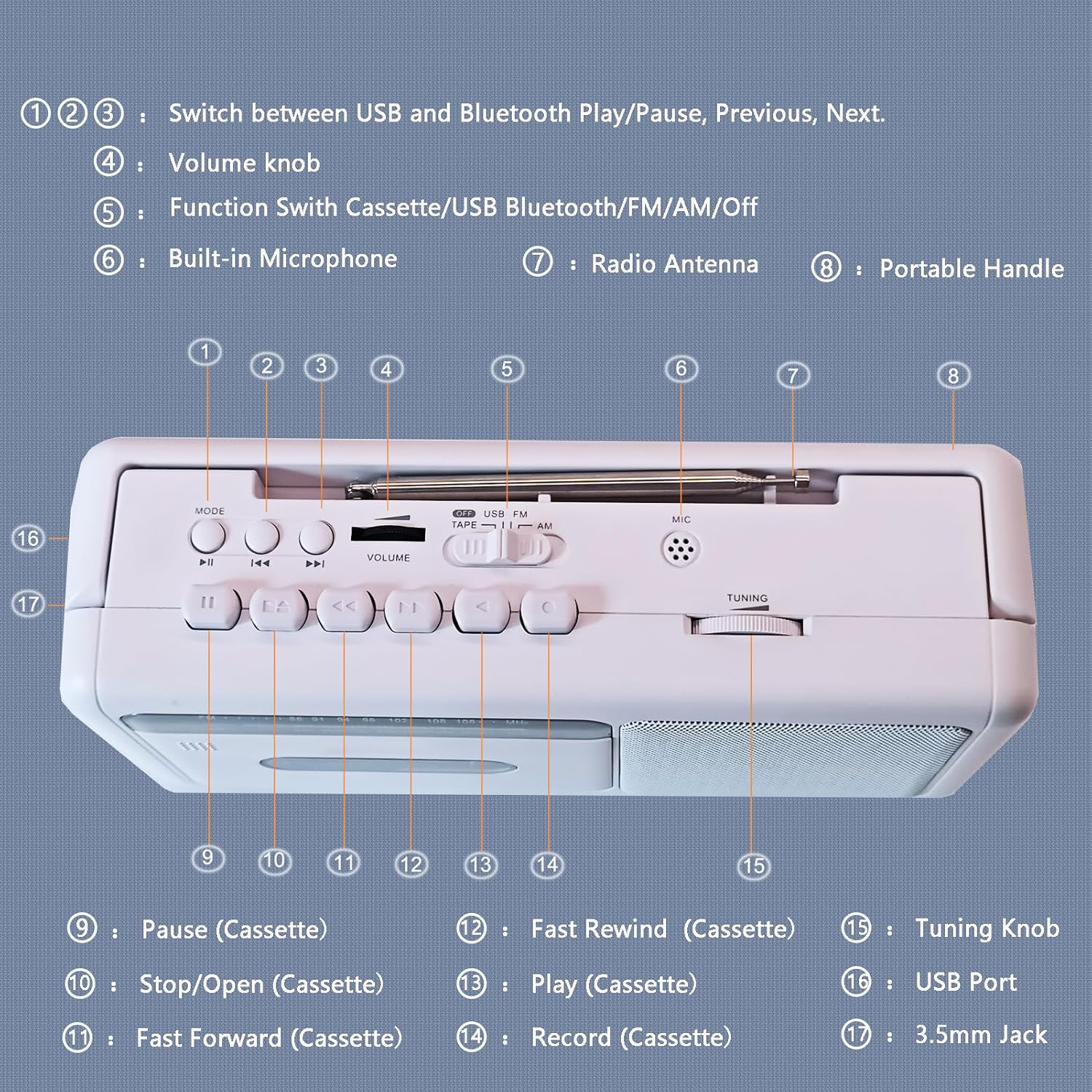
Figure 3: Control Panel Diagram
- 1, 2, 3: Mode/Playback Control Buttons (USB/Bluetooth Play/Pause, Previous, Next)
- 4: Ручка гучнасці
- 5: Function Switch (Cassette/USB/Bluetooth/FM/AM/Off)
- 6: Убудаваны мікрафон
- 7: Радыё-антэна
- 8: Партатыўная ручка
- 9: Pause (Cassette)
- 10: Stop/Open (Cassette)
- 11: Fast Forward (Cassette)
- 12: Fast Rewind (Cassette)
- 13: Play (Cassette)
- 14: Record (Cassette)
- 15: Ручка налады
- 16: Порт USB
- 17: 3.5mm Jack (Earphone/Aux-in)
Праца касетнага плэера
- Set the Function Switch (5) to "TAPE".
- Press the Stop/Open button (10) to open the cassette compartment door.
- Insert a cassette tape with the open edge facing upwards. Close the compartment door firmly.
- Press the Play button (13) to begin playback.
- Adjust the Volume Knob (4) to your desired listening level.
- To pause playback, press the Pause button (9). Press again to resume.
- To fast forward, press the Fast Forward button (11). To fast rewind, press the Fast Rewind button (12). Press Play (13) or Stop/Open (10) to stop winding.
- To stop playback and eject the tape, press the Stop/Open button (10).

Figure 4: Inserting a Cassette Tape
Аперацыя радыё AM/FM
- Set the Function Switch (5) to "FM" or "AM".
- Extend the telescopic antenna (7) for optimal FM reception. For AM reception, rotate the unit for best signal.
- Rotate the Tuning Knob (15) to select your desired radio station.
- Adjust the Volume Knob (4) to your desired listening level.

Figure 5: Enjoying AM/FM Radio
Паток Bluetooth
- Set the Function Switch (5) to "BT" (Bluetooth). The unit will enter pairing mode, indicated by an audible prompt.
- На прыладзе з падтрымкай Bluetooth (напрыклад, смартфоне, планшэце) уключыце Bluetooth і знайдзіце даступныя прылады.
- Select "WTB-777" from the list of devices to pair. Once paired, you will hear a confirmation sound.
- Begin playing audio on your connected device. The sound will be streamed wirelessly to the WTB-777.
- Use the Volume Knob (4) on the unit or the volume controls on your connected device to adjust the volume.
- Use buttons (1, 2, 3) to control playback (Play/Pause, Previous/Next track) directly from the unit.

Малюнак 6: Падключэнне Bluetooth
Прайграванне з USB
- Set the Function Switch (5) to "USB".
- Устаўце флэш-назапашвальнік USB з аўдыёфайлам у фармаце MP3 files into the USB Port (16).
- The unit will automatically begin playing the audio files з USB-дыска.
- Use buttons (1, 2, 3) to control playback (Play/Pause, Previous/Next track).
- Adjust the Volume Knob (4) to your desired listening level.
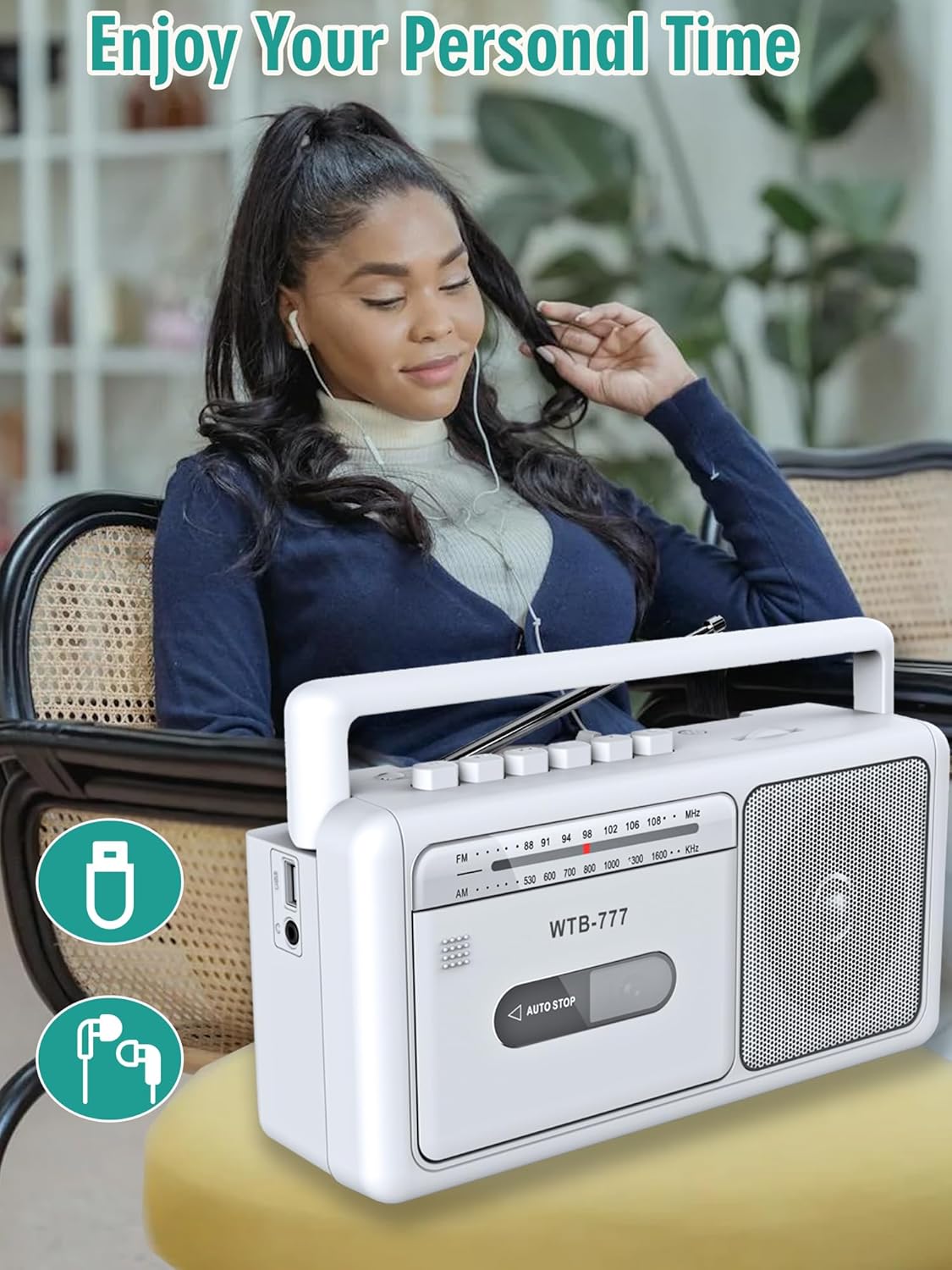
Figure 7: USB Playback and Earphone Jack
Запіс на касету
The WTB-777 allows you to record audio from the radio onto a blank cassette tape.
- Insert a blank cassette tape into the cassette compartment (refer to Cassette Player Operation).
- Set the Function Switch (5) to "FM" or "AM" and tune to your desired radio station.
- Press the Record button (14) and the Play button (13) simultaneously to begin recording. The unit will automatically start recording the radio broadcast onto the tape.
- To stop recording, press the Stop/Open button (10).
Заўвага: The built-in microphone (6) can also be used for voice recording directly to tape when the function switch is set to "TAPE" and the Record button (14) is pressed.
Тэхнічнае абслугоўванне
- Уборка: Use a soft, dry cloth to clean the exterior of the unit. Do not use abrasive cleaners or solvents. For the cassette head and pinch roller, use a specialized cassette head cleaner periodically to ensure optimal sound quality and prevent tape damage.
- захоўванне: When not in use for extended periods, store the unit in a cool, dry place away from direct sunlight and extreme temperatures. Remove batteries if storing for a long time.
- Сыход за стужкай: Store cassette tapes in their cases to protect them from dust and damage. Avoid exposing tapes to strong magnetic fields.
Ліквідацыю непаладак
If you experience issues with your WIITHINK WTB-777, please consult the following table before seeking professional service.
| праблема | Магчымая прычына | Рашэнне |
|---|---|---|
| Прылада не ўключаецца. |
|
|
| Няма гуку з дынаміка. |
|
|
| Касета не прайграваецца або гучыць скажоным чынам. |
|
|
| Дрэнны прыём радыё. |
|
|
| Прылада Bluetooth не спалучаецца. |
|
|
Тэхнічныя характарыстыкі
Detailed technical specifications for the WIITHINK WTB-777.
| Марка | WIITHONK |
| мадэль | ВТБ-777 |
| Памеры прадукту (Д х Ш х У) | 9.8 х 3 х 5.1 цалі (24.9 х 7.6 х 13 см) |
| Вага прадмета | 2.75 фунта (1.25 кг) |
| Колер | Белы |
| Тэхналогія падлучэння | Bluetooth, Built-in Microphone, Earphone Jack, USB |
| Тып дынаміка | Партатыўны |
| Дыяпазон частот AM | 520 - 1710 кГц |
| Дыяпазон частот FM | 87 - 108 МГц |
| Крыніца харчавання | AC (Power Cord included), 4 x 'C' Batteries (not included) |
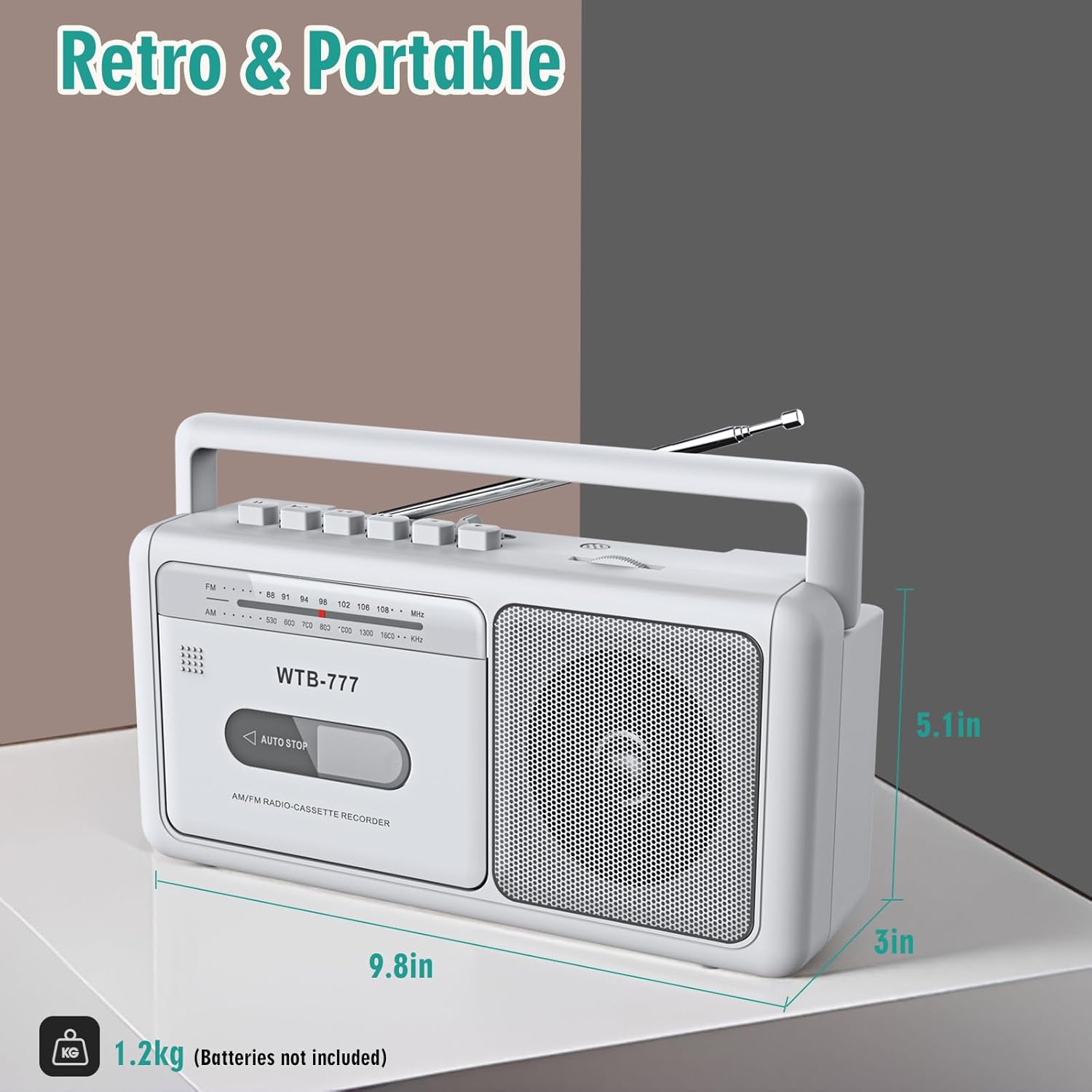
Малюнак 8: Памеры вырабу
Гарантыя і падтрымка
Specific warranty information for the WIITHINK WTB-777 is typically provided with the product packaging or on the manufacturer's official website. Please refer to the documentation included with your purchase for detailed warranty terms and conditions.
For technical support, troubleshooting assistance beyond this manual, or inquiries regarding parts and service, please contact WIITHINK customer support through their official channels. Contact information can usually be found on the product packaging, the manufacturer's website, or the retailer's product page.
Ask a question about this manual
Ask about setup, troubleshooting, compatibility, parts, safety, or missing instructions. Manuals+ will review the question and use this page’s manual context to help answer it.