
1. Уводзіны
Thank you for choosing the Holyton Drone Strobe Light. This anti-collision lamp is designed to enhance the visibility of your drone during night flights and in various other scenarios. It features multiple colors and modes, ensuring compliance with aviation regulations and improving safety. Please read this manual thoroughly before use to ensure proper operation and maintenance.
2. Інфармацыя па бяспецы
- Always ensure the strobe light is securely attached to your drone or other object before operation.
- Adhere to all local aviation authority regulations regarding drone lighting, especially for night flying. This light meets FAA requirements for anti-collision lighting.
- Do not expose the device to extreme temperatures, direct sunlight for prolonged periods, or moisture.
- Захоўваць у месцах, недаступных дзецям.
- Do not attempt to disassemble or modify the light, as this will void the warranty and may cause damage.
3. Змесціва ўпакоўкі
- Holyton Drone Strobe Light (1 unit)
- USB-кабель для зарадкі
- Mounting Accessories (e.g., adhesive pads, rubber bands)
- Кіраўніцтва карыстальніка
4. Асаблівасці прадукту
- Высокая бачнасць: 120 lumens brightness with 360° coverage.
- Multiple Colors & Modes: 7 switchable colors and 7 adjustable flashing modes.
- Акумулятарная батарэя: Provides extended use time after a quick charge.
- Лёгкі і кампактны: Weighs only 6.5g, ideal for various drones and other applications.
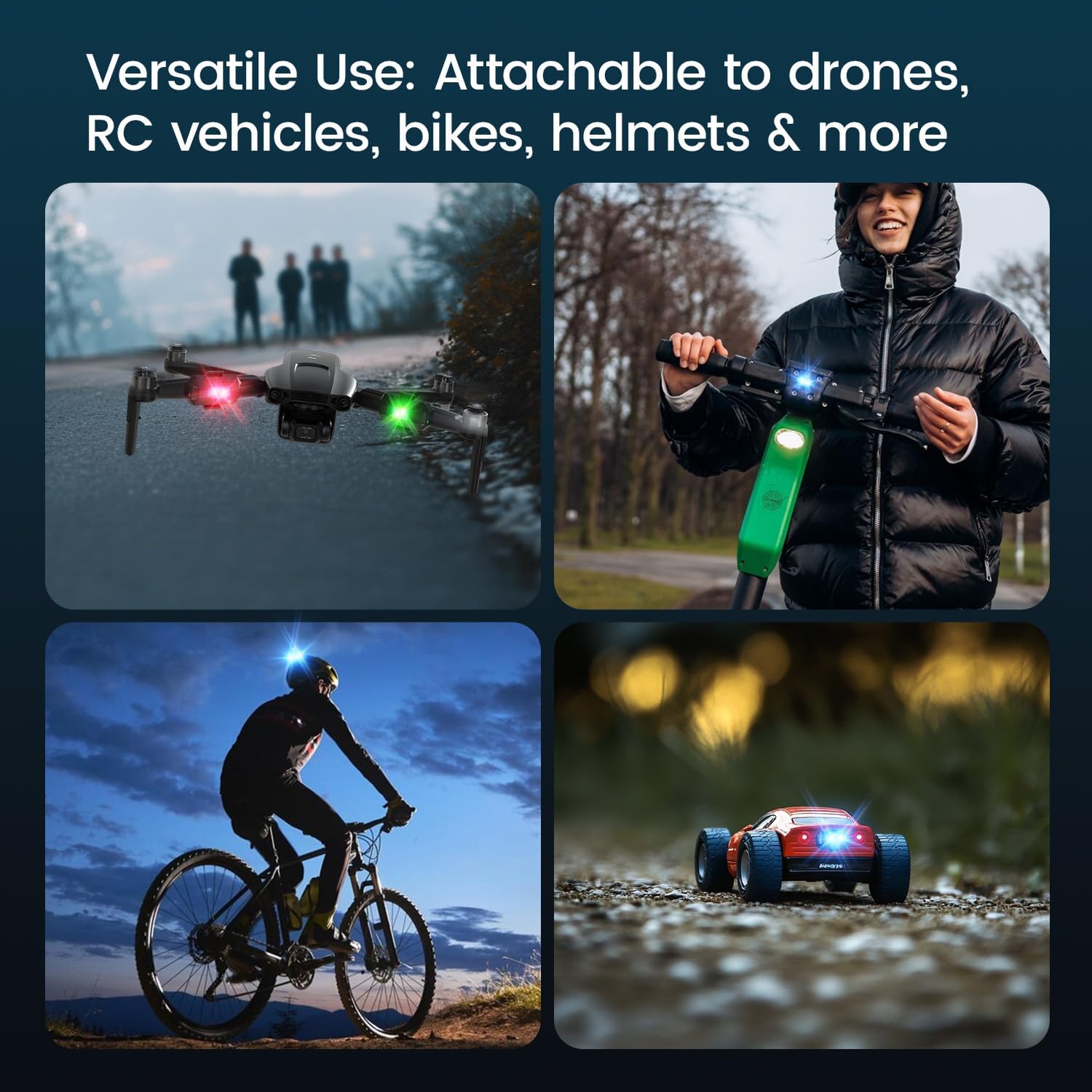
- Універсальнае прымяненне: Suitable for drones, RC vehicles, bicycles, motorcycles, helmets, and more.
- FAA Compliant: Meets requirements for anti-collision lighting during night flights.
5. Настройка і ўстаноўка
5.1 Першапачатковая плата
Before first use, fully charge the strobe light. Refer to Section 6 for charging instructions.
5.2 Mounting the Strobe Light
The Holyton Drone Strobe Light can be attached to various objects using the provided mounting accessories. For drones, ensure the light does not interfere with propellers, sensors, or flight stability.
- Чыстая паверхня: Ensure the mounting surface on your drone or object is clean and dry.
- Нанесці клей: Peel the backing from an adhesive pad and firmly press it onto the designated area on the strobe light.
- Attach to Drone: Peel the remaining backing from the adhesive pad and attach the strobe light to your drone. Apply firm pressure for a few seconds to ensure a secure bond. Alternatively, use rubber bands or other suitable fasteners for temporary attachment.

6. Інструкцыя па эксплуатацыі
6.1 Уключэнне/выключэнне сілкавання
- Уключэнне: Press and hold the power button for approximately 2 seconds until the light illuminates.
- Выключэнне: Націсніце і ўтрымлівайце кнопку харчавання прыблізна 2 секунды, пакуль не выключыцца святло.
6.2 Changing Colors and Modes
The strobe light offers 7 different colors and 7 distinct flashing modes.
- Змяніць колер: While the light is on, short press the power button to cycle through the available colors (e.g., white, red, green, blue, yellow, pink, ice blue).
- Змяніць рэжым: Double-press the power button quickly to cycle through the different flashing modes (e.g., constant, slow flash, fast flash, alternating colors).

7. Зарадка
The Holyton Drone Strobe Light is equipped with a rechargeable Lithium Ion battery.
- Порт для зарадкі: Micro USB
- Час зарадкі: Прыкладна 12 хвілін для поўнай зарадкі.
- Час выкарыстання: Up to 5 hours on a full charge, depending on the selected mode and color.
To charge, connect the provided USB charging cable to the Micro USB port on the strobe light and plug the other end into a standard USB power source (e.g., computer, wall adapter).

8. Тэхнічнае абслугоўванне
- Уборка: Для чысткі лямпы выкарыстоўвайце мяккую сухую тканіну. Не выкарыстоўвайце агрэсіўныя хімічныя рэчывы або абразіўныя матэрыялы.
- захоўванне: Store the strobe light in a cool, dry place away from direct sunlight when not in use.
- Сыход за батарэяй: For optimal battery life, avoid fully discharging the battery frequently. Charge the device regularly, even if not in use, to maintain battery health.
9. Выпраўленне непаладак
| праблема | Магчымая прычына | Рашэнне |
|---|---|---|
| Святло не ўключаецца. | Акумулятар разраджаны. | Charge the strobe light fully. |
| Святло не зараджае. | Charging cable or power source is faulty. | Try a different USB cable or power adapter. Ensure the Micro USB connector is inserted correctly. |
| Святло недастаткова яркае. | Нізкі зарад батарэі або няправільны рэжым. | Charge the device. Ensure a bright mode is selected (e.g., constant white light). |
| Light falls off during use. | Improper mounting or worn adhesive. | Ensure the mounting surface is clean and dry. Use new adhesive pads or more secure fastening methods. |
10. Тэхнічныя характарыстыкі
| Асаблівасць | Дэталь |
|---|---|
| Нумар мадэлі | US03A76731000HT70402 |
| Марка | Холітан |
| Колер | Чорны |
| Форма | Прамавугольны |
| Тып аздаблення | Пафарбаваны |
| Тып крыніцы святла | Святлодыёд (LED) |
| Абажур Матэрыял | Пластыкавыя |
| Вага прадмета | 0.352 унцыі (прыблізна 10 грамаў) |
| Колькасць батарэек | 1 літый-іённы (у камплекце) |
| стыль | Кампактны |
| Яркасць | 120 Lumens (Maximum Light Output) |
| Тып мацавання | Drone Mount (Adhesive/Strap) |
| Асаблівасці лямпачкі | Strobe, Flashing, Anti-Collision, Search and Rescue |
| Памеры прадукту | 1"L x 1"W x 1"H (approximately) |

11. Гарантыя і падтрымка
Holyton products are designed for reliability and performance. This product comes with a standard manufacturer's warranty against defects in materials and workmanship. Please refer to the product packaging or our official webсайт для атрымання канкрэтных гарантыйных умоў.
For technical support, troubleshooting assistance, or warranty claims, please contact our customer service team:
- электронная пошта: holyton@foxmail.com
- тэлефон: +1 (866) 514-8669
Our support team is available to assist you within 24 hours.