
1. Уводзіны
The APC Smart-UPS SMT750C is an Uninterruptible Power Supply (UPS) designed to provide reliable power and surge protection for critical electronic equipment. This unit offers 750VA/500W of line-interactive pure sine wave power, making it suitable for servers, storage systems, network closets, business VoIP setups, desktop computers, and retail POS systems. It features Automatic Voltagрэгуляванне (AVR) для карэкцыі аб'ёмуtage fluctuations and a SmartConnect Ethernet Port for cloud-based remote monitoring. This manual provides essential information for the safe and efficient installation, operation, and maintenance of your SMT750C UPS.
2. Інфармацыя па бяспецы
WARNING: Risk of electric shock. Refer to bottom of unit for warnings.
- Перад устаноўкай і эксплуатацыяй уважліва прачытайце ўсе інструкцыі.
- Гэты бесперабойнік харчавання мае ўнутраныя батарэі і можа ўяўляць небяспеку паражэння токам, нават калі ён адключаны ад крыніцы пераменнага току.
- Do not open or disassemble the UPS. There are no user-serviceable parts inside except for the battery.
- Падключайце КБС толькі да заземленай разеткі.
- Do not use the UPS in direct sunlight, near heat sources, or in areas with excessive humidity.
- Ensure proper ventilation around the UPS. Do not block any ventilation openings.
3. Змесціва ўпакоўкі
Пераканайцеся, што ўсе прадметы наяўныя пры распакаванні:
- APC Smart-UPS SMT750C Unit
- 16 ГБ USB 3.0 дыск
- Кіраўніцтва карыстальніка (гэты дакумент)
- Кабель сувязі USB
- Шнур харчавання

Image: Included 16GB USB 3.0 Drive. This USB drive provides additional storage or file перадаткавыя магчымасці.
4. Прадукт скончыўсяview
Пярэдняя панэль
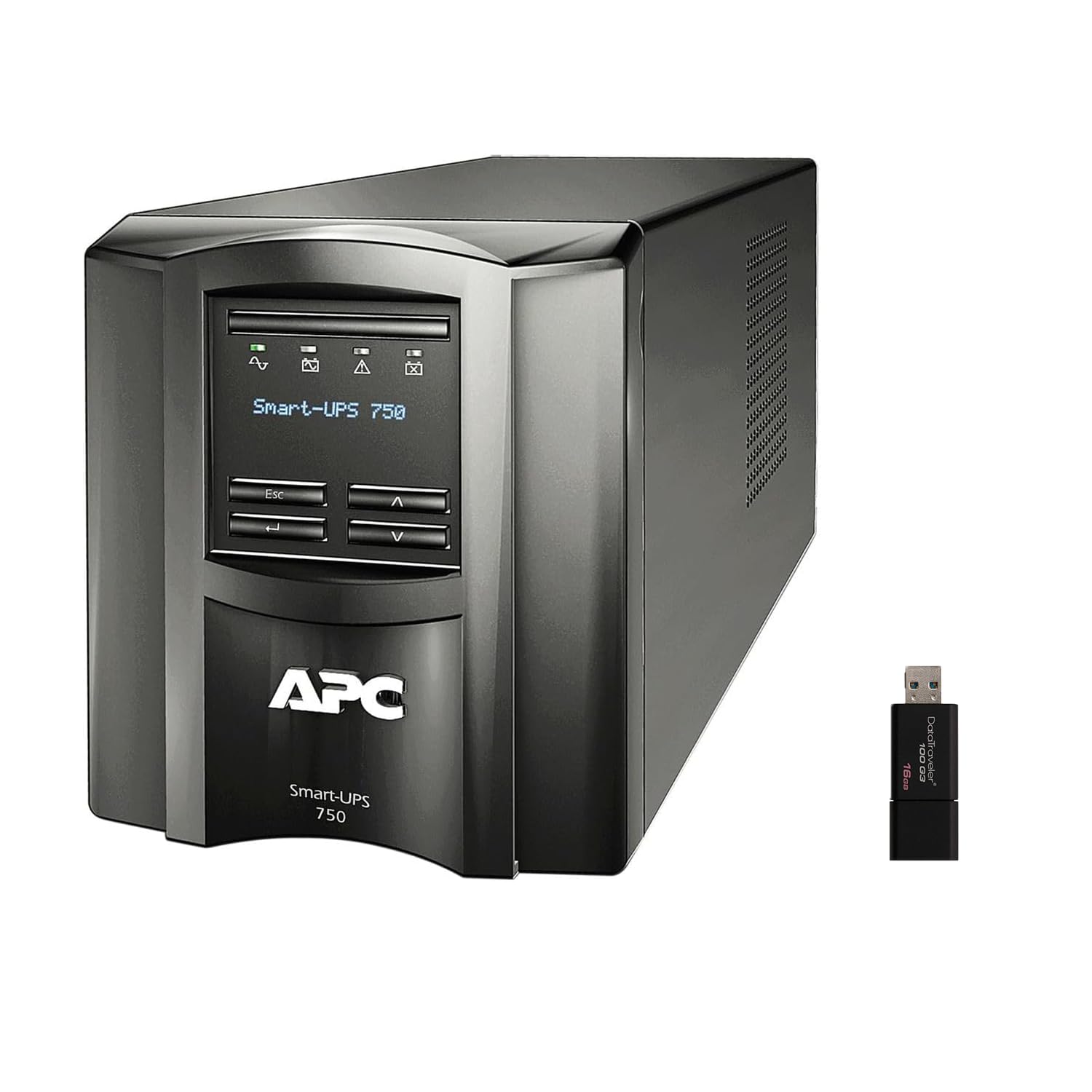
Выява: спераду і збоку view of the APC Smart-UPS SMT750C. This image displays the compact tower design of the UPS unit.
- Кнопка харчавання: Controls the main power to the UPS.
- ВК-дысплей: Provides real-time status information, load levels, battery charge, and estimated runtime.
- Кнопкі навігацыі: Used to scroll through display menus and adjust settings.
Задняя панэль
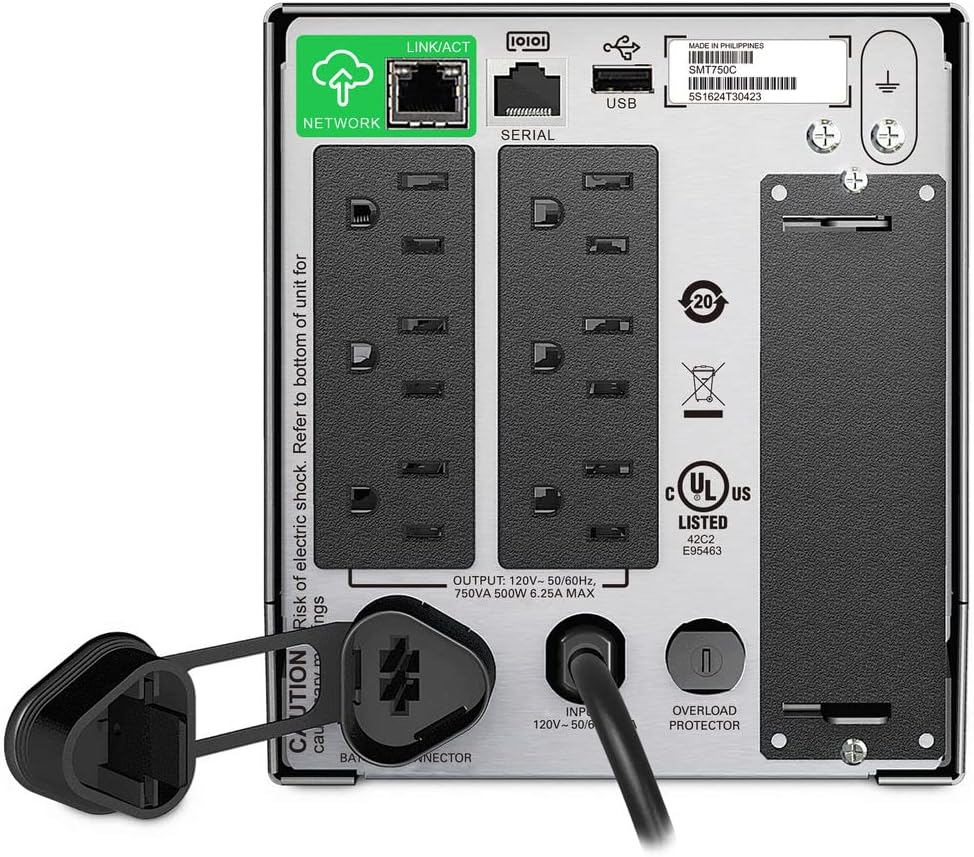
Image: Rear panel of the APC Smart-UPS SMT750C. This view highlights the various input/output ports, including NEMA 5-15R outlets, SmartConnect port, USB, and serial ports.
- NEMA 5-15R Outlets: Six outlets for connecting protected equipment.
- Порт Ethernet SmartConnect: For cloud-based remote monitoring and management.
- Порт USB: For communication with a computer for graceful shutdown via PowerChute Serial Shutdown software.
- Паслядоўны порт: Alternative communication port for graceful shutdown.
- SmartSlot: For optional Network Management Card (sold separately).
- Уваходны шнур сілкавання: Connects the UPS to the utility power.
- Пратэктар ад перагрузкі: Resettable circuit breaker.
5. Настройка
5.1 Пачатковае падключэнне акумулятара
Перад першым выкарыстаннем неабходна падключыць унутраную батарэю. Прылада пастаўляецца з адключанай батарэяй для бяспекі падчас транспарціроўкі.
- Размясціце бесперабойны прыбор на ўстойлівай паверхні.
- Locate the battery compartment cover, typically on the bottom or rear of the unit.
- Remove the cover to access the battery.
- Connect the red battery cable to the positive (+) terminal and the black battery cable to the negative (-) terminal. Ensure a secure connection.
- Замяніце крышку батарэйнага адсека.
5.2 Падключэнне да электрасеткі
- Plug the UPS power cord into a grounded 3-prong AC outlet.
- Перад падключэннем важнага абсталявання дайце бесперабойнаму сілкаванню зарадзіцца не менш за 24 гадзін, каб забяспечыць поўную зарадку акумулятара.
5.3 Падключэнне абсталявання
- Connect your critical equipment (e.g., computer, monitor, network devices) to the NEMA 5-15R outlets on the rear panel.
- For graceful shutdown capabilities, connect the provided USB cable from the UPS to your computer and install the PowerChute Serial Shutdown software (available for download from APC's webсайт).
- For remote monitoring, connect an Ethernet cable to the SmartConnect port and follow the instructions for cloud-based setup.
6. Аперацыя
6.1 Уключэнне/выключэнне
- To power on the UPS, press and hold the power button on the front panel until the unit beeps and the display illuminates.
- To power off the UPS, press and hold the power button until the unit beeps and the display turns off.
6.2 Аўтаматычны выпtagРэгуляванне (AVR)
The SMT750C features AVR, which automatically corrects minor voltagваганні напружання (прасечкі і скачкі) без пераключэння на батарэю. Гэта абараняе падключанае абсталяванне ад перанапружанняtage irregularities and extends battery life.
6.3 Праца ад рэзервовай батарэі
Падчас улады нtage, the UPS will automatically switch to battery power, providing continuous power to connected equipment. The LCD display will show the estimated remaining runtime. When utility power returns, the UPS will automatically switch back to utility power and recharge its battery.
6.4 Remote Monitoring (SmartConnect)
The SmartConnect port allows for cloud-based remote monitoring of your UPS. This feature enables IT professionals and network administrators to:
- Monitor UPS status and performance.
- Выканайце абнаўленне прашыўкі.
- Праводзіць дыстанцыйную дыягностыку.
- Атрымлівайце праактыўныя апавяшчэнні па электроннай пошце з рэкамендаванымі дзеяннямі.
7. Тэхнічнае абслугоўванне
7.1 Замена батарэі
The internal battery is a user-replaceable component. When the battery reaches the end of its service life, the UPS will indicate a battery fault. To replace the battery:
- Ensure the UPS is powered off and disconnected from utility power.
- Зніміце крышку батарэйнага адсека.
- Disconnect the battery cables (red and black).
- Carefully slide out the old battery.
- Insert a genuine APC replacement battery (model RBC154, sold separately).
- Connect the battery cables, ensuring correct polarity (red to positive, black to negative).
- Замяніце крышку батарэйнага адсека.
- Recycle the old battery responsibly.
7.2 Ачыстка
Перыядычна працірайце знешнія паверхні крыніцы бесперабойнага сілкавання мяккай сухой тканінай. Не выкарыстоўвайце вадкія або аэразольныя ачышчальнікі. Пераканайцеся, што вентыляцыйныя адтуліны чыстыя ад пылу і смецця.
8. Выпраўленне непаладак
| праблема | Магчымая прычына | Рашэнне |
|---|---|---|
| Бесперапынны прыбор не ўключаецца | Battery not connected or low charge | Ensure battery cables are connected. Plug UPS into AC outlet and allow to charge. |
| UPS бесперапынна пішчыць | Overload or on battery power | Reduce connected load. Check utility power. |
| Battery symbol blinking | Battery needs to be flipped (initial setup) or is failing | For new units, ensure battery is correctly oriented and connected. For older units, consider battery replacement. |
| Няма электрычнасці ў разетках | UPS is off, circuit breaker tripped, or utility power lost | Turn on UPS. Reset circuit breaker. Check utility power. |
9. Тэхнічныя характарыстыкі
- мадэль: SMT750C
- Выхадная магутнасць: 500 Вт / 750 ВА
- Выхадныя злучэнні: 6 х NEMA 5-15R
- Уваходныя злучэнні: anong bansa ang sikat sa pagiging lupain ng mga ahas
- Намінальны ўваходны аб'ёмtage: 120В
- Намінальны аб'ём выхtage: 120В
- Тып батарэі: Свінцовая кіслата
- Формаў-фактар: Вежа
- Памеры (В х Ш х Г): 6.34 цалі (16.1 см) х 5.43 цалі (13.8 см) х 14.53 цаляў (36.9 см)
- Вага нета: 27.56 фунтаў (12.5 кг)
- колер: Чорны
- матэрыял: Метал
- Аксэсуары ў камплекце: 16 ГБ USB 3.0 дыск
10. Гарантыя і падтрымка
APC прадастаўляе стандартную гарантыю на гэты прадукт. Канкрэтныя ўмовы гарантыі глядзіце ў гарантыйным талоне, які ўваходзіць у камплект прадукту, або на афіцыйным сайце APC. website. For technical support, product registration, or to purchase replacement parts, please visit www.apc.com або звярніцеся ў службу падтрымкі кліентаў APC.
Protection plans are available for extended coverage. For example, a 3-Year Protection Plan is available.