
REDTIGER RTH30GSO
REDTIGER Dash Cam OBD Hardwire Kit (Model RTH30GSO) Instruction Manual
Model: RTH30GSO | Brand: REDTIGER
1. Прадукт скончыўсяview
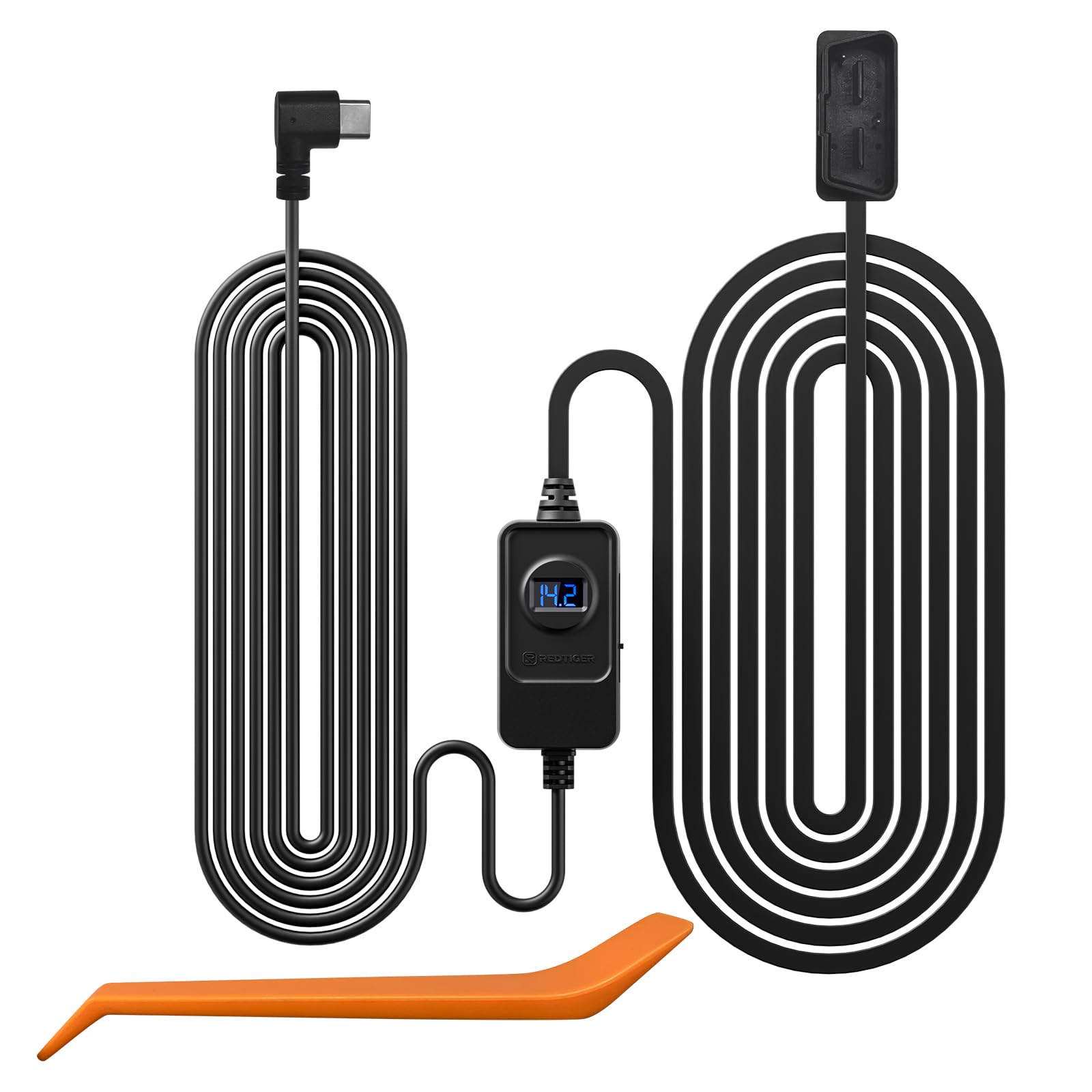
The REDTIGER Dash Cam OBD Hardwire Kit with USB C Port is designed to provide continuous power to your REDTIGER dash camera for 24/7 parking monitoring. This kit ensures your dash cam remains operational even when the vehicle's engine is off, offering low voltage protection to prevent battery drain. It supports a wide input voltage range of 12V-24V and delivers a stable 5V/3A MAX output via its Type-C port, making it compatible with various REDTIGER dash cam models.
2. Асноўныя магчымасці
- 24/7 Parking Monitoring: Provides continuous power to your REDTIGER dash cam for uninterrupted surveillance, even when the vehicle is parked.
- Універсальны падыход: Compatible with 12V to 24V vehicle electrical systems, delivering a consistent 5V/3A MAX output via a Type-C port for various REDTIGER dash cam series.
- Лёгкая ўстаноўка: Draws power directly from the OBD port, simplifying the setup process with a clean, non-invasive installation.
- Пашыраная сумяшчальнасць: Engineered to work with most vehicles and features a Type-C USB port for broad device compatibility.
- Нізкі абtagе абарона: Automatically cuts off power to the dash cam if the vehicle's battery voltage drops below a user-selectable threshold, preventing complete battery discharge.
3. Змесціва ўпакоўкі
The REDTIGER Dash Cam OBD Hardwire Kit includes the following components:
- OBD Hardwire Kit with USB C Port
- Кіраўніцтва карыстальніка
4. Кіраўніцтва па ўстаноўцы
This OBD hardwire kit is compatible with all REDTIGER series dash cams (e.g., F7N, F7NP, F7NT, F7NS, F8, F9, F17, F4, F77 Mini Dash Cam and T27/T700 Mirror Dash Cams). Please note that this hardwire kit is not suitable for dash cams from other brands.
4.1 Locating the OBD Port
The most common location for a vehicle's OBD interface is on the lower left side of the trim panel beneath the steering wheel. However, the exact location may vary depending on the vehicle's make, model, and year. Some common alternative locations include above the accelerator pedal, near the driver's side fuse box, or in front of the gear shifter. Consult your vehicle's owner's manual or maintenance manual for the precise location.

4.2 Пакрокавая ўстаноўка
- Step 1: Connect to OBD Port
After unpacking the OBD hardwire kit, connect its OBD plug to your car's OBD port. - Step 2: Position Voltage Рэгулятар
Размясціце абtage regulator controller in a suitable location where you can conveniently adjust the protection voltage and monitor the voltagэлектронны дысплей. - Step 3: Connect to Dash Cam
Connect the USB Type-C interface of the OBD hardwire kit to your dash cam. Verify that the dash cam powers on correctly.


It is strongly recommended to refer to your vehicle's manual or seek professional assistance if you are unsure about any installation steps.
5. Інструкцыя па эксплуатацыі
5.1 24/7 Parking Monitoring
Once the hardwire kit is correctly installed, your REDTIGER dash cam will automatically enter parking monitoring mode when the vehicle is turned off. This feature ensures continuous recording to protect your vehicle from incidents while parked.


5.2 Нізкая Voltagе Абарона
The hardwire kit features adjustable low voltage protection to prevent your car battery from draining completely. You can select from predefined voltage cut-off levels (e.g., 12.4V, 12.0V, 11.6V for 12V vehicles, and corresponding levels for 24V vehicles). The kit will automatically cut power to the dash cam if the battery voltage drops below the selected threshold, ensuring enough power remains to start your vehicle.


6. Тэхнічныя характарыстыкі
| Асаблівасць | Дэталь |
|---|---|
| Марка | Чырвоны тыгр |
| Назва мадэлі | RTH30GSO |
| Тэхналогія падлучэння | OBD |
| Уваходны кнtage | 12В-24В |
| Выхад Voltagе/Ток | 5 В/3 А МАКС |
| Выхадны порт | USB Type-C |
| Асаблівасць | Parking Monitor, Low Voltagе Абарона |
| Даўжыня кабеля | Прыблізна 11.5 фута |
| Сумяшчальныя прылады | REDTIGER Dash Cams (F7N/F7NP/F7NT/F7NS/F8/F9/F17/F4/F77 Mini Dash Cam and T27/T700 Mirror Dash Cams etc.) |
7. Тэхнічнае абслугоўванне
To ensure optimal performance and longevity of your REDTIGER Dash Cam OBD Hardwire Kit, follow these general maintenance guidelines:
- Рэгулярна правярайце ўсе злучэнні, каб пераканацца, што яны надзейныя.
- Keep the hardwire kit and its components clean and free from dust or debris.
- Пазбягайце працяглага ўздзеяння экстрэмальных тэмператур або прамых сонечных прамянёў на камплект.
- Do not attempt to modify or disassemble the unit, as this may void the warranty and cause damage.
8. Выпраўленне непаладак
If you encounter issues with your REDTIGER Dash Cam OBD Hardwire Kit, consider the following troubleshooting steps:
- Відэарэгістратар не ўключаецца:
- Ensure the OBD plug is securely inserted into the vehicle's OBD port.
- Verify the Type-C connector is firmly plugged into the dash cam.
- Праверце ўзровень зарада акумулятара аўтамабіляtage using the regulator's display. If it's below the set cut-off, the kit will not supply power.
- Рэжым паркоўкі не актывуецца:
- Confirm that parking mode is enabled in your dash cam's settings.
- Ensure the hardwire kit is correctly installed and receiving continuous power from the OBD port.
- Праблемы разраду батарэі:
- Адрэгулюйце нізкі ўзровень гучнасціtage protection setting on the hardwire kit to a higher threshold if your vehicle's battery is frequently draining.
- Ensure your vehicle's battery is in good condition.
For further assistance, please contact REDTIGER customer support.
9. Гарантыя і падтрымка
The REDTIGER Dash Cam OBD Hardwire Kit comes with an 18-month assurance for quality problems. For any quality-related issues or technical support, please reach out to RedtigerDirect, the seller, or REDTIGER customer service.
Please feel free to reach us if any professional help is needed. Always use the dedicated hardwire kit for your REDTIGER dash cam, as other brands' kits may not be compatible.