
1. Уводзіны
The FLEXISPOT E6 Pro Oval Dual Motor Standing Desk Frame (Model E8) is designed to provide a versatile and ergonomic workspace. This height-adjustable electric desk frame features a robust 3-stage oval leg system and powerful dual motors, allowing for smooth and quiet transitions between sitting and standing positions. The intuitive LED control panel includes memory presets and a convenient USB charging port, enhancing user experience and productivity. This manual provides essential information for the safe assembly, operation, and maintenance of your desk frame.

Figure 1: FLEXISPOT E6 Pro Oval Dual Motor Standing Desk Frame (Black)
2. Інфармацыя па бяспецы
Каб забяспечыць бяспечную працу і прадухіліць пашкоджанні, калі ласка, выконвайце наступныя рэкамендацыі:
- Ensure the desk is securely assembled according to the provided instructions.
- Do not exceed the maximum weight capacity of 330 lbs (150 kg) to prevent tipping or instability.
- Keep hands and objects clear of moving parts during height adjustments.
- Пазбягайце траплення вадкасцей непасрэдна на панэль кіравання або побач з электрычнымі кампанентамі.
- Regularly inspect all connections and fasteners to ensure they are tight and secure.
- The desk is equipped with an anti-collision system. However, always exercise caution when adjusting height to prevent accidental contact with objects or persons.
3. зборка
The FLEXISPOT E6 Pro desk frame is designed for straightforward assembly. Please follow the detailed instructions provided in the separate user manual included with your product. Ensure all components are present before beginning assembly.
3.1 Асноўныя кампаненты
- Пад'ёмныя калоны (ножкі)
- Ногі
- Папярочка
- Блок кіравання
- Handset (Control Panel)
- Адаптар сілкавання
- Мантажнае абсталяванне
3.2 Зборка скончанаview
Typically, assembly involves attaching the feet to the lifting columns, connecting the crossbeam, mounting the control box and handset, and finally securing your chosen desktop (sold separately) to the frame. All necessary tools are usually included. Refer to the specific step-by-step diagrams in your product manual for precise instructions.

Малюнак 2: Разарваны view of the FLEXISPOT E6 Pro desk frame components.
4. Інструкцыя па эксплуатацыі
4.1 Рэгуляванне вышыні
The E6 Pro features a 3-stage oval leg system, offering a broad height adjustment range from 23.6 inches to 48.8 inches. This allows users of various heights, from children to tall adults, to find their optimal ergonomic position.
- Падняць стол: Націсніце і ўтрымлівайце Стрэлка ўверх кнопку на панэлі кіравання.
- Ніжні стол: Націсніце і ўтрымлівайце Стрэлка ўніз кнопку на панэлі кіравання.
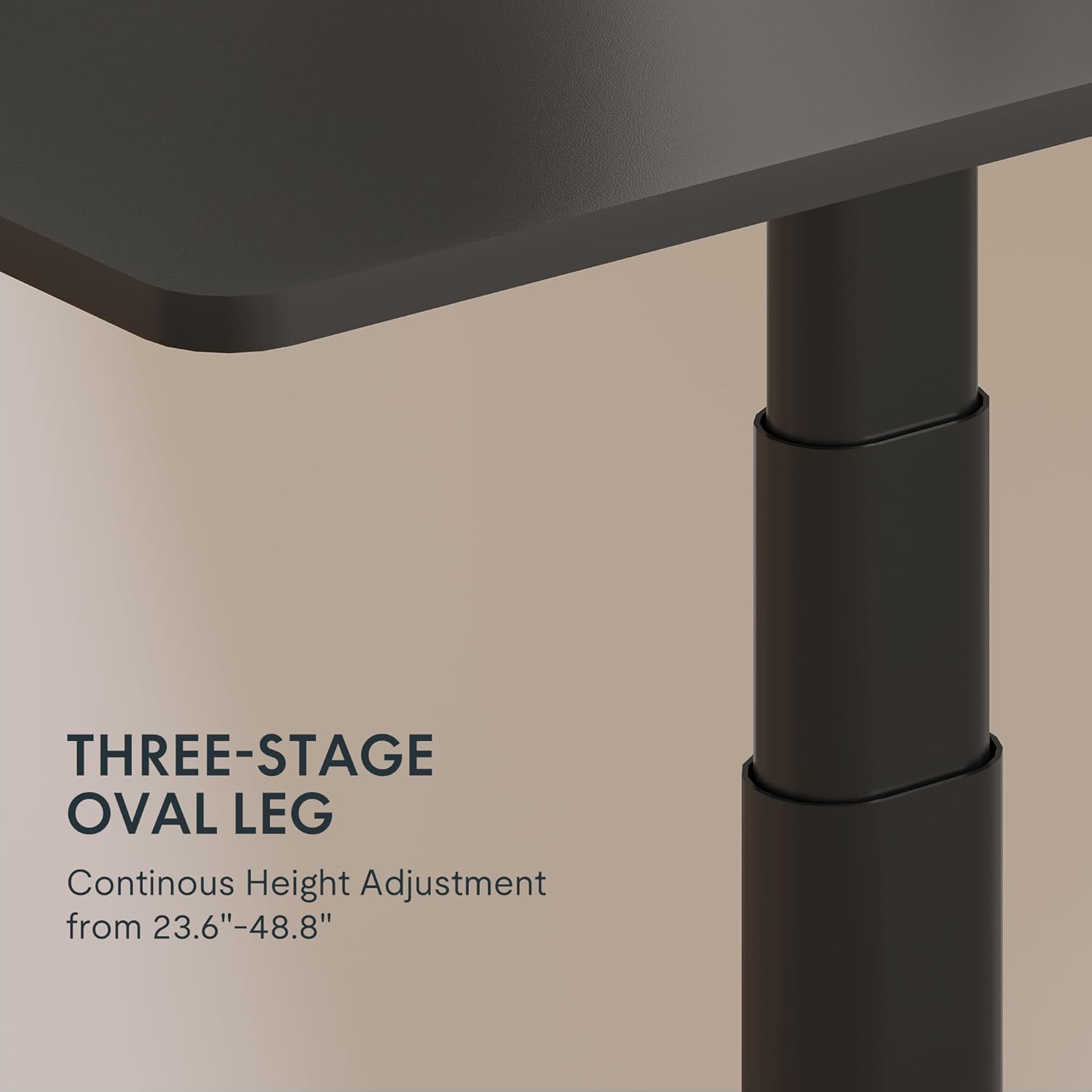
Figure 3: Close-up of the 3-stage oval leg mechanism.
4.2 LED Control Panel with Memory Presets and USB Port
The intuitive LED control panel allows for easy height adjustments and includes programmable memory presets for your preferred sitting and standing heights. It also features a convenient USB port for charging devices.
- Setting Memory Presets: Adjust the desk to your desired height using the Up/Down arrows. Press the «М» button, then press one of the numbered preset buttons ('1', '2', '3', або '4'), каб захаваць бягучую вышыню.
- Выклік прэсетаў памяці: Press any of the numbered preset buttons ('1', '2', '3', або '4'), каб аўтаматычна перамясціць стол на захаваную вышыню.
- Порт для зарадкі USB: Use the integrated USB port to conveniently charge your electronic devices.
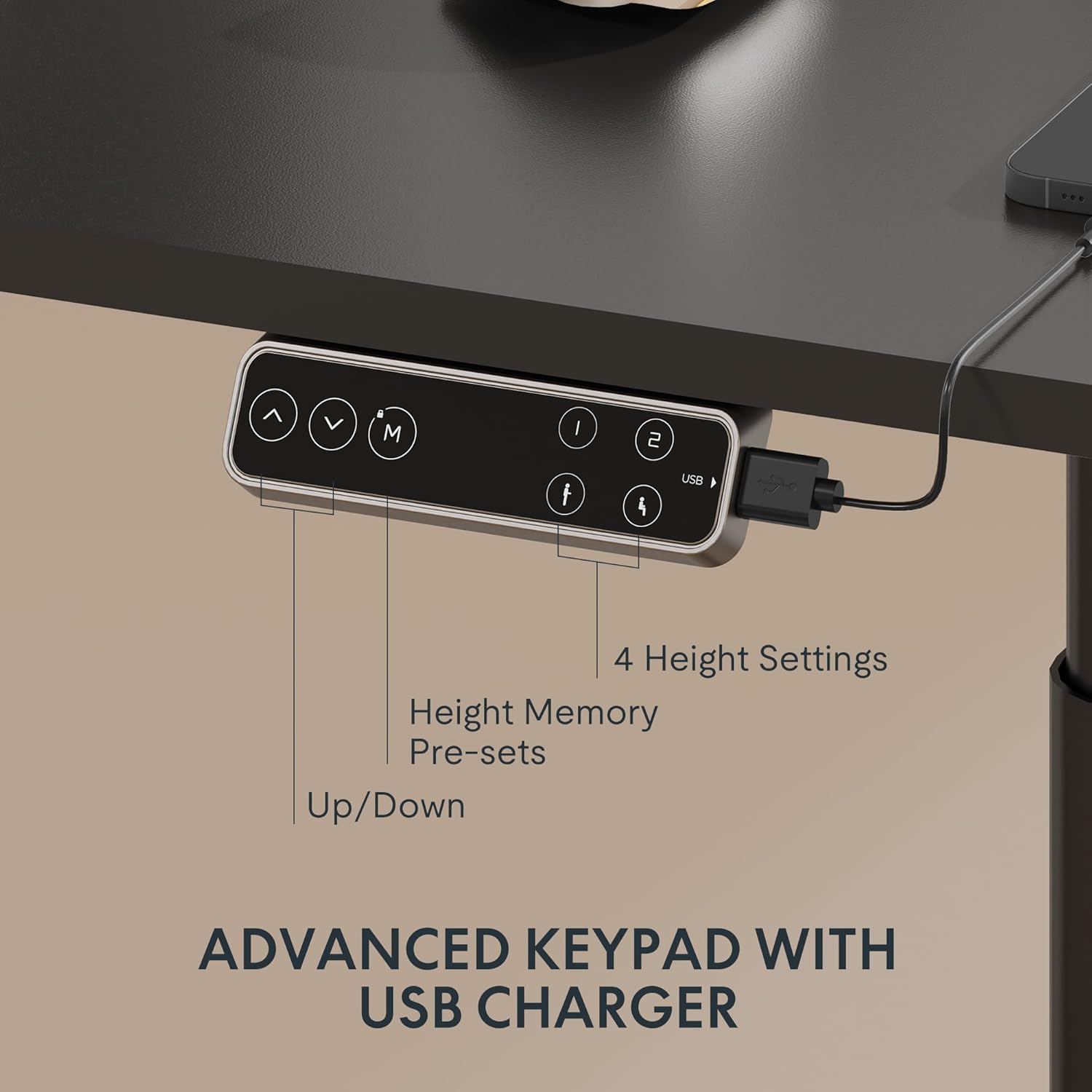
Figure 4: LED Control Panel with memory presets and USB port.
4.3 Сістэма з падвойным рухавіком
The E6 Pro is equipped with quiet dual motors that operate at less than 45dB, ensuring minimal disturbance in your workspace. These powerful motors can handle up to 330 lbs (150 kg) of weight, providing stable and reliable performance.
4.4 Сістэма прадухілення сутыкненняў
For enhanced safety, the desk features an anti-collision system. If the desk encounters an obstruction during height adjustment, it will automatically stop and reverse slightly to prevent damage or injury. This system is designed to protect both the desk and its surroundings.
5. Тэхнічныя характарыстыкі
| Асаблівасць | Дэталь |
|---|---|
| Марка | ФЛЕКСІСПОТ |
| Нумар мадэлі | E8 |
| Дызайн працоўнага стала | Каркас сталага стала |
| Нага Сtages | 3 Сtages Oval Leg |
| Дыяпазон рэгулявання вышыні | ад 23.6 да 48.8 цаляў |
| Тып рухавіка | Двайны рухавік |
| Ёмістасць вагі | Да 330 фунтаў (150 кг) |
| Узровень шуму | Менш за 45 дБ |
| Панэль кіравання | LED with 4 Memory Presets & USB Port |
| Асаблівасць | Anti-Collision System |
| Базавы матэрыял | Метал |
| Колер | Чорная рамка |
| Неабходная зборка | так |
6. Тэхнічнае абслугоўванне
To ensure the longevity and optimal performance of your FLEXISPOT E6 Pro desk frame, regular maintenance is recommended:
- Уборка: Працярыце каркас стала мяккай губкайamp тканінай. Пазбягайце выкарыстання агрэсіўных хімікатаў або абразіўных ачышчальнікаў, якія могуць пашкодзіць пакрыццё.
- Кабельнае кіраванне: Periodically check and organize cables to prevent tangling or damage, especially during height adjustments.
- Праверка крапяжу: Every few months, inspect all screws and bolts to ensure they are tight. Re-tighten if necessary.
- Размеркаванне вагі: Distribute weight evenly across the desktop to prevent undue stress on the frame and motors.
7. Выпраўленне непаладак
If you encounter any issues with your desk frame, please refer to the following common troubleshooting steps:
- Стол не рухаецца: Check all cable connections to ensure they are securely plugged into the control box and power outlet. Verify the power adapter is functioning.
- Няроўны рух: Ensure the desk is not overloaded and that weight is evenly distributed. Perform a reset procedure (refer to your specific user manual for reset instructions).
- Коды памылак на дысплеі: Consult your user manual for a list of error codes and their corresponding solutions.
- Частае спрацоўванне сістэмы прадухілення сутыкненняў: Ensure there are no obstructions in the desk's path during movement.
If the problem persists after attempting these steps, please contact FLEXISPOT customer support for further assistance.
8. Гарантыя і падтрымка
FLEXISPOT provides a comprehensive warranty for your peace of mind:
- 5-гадовае пакрыццё: Applies to the desk frame and motor.
- 2-гадовае пакрыццё: Applies to the control panel and electronics.
For warranty claims, technical support, or any questions regarding your FLEXISPOT E6 Pro desk frame, please visit the official FLEXISPOT webсайт або звярніцеся непасрэдна ў службу падтрымкі кліентаў. Захоўвайце чэк аб куплі як пацверджанне пакупкі.
9. Відэа пра прадукты
9.1 Why Choose FLEXISPOT E6
Video 1: This official FLEXISPOT video highlights the key features and benefits of the E6 series, including its robust construction and smooth operation.
9.2 Welcome to FLEXISPOT'S Mega Factory
Video 2: An inside look at the FLEXISPOT manufacturing facility, showcasing the precision and quality control involved in producing their products.