
1. Уводзіны
The Auronic Electric Air Dehumidifier AU3270 is designed to effectively remove excess moisture from indoor environments, helping to prevent mold growth and maintain a healthy humidity level. This appliance is suitable for spaces up to 15 square meters and can extract up to 10 liters of moisture per day. This manual provides essential information for the safe and efficient use of your dehumidifier.

Image: The Auronic Electric Air Dehumidifier AU3270 positioned in a living room, illustrating its compact design and 10-liter daily capacity for optimal dehumidification.
2. Інструкцыі па тэхніцы бяспекі
Калі ласка, уважліва прачытайце ўсе інструкцыі па тэхніцы бяспекі перад выкарыстаннем прылады, каб пазбегнуць траўмаў або пашкоджанняў.
- Пераканайцеся, што аб'ём блока харчаванняtage адпавядае намінальнай этыкетцы на асушальніку.
- Не выкарыстоўвайце асушальнік паветра з пашкоджаным шнуром харчавання або вілкай.
- Трымайце прыладу далей ад крыніц цяпла, прамых сонечных прамянёў і лёгкаўзгаральных матэрыялаў.
- Не блакуйце ўваход і выхад паветра. Захоўвайце не менш за 20 см прасторы вакол прылады.
- Always place the dehumidifier on a stable, level surface to prevent water spillage.
- Unplug the appliance before cleaning, maintenance, or when not in use for extended periods.
- Не апускайце прыладу, шнур харчавання або вілку ў ваду або іншыя вадкасці.
- Гэты прыбор не прызначаны для выкарыстання асобамі (уключаючы дзяцей) з абмежаванымі фізічнымі, сэнсарнымі або разумовымі здольнасцямі або з адсутнасцю вопыту і ведаў, за выключэннем выпадкаў, калі яны знаходзяцца пад наглядам або праінструктаваныя адносна выкарыстання прыбора асобай, адказнай за іх бяспеку.
- За дзецьмі трэба сачыць, каб яны не гулялі з прыборам.
3. Настройка
3.1 Распакоўка і змесціва ўпакоўкі
Carefully remove the dehumidifier from its packaging. Check that all components are present and undamaged. The package typically includes the dehumidifier unit, a drainage hose, and this user manual.

Image: Contents of the Auronic Dehumidifier package, displaying the main unit, continuous drainage hose, and user manual, along with key product dimensions.
3.2 Размяшчэнне
Place the dehumidifier on a firm, level surface in the desired location. Ensure there is at least 20 cm of free space around the air inlet and outlet for optimal airflow. The unit is effective for rooms up to 15 square meters. Avoid placing it in direct sunlight or near heat-emitting appliances.
3.3 Падключэнне харчавання
Plug the power cord into a grounded electrical outlet. Ensure the outlet meets the power requirements specified on the appliance's rating label.
3.4 Варыянты дрэнажу
Асушальнік паветра прапануе два спосабы дрэнажу:
- Рэзервуар для вады: The unit collects condensed water in its internal 2-liter water tank. The appliance will automatically stop operating when the tank is full, and an indicator will illuminate.
- Бесперапынны дрэнаж: For uninterrupted operation, attach the included drainage hose to the continuous drainage port on the back of the unit. Route the hose to a suitable drain or larger container, ensuring it is sloped downwards to allow water to flow freely by gravity.
4. Інструкцыя па эксплуатацыі
4.1 Панэль кіравання скончанаview
The dehumidifier features an intuitive digital LED display and control buttons for easy operation.
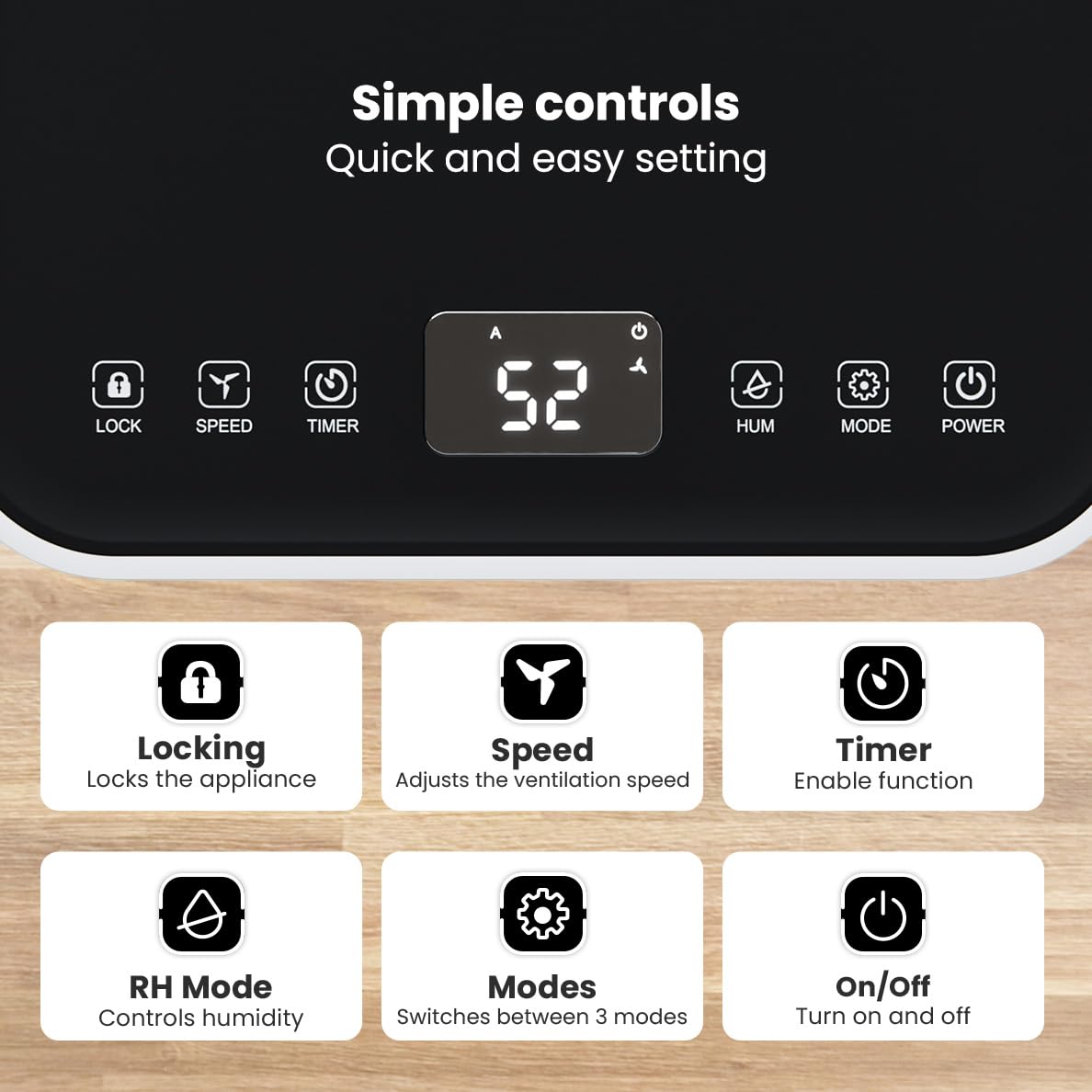
Выява: Падрабязная view of the dehumidifier's control panel, highlighting each button's function for easy setting adjustments.
- Кнопка харчавання (⏻): Уключае або выключае прыбор.
- Кнопка рэжыму (⚙): Switches between the three operating modes: Automatic, Continuous, and Quiet.
- RH Mode Button (💧): Controls the desired relative humidity level. Press to set the target humidity.
- Кнопка таймера (⏱): Enables the timer function for scheduled operation.
- Кнопка хуткасці (⇋): Adjusts the ventilation speed (fan speed).
- Кнопка блакіроўкі (🔒): Блакуе панэль кіравання, каб прадухіліць выпадковыя змены.
Рэжымы працы 4.2
Press the Mode button to cycle through the available operating modes:
- Аўтаматычны рэжым: The device automatically adjusts its operation based on the current room humidity to maintain a comfortable level.
- Бесперапынны рэжым: Ideal for very damp environments like wet basements. The dehumidifier operates continuously regardless of the humidity level until the water tank is full or continuous drainage is active.
- Ціхі рэжым: Designed for night-time use or in areas where low noise is preferred. The dehumidifier operates at a reduced fan speed, ensuring a peaceful environment with a noise level below 36dB.

Image: A chart comparing the noise level of the Auronic Dehumidifier (42dB) to common sounds like breathing, whispering, and loud conversation, highlighting its quiet operation.
4.3 Humidity Sensor and Display
The integrated humidity sensor monitors the room's humidity level, which is displayed on the digital screen. The color of the display indicates the current humidity status:
- Сіні: Humidity level is below 45%.
- Зялёны: Humidity level is between 45% and 64%.
- Чырвоны: Humidity level is above 65%.
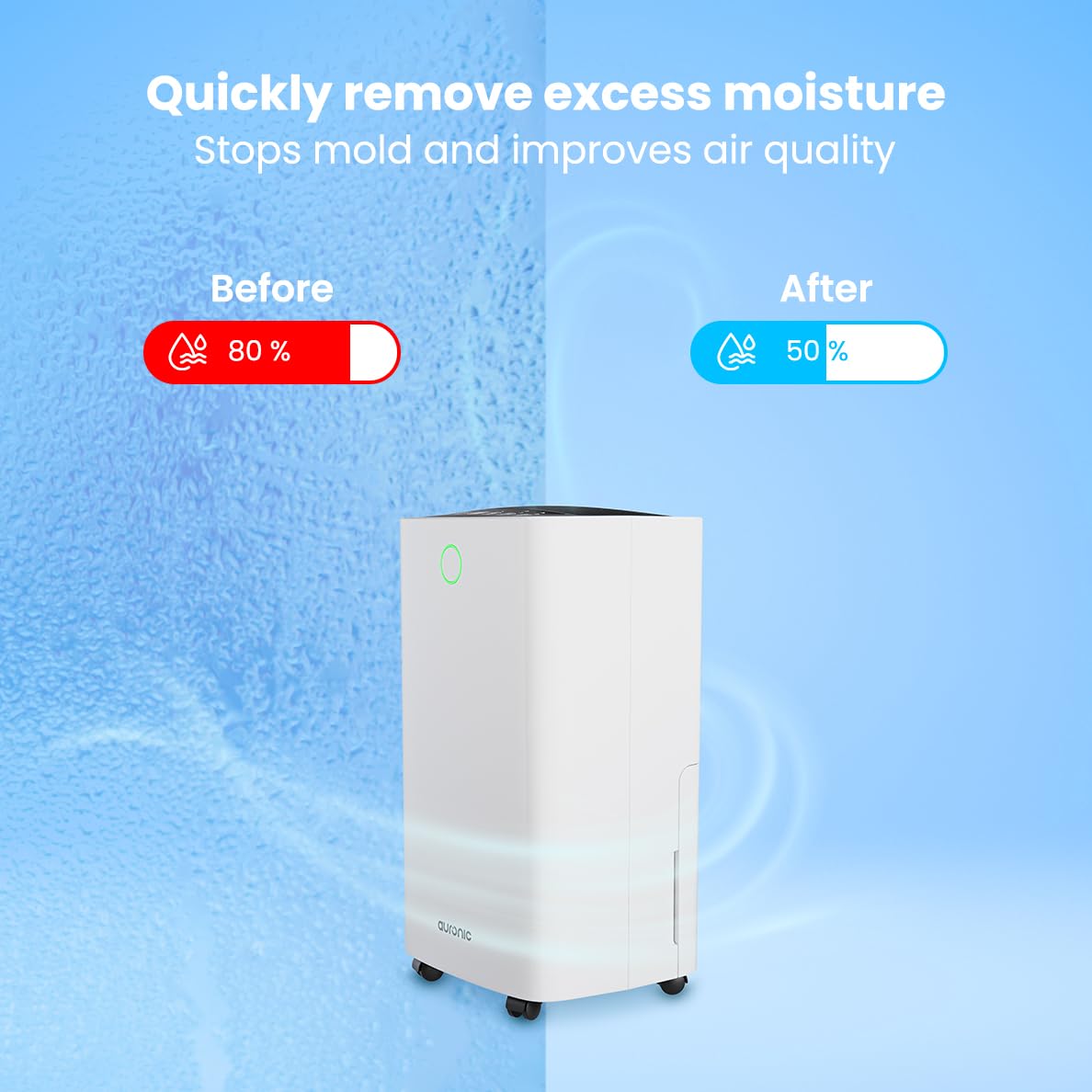
Image: A visual representation demonstrating the dehumidifier's effectiveness, showing a reduction in humidity from 80% to 50% in a room.
4.4 Функцыя сушкі бялізны
The Auronic dehumidifier includes a laundry drying function to assist in reducing the drying time of clothes, sheets, and towels. Place the appliance in your laundry room or near drying clothes to utilize this feature, which helps to remove moisture from the air and accelerate the drying process.

Image: The dehumidifier in a bathroom setting, demonstrating its ability to extract up to 10 liters of moisture and its suitability for rooms up to 15 square meters, alongside its intelligent humidity meter, wash-dry function, and silent operation.
5. Тэхнічнае абслугоўванне
Рэгулярнае тэхнічнае абслугоўванне забяспечвае даўгавечнасць і эфектыўную працу вашага асушальніка паветра.
5.1 Апаражненне рэзервуара для вады
When the water tank is full, the dehumidifier will stop operating, and an indicator light will turn on. Carefully pull out the water tank from the unit, empty the collected water, and then reinsert the tank firmly until it clicks into place. Ensure the tank is properly seated to resume operation.
5.2 Ачыстка паветранага фільтра
The air filter should be cleaned regularly (e.g., every two weeks or as needed) to maintain optimal performance. A dirty filter can reduce efficiency and increase energy consumption.
- Адключыце асушальнік паветра ад разеткі.
- Знайдзіце і зніміце паветраны фільтр (звычайна ён знаходзіцца на задняй або бакавой панэлі прылады).
- Clean the filter using a vacuum cleaner to remove dust and debris. For heavily soiled filters, wash gently with lukewarm water and a mild detergent.
- Allow the filter to air dry completely before reinserting it into the dehumidifier.
5.3 Агульная ўборка і захоўванне
Працярыце знешнюю частку асушальніка мяккім, damp cloth. Do not use abrasive cleaners or solvents. For long-term storage, ensure the water tank is empty and clean, the filter is clean and dry, and the unit is unplugged. Store the dehumidifier in a cool, dry place, preferably in its original packaging.
6. Выпраўленне непаладак
Калі ў вас узніклі праблемы з асушальнікам паветра, звярніцеся да наступных распаўсюджаных праблем і іх рашэнняў:
| праблема | Магчымая прычына | Рашэнне |
|---|---|---|
| Асушальнік паветра не ўключаецца. | Няма харчавання; шнур харчавання не падключаны; кнопка харчавання не націснутая. | Check power connection; Ensure outlet is functional; Press the Power button. |
| Вада не збіраецца або нізкі ўзровень асушвання. | Room temperature too low; Humidity level already low; Air filter clogged; Air inlet/outlet blocked; Water tank not properly inserted. | Ensure room temperature is above 5°C; Check current humidity; Clean the air filter; Clear any obstructions; Reinsert water tank correctly. |
| Агрэгат шумны. | Unit not on a level surface; Air filter clogged; Internal components vibrating. | Place on a stable, level surface; Clean the air filter; If noise persists, contact customer support. |
| Індыкатар поўнага рэзервуара для вады гарыць, але рэзервуар не поўны. | Float switch malfunction; Water tank not properly seated. | Remove and reinsert the water tank; Check float switch for obstructions. |
| На дысплеі адлюстроўваецца код памылкі. | Унутраная памылка або няспраўнасць датчыка. | Адключыце прыладу ад сеткі на 5 хвілін, а затым зноў падключыце яе. Калі памылка не знікне, звярніцеся ў службу падтрымкі кліентаў. |
7. Тэхнічныя характарыстыкі
Technical specifications for the Auronic Electric Air Dehumidifier AU3270:
| Асаблівасць | Дэталь |
|---|---|
| Марка | Аўронавы |
| Назва мадэлі | AU3270 |
| Ёмістасць | 10 літра ў дзень |
| Ёмістасць бака для вады | 2 літраў |
| Пакрыццё плошчы падлогі | Up to 15 m² (150000 Square Centimeters) |
| Ватtage | 185 ват |
| Памеры прадукту (Д х Ш х У) | 50 Г х 30.5 Ш х 26.5 В сантыметраў |
| Вага прадмета | 10 кілаграма |
| Колер | Белы |
| Узровень шуму | Below 36dB (in Quiet Mode) |
8. Гарантыя і падтрымка
8.1 Інфармацыя аб гарантыі
Your Auronic Electric Air Dehumidifier AU3270 comes with a standard manufacturer's warranty. Please refer to the warranty card included in your package for specific terms, conditions, and duration. Keep your proof of purchase for warranty claims.
8.2 Падтрымка кліентаў
For any questions, technical assistance, or warranty claims, please contact Auronic customer support. Contact details can typically be found on the product packaging, the official Auronic webсайт або гарантыйны талон.