
AWEI H22
AWEI Smart Watch H22 User Manual
Мадэль: H22
Уводзіны
This manual provides detailed instructions for the setup, operation, and maintenance of your AWEI Smart Watch H22. Please read this manual thoroughly to ensure proper use and to maximize the features of your device. The AWEI H22 is a 1.39-inch smartwatch designed for both men and women, offering fitness tracking, call functionality, and compatibility with Android and iOS devices.
1. Настройка
1.1 Што ў камплекце
- AWEI Smart Watch H22
- Зарадны кабель
- Кіраўніцтва карыстальніка (гэты дакумент)
1.2 Зарадка прылады
Before initial use, fully charge your AWEI Smart Watch H22. Connect the charging cable to the watch's charging port and a standard USB power adapter (not included). A full charge typically takes approximately 2.5 hours. The watch is equipped with a 400mAh Lithium Polymer battery.
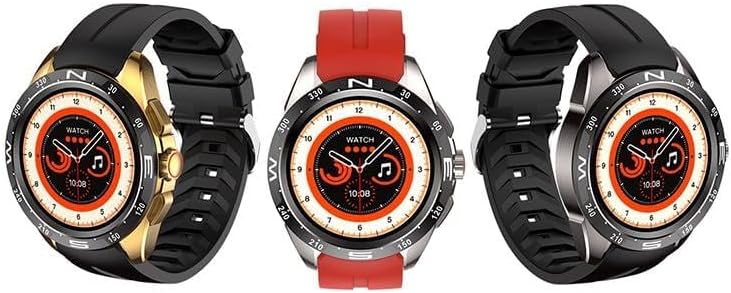
Image: The AWEI Smart Watch H22, showcasing its round display and various strap/bezel color options. This image illustrates the physical appearance of the device.
1.3 Усталёўка і спалучэнне праграм
- Спампаваць прыкладанне: Пошук the official AWEI smartwatch application in your smartphone's app store (compatible with iOS 9.0 and above, and Android 6.0 and above).
- Уключыць Bluetooth: Пераканайцеся, што Bluetooth уключаны на вашым смартфоне.
- Адкрыйце прыкладанне: Launch the AWEI app and follow the on-screen instructions to create an account or log in.
- Падключыце гадзіннік: Within the app, navigate to the device pairing section. The app will search for available devices. Select "AWEI H22" from the list to initiate pairing.
- Пацвердзіць спалучэнне: A pairing request may appear on your watch screen. Confirm the pairing on both your watch and smartphone.
Заўвага: Для аптымальнай прадукцыйнасці пераканайцеся, што аперацыйная сістэма вашага смартфона абноўлена.
2. Інструкцыя па эксплуатацыі
2.1 Асноўная навігацыя
- Сэнсарны экран: Правядзіце пальцам улева/управа, уверх/уніз, каб перамяшчацца па меню і функцыях. Націсніце, каб выбраць.
- Бакавая кнопка(і): Typically, a short press returns to the previous screen or watch face. A long press may power on/off or access a quick menu. Refer to the watch's on-screen prompts for specific button functions.
- Wrist Flip: Enable the "wrist flip to light up screen" feature in the app settings to automatically activate the display when you raise your wrist.
2.2 Асноўныя магчымасці
- Маніторынг сардэчнага рытму: Access the heart rate function on the watch to measure your current heart rate.
- Маніторынг кіслароду ў крыві: Use the blood oxygen feature to check your SpO2 levels.
- Мульты-спартыўныя рэжымы: The watch supports various sports modes including Running, Walking, Hiking, Basketball, Badminton, Boating, Climbing, Fitness, Cycling, Football, Yoga, and more. Select a mode before starting an activity to track relevant metrics like exercise time and calories burned.
- Адказваць/здзяйсняць званкі: Once paired via Bluetooth, you can answer incoming calls directly from your watch or dial numbers.
- Кіраванне музыкай: Кіруйце прайграваннем музыкі на смартфоне (прайграванне, паўза, пераключэнне трэкаў) непасрэдна з гадзінніка.
- Аддаленая фатаграфія: Выкарыстоўвайце гадзіннік як пульт дыстанцыйнага кіравання затворам для камеры смартфона.
- Наладжвальныя цыферблаты: Change watch faces from a selection of cloud-based options or upload your own photos via the app.
- Сядзячы напамін: Set reminders to encourage movement after periods of inactivity.
- Female Physiological Cycle Tracking: Monitor and track your physiological cycle through the app.
- Будзільнік: Set alarms directly on the watch or through the companion app.
3. Тэхнічнае абслугоўванне
3.1 Ачыстка
Рэгулярна чысціце гадзіннік і раменьчык мяккай сухой тканінай. Пры неабходнасці выкарыстоўвайце злёгкуamp анучай з мяккім мылам, затым вытрыце насуха. Пазбягайце агрэсіўных хімічных рэчываў або абразіўных матэрыялаў.
3.2 Воданепранікальнасць
The AWEI Smart Watch H22 has an IP68 waterproof rating. This means it is resistant to dust and can withstand immersion in water up to 1.5 meters for 30 minutes. It is suitable for daily use, such as washing hands, face, or during sweaty activities. However, it is not recommended for use in hot water (e.g., hot showers, saunas) or seawater, as this can compromise the waterproof seals.
3.3 Сыход за акумулятарам
- Пазбягайце частай поўнай разрадкі акумулятара.
- Charge the watch regularly, even if not in constant use, to maintain battery health.
- Захоўвайце гадзіннік у прахалодным, сухім месцы, калі ён не выкарыстоўваецца працяглы час.
4. Выпраўленне непаладак
| праблема | Магчымае рашэнне |
|---|---|
| Гадзіннік не ўключаецца. | Пераканайцеся, што гадзіннік цалкам зараджаны. Падключыце яго да зараднай прылады як мінімум на 30 хвілін. |
| Немагчыма спалучыць прыладу са смартфонам. |
|
| Inaccurate heart rate/blood oxygen readings. |
|
| Апавяшчэнні не атрыманы. |
|
5. Тэхнічныя характарыстыкі
| Асаблівасць | Дэталь |
|---|---|
| Нумар мадэлі | H22 |
| Памер экрана | 1.39 цалі |
| Ёмістасць батарэі | 400 мАг (літый-палімерны) |
| Час зарадкі | Прыбл. 2.5 гадзіны |
| Сувязь | Bluetooth |
| Сумяшчальнасць аперацыйнай сістэмы | iOS 9.0+ / Android 6.0+ |
| Рэйтынг воданепранікальнасці | IP68 |
| Асаблівасці | Heart rate, blood oxygen, female physiological cycle, sedentary reminder, customizable dial, wrist flip screen, time display, remote photo, music control, alarm clock, multiple sports mode detection. |
6. Гарантыя і падтрымка
Your AWEI Smart Watch H22 comes with a адзін год гарантыі з даты пакупкі. Гэтая гарантыя распаўсюджваецца на вытворчыя дэфекты пры нармальным выкарыстанні. Яна не распаўсюджваецца на пашкоджанні, выкліканыя няправільным выкарыстаннем, няшчаснымі выпадкамі, несанкцыянаванымі мадыфікацыямі або невыкананнем інструкцый, выкладзеных у гэтым кіраўніцтве.
For technical support, warranty claims, or any questions regarding your device, please contact AWEI customer service. Refer to the contact information provided with your product packaging or visit the official AWEI webсайт для падрабязнай інфармацыі аб падтрымцы.
Калі ласка, захавайце пацвярджэнне пакупкі для гарантыйных мэт.
Ask a question about this manual
Ask about setup, troubleshooting, compatibility, parts, safety, or missing instructions. Manuals+ will review the question and use this page’s manual context to help answer it.