
CHEREEKI STK-4006L
CHEREEKI Wireless Gamepad for PS-4
Model: STK-4006L
Кіраўніцтва карыстальніка
Уводзіны
Thank you for choosing the CHEREEKI Wireless Gamepad for PS-4. This controller is designed to enhance your gaming experience on PS-4, PS4 Slim, and PS4 Pro consoles, offering precise control, immersive feedback, and comfortable design. This manual provides detailed instructions on setting up, operating, maintaining, and troubleshooting your new gamepad.

Image: The CHEREEKI Wireless Gamepad in white, showcasinг яго эрганамічны дызайн.
Прадукт скончаныview
Familiarize yourself with the various components and buttons of your CHEREEKI Wireless Gamepad.
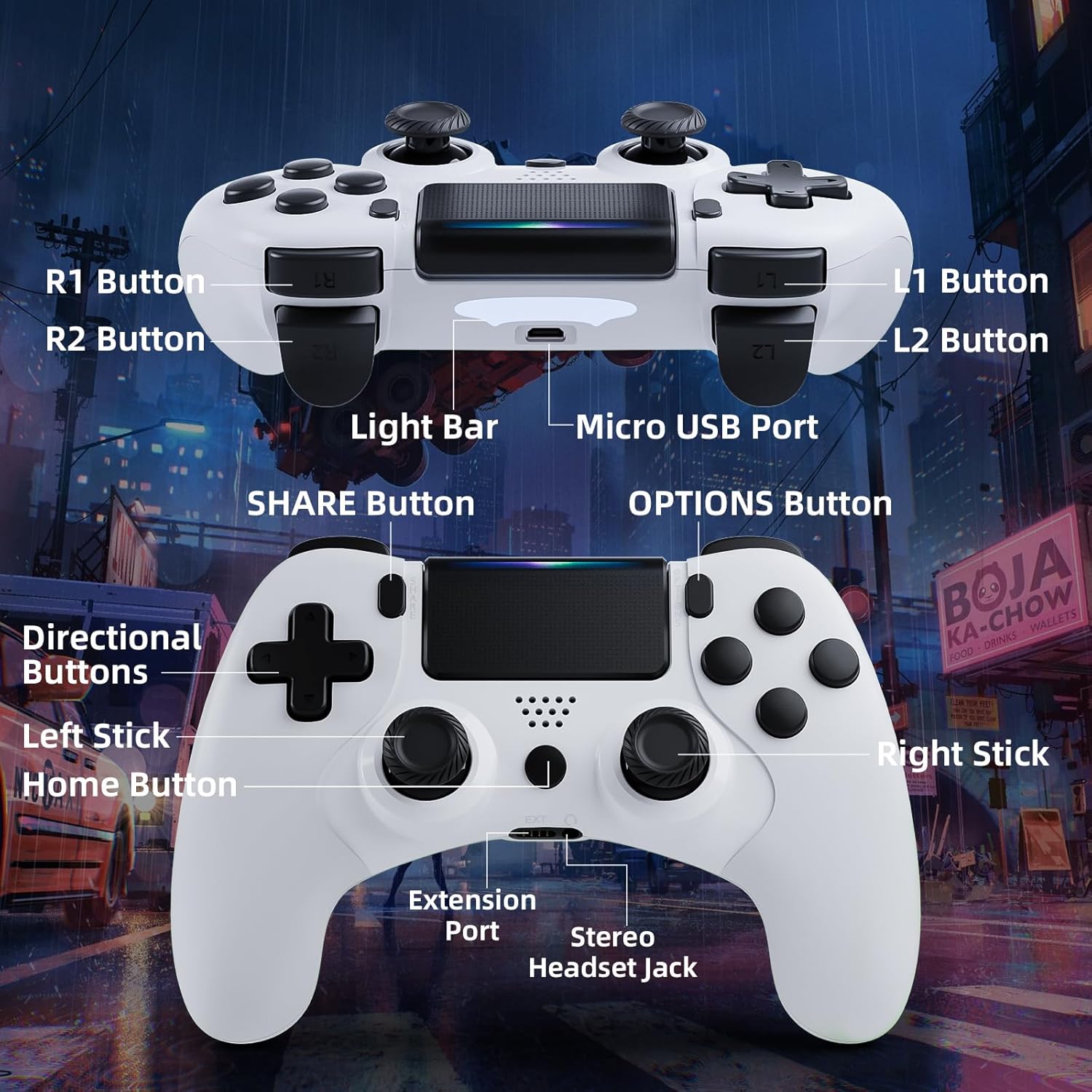
Image: Detailed diagram of the CHEREEKI Wireless Gamepad, highlighting its various buttons and ports for easy identification.
Кампаненты кантролера:
- R1 Button: Right shoulder button.
- R2 Button: Right trigger button.
- L1 Button: Left shoulder button.
- L2 Button: Left trigger button.
- Светлая паласа: Indicates controller status and player number.
- Порт Micro USB: For charging and initial wired connection.
- Кнопка ПАДЗЯЛІЦЦА: For sharing gameplay videos and screenshots.
- Кнопка ПАРАМЕТРЫ: Access in-game menus and options.
- Кнопкі кіравання (D-Pad): Для накіраванага ўводу.
- Левы джойсцік: Analog stick for movement.
- Кнопка дадому: PS button, for turning on/off the console and accessing the PS menu.
- Правы джойсцік: Analog stick for camera control or aiming.
- Порт пашырэння: For compatible accessories.
- Stereo Headset Jack: Для падключэння гарнітуры.
Настройка
1. Пачатковае падключэнне і спалучэнне
The controller must be connected via USB cable for the first time to pair with your PS-4 console. This establishes the connection for future wireless use.
- Ensure your PS-4 console is powered on.
- Connect the Micro USB cable to the controller's Micro USB Port and the other end to a USB port on your PS-4 console.
- Націсніце Кнопка "Дадому". (PS button) on the controller. The light bar will flash and then glow steadily, indicating successful pairing.
- Once paired, you can disconnect the USB cable to use the controller wirelessly.
2. Зарадка геймпада
The CHEREEKI Wireless Gamepad features a built-in 600 mAh rechargeable battery.
- Connect the controller to your PS-4 console or a standard USB charger using the Micro USB cable.
- The light bar will slowly pulse orange while charging.
- Звычайна поўная зарадка займае 2-3 гадзіны.
- Once fully charged, the light bar will turn off.
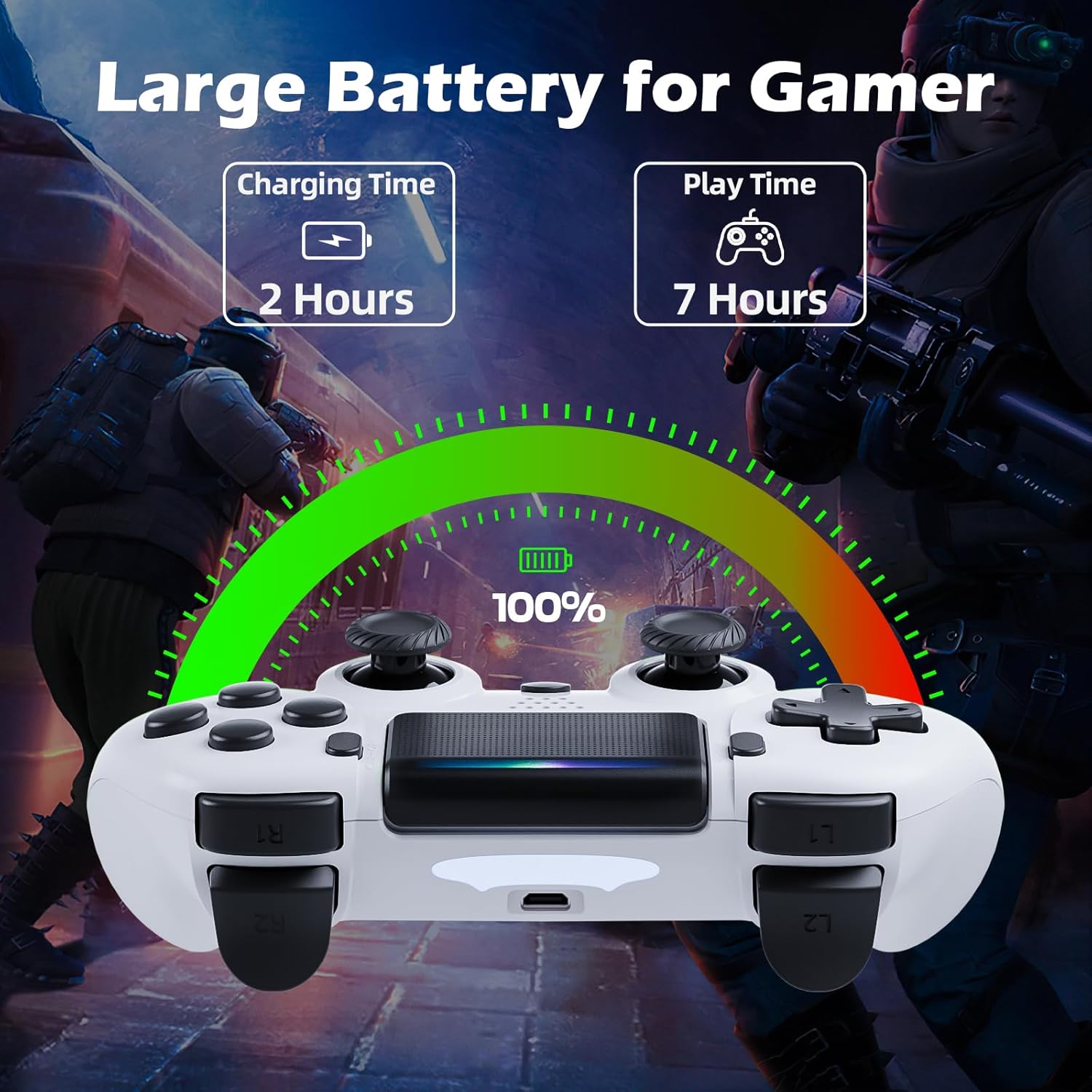
Image: Illustration showing the controller's charging time of 2 hours and play time of 7 hours on a full charge.
3. Сумяшчальнасць
This controller is compatible with PS-4, PS4 Slim, and PS4 Pro consoles.

Image: Visual representation of the controller's wide compatibility with PS4, PS4 Slim, and PS4 Pro consoles.
Інструкцыя па эксплуатацыі
1. Асноўныя элементы кіравання
The gamepad features standard PS-4 button layouts for intuitive gameplay.
- Аналагавыя джойсцікі: Use the Left Stick for character movement and the Right Stick for camera control or aiming.
- Кнопкі кіравання (D-Pad): For precise directional input in menus or specific game actions.
- Кнопкі дзеянняў (трохкутнік, круг, крыж, квадрат): Выконвайце ўнутрыгульнёвыя дзеянні, вызначаныя гульнёй.
- Shoulder and Trigger Buttons (L1, L2, R1, R2): Used for various actions like shooting, aiming, or interacting.
2. Motion Sensor (Gyro) Control
The built-in 6-axis motion sensor allows for intuitive control by tilting and rotating the controller.
- In supported games, you can use motion control for actions like steering, aiming, or adjusting viewныя вуглы.
- Experiment with tilting the controller to achieve faster turns, adjust viewing angles, or aim more accurately.

Image: Illustration demonstrating the Gyro Motion Control feature, allowing for faster turning, viewing angle adjustment, and accurate aiming.
3. Double Vibration Feedback
Experience immersive gameplay with the dual motor vibration feature, providing tactile feedback for in-game events.
- The controller will vibrate to simulate impacts, explosions, and other in-game sensations.
- Vibration intensity may vary based on game design.

Image: Illustration of the Double Motor Vibration feature, showing the internal motors that provide immersive haptic feedback during gameplay.
4. Функцыянальнасць сэнсарнай панэлі
The integrated touchpad allows for new ways to interact with games and navigate menus.
- Tap, swipe, or click the touchpad as required by specific games or system functions.
5. Кнопка SHARE
The SHARE button allows you to easily share your gameplay moments.
- Націсніце Кнопка SHARE to access the Share menu, where you can upload screenshots or video clips to social media, or start a broadcast.
6. Stereo Headset Jack
Connect your compatible 3.5mm headset to the Stereo Headset Jack for in-game audio and voice chat.
- Plug your headset into the port located at the bottom of the controller.
- Adjust audio settings via the PS-4 system menu.
7. Эрганамічны дызайн
The controller is designed for comfort during extended gaming sessions.

Image: Depiction of the controller's ergonomic design, showing how it comfortably fits the shape of the hand for prolonged use.
Тэхнічнае абслугоўванне
Proper care will extend the life of your CHEREEKI Wireless Gamepad.
- Уборка: Выкарыстоўвайце мяккую сухую тканіну для працірання кантролера. Для ўстойлівага бруду злёгкуampпрамыйце тканіну вадой. Пазбягайце агрэсіўных хімічных рэчываў або абразіўных ачышчальнікаў.
- захоўванне: Захоўвайце кантролер у прахалодным, сухім месцы, удалечыні ад прамых сонечных прамянёў і экстрэмальных тэмператур.
- Сыход за батарэяй: To maintain battery health, avoid fully discharging the controller frequently. If storing for a long period, charge the battery to about 50% every few months.
- Апрацоўка: Avoid dropping the controller or exposing it to excessive force, which can damage internal components.
Ліквідацыю непаладак
If you encounter issues with your gamepad, refer to the following common problems and solutions.
| праблема | Магчымая прычына | Рашэнне |
|---|---|---|
| Controller does not connect wirelessly or connection is unstable. | Not properly paired; too far from console; interference. |
|
| Controller does not charge or holds charge for a short time. | Faulty cable; power source issue; battery degradation. |
|
| Кнопкі не рэагуюць або заліпаюць. | Debris under buttons; physical damage. |
|
| No vibration feedback. | Vibration disabled in game/system settings; game does not support vibration. |
|
Тэхнічныя характарыстыкі
| Асаблівасць | Дэталь |
|---|---|
| Нумар мадэлі | СТК-4006Л |
| Сумяшчальнасць | PS-4, PS4 Slim, PS4 Pro |
| Сувязь | Wireless (Bluetooth), Wired (Micro USB) |
| Далёкасць бесправадной сувязі | Да 8 метраў |
| Тып батарэі | Убудаваны літый-іённы акумулятар |
| Ёмістасць батарэі | 600 мАг |
| Час зарадкі | Прыбл. 2-3 гадзіны |
| Час гульні | Да 7 гадзін |
| Памеры (Д х Ш х У) | 17.4 х 13 х 7.6 см (прыблізна 6.85 х 5.12 х 2.99 цалі) |
| Вага | 210 грамаў (прыблізна 0.46 фунта) |
| Датчыкі | 6-axis motion sensor (gyroscope, accelerometer) |
| Вібрацыя | Двайная вібрацыя рухавіка |
| Увод/Вывад | Touchpad, Stereo Headset Jack, Extension Port |
Гарантыя і падтрымка
For warranty information, please refer to the documentation included with your purchase or visit the official CHEREEKI webсайт. Умовы гарантыі могуць адрознівацца ў залежнасці ад рэгіёна і прадаўца.
If you require technical support or have questions not covered in this manual, please contact the seller or CHEREEKI customer service through their official channels. Provide your model number (STK-4006L) and a detailed description of your issue for faster assistance.