
1. Уводзіны
Thank you for choosing the KESIEME Intelligent Touch Screen Open Ear Earbuds. These wireless headphones are designed for comfort and awareness, featuring an open-ear design, Bluetooth 5.4 connectivity, and a touch-screen charging case for intuitive control. This manual provides detailed instructions to help you get the most out of your device.

Image 1.1: KESIEME Open Ear Earbuds and their intelligent touch screen charging case.
2. Змесціва ўпакоўкі
Калі ласка, пастаўце галачку для наступных пунктаў:
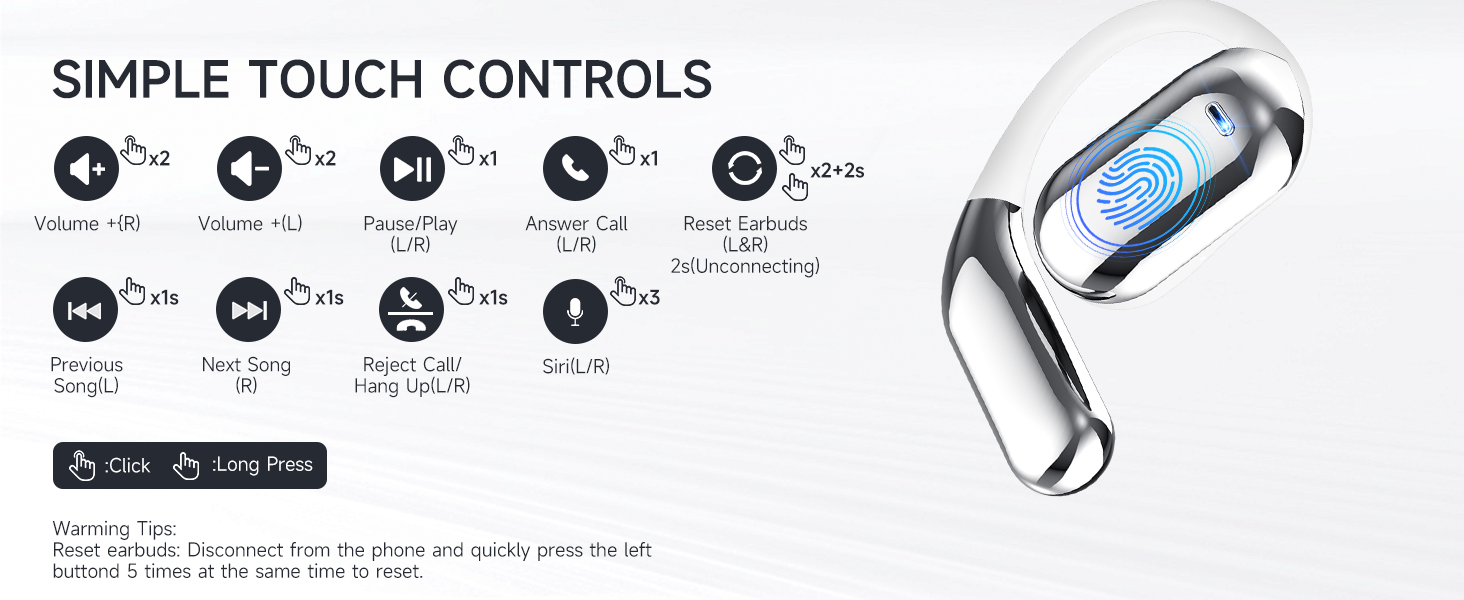
Image 2.1: Illustration of items included in the product package.
- Open Air Conduction Earphones (2 units)
- Зарадны чахол (1 адзінка)
- Кіраўніцтва карыстальніка (1 адзінка)
- Зарадны кабель Type-C (1 шт.)
3. Прадукт скончыўсяview і Асаблівасці
3.1 Open Ear Design
The KESIEME earbuds feature an open-ear design that rests gently on the ear, providing comfort for extended wear and allowing you to remain aware of your surroundings. This design minimizes pressure in the ear canal and reduces the risk of hearing damage compared to in-ear headphones.

Image 3.1: Comparison of open-ear design comfort versus traditional in-ear designs.
3.2 Premium Sound Quality
Equipped with dual 14.2mm air conduction dynamic drivers, these headphones deliver clear sound, powerful volume, and stereo audio. The design addresses sound leakage, ensuring a private listening experience.

Малюнак 3.2: Падрабязны view of the 14.2mm dynamic drivers for enhanced audio.
3.3 Тэхналогія Bluetooth 5.4
The earbuds utilize Bluetooth 5.4 for a stable, fast, and low-latency wireless connection. This advanced technology ensures an uninterrupted audio experience with a connection range of up to 33 feet (10 meters).

Image 3.3: Benefits of upgraded Bluetooth 5.4 technology.
3.4 Камфорт і пасадка
Designed with ergonomic ear hooks and skin-friendly materials, the earbuds are lightweight and provide a secure, comfortable fit for various activities.

Image 3.4: Features contributing to the ultimate comfort and fit of the earbuds.
4. Настройка і зарадка
4.1 Першапачатковая зарадка
Before first use, fully charge the earbuds and the charging case. Connect the provided Type-C charging cable to the charging case and a power source. The smart LED power display on the case will indicate the charging status and battery levels.
A single full charge provides up to 20 hours of earbud playtime. The charging case can recharge the earbuds multiple times, extending total playtime to approximately 48 hours.
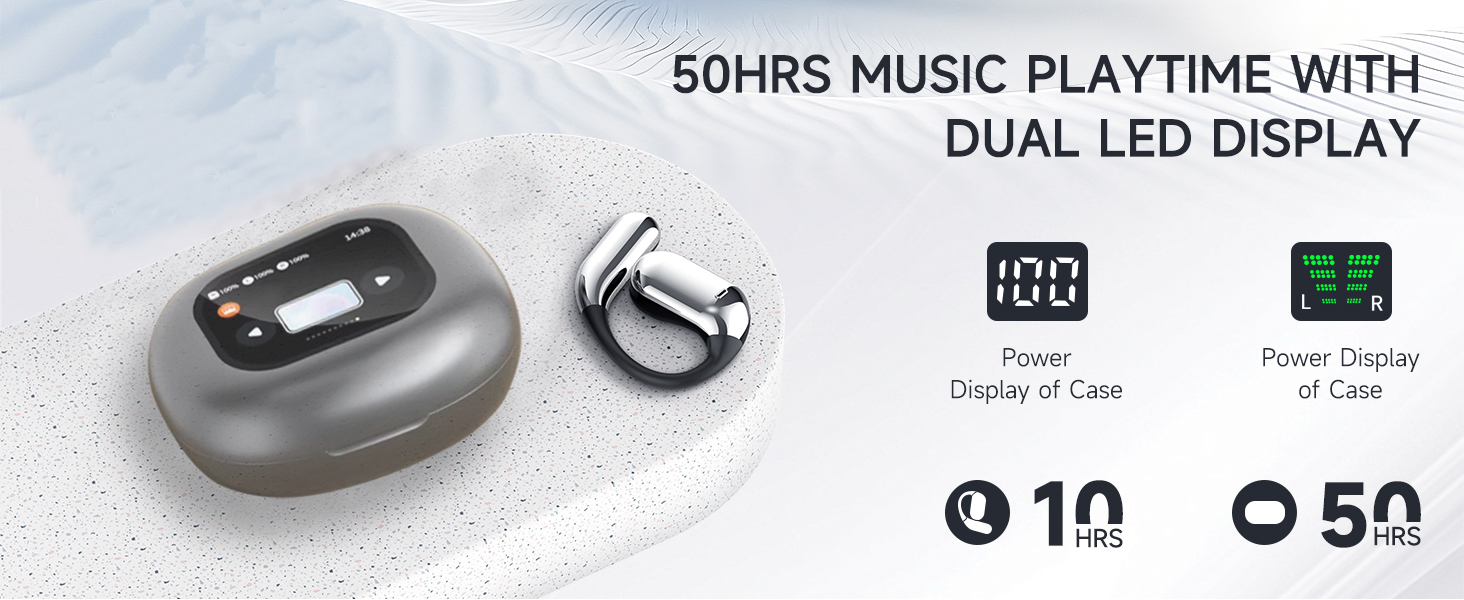
Image 4.1: Charging case with LED display showing battery status and total playtime.
4.2 Спалучэнне з прыладай
- Пераканайцеся, што навушнікі зараджаны.
- Адкрыйце зарадны кейс. Навушнікі аўтаматычна ўключацца і пяройдуць у рэжым спалучэння.
- На вашай прыладзе (смартфоне, планшэце, камп'ютары) уключыце Bluetooth і знайдзіце даступныя прылады.
- Select "KESIEME YYK" (or similar model name) from the list to connect.
- Пасля падключэння вы пачуеце гук пацверджання, і навушнікі будуць гатовыя да выкарыстання.
Заўвага: Навушнікі аўтаматычна падключацца да апошняй спалучанай прылады пасля вымання з чахла, калі на прыладзе ўключаны Bluetooth.
5. Інструкцыя па эксплуатацыі
5.1 Нашэнне навушнікаў
Для надзейнай і камфортнай пасадкі выканайце наступныя дзеянні:
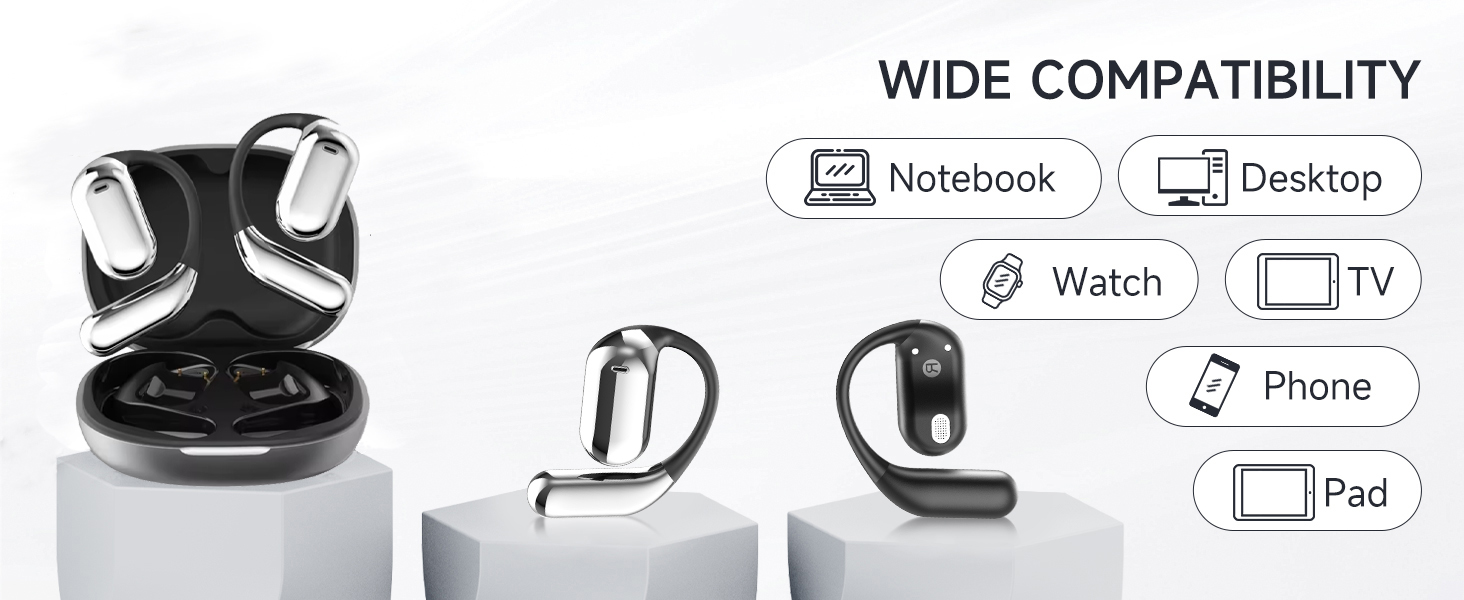
Image 5.1: Step-by-step instructions for correctly wearing the earbuds.
- Дастаньце навушнікі з чахла для зарадкі.
- Hang the end of the earphones on the ear bone.
- Turn the earphones and slide them behind the ear.
- Адрэгулюйце завушны кручок, надзеньце і пацягніце яго ўніз для надзейнай фіксацыі.
5.2 Сэнсарнае кіраванне
The earbuds feature intuitive touch controls for managing audio playback, calls, and voice assistant functions. The charging case also has a touch screen for additional controls.
Выява 5.2: Канецview of earbud touch controls.
| Дзеянне | Функцыя |
|---|---|
| Double Click (L/R) | Volume + (Right Earbud), Volume - (Left Earbud) |
| Single Click (L/R) | Прайграванне/прыпыненне музыкі, адказ на выклік |
| Доўгі націск 1 секунды (Л/П) | Previous Song (Left Earbud), Next Song (Right Earbud) |
| Доўгі націск 2 секунды (Л/П) | Reject Call / Hang Up Call |
| Triple Click (L/R) | Актывацыя галасавога памочніка (Siri/Google Assistant) |
| Double Click + Long Press 2s (L/R) | Reset Earbuds (Disconnect from phone, then quickly press left button 5 times to reset) |
5.3 Функцыі сэнсарнага экрана зараднага чахла
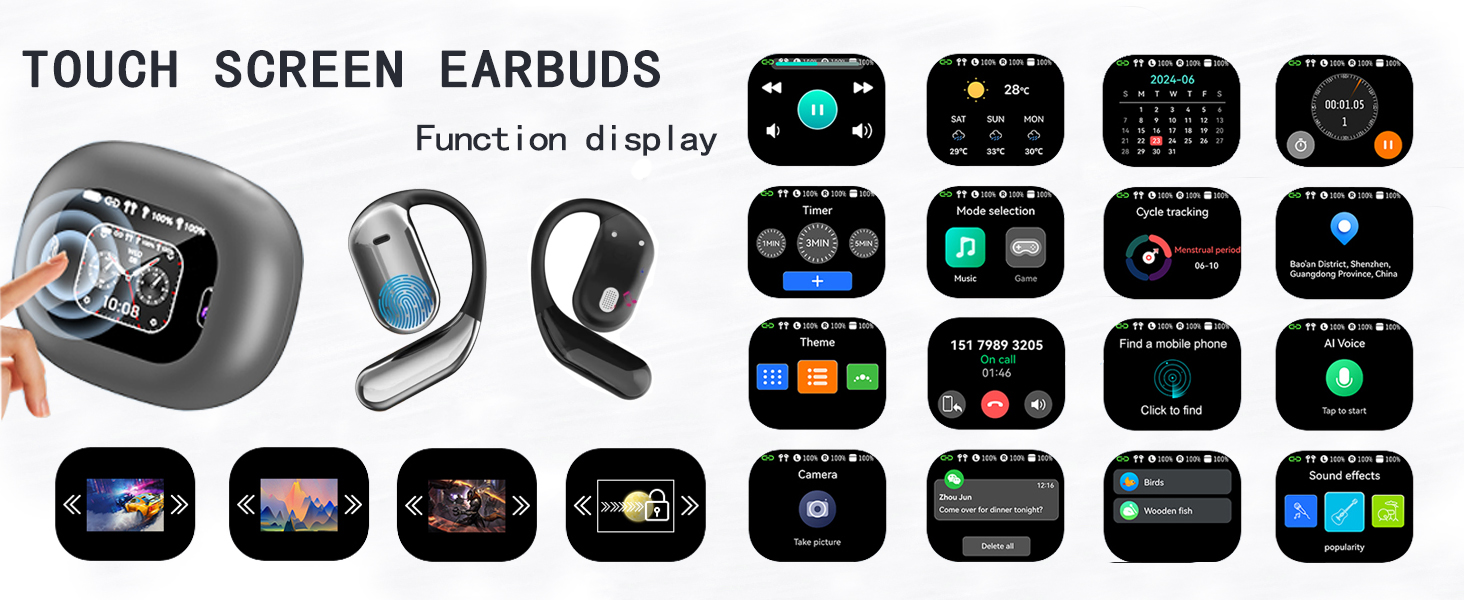
The charging case features an LCD full-color touch screen, providing access to various functions directly from the case.
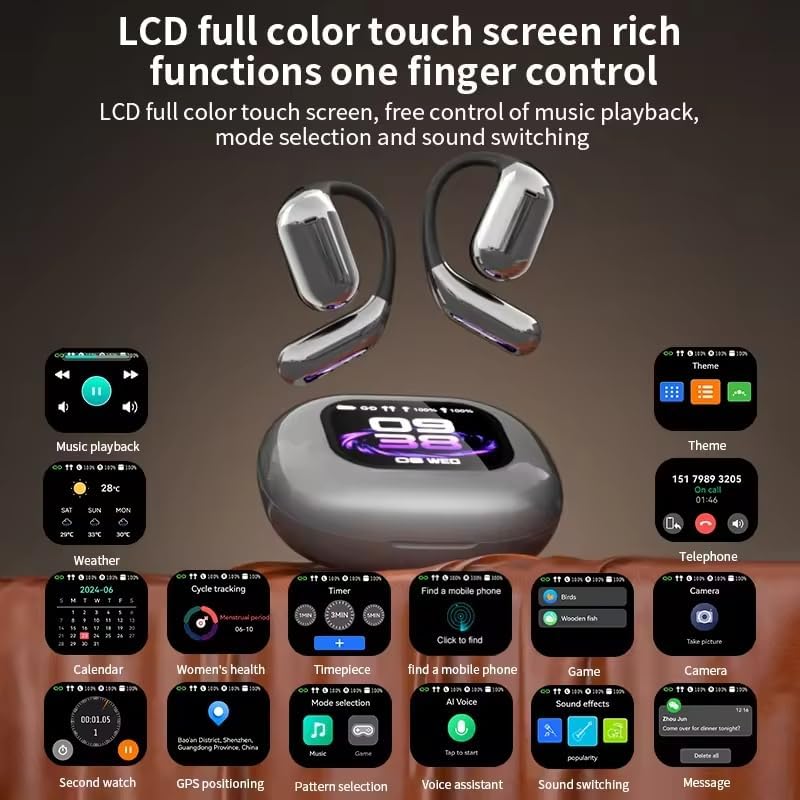
Выява 5.3: Канецview of the charging case's touch screen interface and available functions.
- Прайграванне музыкі: Control tracks and volume.
- Надвор'е: View current weather information.
- Каляндар: Access date and time.
- Таймер: Set countdowns.
- Выбар рэжыму: Switch between different audio modes (e.g., Music, Game).
- Адсочванне цыклу: (Potentially for fitness, details not specified).
- Find a Mobile Phone: Знайдзіце спалучаны смартфон.
- Тэмы: Наладзьце тэму дысплея.
- тэлефон: View call history or dial.
- Камера: Remote control for your phone's camera.
- AI Voice: Актывуйце галасавога памочніка.
- Гукавыя эфекты: Adjust audio equalization.
- Паведамленні: View апавяшчэнні.
6. Тэхнічнае абслугоўванне
To ensure the longevity and optimal performance of your KESIEME earbuds, follow these maintenance guidelines:
- Уборка: Рэгулярна працірайце навушнікі і зарадны футляр мяккай, сухой тканінай без ворса. Пазбягайце выкарыстання абразіўных матэрыялаў, спірту або хімічных ачышчальнікаў.
- захоўванне: Калі навушнікі не выкарыстоўваюцца, захоўвайце іх у зарадным футляры, каб абараніць ад пылу і пашкоджанняў. Трымайце футляр закрытым.
- Зарадка: Use only the provided Type-C cable for charging. Avoid exposing the charging port to moisture.
- Воданепранікальнасць: Навушнікі воданепранікальныя, але не цалкам воданепранікальныя. Пазбягайце апускання іх у ваду і моцнага дажджу. Старанна высушыце іх, калі яны намокнуць.
- тэмпература: Do not expose the earbuds or charging case to extreme temperatures (hot or cold) or direct sunlight for prolonged periods.
7. Выпраўленне непаладак
Калі ў вас узніклі праблемы з навушнікамі-ўкладышамі, звярніцеся да наступных распаўсюджаных рашэнняў:
| праблема | Рашэнне |
|---|---|
| Навушнікі не спалучаюцца/не падключаюцца |
|
| Няма гуку альбо малая гучнасць |
|
| Чахол для зарадкі не зараджаецца |
|
| Сэнсарныя элементы кіравання не рэагуюць |
|
8. Тэхнічныя характарыстыкі
| Асаблівасць | Дэталь |
|---|---|
| Марка | КЕСІЭМЕ |
| Назва мадэлі | Open Ear Earbuds (YYK) |
| Тэхналогія падлучэння | Бесправадная сувязь (Bluetooth) |
| Тэхналогія бесправадной сувязі | Bluetooth 5.4 |
| Дыяпазон Bluetooth | 33 футаў (10 метраў) |
| Размяшчэнне вушэй | Адкрытае вуха |
| Формаў-фактар | АДКРЫТАЕ ВУХА |
| Тып аўдыё драйвера | Дынамічны драйвер |
| Памер аўдыё драйвера | 14.2 міліметра |
| Дыяпазон частот | 20 Гц - 20 000 Гц |
| Імпеданс | 32 Ом |
| Тэрмін службы батарэі (навушнікі) | Да 20 гадзін (адной зарадкі) |
| Агульны час прайгравання (з кейсам) | Да 48 гадзін |
| Тып кіравання | Дакранацца |
| Узровень воданепранікальнасці | Водатрывалы |
| Вага прадмета | 6.7 унцыі (0.19 кілаграма) |
| Памеры прадукту | 6 х 4.2 х 1.5 цалі |
| Сумяшчальныя прылады | Desktops, Laptops, Tablets, Mobile Phones |
9. Гарантыя і падтрымка
KESIEME products are designed for reliability and performance. For warranty information, please refer to the documentation included with your purchase or contact KESIEME customer support.
If you require further assistance or have questions not covered in this manual, please contact KESIEME customer support through their official website or the retailer where you purchased the product. Please have your model number (YYK) and purchase details ready.