
STINGER 10.1" - IX210
Stinger HORIZON10 10.1" Universal Car Stereo
Кіраўніцтва па эксплуатацыі
Уводзіны
The Stinger HORIZON10 is a state-of-the-art 10.1-inch universal car stereo designed to enhance your in-vehicle entertainment and connectivity. Featuring a 1280x800 HD weather-resistant touchscreen, wireless Apple CarPlay and Android Auto, advanced audio controls, and multiple camera inputs, the HORIZON10 provides a comprehensive and intuitive user experience. This manual provides detailed instructions for setting up, operating, maintaining, and troubleshooting your new car stereo.

Image: The Stinger HORIZON10 Infotainment System, showcasinяго элегантны дызайн і карыстальніцкі інтэрфейс.
Што ў скрынцы
Upon unboxing your Stinger HORIZON10, please verify that all the following components are included:
- 10.1" Multimedia Touchscreen Display
- Радыёмодуль
- Кранштэйн дысплея
- Nose Bracket - Radio Bracket
- Задняя вечка раздыма LVDS
- Шрубы
- Воданепранікальная заглушка
- 16-кантактны AV-правод
- 12-кантактны джгут папярэдняга выхаду
- 14-кантактны джгут дадзеных
- 26 Pin Power Harness LVDS Display Cable
- Знешні мікрафон
- GPS антэна
- GPS Mounting Plate
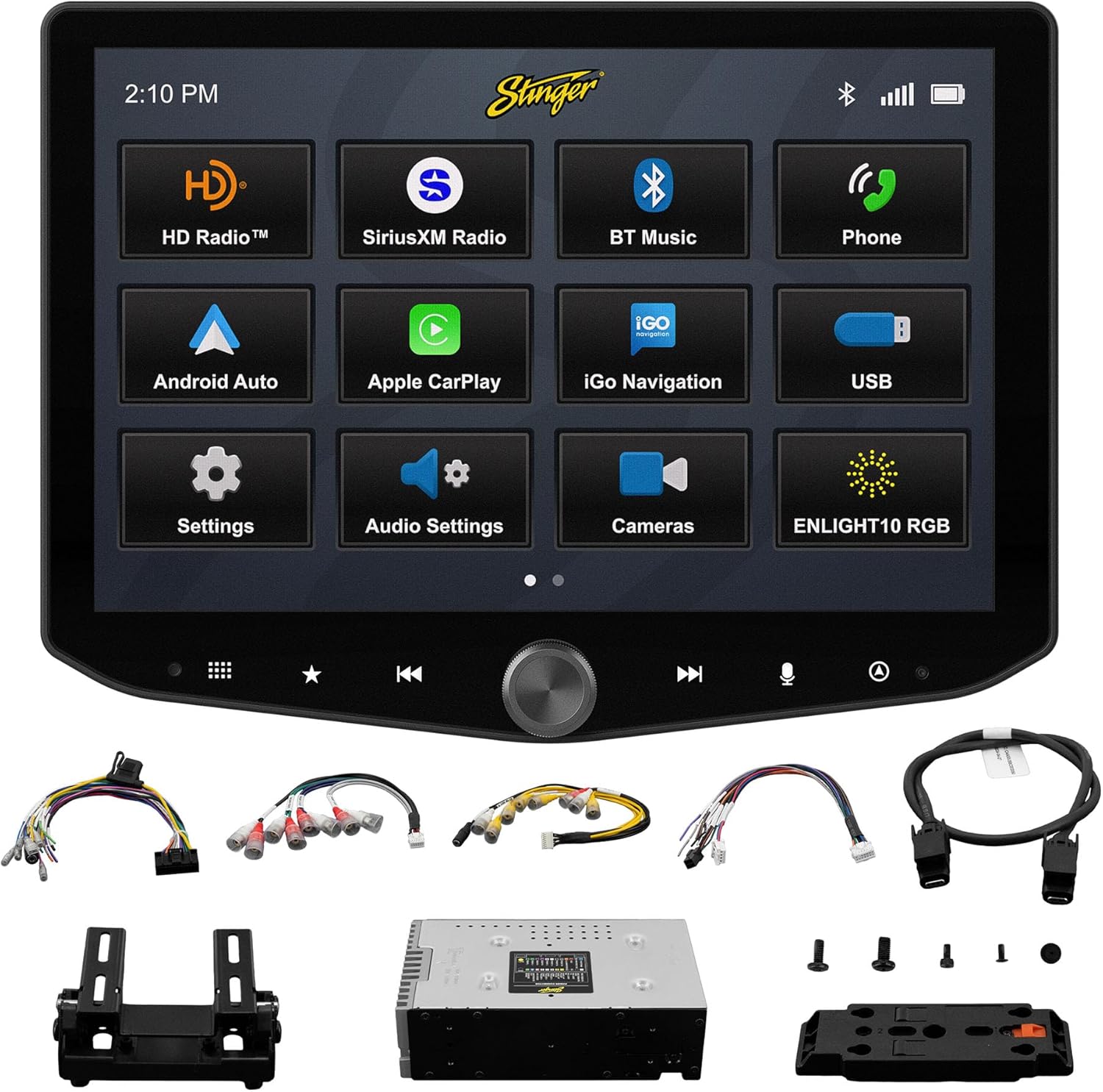
Image: All components included with the Stinger HORIZON10 car stereo system.
Настройка і ўстаноўка
Professional installation is highly recommended for the Stinger HORIZON10 to ensure proper functionality and integration with your vehicle's electrical system. This unit is designed for universal compatibility, but specific vehicle dash kits, wiring harness interfaces, or antenna adapters may be required and are sold separately.
Пачатковыя крокі наладкі:
- Мантаж: Securely mount the display and radio module using the provided brackets and screws. Ensure proper ventilation around the unit.
- Праводка: Connect the 16-pin AV harness, 12-pin pre-out harness, 14-pin data harness, and 26-pin power harness LVDS display cable to the corresponding ports on the radio module and your vehicle's wiring system. Refer to your vehicle's specific wiring diagram if necessary.
- Знешнія злучэнні: Connect the external microphone for hands-free calling and the GPS antenna for navigation functionality.
- Уключэнне: Once all connections are secure, power on your vehicle to initiate the stereo. The unit should boot up and display the Stinger logo.
- Першапачатковая канфігурацыя: Выконвайце падказкі на экране для пачатковай налады, такія як выбар мовы і гадзіннага пояса.
Інструкцыя па эксплуатацыі
Сэнсарны інтэрфейс
The HORIZON10 features a large 10.1" 1280x800 HD floating touchscreen with anti-glare and anti-fingerprint film protection. Navigate through menus and applications by tapping, swiping, and pinching on the screen. The capacitive touch panel buttons and machined aluminum anodized knob provide additional tactile control.

Выява: Падрабязная view of the Stinger HORIZON10 touchscreen, highlighting its capacitive touch buttons and anodized knob.
Бесправадная сетка Apple CarPlay і Android Auto
Connect your iPhone or Android phone wirelessly to access navigation, calls, messages, music, and more directly on the HORIZON10 display. Wired connections are also supported via the USB-C input, which also provides fast 3A phone charging.

Image: The Stinger HORIZON10 displaying the Apple CarPlay interface wirelessly connected to an iPhone.

Image: The Stinger HORIZON10 displaying the Android Auto interface wirelessly connected to an Android phone.
Bluetooth 5.1 & Wi-Fi Connectivity
The unit supports dual phone connections for fast hands-free calling and music streaming via Bluetooth 5.1 A2DP. Wi-Fi connectivity enables additional features and updates.
Пашыраныя функцыі гуку
Customize your sound experience with the 15-band adjustable EQ, 6 user EQ presets, and built-in crossover with HPF & LPF. The system offers 4.5 Vrms & 8ch RCA outputs with subwoofer control, and a Toslink (optical) audio output (48 kHz variable) for high-fidelity sound.

Image: Screenshot of the Stinger HORIZON10's advanced audio settings, showing the 15-band equalizer.
Уваходы камеры
Integrate up to four cameras (front/rear dashcam, blind spot cameras, backup camera) for enhanced safety and visibility. The system supports both AHD 720p and CVBS 480p camera inputs.

Image: The Stinger HORIZON10 displaying multiple camera views, illustrating its 4 camera input capability.
Радыё цюнэр
Enjoy a wide variety of audio content with the built-in HD AM/FM radio tuner. The unit is also SiriusXM-Ready (SiriusXM Tuner Sold Separately).

Image: The Stinger HORIZON10 displaying the HD Radio interface, showing available stations.
USB & HDMI Inputs
The unit includes two USB-A inputs, one USB-C input (with 3A charging), and one HDMI input for media playback or mirroring.
Налада
Personalize your experience by changing the background image and rearranging Home screen icons for easier access to your most used features.
onX Offroad App
The HORIZON10 includes a free 3-month trial of the onX GPS navigation off-roading map app. Register on the Stinger website to activate your trial.
Відэа прадуктуview
Відэа: Чыноўнік скончыўview of the Stinger HORIZON10's key features and capabilities.
Тэхнічнае абслугоўванне
To ensure the longevity and optimal performance of your Stinger HORIZON10, follow these maintenance guidelines:
- Ачыстка экрана: Выкарыстоўвайце мяккую тканіну без ворса, каб акуратна працерці сэнсарны экран. Для выдалення ўстойлівых плям злёгкуampПрацярыце тканіну вадой або сродкам для ачысткі экрана. Пазбягайце абразіўных матэрыялаў або агрэсіўных хімічных рэчываў.
- Ўстойлівасць да надвор'я: While the display is IP65 weather-resistant, the radio chassis is not. Avoid direct exposure of the main unit to water or excessive moisture.
- Агульны догляд: Трымайце прыладу чыстай ад пылу і смецця. Пераканайцеся, што ўсе злучэнні надзейныя.

Image: The Stinger HORIZON10 display with water droplets, demonstrating its IP65 weather-resistant feature.
Ліквідацыю непаладак
If you encounter issues with your Stinger HORIZON10, refer to the following common problems and solutions:
| праблема | Магчымая прычына | Рашэнне |
|---|---|---|
| Няма сілы | Няспраўнае падключэнне да электрасеткі, перагарэлы засцерагальнік, праблема з акумулятарам аўтамабіля. | Check all power connections. Inspect vehicle fuses. Ensure vehicle battery is charged. |
| Няма аўдыявыхаду | Incorrect audio settings, loose speaker wires, ampLifier пытанне. | Verify audio settings (volume, mute, source). Check speaker wire connections. Consult an audio specialist if using an external ampзадымнік. |
| CarPlay/Android Auto не падключаецца | Bluetooth/Wi-Fi off on phone, incorrect pairing, phone software issue. | Ensure Bluetooth and Wi-Fi are enabled on your phone. Re-pair the device. Restart both the phone and the HORIZON10 unit. Update phone OS. |
| Сэнсарны экран не рэагуе | Temporary software glitch, excessive dirt/moisture on screen. | Perform a soft reset (refer to device settings for reset option). Clean the screen thoroughly. If persistent, contact support. |
| Дрэнны радыёпрыём | Антэна не падключана, пашкоджана антэна, зона слабага сігналу. | Праверце падключэнне антэны. Калі вы знаходзіцеся ў зоне са слабым прыёмам, падумайце аб выкарыстанні ўзмацняльніка сігналу. |
If the problem persists after attempting these solutions, please contact Stinger customer support.
Тэхнічныя характарыстыкі
| Асаблівасць | Дэталь |
|---|---|
| Нумар мадэлі | 10.1" - IX210 |
| Памеры прадукту | 12.75 х 7.5 х 9.75 цалі |
| Вага прадмета | 6.98 фунта |
| Памер дысплея | 10.1 цаляў |
| Дазвол дысплея | 1280x800 HD |
| Ўстойлівасць да надвор'я | IP65 (Display only) |
| Тэхналогія падлучэння | Bluetooth 5.1 A2DP, Wi-Fi |
| Тып кантролера | Smartphone, Touchscreen |
| Уваходы USB | 2x USB-A, 1x USB-C (3A charging) |
| Парты HDMI | 1 |
| Уваходы камеры | 4 (AHD 720p / CVBS 480p compatible) |
| Рэжым выхаду гуку | Стэрэа |
| Канфігурацыя канала аб'ёмнага гуку | 7.1 |
| Колькасць каналаў | 8 |
| EQ | 15-band adjustable EQ, 6 user presets |
| Вынікі RCA | 4.5 Vrms & 8ch with subwoofer control |
| Аптычны аўдыявыхад | Toslink (48 kHz variable) |
Інфармацыя аб гарантыі
For detailed warranty information regarding your Stinger HORIZON10, please refer to the warranty card included with your product or visit the official STINGER webсайт. Умовы гарантыі могуць адрознівацца і рэгулююцца палітыкай вытворцы.
Падтрымка кліентаў
Should you require further assistance, technical support, or have questions not covered in this manual, please contact STINGER customer service through their official webсайт або кантактную інфармацыю, прадстаўленую ў дакументацыі да вашага прадукту.
Афіцыйны STINGER Webсайт: www.stinger.com
Ask a question about this manual
Ask about setup, troubleshooting, compatibility, parts, safety, or missing instructions. Manuals+ will review the question and use this page’s manual context to help answer it.