
1. Уводзіны
This manual provides essential information for the proper use and care of your SUAAT S3 10-inch Android 14 Tablet. Please read this manual thoroughly before operating the device to ensure optimal performance and longevity. Keep this manual for future reference.
2. Змесціва ўпакоўкі
Праверце, ці ўсе пералічаныя ніжэй прадметы ўваходзяць у камплект. Калі якія-небудзь прадметы адсутнічаюць або пашкоджаныя, звярніцеся ў службу падтрымкі кліентаў.
- Планшэт SUAAT S3
- Корпус планшэта
- Ахоўная фільм
- Клавіятура
- Мышка
- Type-C to USB Adapter (OTG)
- Кабель Type-C
- European Standard Charger
- Штыфт для выталки SIM-карты
- Кіраўніцтва карыстальніка

Малюнак 2.1: All items included in the SUAAT S3 Tablet package.
3. Прадукт скончыўсяview
The SUAAT S3 tablet features a sleek design with a 10-inch display and a robust set of accessories to enhance your user experience.

Малюнак 3.1: SUAAT S3 Tablet and its accessories.
Асноўныя характарыстыкі:
- Аперацыйная сістэма: Android 14
- Працэсар: Octa-core 1.8 GHz (A523)
- Аператыўная памяць: 20 ГБ (6 ГБ фізічнай памяці + 14 ГБ пашырэння)
- ПЗУ: 128 ГБ
- Дысплей: 10.1-inch IPS, 1280 x 800 pixels
- Падключэнне: Dual-band WiFi (2.4G/5G), Bluetooth 5.0
- акумулятар: 6000 мАг
- сертыфікацыя: GMS Certified, Widevine L1
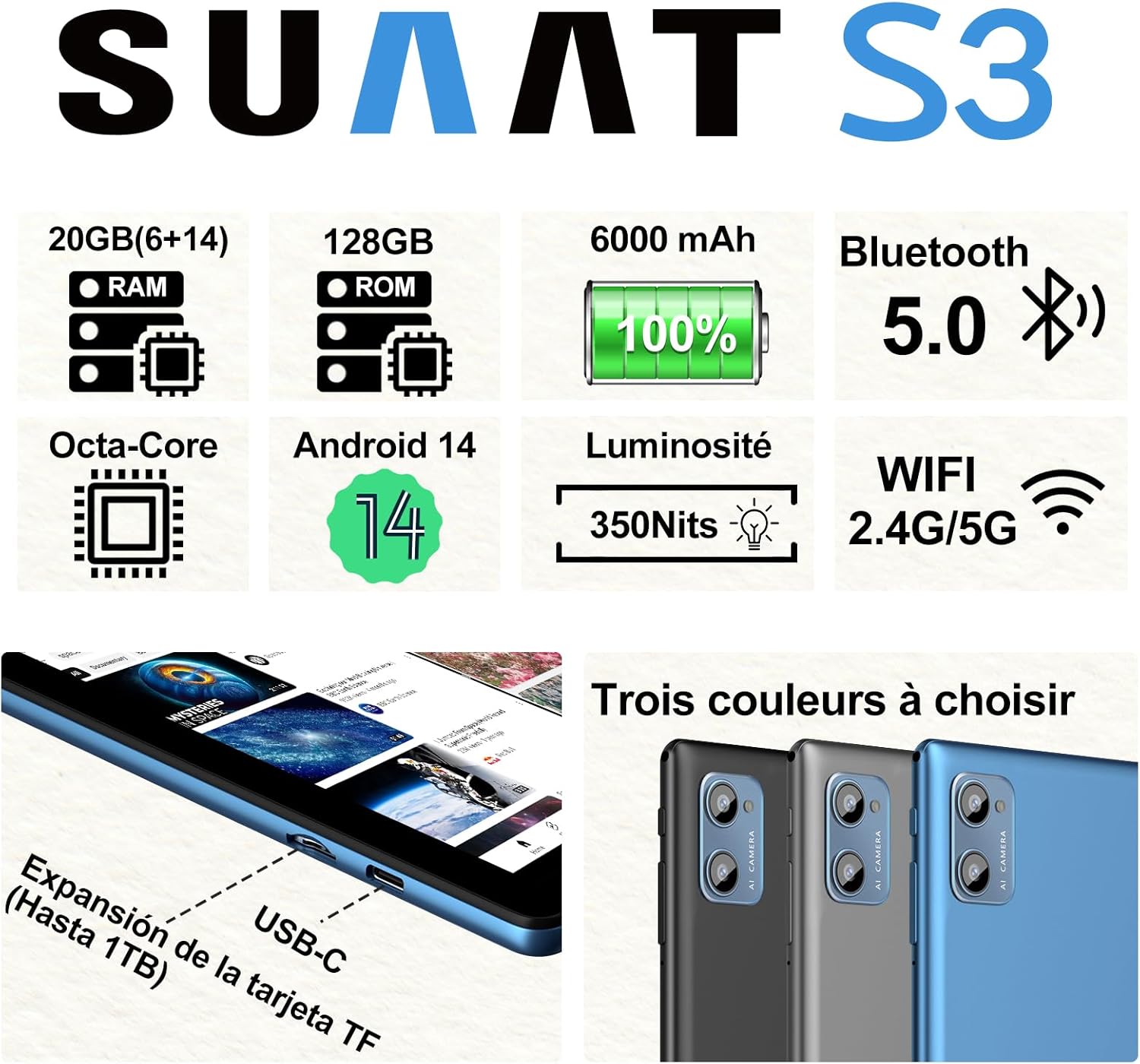
Малюнак 3.2: SUAAT S3 Tablet key specifications.
4. Пачатковая налада
4.1 Зарадка планшэта
Before first use, fully charge the tablet using the provided Type-C cable and European standard charger. The charging port is located on the side of the tablet.

Малюнак 4.1: Tablet charging via USB-C.
4.2 Уключэнне/выключэнне
- Каб уключыць: Націсніце і ўтрымлівайце кнопку харчавання, пакуль не загарыцца экран.
- Каб выключыць: Націсніце і ўтрымлівайце кнопку харчавання, затым абярыце «Выключыць харчаванне» з опцый на экране.
- Каб перазапусціць: Націсніце і ўтрымлівайце кнопку харчавання, затым абярыце «Перазагрузка» з прапанаваных варыянтаў.
4.3 Пачатковая канфігурацыя
Upon first power-on, follow the on-screen prompts to set up your tablet. This includes selecting your language, connecting to a Wi-Fi network, setting up your Google account, and configuring security options.
5. Інструкцыя па эксплуатацыі
5.1 Функцыі Android 14
Your SUAAT S3 tablet runs on Android 14, offering enhanced privacy, customization, and productivity features:
- Бацькоўскі кантроль: Manage screen time, app access, and content filters for children.
- Multi-Account Mode: Create separate user profiles for different users, each with their own apps, settings, and data.
- Рэжым падзеленага экрана: Use two applications simultaneously by dividing the screen.
- Custom Themes: Personalize your tablet's appearance with various themes and wallpapers.
- Фішкі: Add calendar, weather, and other widgets to your home screen for quick information access.

Малюнак 5.1: Tablet in split-screen mode.
5.2 Асноўная навігацыя
- Галоўны экран: Правядзіце пальцам улева або ўправа, каб перамяшчацца паміж галоўнымі экранамі.
- Скрыня праграм: Правядзіце пальцам уверх ад ніжняй часткі экрана, каб атрымаць доступ да ўсіх усталяваных праграм.
- Апавяшчэнні і хуткія налады: Правядзіце пальцам уніз ад верхняй частцы экрана да view апавяшчэнні і доступ да хуткіх налад пераключальнікі.
- Апошнія праграмы: Націсніце квадратную кнопку навігацыі (або правядзіце пальцам уверх знізу і ўтрымлівайце яго, калі выкарыстоўваецца навігацыя жэстамі), каб убачыць нядаўна адкрытыя праграмы.
6. Сувязь
6.1 Падключэнне Wi-Fi
The tablet supports dual-band Wi-Fi (2.4G and 5G) for faster and more stable internet connectivity.
- Перайсці да Налады > Сетка і інтэрнэт > Wi-Fi.
- Уключыць/выключыць Wi-Fi On.
- Абярыце патрэбную сетку са спісу і ўвядзіце пароль, калі патрабуецца.
6.2 Прылады Bluetooth
Connect Bluetooth accessories like the included keyboard and mouse, or headphones, using Bluetooth 5.0.
- Перайсці да Налады > Падключаныя прылады > Bluetooth.
- Пераключыць Bluetooth On.
- Пераканайцеся, што ваша прылада Bluetooth знаходзіцца ў рэжыме спалучэння.
- Select the device from the 'Available devices' list to pair.
6.3 Раз'ём для навушнікаў
A 3.5mm headphone jack is provided for wired audio connections.
7. Display and Multimedia
7.1 10.1-inch IPS Display
The tablet features a 10.1-inch IPS display with a resolution of 1280 x 800 pixels, offering clear and vibrant visuals with wide viewныя вуглы.

Малюнак 7.1: 10.1-inch IPS Display.
7.2 Падтрымка Widevine L1
With Widevine L1 support, the tablet can stream high-definition content from popular streaming services, providing a clear and immersive viewвопыту.
7.3 GMS Certification
The tablet is GMS (Google Mobile Services) certified, ensuring full access to the Google Play Store and all Google applications, along with robust security and privacy features.
8. Захоўванне і прадукцыйнасць
8.1 RAM and ROM
The SUAAT S3 comes with 20GB of RAM (6GB physical + 14GB virtual expansion) and 128GB of internal storage (ROM). This ample memory allows for smooth multitasking and storage of numerous applications, videos, images, and files.

Малюнак 8.1: Tablet showcasing large memory for apps and media.
8.2 Octa-Core Processor
Equipped with an Octa-core 1.8 GHz A523 processor, the tablet delivers stable and responsive performance for everyday tasks, gaming, and multimedia consumption.
8.3 Пашыраная памяць
The tablet supports expandable storage via a TF (microSD) card, allowing you to increase storage capacity up to 1TB for even more files і СМІ.
9. Кіраванне батарэяй
9.1 Ёмістасць батарэі
The SUAAT S3 is powered by a 6000 mAh battery, providing extended usage time. Actual battery life may vary based on usage patterns and settings.
9.2 Рэкамендацыі па зарадцы
- Use only the original charger and cable provided with the tablet.
- Avoid exposing the tablet to extreme temperatures during charging.
- Do not leave the tablet charging for excessively long periods after it has reached 100% to prolong battery health.
10. Тэхнічнае абслугоўванне
10.1 Ачыстка планшэта
- Выкарыстоўвайце мяккую тканіну без ворса для чысткі экрана і корпуса планшэта.
- Для ўстойлівых плям злёгкуampпрацярыце тканіну вадой або сродкам для чысткі экранаў. Пазбягайце агрэсіўных хімічных рэчываў.
- Ensure the tablet is powered off and unplugged before cleaning.
10.2 Захоўванне
When not in use for extended periods, store the tablet in a cool, dry place. Avoid direct sunlight and extreme temperatures.
10.3 Абнаўленне праграмнага забеспячэння
Рэгулярна правярайце наяўнасць абнаўленняў праграмнага забеспячэння і ўсталёўвайце іх, каб пераканацца, што ваш планшэт мае найноўшыя функцыі, патчы бяспекі і паляпшэнні прадукцыйнасці. Перайдзіце па спасылцы Налады > сістэма > Абнаўленне сістэмы.
11. Выпраўленне непаладак
If you encounter issues with your SUAAT S3 tablet, refer to the following common solutions:
| праблема | Магчымае рашэнне |
|---|---|
| Планшэт не ўключаецца | Пераканайцеся, што акумулятар зараджаны. Падключыце зарадную прыладу і пачакайце некалькі хвілін, перш чым зноў уключыць прыладу. |
| Экран не рэагуе | Перазагрузіце планшэт. Калі праблема не знікне, выканайце скід да заводскіх налад (дадзеныя будуць страчаны). |
| Немагчыма падключыцца да Wi-Fi | Check if Wi-Fi is enabled in settings. Restart your router. Ensure you are entering the correct password. |
| Прылада Bluetooth не спалучаецца | Ensure Bluetooth is enabled on both devices and the accessory is in pairing mode. Try restarting both devices. |
| Праграмы збочваюць або працуюць павольна | Close background apps. Clear app cache (Settings > Apps > [App Name] > Storage > Clear cache). Ensure sufficient storage space. |
| Акумулятар хутка разраджаецца | Reduce screen brightness. Disable unused features like Wi-Fi or Bluetooth. Close background apps. Check for power-intensive apps. |
If these solutions do not resolve the issue, please contact SUAAT customer support.
12. Тэхнічныя характарыстыкі
| Асаблівасць | Дэталь |
|---|---|
| Марка | СУААТ |
| Нумар мадэлі | S3 |
| Аперацыйная сістэма | Android 14 |
| Працэсар | A523 Octa-core 1.8 GHz |
| АЗП | 20 GB (6GB installed) |
| Захоўванне (ROM) | 128 ГБ |
| Сховішча з магчымасцю пашырэння | Да 1 ТБ праз TF-карту |
| Памер экрана | 10.1 цалі |
| Дазвол экрана | 1280 х 800 пікселяў |
| Бесправоднае падключэнне | Wi-Fi (802.11n, 2.4G/5G Dual-band) |
| Bluetooth | Bluetooth 5.0 |
| Тып раздыма | USB-C |
| Раз'ём для навушнікаў | 3.5 мм |
| Ёмістасць батарэі | 6000 мАг |
| Памеры (Д х Ш х У) | 17 х 12 х 0.8 см |
| Вага | 1.28 кілаграмаў |
| Аксэсуары ў камплекце | Keyboard, Mouse, Protective Case, Screen Protector |
13. Гарантыя і падтрымка
SUAAT provides professional technical support and customer service for your S3 tablet. If you require assistance, have questions, or encounter any issues not covered in this manual, please contact our customer support team. Refer to your purchase documentation for specific warranty terms and contact information.