
H3C H3C Magic NX15-UK
Кіраўніцтва карыстальніка двухдыяпазоннага гігабітнага Wi-Fi 6 маршрутызатара H3C Magic NX15 AX1500
Model: H3C Magic NX15-UK
1. Уводзіны
The H3C Magic NX15 is a high-performance Gigabit Wi-Fi 6 router designed to provide a fast and reliable internet experience. Featuring a vertical design, full gigabit network ports, and Wi-Fi 6 (802.11ax) technology on the 5GHz band, it ensures high-speed connectivity. Equipped with four high-gain external antennas and EasyMesh compatibility, it offers wide and flexible network signal coverage. Enhanced security is provided through WPA3 encryption. This manual provides essential information for setting up, operating, and maintaining your H3C Magic NX15 router.
2. Змесціва ўпакоўкі
Калі ласка, уважліва праверце змесціва ўпакоўкі. Калі якія-небудзь прадметы адсутнічаюць або пашкоджаныя, звярніцеся да прадаўца.
- H3C Magic NX15 AX1500 Dual Band Gigabit Wi-Fi 6 Router
- Адаптар сілкавання
- Кабель Ethernet
- Кіраўніцтва па хуткай усталёўцы (гэтае кіраўніцтва)
3. Прадукт скончыўсяview
Familiarize yourself with the components and interfaces of your H3C Magic NX15 router.
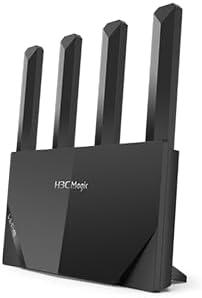
Малюнак 3.1: Фронт view of the H3C Magic NX15 router, showcasing its vertical design and four external antennas.
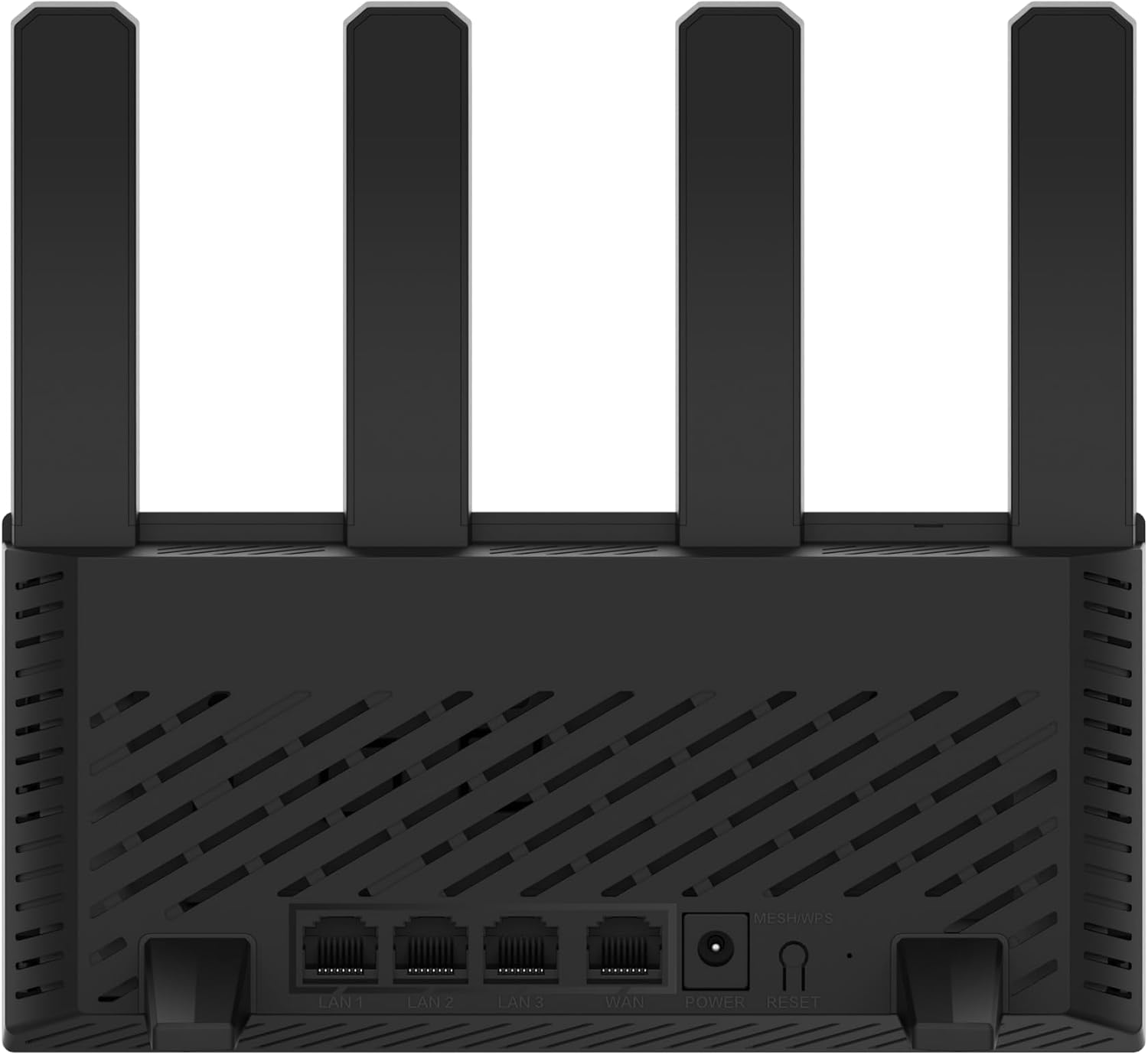
Малюнак 3.2: Тыл view of the H3C Magic NX15 router, displaying the LAN ports, WAN port, power input, and Reset/WPS button.

Малюнак 3.3: Топ view of the H3C Magic NX15 router, highlighting the ventilation design for heat dissipation.

Малюнак 3.4: Збоку view of the H3C Magic NX15 router, showing the sleek profile and additional ventilation slots.
Port and Button Descriptions:
- WAN порт: Падключаецца да вашага мадэма або сеткі пастаўшчыка інтэрнэт-паслуг (ISP).
- Парты лакальнай сеткі (LAN1, LAN2, LAN3): Connect to wired devices such as computers, gaming consoles, or smart TVs.
- Порт харчавання: Падключаецца да адаптара харчавання, які ўваходзіць у камплект.
- Кнопка скіду/WPS:
- Press briefly to activate WPS (Wi-Fi Protected Setup) for easy connection of compatible devices.
- Press and hold for approximately 5-10 seconds to restore the router to factory default settings.
- Антэны: Four high-gain external antennas for optimal Wi-Fi signal coverage.
4. Кіраўніцтва па наладцы
Follow these steps to set up your H3C Magic NX15 router for the first time.
- Распакуйце маршрутызатар: Асцярожна дастаньце маршрутызатар і ўсе аксэсуары з упакоўкі.
- Размяшчэнне маршрутызатара: Place the router in a central location in your home or office, away from obstructions and sources of interference (e.g., microwaves, cordless phones). Ensure good ventilation.
- Падключэнне да сілкавання: Connect the included power adapter to the router's power port and then plug the adapter into a power outlet. Wait for the router to power on and its indicator lights to stabilize.
- Падключэнне да мадэма: Connect one end of the provided Ethernet cable to the WAN port on your H3C Magic NX15 router and the other end to your modem's LAN port.
- Падключэнне прылад (неабавязкова): For wired connections, connect an Ethernet cable from one of the router's LAN ports to your computer or other network device.
- Падключыцеся да Wi-Fi:
- На камп'ютары або мабільнай прыладзе знайдзіце даступныя сеткі Wi-Fi.
- Select the Wi-Fi network name (SSID) printed on the label at the bottom of your router.
- Enter the Wi-Fi password (also printed on the router's label) when prompted.
- Старонка кіравання маршрутызатарам доступу:
- Адкрыйце a web браўзер (напрыклад, Chrome, Firefox, Edge).
- Увядзіце IP-адрас па змаўчанні (звычайна
192.168.1.1orh3cmagic.com) into the address bar and press Enter. Refer to the router's label for the exact address. - Follow the on-screen instructions to complete the initial setup, including setting a new administrator password and configuring your internet connection type (e.g., PPPoE, DHCP, Static IP).
5. Інструкцыя па эксплуатацыі
This section details the key features and how to operate your H3C Magic NX15 router.
5.1 Dual-Band Wi-Fi Operation
The H3C Magic NX15 supports dual-band Wi-Fi (2.4GHz and 5GHz) for optimal performance. It features intelligent band steering, which automatically directs your devices to the best available band (2.4GHz for wider coverage, 5GHz for higher speeds) without manual selection.
- Дыяпазон 2.4 ГГц: Provides wider coverage and better penetration through walls, suitable for general browsing and devices further from the router.
- Дыяпазон 5 ГГц: Offers higher speeds and lower latency, ideal for streaming 4K video, online gaming, and high-bandwidth applications, typically for devices closer to the router.
5.2 Intelligent Management via Mobile App
Manage your router conveniently using the dedicated H3C mobile application. The app allows for easy network settings configuration, network speed optimization, and various other operations.
- Спампаваць прыкладанне: Пошук the "H3C Magic" app in your device's app store (Google Play Store for Android or Apple App Store for iOS).
- Усталяваць і запусціць: Усталюйце праграму і адкрыйце яе.
- Увайсці: Use your router's administrator credentials to log in to the app.
- Кіраванне наладамі: З прыкладання вы можаце:
- Change Wi-Fi names and passwords.
- Маніторынг падлучаных прылад.
- Наладзьце бацькоўскі кантроль.
- Configure guest Wi-Fi networks.
- Optimize network performance.
5.3 EasyMesh for Whole-Home Wi-Fi
The H3C Magic NX15 supports EasyMesh technology, allowing you to expand your Wi-Fi coverage by adding additional compatible H3C mesh units. This creates a seamless whole-home Wi-Fi network, eliminating dead zones in large or complex house types.
- Refer to the EasyMesh setup guide provided with your additional mesh units for detailed instructions on expanding your network.
- Ensure all mesh units are compatible with the EasyMesh standard.
5.4 Network Security Features
The router includes multiple functions to enhance your private network's security:
- Шыфраванне WPA3: Provides the latest and strongest Wi-Fi security protocol.
- Access Allowlist/Denylist: Control which devices can connect to your network based on their MAC addresses.
- Госцевы Wi-Fi: Стварыце асобную сетку Wi-Fi для гасцей, каб забяспечыць бяспеку і прыватнасць асноўнай сеткі.
- Бацькоўскі кантроль: Manage internet access times and block inappropriate content for specific devices.
These security features can be configured via the router's web management interface or the H3C mobile app.
6. Тэхнічнае абслугоўванне
Proper maintenance ensures the longevity and optimal performance of your H3C Magic NX15 router.
- Размяшчэнне: Keep the router in a well-ventilated area, away from direct sunlight, heat sources, and moisture. The stereoscopic heat dissipation design with a large metal heat sink helps maintain stable operation.
- Уборка: Regularly dust the router's exterior and ventilation slots with a soft, dry cloth. Do not use liquid cleaners or aerosols.
- Абнаўленні прашыўкі: Перыядычна правярайце наяўнасць абнаўленняў прашыўкі і ўсталёўвайце іх праз маршрутызатар web management interface or the mobile app. Firmware updates often include performance improvements, new features, and security patches.
- Перазагрузка: Калі ў вас узніклі праблемы з сеткай, паспрабуйце перазагрузіць маршрутызатар, адключыўшы адаптар харчавання на 10 секунд, а затым зноў падключыўшы яго.
- Бяспека: Regularly change your Wi-Fi password and router administrator password to strong, unique combinations.
7. Выпраўленне непаладак
У гэтым раздзеле разглядаюцца распаўсюджаныя праблемы, з якімі вы можаце сутыкнуцца, і прапануюцца рашэнні.
| праблема | Магчымая прычына | Рашэнне |
|---|---|---|
| Няма доступу ў Інтэрнэт |
|
|
| Wi-Fi Signal Weak or Unstable |
|
|
| Немагчыма атрымаць доступ да старонкі кіравання маршрутызатарам |
|
|
| Forgot Router Administrator Password | Пароль страчаны | Press and hold the Reset/WPS button on the router for 5-10 seconds to restore factory default settings. You will then need to reconfigure the router. |
8. Тэхнічныя характарыстыкі
Detailed technical specifications for the H3C Magic NX15 router.
| Асаблівасць | Дэталь |
|---|---|
| Назва мадэлі | H3C Magic NX15 |
| Нумар мадэлі тавару | H3C Magic NX15-UK |
| Марка | H3C |
| бесправадной стандарт | 802.11ax (Wi-Fi 6) |
| Клас дыяпазону частот | Двухдыяпазонны (2.4 ГГц і 5 ГГц) |
| Антэны | 4 High-Gain External Antennas |
| Парты | Gigabit WAN, Gigabit LAN (x3) |
| Асаблівасці | Access Point Mode, EasyMesh, WPA3 Security, Parental Control, Guest Wi-Fi, App Management |
| Памеры (пакет) | 21 х 19.4 х 6.3 см |
| Вага (упакоўкі) | 500 г |
| Вытворца | H3C |
| Краіна паходжання | Кітай |
| Першая даступная дата | 24 жніўня 2024 г |
9. Гарантыя і падтрымка
The H3C Magic NX15 router comes with a standard manufacturer's warranty. For specific warranty terms and conditions, please refer to the warranty card included in your product packaging or visit the official H3C webсайт.
Тэхнічная падтрымка:
If you encounter any issues or have questions regarding your H3C Magic NX15 router, please contact H3C technical support.
- Інтэрнэт-падтрымка: Visit the official H3C support webсайт з часта задаванымі пытаннямі, інструкцыямі па ліквідацыі непаладак і загрузкай драйвераў/прашыўкі.
- Кантактная інфармацыя: Refer to the H3C website or your product documentation for regional contact numbers and email support.
Please have your product model number (H3C Magic NX15-UK) and serial number ready when contacting support.
Ask a question about this manual
Ask about setup, troubleshooting, compatibility, parts, safety, or missing instructions. Manuals+ will review the question and use this page’s manual context to help answer it.