
Уводзіны
Thank you for choosing the Mesqool CR1025 Digital Alarm Clock Radio. This device combines multiple functions including a digital alarm clock, Bluetooth 5.0 speaker, FM radio, night light, and dual USB charging ports. This manual provides detailed instructions to help you set up and operate your new device effectively.
Змест пакета
- Mesqool CR1025 Digital Alarm Clock Radio
- Адаптар сілкавання
- Кіраўніцтва карыстальніка
- C Battery (for backup)
Прадукт скончаныview
Familiarize yourself with the components and controls of your Mesqool CR1025 Digital Alarm Clock Radio.
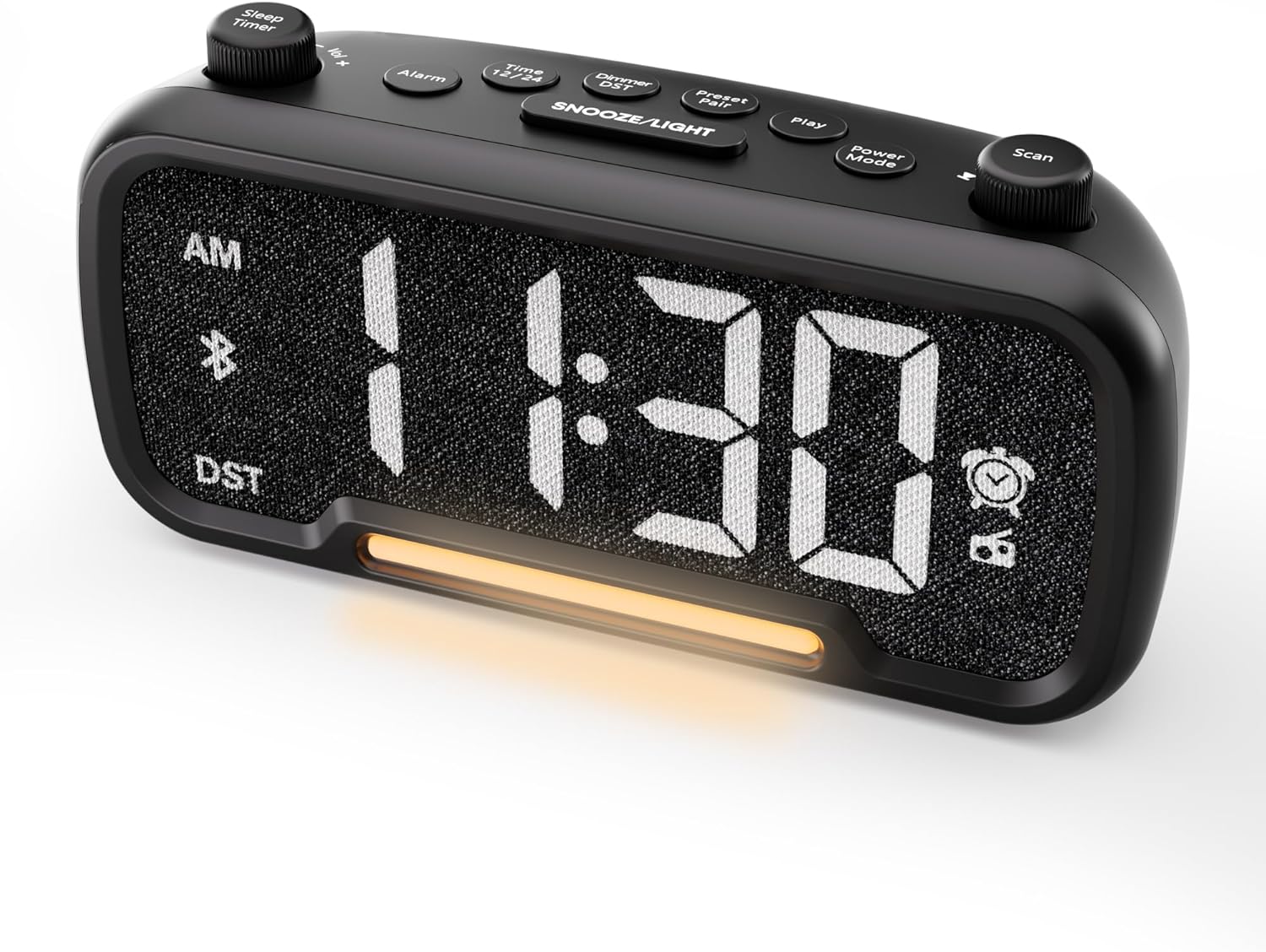

Control Buttons and Knobs:
- Sleep Timer / Vol +/- Knob (Left): Adjusts volume, sets sleep timer duration.
- Кнопка сігналізацыі: Sets and activates/deactivates alarms.
- Time 12/24 Button: Switches between 12-hour and 24-hour time formats.
- Dimmer / DST Button: Adjusts display brightness, activates/deactivates Daylight Saving Time (DST).
- Preset / Pair Button: Saves FM radio presets, initiates Bluetooth pairing.
- Кнопка прайгравання: Plays/pauses media in Bluetooth mode.
- Кнопка рэжыму харчавання: Cycles through operating modes (FM, Bluetooth, AUX).
- Scan / TU +/- Knob (Right): Scans FM radio stations, manually tunes FM frequency.
- Кнопка SNOOZE/LED: Activates snooze function, turns night light on/off.

Настройка
1. Пачатковае ўключэнне
Connect the provided power adapter to the DC 5V IN port on the back of the alarm clock and plug it into a standard wall outlet. The display will light up. Ensure the C battery is installed for backup in case of power outage.

2. Усталёўка часу
- Націсніце і ўтрымлівайце Час 12 button for 2 seconds. The hour digits will begin to flash.
- Павярнуць Гучнасць +/- knob (left knob) to adjust the hour.
- Націсніце Час 12 button again. The minute digits will begin to flash.
- Павярнуць Гучнасць +/- ручка для рэгулявання хвілін.
- Націсніце Час 12 button once more to confirm the time setting.
Video demonstrating how to set the time on the Mesqool Digital Alarm Clock Radio.
3. 12/24-гадзінны фармат часу
To switch between 12-hour and 24-hour time formats, short press the Час 12 button. The display will change accordingly.
4. Карэкцыя пераходу на летні час (DST)
To activate or deactivate DST, press and hold the Dimmer / DST button for 2 seconds. The time will adjust by one hour forward or backward, and the DST indicator will appear or disappear on the display.
Інструкцыя па эксплуатацыі
1. Налада сігналізацыі
- Націсніце і ўтрымлівайце Сігналізацыя кнопку на працягу 2 секунд. Лічбы гадзін будуць міргаць.
- Павярнуць Гучнасць +/- knob to adjust the desired alarm hour.
- Націсніце Сігналізацыя зноў націсніце кнопку. Лічбы хвілін будуць міргаць.
- Павярнуць Гучнасць +/- knob to adjust the desired alarm minute.
- Націсніце Сігналізацыя button again. The alarm sound selection will flash (bell icon for buzzer, radio icon for FM radio). Rotate the Гучнасць +/- knob to choose between buzzer or FM radio as the alarm sound.
- If FM radio is selected, press the Сігналізацыя button again. The volume level will flash (L01-L16). Rotate the Гучнасць +/- knob to set the desired alarm volume.
- Націсніце Сігналізацыя button once more to confirm and activate the alarm. The alarm icon will appear on the display.
To deactivate the alarm, short press the Сігналізацыя button. The alarm icon will disappear from the display.

Функцыя затрымкі:
Калі прагучыць сігнал трывогі, націсніце SNOOZE / LIGHT button to activate the snooze function for 9 minutes. The alarm will sound again after 9 minutes. To turn off the alarm completely, press any other button except SNOOZE / LIGHT.

2. Работа FM-радыё
- Націсніце Рэжым харчавання button repeatedly until the radio icon lights up on the display, indicating FM radio mode.
- Auto-Scan and Save Presets: Націсніце Scan / TU +/- knob (right knob) to automatically search for available FM stations and save them as presets (up to 20 stations). The display will show "P01", "P02", etc., as stations are saved.
- Ручная настройка: Павярнуць Scan / TU +/- knob to manually browse frequencies.
- Адклікаць перадусталёўкі: Кароткае націсканне Прадусталяваная / пара button to cycle through saved preset stations.
- Наладзіць гучнасць: Павярнуць Гучнасць +/- knob (left knob) to adjust the radio volume (L01-L16).

Video demonstrating how to set the FM radio alarm on the Mesqool Digital Alarm Clock Radio.
3. Праца з дынамікам Bluetooth
- Націсніце Рэжым харчавання button repeatedly until the Bluetooth icon (bt) starts flashing on the display, indicating pairing mode.
- On your mobile device, enable Bluetooth and search for "CR1025" in the list of available devices.
- Select "CR1025" to pair. Once connected, the Bluetooth icon will stop flashing and remain solid.
- Цяпер вы можаце прайграваць аўдыё з вашай прылады праз дынамік будзільніка.
- Выкарыстоўвайце Гучнасць +/- knob on the alarm clock or your mobile device to adjust the volume.
- Націсніце гуляць кнопка для прайгравання або прыпынення гуку.

Video demonstrating how to set up Bluetooth on the Mesqool Digital Alarm Clock Radio.
4. Праца начнога святла
The alarm clock features a gentle night light. To turn the night light on or off, short press the SNOOZE / LIGHT кнопка.

5. Dimmer Setting
The display brightness can be adjusted to 5 levels. Short press the Dimmer / DST button to cycle through the brightness levels (L01-L05). Select the level that best suits your environment.

6. Sleep Timer Setting
The sleep timer allows you to set a duration for the FM radio or Bluetooth speaker to play before automatically turning off. This is useful for falling asleep to music or podcasts.
- While in FM radio or Bluetooth mode, press the Таймер сну button. The display will show the current sleep timer duration (e.g., "30" for 30 minutes).
- Павярнуць Sleep Timer / Vol +/- knob to select the desired duration: 15, 30, 60, 90, or 120 minutes. You can also select "OFF" to disable the sleep timer.
- The timer will start counting down, and the device will automatically turn off after the selected duration.
7. Парты зарадкі USB
The alarm clock is equipped with two USB charging ports (Type-C and USB-A) on the back, each providing 5V/1A output. These ports can be used to conveniently charge your smartphone, tablet, or other USB-powered devices.

Ліквідацыю непаладак
| праблема | Магчымае рашэнне |
|---|---|
| Дысплей гадзінніка пусты. | Ensure the power adapter is securely connected to both the clock and a working power outlet. Check if the power outlet is functional. |
| Сігналізацыя не гучыць. | Verify that the alarm is set and activated (alarm icon visible on display). Check the alarm volume level. Ensure the correct alarm sound (buzzer or FM radio) is selected. |
| Слабы прыём FM-радыё. | Extend the FM antenna fully. Try repositioning the antenna or the clock for better signal. Perform an auto-scan again to find stronger stations. |
| Cannot pair Bluetooth device. | Ensure the clock is in Bluetooth pairing mode (flashing 'bt' icon). Make sure Bluetooth is enabled on your mobile device and it is within range. Forget "CR1025" from your device's Bluetooth list and try pairing again. |
| Не працуюць USB-порты зарадкі. | Confirm the alarm clock is powered on. Ensure the charging cables are properly connected to both the clock and your device. Try a different USB cable or device to rule out cable/device issues. |
Тэхнічныя характарыстыкі
| Асаблівасць | Дэталь |
|---|---|
| Марка | Мескул |
| Нумар мадэлі | CR1025 |
| Колер | Чорны |
| Тып дысплея | Лічбавы святлодыёд |
| Памеры прадукту | 6.61 см Д х 3.31 см Ш х 2.32 см В |
| Крыніца харчавання | Электрычны шнур (адаптар пераменнага току ў камплекце) |
| Рэзервовы акумулятар | 1 батарэйка тыпу C (у камплекце) |
| Версія Bluetooth | V5.0 |
| Радыёчастата FM | 87.5-108 МГц |
| FM пресеты | Да 20 станцый |
| Дыммер дысплея | 5 узроўняў |
| Гукі будзільніка | Buzzer, FM Radio |
| Працягласць адкладання | 9 хвілін |
| USB-выхад для зарадкі | Type-C & USB-A, 5V/1A each |
| Матэрыял | Пластыкавыя |
| Вага прадмета | 0.48 фунта (прыблізна 7.7 унцыі) |
Тэхнічнае абслугоўванне
- Працірайце прыладу мяккай сухой тканінай. Не выкарыстоўвайце вадкія ачышчальнікі або абразіўныя матэрыялы.
- Трымайце прыладу далей ад прамых сонечных прамянёў, экстрэмальных тэмператур і высокай вільготнасці.
- Забяспечце належную вентыляцыю вакол прылады, каб прадухіліць перагрэў.
- If the device will not be used for an extended period, remove the backup battery.
Інфармацыя па бяспецы
- Не падвяргайце прыладу ўздзеянню вады і вільгаці.
- Не спрабуйце разбіраць або рамантаваць прыладу самастойна. Звярніцеся да кваліфікаванага абслугоўваючага персаналу.
- Захоўвайце прыладу ў месцах, недаступных дзецям.
- Выкарыстоўвайце толькі прадастаўлены адаптар сілкавання. Выкарыстанне несанкцыянаваных адаптараў можа пашкодзіць прыладу і ануляваць гарантыю.
- Avoid placing the device near heat sources or open flames.
Гарантыя і падтрымка
Specific warranty details are not provided in the product information. For warranty claims, technical support, or further assistance, please contact Mesqool customer service through their official webсайт або прадаўца, дзе быў набыты прадукт. Калі ласка, захавайце пацвярджэнне пакупкі для любых пытанняў, звязаных з гарантыяй.
Visit the Mesqool Store for more information: Mesqool Official Store