
1. Уводзіны
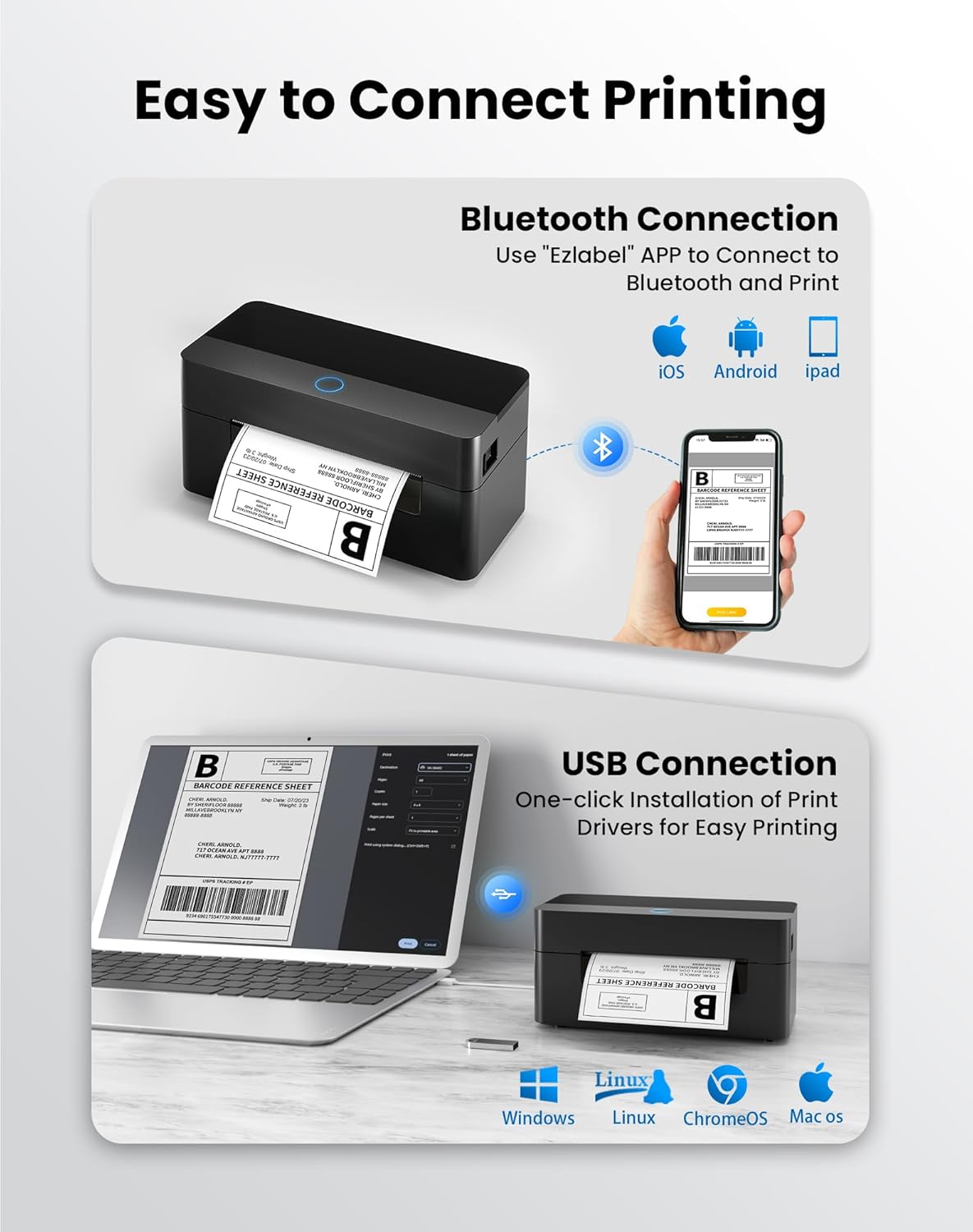
This manual provides detailed instructions for the setup, operation, and maintenance of your BPXX Bluetooth Thermal Shipping Label Printer, Model D463B. This printer is designed for efficient and clear printing of various thermal labels, including 4x6 inch shipping labels, with a resolution of 203 DPI. It supports both Bluetooth connectivity via the 'Ezlabel' mobile application and USB connection to computers.
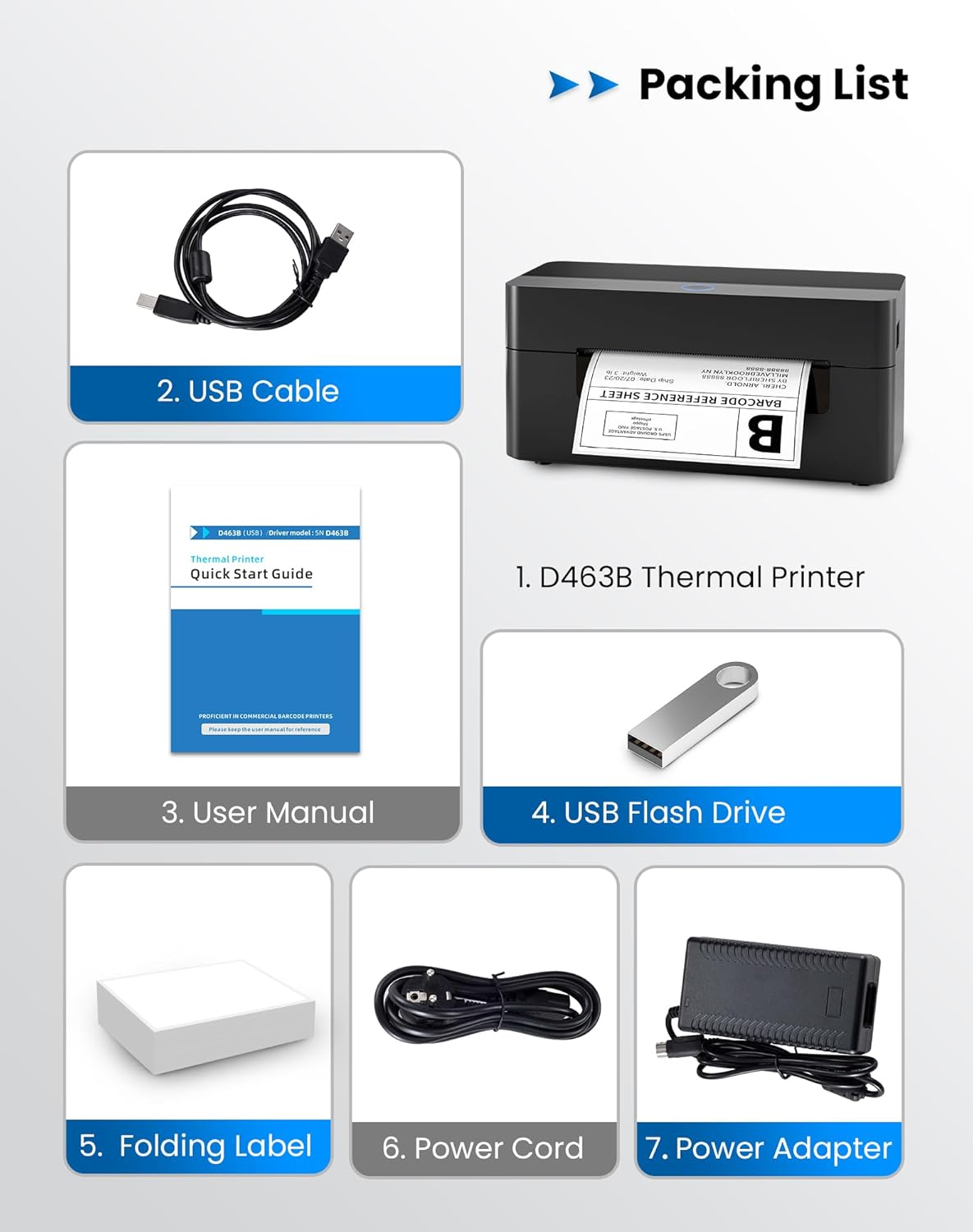
2. Упаковачны ліст
Калі ласка, пераканайцеся, што ўсе пералічаныя ніжэй прадметы ўваходзяць у ваш пакет:
- 1 x BPXX D463B Thermal Printer
- 1 х USB-кабель
- 1 х Кіраўніцтва карыстальніка
- 1 x USB Flash Drive (containing drivers)
- 1 x Folding Label (sampLe roll)
- 1 х Шнур харчавання
- 1 х адаптар сілкавання
3. Кіраўніцтва па наладцы
3.1 Падлучэнне абсталявання
- Connect the power adapter to the printer's power port and plug the power cord into an electrical outlet.
- Open the printer cover and load the thermal labels. Ensure the labels are facing the correct direction for printing and are properly aligned within the guide rails.
- Надзейна зачыніце крышку прынтара.

3.2 Усталёўка праграмнага забеспячэння і драйвераў
3.2.1 Mobile App (Bluetooth Connection)
For mobile printing, download the 'Ezlabel' application from your device's app store (available for iOS and Android).
- Пошук 'Ezlabel' in the App Store (iOS) or Google Play Store (Android).
- Спампаваць і ўсталяваць праграму.
- Уключыце Bluetooth на мабільнай прыладзе.
- Open the 'Ezlabel' app and follow the in-app instructions to connect to your BPXX D463B printer via Bluetooth.
3.2.2 Computer Driver (USB Connection)
For computer printing, install the appropriate drivers for your operating system (Windows, Mac OS, Linux, ChromeOS). Drivers are provided on the included USB flash drive or can be downloaded from the official webсайт.
- Insert the provided USB flash drive into your computer.
- Locate and run the installer for your operating system.
- Выконвайце падказкі на экране, каб завяршыць усталёўку драйвера.
- Alternatively, download drivers from: BPXX Driver Download
4. Інструкцыя па эксплуатацыі
4.1 Загрузка этыкетак
Ensure the thermal labels are loaded correctly for optimal printing. The printer supports thermal labels with widths ranging from 1 to 4.5 inches, including standard 4x6 inch shipping labels.
- Адкрыйце верхнюю крышку прынтара.
- Place the roll of thermal labels into the label compartment, ensuring the printable side faces upwards.
- Feed the first label through the printer's output slot until it is slightly extended.
- Adjust the label guides to fit the width of your labels snugly, without being too tight.
- Close the top cover. The printer will automatically detect the label size and calibrate.

4.2 Printing via Bluetooth (Mobile App)
- Ensure the printer is powered on and connected to the 'Ezlabel' app via Bluetooth.
- Open the 'Ezlabel' app on your mobile device.
- Select or create your desired label design. The app includes preset templates for various label sizes.
- Confirm print settings such as label size and quantity.
- Ініцыюйце каманду друку з праграмы.
4.3 Printing via USB (Computer)
- Падключыце прынтар да кампутара з дапамогай кабеля USB, які ўваходзіць у камплект.
- Ensure the printer drivers are correctly installed.
- Open the document or application from which you wish to print (e.g., a PDF viewer, shipping software).
- Select the BPXX D463B printer from your printer options.
- Adjust print settings as needed (e.g., paper size to 4x6 inches for shipping labels).
- Send the print command.
4.4 Supported Platforms and Print Quality
The BPXX D463B printer is compatible with major shipping carriers and e-commerce platforms, facilitating the printing of shipping labels, return labels, and postage labels.
- Shipping Carriers: FedEx, UPS, USPS, DHL, EasyPost, etc.
- E-commerce Platforms: Amazon, Shopify, Etsy, eBay, Walmart, etc.
The printer utilizes a high-quality thermal print head and advanced algorithms to deliver clear and sharp barcodes and text at 203 DPI resolution. It achieves a high-speed output of 152mm/s, capable of printing approximately 72 4x6 inch shipping labels per minute.


5. Тэхнічнае абслугоўванне
Рэгулярнае тэхнічнае абслугоўванне забяспечвае аптымальную прадукцыйнасць і падаўжае тэрмін службы вашага прынтара.
- Ачыстка друкавальнай галоўкі: Use an alcohol swab or a specialized thermal printer cleaning pen to gently wipe the print head. Ensure the printer is off and cooled down before cleaning.
- Ачыстка вонкавага выгляду: Працярыце знешнія паверхні прынтара мяккай тканінайamp тканіна. Пазбягайце выкарыстання агрэсіўных хімікатаў або абразіўных матэрыялаў.
- Выдаленне пылу: Periodically use compressed air to clear any dust or paper debris from inside the label compartment.
6. Выпраўленне непаладак
If you encounter issues with your BPXX D463B printer, refer to the following common problems and solutions:
- Прынтар не адказвае:
- Ensure the power cord is securely connected and the printer is turned on.
- For Bluetooth connection, verify that Bluetooth is enabled on your device and the printer is paired within the 'Ezlabel' app.
- For USB connection, check the USB cable connection and ensure drivers are correctly installed. Try a different USB port or cable.
- Poor Print Quality (Faint/Streaky Prints):
- Ачысціце друкавальную галоўку, як апісана ў раздзеле «Тэхнічнае абслугоўванне».
- Пераканайцеся, што вы выкарыстоўваеце якасныя тэрмічныя этыкеткі.
- Check print density settings in the 'Ezlabel' app or printer preferences on your computer.
- Этыкеткі падаюцца няправільна:
- Verify that labels are loaded correctly and aligned with the guide rails.
- Ensure there are no obstructions in the label path.
- Perform a label calibration from the printer settings or app if available.
- Printer Offline Error:
- Перазагрузіце прынтар і камп'ютар/мабільную прыладу.
- Re-establish the Bluetooth or USB connection.
- Check printer status in your operating system's printer settings.
7. Тэхнічныя характарыстыкі прадукту
| Назва мадэлі | D463B |
| Марка | BPXX |
| Тэхналогія друку | Цеплавы |
| Тэхналогія падлучэння | Bluetooth, USB |
| Максімальны дазвол друку | 203 x 203 Dots Per Inch (DPI) |
| Максімальная хуткасць друку | 152 mm/s (72 labels per minute) |
| Максімальны памер носьбіта | 4 х 6 цаляў |
| Падтрымоўваная шырыня этыкеткі | 1 - 4.5 цалі |
| Сумяшчальныя прылады | PC (Windows, Mac OS, Linux, ChromeOS), Smartphones (iOS, Android) |
| Метад кантролю | App ('Ezlabel'), USB |
| Памеры прадукту | 7.3" Г x 3.3" Ш x 3.3" У |
| Вага прадмета | 1.6 фунта |
| Уключаныя кампаненты | Printer, USB Cable, User Manual, USB Flash Drive, Sample Labels, Power Cord, Power Adapter |
8. Гарантыя і падтрымка
The BPXX D463B Thermal Shipping Label Printer comes with a limited warranty. For specific warranty terms and conditions, please refer to the documentation included with your product or contact BPXX customer support.
For technical assistance, troubleshooting, or any inquiries regarding your product, please contact BPXX customer support through the official webсайт або кантактную інфармацыю, указаную на ўпакоўцы прадукту.