
1. Уводзіны
This manual provides detailed instructions for the setup, operation, and maintenance of your Dpofirs 5G Router with SIM Card Slot. This device offers high-speed 5G cellular network access, dual-band Wi-Fi (2.4G and 5.8G), and supports up to 32 users, making it suitable for indoor home and office environments.
2. Прадукт скончыўсяview
Familiarize yourself with the components and features of your 5G router.
2.1 Змест пакета
- 1 x Dpofirs 5G Router
- 1 х Шнур харчавання
- 1 х Інструкцыя па эксплуатацыі (гэты дакумент)
- 1 х сеткавы кабель
2.2 Router Components and Indicators
The router features various ports and indicator lights for easy monitoring and connectivity.
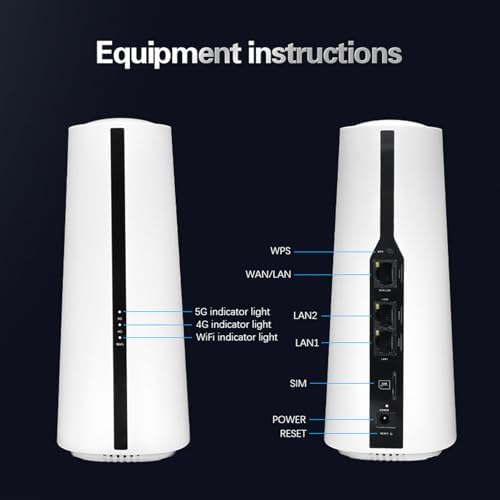
выява: Спераду і ззаду view of the Dpofirs 5G Router. The front shows indicator lights for 5G, 4G, and WiFi. The back panel includes ports for WPS, WAN/LAN, LAN2, LAN1, SIM card slot, Power input, and a Reset button.
- 5G Indicator Light: Паказвае стан сеткі 5G.
- 4G Indicator Light: Паказвае стан сеткі 4G.
- WiFi Indicator Light: Паказвае актыўнасць Wi-Fi.
- Кнопка WPS: Для абароненай налады Wi-Fi.
- Порт WAN/LAN: Connects to an external modem or acts as a LAN port.
- LAN1/LAN2 Ports: Connects to wired devices.
- Слот для SIM-карты: Устаўце сюды сваю SIM-карту 5G/4G.
- Спажываная магутнасць: Падключыце адаптар сілкавання.
- Кнопка скіду: Press and hold to restore factory settings.
2.3 Памеры і вага прадукту
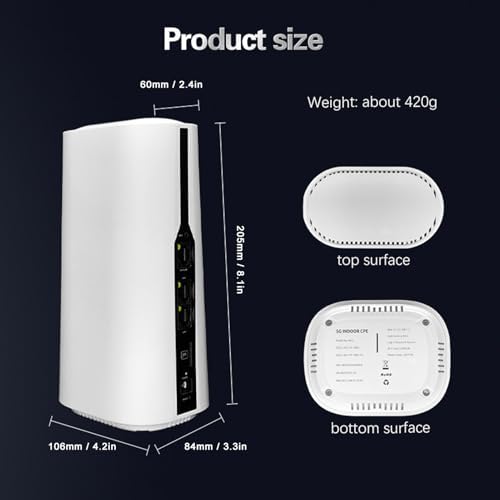
выява: Diagram showing the physical dimensions of the Dpofirs 5G Router. The router measures approximately 60mm (2.4in) at the top, 108mm (4.2in) at the base, 205mm (8.1in) in height, and 84mm (3.3in) in depth. Its weight is approximately 420g.
3. Інструкцыі па ўсталёўцы
Follow these steps to set up your 5G router.
3.1 Устаўка SIM-карты
- Пераканайцеся, што маршрутызатар выключаны.
- Locate the SIM card slot on the back of the router.
- Insert your activated 5G/4G SIM card into the slot until it clicks into place. Ensure the correct orientation as indicated on the device.
- Do not force the SIM card. If it does not fit, check the orientation or SIM card size.
3.2 Падключэнне сілкавання
- Connect the provided power adapter to the Power Input port on the router.
- Plug the other end of the power adapter into a standard electrical outlet (100-240V).
- Маршрутызатар уключыцца аўтаматычна. Пачакайце, пакуль індыкатары стабілізуюцца.
3.3 Initial Network Configuration (Optional)
For advanced settings or initial setup, you can access the router's web інтэрфейс.
- Connect a computer to one of the LAN ports using the provided network cable, or connect wirelessly to the default Wi-Fi network (SSID and password usually found on a sticker on the router's bottom).
- Адкрыйце a web браўзер і ўвядзіце IP-адрас па змаўчанні (напрыклад, 192.168.1.1) у адрасны радок.
- Log in using the default username and password (refer to the sticker on the router or the quick start guide).
- Follow the on-screen prompts for initial setup, such as changing the default Wi-Fi name and password.
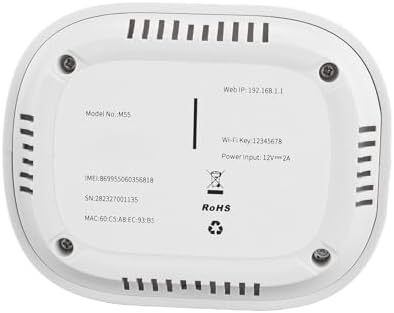
выява: The bottom surface of the Dpofirs 5G Router, displaying important information such as Model No.: M55, Web IP: 192.168.1.1, Wi-Fi Key: 12345678, and Power Input: 12V=2A. This information is crucial for initial setup and access.
4. Інструкцыя па эксплуатацыі
Once set up, your router provides internet access to multiple devices.
4.1 Падключэнне прылад
- Бесправоднае злучэнне: On your Wi-Fi enabled device (smartphone, laptop, tablet), search for available Wi-Fi networks. Select your router's SSID (network name) and enter the Wi-Fi password.
- Правадное злучэнне: Connect devices like desktop computers, gaming consoles, or smart TVs to the LAN1 or LAN2 ports using an Ethernet cable.
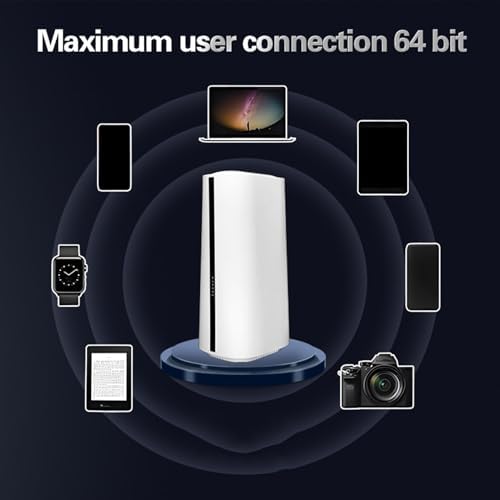
выява: Illustration demonstrating the Dpofirs 5G Router's capability to connect to multiple devices simultaneously. Devices shown include a laptop, smartphones, tablets, a smartwatch, and a camera, indicating support for up to 32 users.
4.2 Understanding Indicator Lights
- Solid Green (5G/4G): Connected to the respective cellular network.
- Blinking Green (5G/4G): Data activity on the respective cellular network.
- Solid Blue (WiFi): Wi-Fi актыўны.
- Blinking Blue (WiFi): Wi-Fi data activity.
- Няма святла: Network not connected or feature is off.
5. Тэхнічнае абслугоўванне
Proper maintenance ensures optimal performance and longevity of your router.
5.1 Агульны догляд
- Keep the router in a cool, dry place, away from direct sunlight and heat sources.
- Забяспечце належную вентыляцыю вакол прылады.
- Працірайце вонкавыя паверхні мяккай сухой тканінай. Не выкарыстоўвайце вадкія ачышчальнікі.
- Пазбягайце размяшчэння цяжкіх прадметаў на маршрутызатары.
5.2 Абнаўленне прашыўкі
Перыядычна правярайце маршрутызатар web interface for available firmware updates. Firmware updates can improve performance, add new features, and enhance security. Follow the instructions provided within the web interface for safe updating.
5.3 Скід налад маршрутызатара
If you encounter persistent issues or forget your login credentials, you may need to reset the router to factory default settings. To do this, with the router powered on, use a paperclip or similar pointed object to press and hold the Reset button for approximately 10 seconds until the indicator lights flash. The router will then restart with default settings.
6. Выпраўленне непаладак
Звярніцеся да гэтага раздзела, каб знайсці рашэнні распаўсюджаных праблем.
6.1 Няма падключэння да Інтэрнэту
- Праверце SIM-карту: Пераканайцеся, што SIM-карта правільна ўстаўлена і актывавана з тарыфным планам перадачы дадзеных.
- Моц сігналу: Verify the 5G/4G indicator light. If it's off or blinking slowly, the signal might be weak. Try repositioning the router.
- Стан маршрутызатара: Check if the router is powered on and all necessary indicator lights are active.
- Перазапуск: Выключыце і зноў уключыце маршрутызатар, адключыўшы яго ад сеткі на 30 секунд, а затым зноў падключыўшы.
- Налады APN: Доступ да маршрутызатара web interface and verify that the Access Point Name (APN) settings are correct for your mobile carrier.
6.2 Праблемы з падключэннем да Wi-Fi
- Няправільны пароль: Двойчы праверце пароль Wi-Fi.
- Дыяпазон сігналаў: Ensure your device is within the Wi-Fi range of the router.
- Перашкоды: Other electronic devices can cause interference. Try changing the Wi-Fi channel in the router's settings.
- Абмежаванне прылад: The router supports up to 32 users. If too many devices are connected, performance may degrade.
6.3 Павольная хуткасць Інтэрнэту
- Моц сігналу: A weak 5G/4G signal will result in slower speeds.
- Перагрузка сеткі: During peak hours, cellular network speeds may decrease.
- Колькасць карыстальнікаў: More connected devices sharing bandwidth can reduce individual speeds.
- Размяшчэнне маршрутызатара: Place the router in a central location, away from obstructions.
7. Тэхнічныя характарыстыкі
Detailed technical specifications for the Dpofirs 5G Router.
| Асаблівасць | Дэталь |
|---|---|
| Назва мадэлі | Dpofirsei2sngv1m5-12 |
| Марка | Дпофіры |
| Тэхналогія падлучэння | Ethernet, 5G Cellular |
| Стандарт бесправадной сувязі | 802.11ac, 802.11n |
| Клас дыяпазону частот | Двухдыяпазонны (2.4 ГГц, 5.8 ГГц) |
| Хуткасць перадачы даных | Да 1800 Мбіт/с |
| Колькасць партоў | 1 WAN/LAN, 2 LAN |
| Сумяшчальныя прылады | Personal Computer, Laptop, Smartphone, Tablet, Gaming Console |
| Пратакол бяспекі | WPA2-PSK, WPA3 |
| Колер | Белы |
| Увод магутнасці | 100-240 В (вілка ЗША) |
| Max Users Supported | 32 |
8. Гарантыя і падтрымка
This product comes with a manufacturer's warranty and support resources.
8.1 Гарантыя вытворцы
The Dpofirs 5G Router is covered by a 90-дзённая гарантыя вытворцы from the date of purchase. This warranty covers defects in materials and workmanship under normal use. It does not cover damage caused by misuse, accidents, unauthorized modifications, or external factors.
8.2 Падтрымка кліентаў
For technical assistance, troubleshooting beyond this manual, or warranty claims, please contact Dpofirs customer support. Refer to the contact information provided with your purchase or visit the official Dpofirs webсайт для падрабязнай інфармацыі аб падтрымцы.
Заўвага: Захоўвайце чэк аб куплі ў якасці пацверджання пакупкі для гарантыйных мэт.