
1. Уводзіны
This manual provides detailed instructions for the installation, operation, and maintenance of the Aigo B760L D4 Motherboard. Please read this manual thoroughly before installing or using the product to ensure proper functionality and to prevent damage.
2. Інфармацыя па бяспецы
Заўсёды выконвайце наступныя меры бяспекі:
- Disconnect power before installing or removing any components.
- Трымайце матчыну плату за краю, каб не дакранацца да адчувальных кампанентаў.
- Use an anti-static wrist strap to prevent electrostatic discharge (ESD) damage.
- Забяспечце належную вентыляцыю ўнутры корпуса кампутара, каб прадухіліць перагрэў.
- Не падвяргайце матчыну плату ўздзеянню вільгаці або экстрэмальных тэмператур.
3. Змесціва ўпакоўкі
Праверце наяўнасць усіх прадметаў у камплекце:
- Aigo B760L D4 Motherboard
- Кіраўніцтва карыстальніка (гэты дакумент)
- Кабелі SATA (колькасць можа адрознівацца)
- I / O Shield
- CD/USB-дыск з драйверамі (калі ў камплекце)
4. Прадукт скончыўсяview
The Aigo B760L D4 is an M-ATX motherboard designed for Intel LGA 1700 processors, featuring the Intel B760 chipset. It supports DDR4 memory and offers a range of connectivity options.
4.1 Схема мацярынскай платы
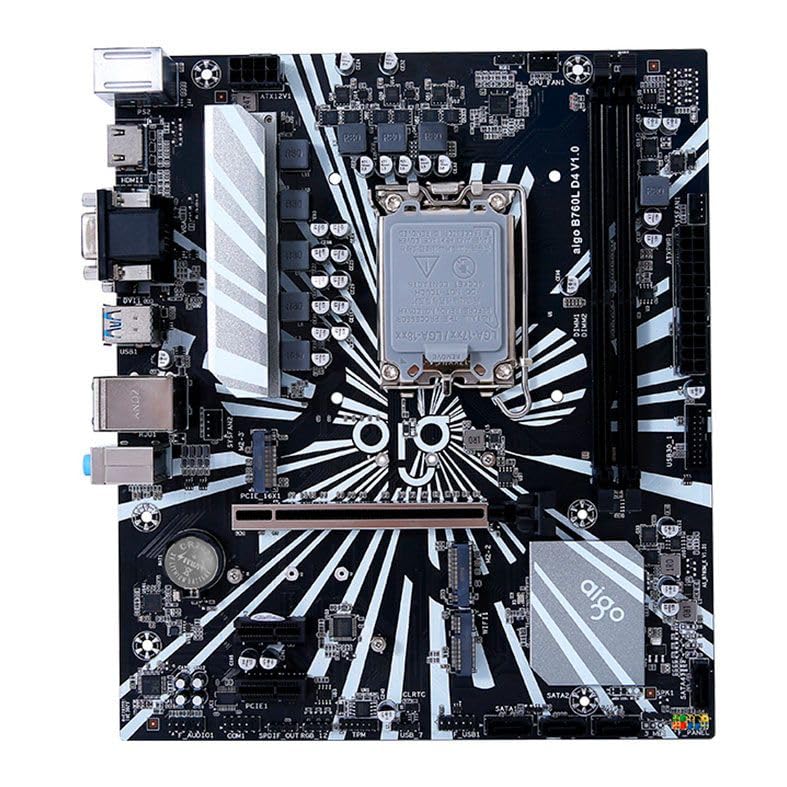
Малюнак 1: Закончанаview of the Aigo B760L D4 Motherboard alongside its retail packaging.

Малюнак 2: Зверху ўніз view of the Aigo B760L D4 Motherboard, highlighting component placement.

Малюнак 3: Пад вуглом view of the Aigo B760L D4 Motherboard, showing the CPU socket and memory slots.
4.2 Задняя панэль уводу/вываду

Figure 4: Rear I/O panel of the Aigo B760L D4 Motherboard, displaying various connectivity ports.
The rear I/O panel includes:
- 1 x PS/2 Keyboard and Mouse port
- 2 порта USB 2.0
- 4 порта USB 3.0
- 1 порта HDMI
- 2 x DVI ports
- 1 порт VGA
- 1 x RJ45 LAN port
- Audio jacks (Line In, Line Out, Mic In)
5. Настройка
5.1 Усталёўка працэсара
- Знайдзіце раз'ём працэсара LGA 1700 на матчынай плаце.
- Адкрыйце рычаг раздыма працэсара і падніміце нагрузачную пласціну.
- Акуратна выраўнуйце працэсар з сокетам, пераканаўшыся, што трохкутная адзнака на працэсары супадае з адзнакай на сокеце.
- Акуратна ўстаўце працэсар у раз'ём, не прыціскаючы яго да сілы.
- Зачыніце нагрузачную пласціну і зафіксуйце яе рычагом.
5.2 Усталёўка памяці DDR4
The motherboard supports up to 64GB of DDR4 memory across two slots, with speeds from 2133 MHz to 3200 MHz in dual-channel configuration.
- Адкрыйце зашчапкі з абодвух канцоў слота DIMM.
- Сумясціце модуль памяці са слотам, пераканаўшыся, што выемка на модулі супадае з ключом у слоце.
- Моцна націсніце на абодва канцы модуля памяці, пакуль зашчапкі не зафіксуюцца.
5.3 Installing Storage Devices
The motherboard features 4 x SATA 3.0 ports and 2 x M.2 NVME Dual-Protocol slots.
5.3.1 SATA Drives
- Падключыце адзін канец кабеля перадачы дадзеных SATA да порта SATA на матчынай плаце.
- Падключыце другі канец кабеля перадачы дадзеных SATA да жорсткага дыска SATA або SSD-назапашвальніка.
- Connect a SATA power cable from your power supply to the drive.
5.3.2 M.2 NVME Drives
- Locate an M.2 slot on the motherboard.
- Выкруціце шрубу-стойку M.2.
- Insert the M.2 NVME drive into the slot at a 30-degree angle.
- Gently push the drive down and secure it with the standoff screw.
5.4 Падключэнне сілкавання
Падключыце 24-кантактны раз'ём харчавання ATX і 8-кантактны раз'ём харчавання ATX 12V ад блока харчавання да адпаведных партоў на матчынай плаце.
5.5 Усталёўка плат пашырэння
The motherboard includes 1 x PCIe x16 slot and 1 x PCIe x1 slot.
- Align your expansion card (e.g., graphics card) with the appropriate PCIe slot.
- Press down firmly until the card is seated correctly in the slot.
- Secure the card with a screw to the computer case.
6. Аперацыйная
6.1 Першая загрузка і налада BIOS
After assembling your system, connect a monitor, keyboard, and mouse. Power on the system. During startup, press the designated key (usually DEL or F2) to enter the BIOS/UEFI setup utility. Here you can configure boot order, system time, and other advanced settings.
6.2 Устаноўка аперацыйнай сістэмы
The Aigo B760L D4 Motherboard supports Windows 10 and Windows 11 operating systems. Insert your OS installation media (USB drive or DVD) and follow the on-screen instructions to install the operating system.
6.3 Ўстаноўка драйвера
After OS installation, install the necessary drivers for the chipset, audio, LAN, and other integrated components. These drivers are typically provided on a CD/USB with the motherboard or can be downloaded from the manufacturer's webсайт.
7. Тэхнічнае абслугоўванне
- Трымайце яго ў чысціні: Regularly clean dust from inside your computer case using compressed air. Dust accumulation can lead to overheating.
- Абнаўленні BIOS: Перыядычна правярайце інфармацыю вытворцы webсайт для абнаўленняў BIOS/UEFI. Абнаўленні могуць палепшыць стабільнасць, сумяшчальнасць і прадукцыйнасць. Уважліва выконвайце інструкцыі па абнаўленні.
- Абнаўленні драйвераў: Абнаўляйце драйверы, каб забяспечыць аптымальную прадукцыйнасць і сумяшчальнасць з новым праграмным і апаратным забеспячэннем.
- Кантроль навакольнага асяроддзя: Operate the system in a cool, dry, and well-ventilated environment.
8. Выпраўленне непаладак
8.1 Няма харчавання
- Ensure the power supply is connected correctly to the motherboard (24-pin and 8-pin ATX 12V).
- Check if the power supply switch is in the "ON" position.
- Verify that the power button on the case is correctly connected to the motherboard's front panel header.
8.2 Няма дысплея
- Ensure the monitor is connected to the correct video output (either integrated graphics or a dedicated graphics card).
- Пераўсталюйце відэакарту і модулі памяці.
- Try booting with only one memory module installed.
8.3 Нестабільнасць сістэмы / Збоі
- Check CPU and GPU temperatures to ensure they are not overheating.
- Verify that all power connectors are securely attached.
- Запусціце інструменты дыягностыкі памяці, каб праверыць наяўнасць няспраўных аператыўных прылад.
- Ensure BIOS is updated to the latest stable version.
9. Тэхнічныя характарыстыкі
| Асаблівасць | Спецыфікацыя |
|---|---|
| Марка | Айго |
| мадэль | AIGO-B760L-D4 |
| Набор мікрасхем | Intel B760 |
| Гняздо працэсара | LGA 1700 |
| Слоты памяці | 2 слота DDR4 DIMM |
| Максімальная ёмістасць памяці | 64 ГБ |
| Падтрымка хуткасці памяці | 2133 ~ 3200 MHz (Dual Channel) |
| Аўдыё інтэрфейс | 1 x HDMI, 2 x DVI, 1 x VGA |
| Слоты SATA | 4 х SATA 3.0 |
| Слоты M.2 | 2 x M.2 NVME Dual-Protocol |
| USB-парты (ззаду) | 2 х USB 2.0, 4 х USB 3.0 |
| Слоты пашырэння | 1 x PCIe x1, 1 x PCIe x16 |
| Падтрымка аперацыйнай сістэмы | Windows 10/11 |
| PS / 2 порт | 1 x PS/2 Keyboard and Mouse |
| Фаза харчавання | 8-фазны |
| Раздымы харчавання | 1 x 24-pin ATX, 1 x 8-pin ATX 12V |
| Інтэрфейс WiFi | 1 x WiFi interface (PCIe compatible) |
| порт LAN | 1 х RJ45 |
| Памеры | 24.4 x 21 cm (M-ATX) |
10. Гарантыя і падтрымка
For warranty information and technical support, please refer to the documentation provided with your purchase or visit the official Aigo webсайт. Захоўвайце пацвярджэнне пакупкі для прэтэнзій па гарантыі.