
STN28
STN-28 Colorful Cat Ear Luminous Wireless Bluetooth Headset User Manual
Model: LX-B39C | Brand: Generic
Уводзіны
This manual provides detailed instructions for the operation, maintenance, and troubleshooting of your new STN-28 Colorful Cat Ear Luminous Wireless Bluetooth Headset. Please read this manual thoroughly before using the product to ensure proper function and longevity.
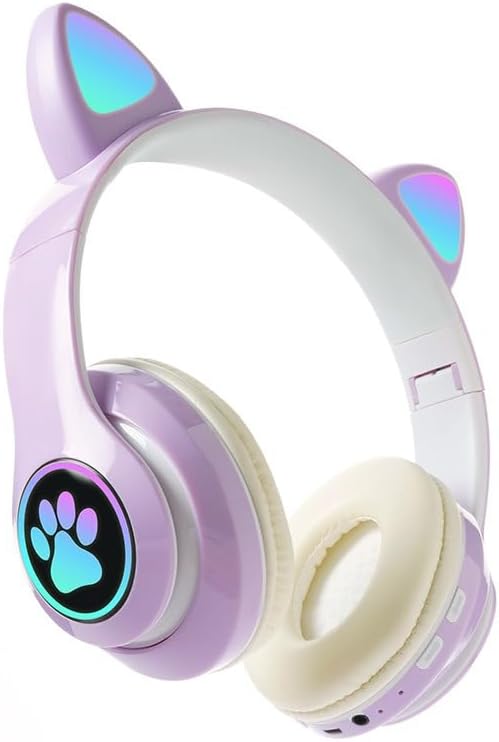
Image: The STN-28 Colorful Cat Ear Luminous Wireless Bluetooth Headset in light purple, featuring glowing cat ears and a paw print design on the ear cup.
Асаблівасці прадукту
- Стыльны дызайн: Features unique cat ear design with luminous accents.
- Бесправаднае падключэнне: Bluetooth 5.0+EDR for seamless pairing.
- Зручная пасадка: Padded ear cups and adjustable headband.
- Элементы кіравання гукам: Integrated buttons for music, volume, and calls.
- Партатыўны: Lightweight and foldable head-mounted design.
- Прайграванне карты TF: Supports playing songs from an external TF card.
Змест пакета
Калі ласка, праверце ўпакоўку на наяўнасць наступных прадметаў:
- STN-28 Wireless Headset Body
- USB-кабель для зарадкі
- Кіраўніцтва карыстальніка (гэты дакумент)
Настройка
Зарадка гарнітуры
Before first use, fully charge the headset. Connect the provided USB charging cable to the headset's USB charging port and to a compatible USB power source (e.g., computer USB port, USB wall adapter).
- The indicator light will show red during charging.
- Час зарадкі складае прыкладна 2 гадзіны.
- The red light will turn off once the headset is fully charged.
The headset is equipped with a rechargeable 3.7V/400MAH polymer A-grade lithium battery with overcharge and over-discharge protection.
Уключэнне/выключэнне
- Каб уключыць: Press and hold the power button until the indicator lights flash red and blue.
- Каб выключыць: Націсніце і ўтрымлівайце кнопку харчавання, пакуль не пагаснуць індыкатары.
Інструкцыя па эксплуатацыі
Спалучэнне Bluetooth
- Пераканайцеся, што гарнітура цалкам зараджана і выключана.
- Press and hold the power button for approximately 3-5 seconds until the indicator lights flash red and blue alternately. This indicates the headset is in pairing mode.
- На вашай прыладзе (смартфоне, планшэце, камп'ютары) уключыце Bluetooth і знайдзіце даступныя прылады.
- Select "STN-28" or "LX-B39C" from the list of found devices.
- Once successfully paired, the indicator light on the headset will flash blue slowly.
- The headset supports Bluetooth 5.0+EDR and modes A2DP 1.2, AVRCP 1.0, HSP, HSF 1.5.
The transmission range is up to 10 meters (33 feet) in an open environment.
Music Playback and Call Control
The headset features integrated controls for media and calls. Specific button functions may vary slightly, but generally include:
- Прайграванне/Паўза: Аднаразовае націсканне шматфункцыянальнай кнопкі.
- Наступны трэк: Доўга націсніце кнопку «+».
- Папярэдні трэк: Доўга націсніце кнопку «-».
- Павялічыць гучнасць: Кароткачасова націсніце кнопку «+».
- Паменшыць гучнасць: Кароткачасова націсніце кнопку «-».
- Адказ/завяршэнне выкліку: Аднаразовае націсканне шматфункцыянальнай кнопкі падчас уваходнага званка.
- Адхіліць выклік: Доўга націсніце шматфункцыянальную кнопку падчас уваходнага званка.

Выява: Падрабязны view of the headset's right ear cup, highlighting the control buttons for media playback and calls, as well as the charging port and TF card slot.
Прайграванне карты TF
The headset supports playing audio files directly from an external TF (microSD) card. Insert a TF card with your desired music into the designated slot on the headset. The headset will automatically switch to TF card playback mode.
Тэхнічнае абслугоўванне
- Рэгулярна працірайце гарнітуру мяккай сухой тканінай. Не выкарыстоўвайце абразіўныя ачышчальнікі або растваральнікі.
- Пазбягайце ўздзеяння на гарнітуру экстрэмальных тэмператур, вільготнасці або прамых сонечных прамянёў.
- Захоўвайце гарнітуру ў прахалодным, сухім месцы, калі яна не выкарыстоўваецца.
- Не спрабуйце разбіраць або рамантаваць гарнітуру самастойна, бо гэта прывядзе да анулявання гарантыі.
- Трымайце порт зарадкі чыстым ад пылу і смецця.
Ліквідацыю непаладак
| праблема | Магчымая прычына | Рашэнне |
|---|---|---|
| Гарнітура не ўключаецца. | Нізкі акумулятар. | Зараджайце гарнітуру не менш за 2 гадзіны. |
| Немагчыма спалучыць прыладу. | Гарнітура не ў рэжыме спалучэння; Bluetooth на прыладзе выключаны; прылада знаходзіцца занадта далёка. | Ensure headset is flashing red/blue; enable Bluetooth on device; move device closer (within 10M). |
| Няма гуку падчас прайгравання. | Занадта нізкі гук; гарнітура не падключана; на прыладзе выбраны няправільны аўдыёвыхад. | Increase headset/device volume; re-pair headset; check device's audio settings. |
| Дрэнная якасць гуку або абрывы сувязі. | Interference; device too far; low headset battery. | Move away from sources of interference; move closer to device; charge headset. |
Тэхнічныя характарыстыкі
| Асаблівасць | Дэталь |
|---|---|
| мадэль | LX-B39C (STN-28) |
| Спосаб нашэння | Head-mounted, Folding |
| Версія Bluetooth | 5.0+EDR |
| Supported Bluetooth Modes | A2DP 1.2, AVRCP 1.0, HSP, HSF 1.5 |
| Ёмістасць батарэі | Батарэя 400mAh літыя палімера |
| Памер дынаміка/імпеданс | 40 мм / 32 Ом |
| Прыёмная адчувальнасць | -84 дБм |
| Максімальная магутнасць перадачы | 6dBm |
| Далёкасць перадачы | ≤10 метраў |
| Порт для зарадкі | USB |
| Час зарадкі | Прыбл. 2 гадзіны |
| Час прайгравання музыкі | Да 6 гадзін |
| Час размовы | Да 6 гадзін |
| Час чакання | 200 гадзіны |
| Кантроль шуму | Актыўнае падаўленне шуму |
| Метад кантролю | Touch / Media Control Buttons |
| Колер | Светла-фіялетавы |
| Размяшчэнне вушэй | Над вухам |
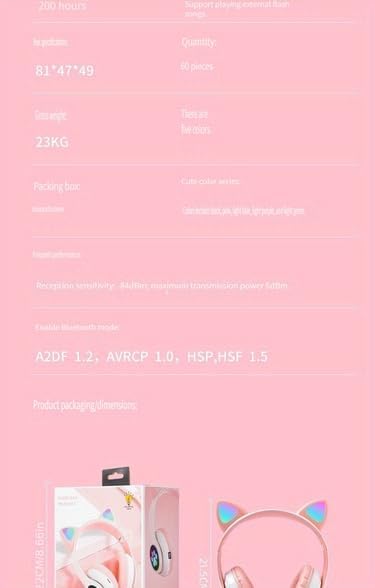
Image: A visual representation of the headset's dimensions and some technical specifications, including model number and battery capacity.
Гарантыя і падтрымка
Каб атрымаць інфармацыю аб гарантыі або тэхнічную падтрымку, звярніцеся да прадаўца, у якога вы набылі гэты прадукт. Захоўвайце пацвярджэнне пакупкі для любых гарантыйных прэтэнзій.
Manufacturer: Shantou Chaoyang District Gurao Lanxin Electronics Factory
Ask a question about this manual
Ask about setup, troubleshooting, compatibility, parts, safety, or missing instructions. Manuals+ will review the question and use this page’s manual context to help answer it.