
1. Уводзіны
Дзякуй за пакупкуasing the STN-28 Colorful Cat Ear Luminous Bluetooth Headset. This headset combines wireless audio technology with a unique luminous cat ear design, offering a comfortable and immersive listening experience. This manual provides essential information on how to set up, operate, and maintain your new headset.
2. Інфармацыя па бяспецы
- Не падвяргайце гарнітуру ўздзеянню экстрэмальных тэмператур, вільготнасці або агрэсіўных рэчываў.
- Пазбягайце падзення або моцных удараў гарнітуры.
- Не разбірайце і не спрабуйце рамантаваць гарнітуру самастойна. Гэта прывядзе да анулявання гарантыі.
- Clean the headset with a soft, dry cloth. Do not use harsh chemicals or abrasive materials.
- Працяглае праслухоўванне на высокім узроўні гучнасці можа пашкодзіць слых. Адрэгулюйце гучнасць да бяспечнага ўзроўню.
3. Змесціва ўпакоўкі
- STN-28 Wireless Headset Body
- USB-кабель для зарадкі
- Кіраўніцтва карыстальніка (гэты дакумент)
4. Прадукт скончыўсяview і элементы кіравання
Familiarize yourself with the headset's components and control buttons.
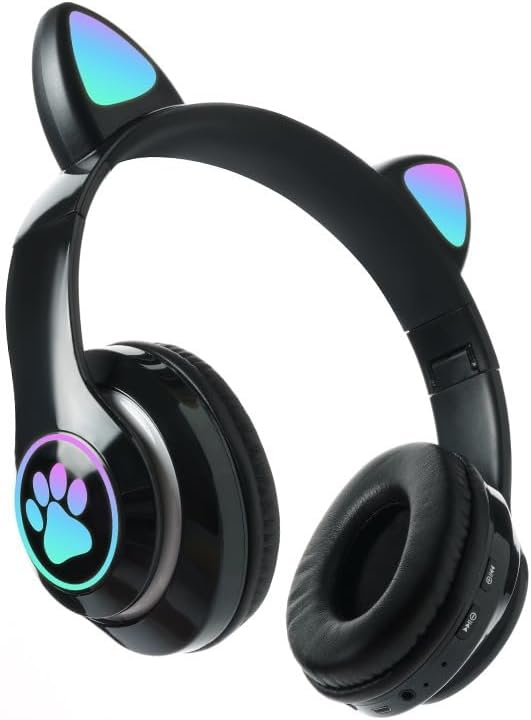
Выява: спераду view of the STN-28 headset in black, showcasing the luminous cat ears and paw print design on the earcups.

Image: Two STN-28 headsets, one in purple and one in pink, displayed on a wooden stand, highlighting their colorful design and cat ear feature.
Control Buttons (Typical Layout - Refer to your specific model for exact placement):
- Кнопка харчавання: Укл./Выкл., Прайграванне/Паўза, Адказ/Завяршэнне выкліку.
- Павялічыць гучнасць (+): Павелічэнне гучнасці, наступны трэк (доўгі націск).
- Памяншэнне гучнасці (-): Памяншэнне гучнасці, Папярэдні трэк (доўгае націсканне).
- Кнопка рэжыму (M): Switch between Bluetooth and TF Card mode.
- Порт для зарадкі USB: Для зарадкі гарнітуры.
- Слот TF карты: Insert external TF card for music playback.
- Святлодыёдны індыкатар: Shows power, connection, and charging status.
5. Настройка
5.1 Зарадка гарнітуры
- Connect the USB charging cable to the headset's USB charging port.
- Падключыце другі канец кабеля да крыніцы харчавання USB (напрыклад, USB-порт кампутара, насценны адаптар USB).
- The LED indicator light will show a red light during charging.
- A full charge takes approximately 2 hours. The red light will turn off when fully charged.
Note: Ensure the headset is fully charged before first use for optimal battery life.
5.2 Уключэнне/выключэнне
- Каб уключыць: Press and hold the Power button for a few seconds until the LED indicator lights flash red and blue.
- Каб выключыць: Press and hold the Power button for a few seconds until the LED indicator light turns off.
5.3 Спалучэнне па Bluetooth
- Пераканайцеся, што гарнітура цалкам зараджана і выключана.
- Press and hold the Power button until the LED indicator lights flash red and blue alternately. This indicates the headset is in pairing mode.
- На вашай прыладзе (смартфоне, планшэце, ноўтбуку) уключыце Bluetooth і знайдзіце даступныя прылады.
- Select "STN-28" or "LX-B39C" from the list of found devices.
- Once successfully paired, the LED indicator light on the headset will flash blue slowly.
Note: The headset supports Bluetooth 5.0+EDR for stable and efficient connection.
6. Інструкцыя па эксплуатацыі
6.1 Прайграванне музыкі (рэжым Bluetooth)
- Прайграванне/Паўза: Кароткае націсканне кнопкі харчавання.
- Павялічыць гучнасць: Кароткачасова націсніце кнопку «+».
- Паменшыць гучнасць: Кароткачасова націсніце кнопку «-».
- Наступны трэк: Доўга націсніце кнопку «+».
- Папярэдні трэк: Доўга націсніце кнопку «-».
6.2 Тэлефонныя званкі
- Адказаць на званок: Кароткачасова націсніце кнопку харчавання, калі паступае ўваходны званок.
- Завяршыць выклік: Кароткачасова націсніце кнопку харчавання падчас размовы.
- Адхіліць выклік: Доўга націсніце кнопку харчавання, калі паступае ўваходны званок.
Прайграванне з карты TF 6.3
- Устаўце карту TF (MicroSD) з аўдыё ў фармаце MP3 files у слот для карты TF.
- The headset will automatically switch to TF card playback mode, or you may need to short press the "M" (Mode) button to switch.
- Use the Play/Pause, Volume Up/Down, and Next/Previous Track buttons as described in section 6.1.
6.4 Luminous Cat Ear Feature
The cat ears and paw print on the earcups feature luminous accents. This feature is typically activated automatically when the headset is powered on. There is no specific control mentioned for this feature, implying it's always on when the headset is active.
7. Тэхнічнае абслугоўванне і догляд
- Уборка: Wipe the headset regularly with a soft, dry, lint-free cloth. Do not use liquid cleaners or sprays.
- захоўванне: When not in use, store the headset in a cool, dry place away from direct sunlight and extreme temperatures.
- Сыход за батарэяй: Каб падоўжыць тэрмін службы батарэі, пазбягайце частай поўнай разрадкі батарэі. Рэгулярна зараджайце гарнітуру, нават калі яна не выкарыстоўваецца працяглы час.
- Воданепранікальнасць: The headset is listed as "Waterproof". While it offers protection against water, avoid submerging it in water or exposing it to heavy rain for prolonged periods to prevent damage.
8. Выпраўленне непаладак
| праблема | Магчымая прычына | Рашэнне |
|---|---|---|
| Гарнітура не ўключаецца. | Нізкі акумулятар. | Charge the headset fully (approx. 2 hours). |
| Немагчыма спалучыць прыладу. | Гарнітура не ў рэжыме спалучэння; Bluetooth на прыладзе выключаны; прылада знаходзіцца занадта далёка. | Ensure headset is flashing red/blue; enable Bluetooth on device; keep devices within 10 meters. Try forgetting the device on your phone and re-pairing. |
| Няма гуку або нізкі ўзровень гучнасці. | Занадта нізкі гук на гарнітуры або прыладзе; гарнітура не падключана. | Increase volume on both headset and connected device. Ensure headset is properly paired. |
| TF-карта не прайграваецца. | Карта ўстаўлена няправільна; не падтрымліваецца file format; headset not in TF card mode. | Reinsert TF card; ensure files are MP3; press 'M' button to switch to TF card mode. |
9. Тэхнічныя характарыстыкі
| мадэль | STN-28 / LX-B39C |
| Спосаб нашэння | Head-mounted folding |
| Версія Bluetooth | Bluetooth 5.0+EDR |
| Supported Bluetooth Modes | A2DP 1.2, AVRCP 1.0, HSP, HSF 1.5 |
| Ёмістасць батарэі | 400mAh Polymer A-grade Lithium Battery |
| Speaker Size / Impedance | 40 мм / 32 Ом |
| Далёкасць перадачы | ≤10 meters (33 feet) |
| Час зарадкі | Прыбл. 2 гадзіны |
| Час прайгравання музыкі | ≤6 гадзін |
| Час размовы | ≤6 гадзін |
| Час чакання | 200 гадзіны |
| Дыяпазон частот | 20 Гц - 20 000 Гц |
| Узровень воданепранікальнасці | Воданепранікальны |
| Тып кіравання | Media Control, Touch (via buttons) |
| Асаблівасці | Luminous Cat Ears, TF Card Playback |
10. Гарантыя і падтрымка
This product comes with a standard manufacturer's warranty. For specific warranty terms, conditions, and duration, please refer to the warranty card included with your purchase or contact the retailer where you purchased the product.
For technical support or inquiries, please contact your retailer or the manufacturer directly. Keep your purchase receipt as proof of purchase for warranty claims.