
Уводзіны
This manual provides detailed instructions for the operation and maintenance of your CAMMHD V8PRO-512G 4K Body Camera. Please read this manual thoroughly before using the device to ensure proper functionality and to prevent damage.
Што ў скрынцы
Праверце наяўнасць усіх прадметаў у камплекце:
- 1*V8-512GB Body Camera
- 1*Charger and 1*Type-C Cable
- 1*Dock and 1*Battery
- 1*Long Clip and 1*Short Clip
- 1* Кіраўніцтва карыстальніка

Image: All components included in the CAMMHD V8PRO-512G package.
Прадукт скончаныview
Familiarize yourself with the main components and controls of your body camera.

Выява: спераду view of the CAMMHD V8PRO-512G body camera.
Side Controls and Ports

Выява: Збоку view of the camera with buttons for video marking, video recording, audio recording, and photo capture.
The side of the camera features dedicated buttons for quick access to functions:
- Important Video Marking Button: Mark important segments during recording.
- Video Recording Button: Пачаць і спыніць запіс відэа.
- Кнопка запісу аўдыя: Start and stop audio-only recording.
- Photo Capture Button: Take still images.
- Кнопка ўключэння/выключэння харчавання: Controls the device power.
Выява: Збоку view of the camera showing Type-C and Mini USB ports.
The device includes a Type-C charging port and a Mini USB charging port for versatile connectivity.
Відэа: Оверview of the main features of the CAMMHD V8 body camera, demonstrating its design and key functionalities.
Настройка
Ўстаноўка і зарадка батарэі
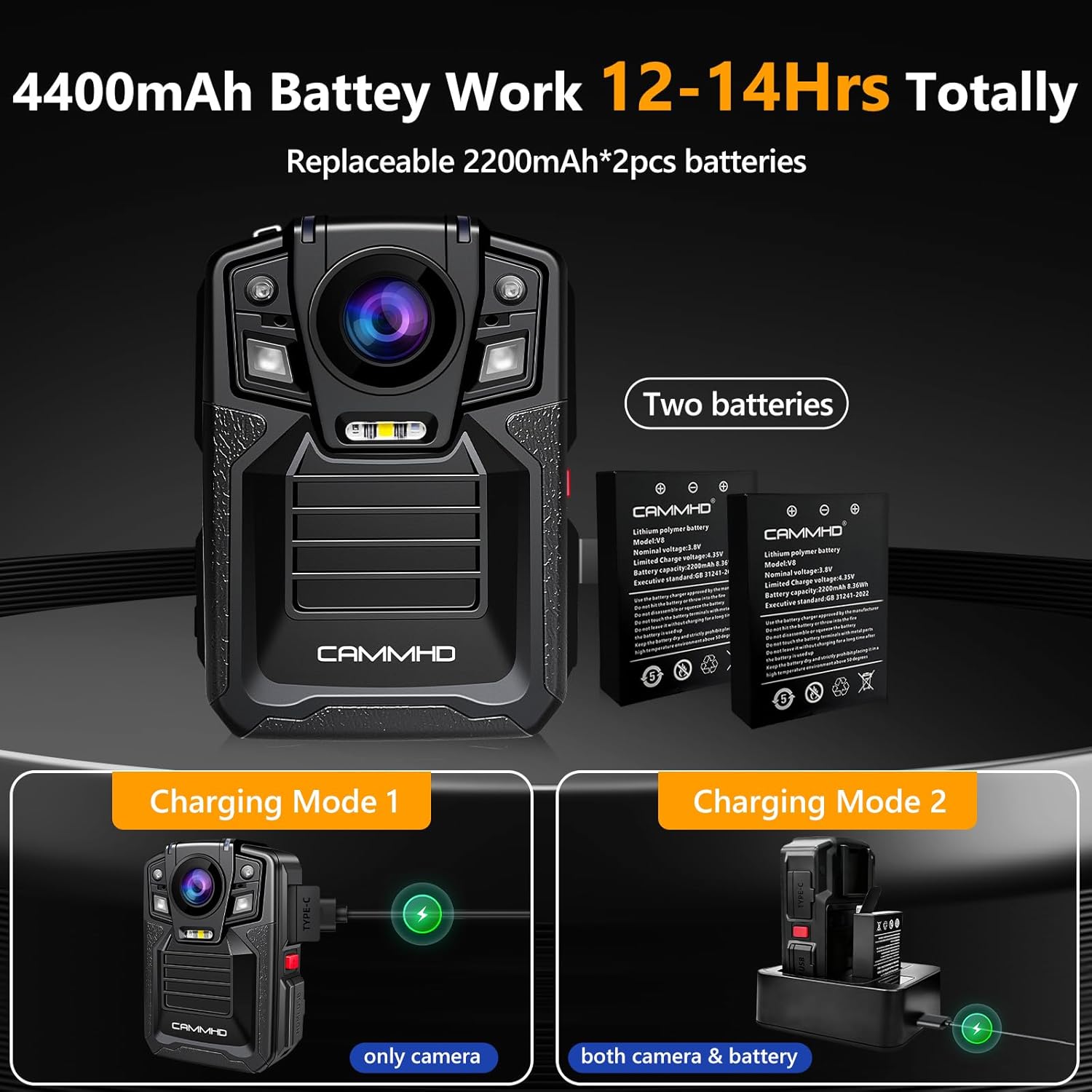
The CAMMHD V8PRO-512G uses replaceable 2200mAh batteries (two included) for extended operation.
Video: Step-by-step guide on how to replace the V8 body camera battery.
Каб усталяваць або замяніць батарэю:
- Знайдзіце адсек для батарэі на задняй панэлі камеры.
- Slide the lock mechanism to unlock the compartment.
- Insert the battery, ensuring correct orientation.
- Close the compartment and slide the lock mechanism to secure it.
Варыянты зарадкі:
- Прамая зарадка: Connect the camera directly to the charger using the Type-C cable.
- Док-станцыя для зарадкі: Use the provided charging dock to simultaneously charge the camera and an extra battery.
Image: The body camera and an extra battery being charged simultaneously using the charging dock.
Інструкцыя па эксплуатацыі
Уключэнне/выключэнне харчавання
Press and hold the red power button on the side of the device to turn it on or off.
Запіс відэа
Press the dedicated video recording button to start or stop 4K/2160P video recording. The camera features a 170° ultra-clear wide-angle lens. The image can be zoomed in and out during recording, and snapshot is supported.
Image: Demonstrates the 4K/2160P video resolution capability of the camera.
Аўдыёзапіс
Press the dedicated audio recording button to start or stop audio-only recording.
Захоп фота
Press the dedicated photo capture button to take still images.
Начное бачанне
The camera supports auto/manual IR night vision. Two powerful IR night vision LED lights can capture objects within 50 feet. In dark conditions, the camera can automatically switch to Night Vision Mode.
Image: The camera's auto/manual infrared night vision feature.
цыклічны запіс
The built-in 512GB SD card supports loop recording. When the storage limit is reached, the latest video automatically overwrites the oldest video.
Дата Свamp і бяспекі
Enable the Date Stamp feature to ensure all recordings are time-stamped and cannot be modified or deleted, providing verifiable evidence. For enhanced security, enable Camera Password protection to restrict access to the device and its files.
Прайграванне і File Трансфер
You can browse saved files directly on the camera's screen using the playback buttons. To transfer files to a computer, connect the camera via USB.
Video: Demonstrates on-device playback and connecting the CAMMHD V8 body camera to a computer for file перадача.
Тэхнічнае абслугоўванне
Фарматаванне SD -карты
Regularly format the internal 512GB SD card to maintain optimal performance and free up storage space. This option is available in the device's setup menu.
Агульны догляд
The camera is IP68 waterproof, offering protection against dust and water immersion. However, avoid prolonged exposure to extreme conditions and clean the lens and body with a soft, dry cloth.
Ліквідацыю непаладак
If you encounter any issues, refer to the included User Manual and Troubleshooting Guide for detailed solutions. Common issues can often be resolved by checking battery levels, ensuring proper connections, or formatting the SD card.
Тэхнічныя характарыстыкі
| Марка | CAMMHD |
| Нумар мадэлі | V8PRO-512G |
| Дазвол відэа | 4K/2160P |
| Тэхналогія фотадатчыка | CMOS |
| Шырокі кут | 170° |
| Ёмістасць батарэі | 2 x 2200mAh (4400mAh total) |
| Час запісу відэа | Up to 14 hours (at 720p) |
| Кампрэсія відэа | H.265 |
| Рэйтынг воданепранікальнасці | IP68 |
| Дыяпазон начнога бачання | Да 50 футаў |
| Захоўванне | 512GB (Built-in SD card) |
| Сувязь | USB Type-C, Mini USB |
| Памеры | 2.32 х 3.27 х 1.22 цалі |
| Вага | 5.7 унцыі |
Падтрымка
For any questions or further assistance, please contact us via email:
CAMMHD-Service@outlook.com


