
THOMSON 32HF2S34
THOMSON 32" HD LED Fire TV User Manual
Model: 32HF2S34
Уводзіны
This manual provides comprehensive instructions for setting up, operating, and maintaining your THOMSON 32" HD LED Fire TV (Model: 32HF2S34). This television combines useful technology with user-friendly features, offering easy access to applications, games, and streaming services through the intuitive Fire TV operating system. It supports Alexa voice control, AirPlay for Apple devices, and includes an integrated Smart Home dashboard. With a built-in Triple Tuner, Dolby Audio, and HDR10 visuals, this TV is designed to enhance your home entertainment experience.
Кіраўніцтва па ўстаноўцы
1. Распакоўка і змесціва ўпакоўкі
Асцярожна выміце ўсе кампаненты з упакоўкі. Пераканайцеся, што ўсе пералічаныя ніжэй элементы наяўныя:
- THOMSON 32" HD LED Fire TV
- Пульт дыстанцыйнага кіравання
- Сілавы кабель
- Тумбы пад тэлевізар (2) і шрубы
- Кіраўніцтва карыстальніка (гэты дакумент)
Заўвага: The remote control is included in the box.
2. Мацаванне падставак для тэлевізара
Place the TV screen face down on a soft, clean surface to prevent scratches. Align each stand with the corresponding screw holes on the bottom of the TV. Secure the stands using the provided screws.

Выява: спераду view of the Thomson 32-inch HD Fire TV.

Выява: Side profile of the Thomson 32-inch HD Fire TV.

Выява: Задняя частка view of the Thomson 32-inch HD Fire TV, highlighting the various input and output ports. These include Audio Out, CI+, Headphones, AV In, USB 2.0, 2x HDMI 1.4, Antenna, LAN, and Satellite connections.
3. Падключэнне знешніх прылад
Connect your external devices such as cable boxes, gaming consoles, or Blu-ray players to the appropriate ports on the back of the TV. The TV features 2 HDMI ports, 1 USB port, AV In, and a CI+ slot.
- HDMI: Для аўдыё і відэа высокай выразнасці.
- USB: Для падключэння USB-назапашвальнікаў.
- AV-уваход: Для старых аналагавых прылад.
- CI+: For encrypted cable or satellite channels.
- Антэна/Спадарожнік: Для падключэння эфірных або спадарожнікавых антэн.
- LAN: Для праваднога падключэння да Інтэрнэту.
4. Уключэнне і пачатковая налада
Plug the power cable into the TV and then into a wall outlet. Press the power button on the remote control or on the TV. Follow the on-screen instructions to complete the initial setup, including language selection, network connection (Wi-Fi or Ethernet), and Fire TV account login.
Кіраванне тэлевізарам
1. Fire TV Operating System
The Thomson Fire TV provides an intuitive interface for accessing a wide range of content. The home screen offers personalized recommendations and quick access to your favorite apps and streaming services.

Image: The Fire TV interface displaying popular streaming applications such as Netflix, Prime Video, Disney+, YouTube, Spotify, and Apple TV.
2. Галасавое кіраванне Alexa
Your TV comes with Alexa voice control integrated into the remote. Press the Alexa button on your remote and speak commands to control your TV, search for content, get recommendations, or manage smart home devices.

Image: Demonstrates the use of Alexa voice control with the Thomson Fire TV remote. Examples of voice commands include checking the weather, playing music, opening apps like Netflix, and controlling smart home lights.
3. Функцыянальнасць AirPlay
Stream content directly from your Apple devices (iPhone, iPad, Mac) to your Thomson Fire TV using AirPlay. Ensure both devices are connected to the same Wi-Fi network.

Image: Shows content being cast from an iOS device to the Thomson TV via Apple AirPlay.
4. Smart Home Dashboard
Control your connected smart home devices directly from your TV using the integrated Smart Home dashboard. This feature allows you to monitor and manage various smart devices from a single interface.
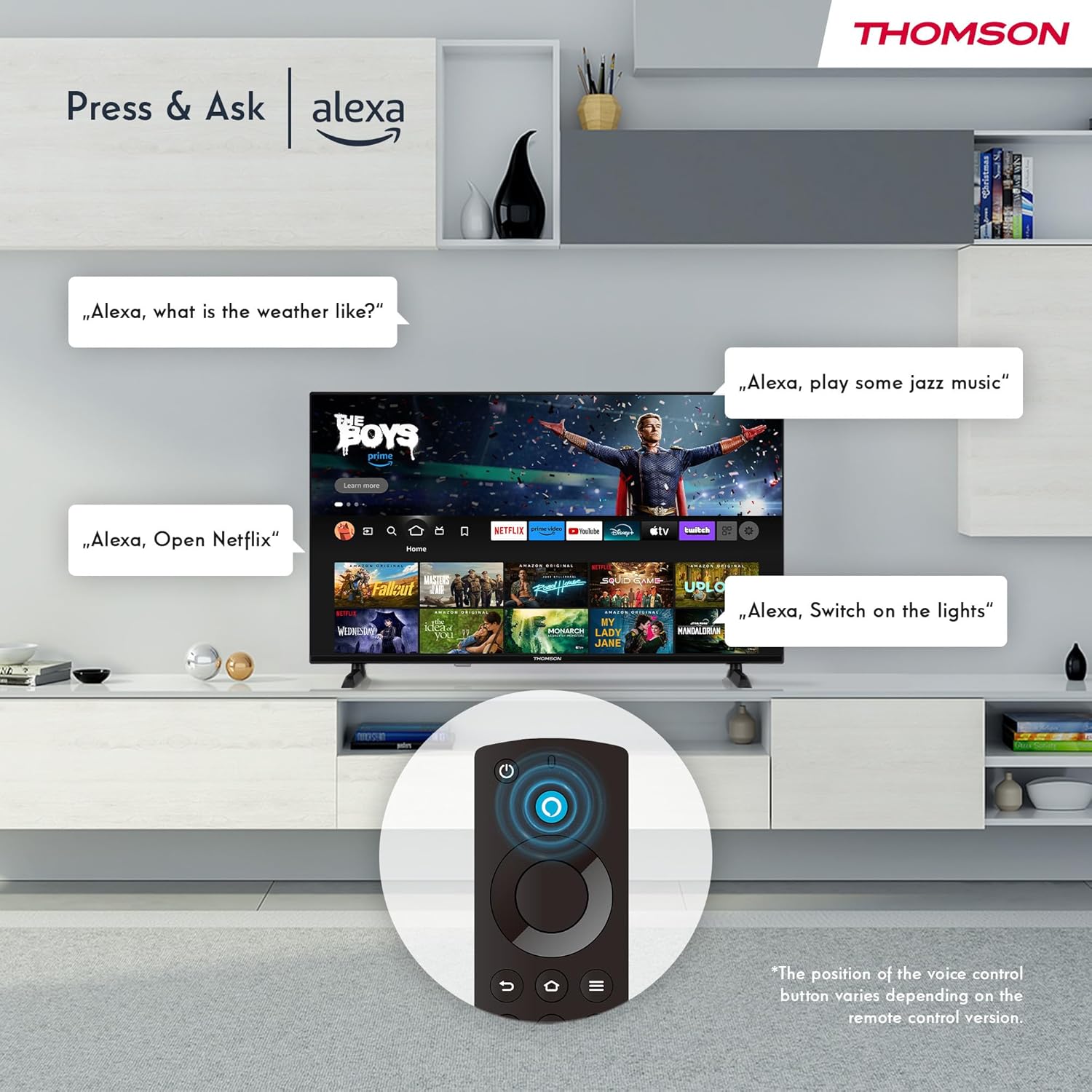
Image: The Smart Home dashboard on the Thomson TV, providing centralized control for various smart devices like cameras, lights, and plugs.
5. Некалькі карыстальнікаў Profiles
Стварыце некалькі праfiles on your Fire TV to receive personalized recommendations and settings for each user in your household.

Image: The Fire TV interface allowing creation of multiple user profileдля персаналізаваных рэкамендацый па кантэнту.
6. Triple Tuner and CI+
The integrated Triple Tuner allows you to receive signals from various sources:
- DVB-C: Кабельнае тэлебачанне
- DVB-S2: Satellite television
- DVB-T2: Terrestrial (antenna) television
Insert a CI+ card into the CI+ slot to access encrypted channels from your service provider.
7. Audio and Video Enhancements
Experience rich and clear sound with Dolby Audio and Dolby Digital Plus. Enjoy stunning visuals in HD resolution with HDR10 support for enhanced contrast and color.

Image: Visual representation of Dolby Audio technology enhancing the sound experience on the Thomson TV.

Image: A visual comparison demonstrating the superior image quality of HDR10 compared to SDR, highlighting enhanced colors and contrast.
8. Пульт дыстанцыйнага кіравання
The Bluetooth remote control provides easy navigation with direct access buttons for popular streaming services like Netflix and Prime Video, as well as the Amazon Silk browser. The Alexa button activates voice commands.
Тэхнічнае абслугоўванне
Ачыстка вашага тэлевізара
Каб ачысціць экран, акуратна працярыце яго мяккай тканінай без ворса. Для выдалення ўстойлівых плям,ampen the cloth slightly with water or a screen-cleaning solution. Avoid using harsh chemicals or abrasive materials. For the TV body, use a dry, soft cloth.
Абнаўлення праграмнага забеспячэння
Your Fire TV will periodically receive software updates to improve performance and add new features. Ensure your TV is connected to the internet to receive these updates automatically. You can also manually check for updates in the settings menu.
Ліквідацыю непаладак
| праблема | Магчымая прычына / рашэнне |
|---|---|
| Няма харчавання / тэлевізар не ўключаецца |
|
| Няма выявы / чорны экран |
|
| Без гуку |
|
| Пульт дыстанцыйнага кіравання не працуе |
|
| Праблемы з падключэннем да сеткі |
|
Тэхнічныя характарыстыкі
| Асаблівасць | Дэталь |
|---|---|
| Марка | ТОМСАН |
| Нумар мадэлі | 32HF2S34 |
| Памер экрана (па дыяганалі) | 32 цаляў (80 см) |
| Тэхналогія адлюстравання | святлодыёд |
| дазвол | HD (1366 x 768 Pixels) |
| Частата абнаўлення | 50 Гц |
| Аперацыйная сістэма | Пажарны тэлевізар |
| Галасавое кіраванне | Убудаваная Alexa |
| Бесправоднае падключэнне | Wi-Fi, Bluetooth 5.0, AirPlay |
| Правадное падключэнне | 2x HDMI 1.4, 1x USB, AV In, CI+, Ethernet (LAN) |
| Цюнеры | Triple Tuner (DVB-C, DVB-S2, DVB-T2) |
| Аўдыётэхналогія | Dolby Audio, Dolby Digital Plus |
| Падтрымка HDR | HDR10 |
| Памеры (Д х Ш х У) | 71.9 х 45.6 х 15 см (з падстаўкай) |
| Вага | 4 кг |
| Клас энергаэфектыўнасці | E |
Інфармацыя аб гарантыі
Your THOMSON 32" HD LED Fire TV (Model: 32HF2S34) is covered by a manufacturer's warranty of 3 гады from the date of purchase. This warranty covers defects in materials and workmanship under normal use. Please retain your proof of purchase for warranty claims. For detailed terms and conditions, refer to the warranty card included with your product or visit the official THOMSON support webсайт.
Падтрымка
For further assistance, technical support, or service requests, please contact THOMSON customer support through one of the following methods:
- Інтэрнэт-падтрымка: Наведайце афіцыйную службу падтрымкі THOMSON webсайт з часта задаванымі пытаннямі, кіраўніцтвамі па ліквідацыі непаладак і загрузкай праграмнага забеспячэння. www.thomsonconsumer.com/support (Заўвага: Гэта запаўняльнік URL, please refer to your product's specific support information.)
- Падтрымка па электроннай пошце: support@thomsonconsumer.com (Note: This is a placeholder email, please refer to your product's specific support information.)
- Падтрымка па тэлефоне: Refer to the contact numbers provided in your product packaging or on the official THOMSON webсайт для вашага рэгіёну.
When contacting support, please have your TV's model number (32HF2S34) and serial number ready.
Ask a question about this manual
Ask about setup, troubleshooting, compatibility, parts, safety, or missing instructions. Manuals+ will review the question and use this page’s manual context to help answer it.