
Уводзіны
This manual provides essential instructions for the setup, operation, and maintenance of your SLuB ZW60 Smartwatch. Please read this guide thoroughly before using your device to ensure proper function and longevity. The SLuB ZW60 features a 1.43-inch touchscreen, Bluetooth 5.3 connectivity, music player capabilities, various sports modes, IP67 dust and water resistance, and comprehensive health monitoring functions.
Важная заўвага: The health management functions of this smartwatch are for reference only and cannot be used for medical purposes. This product is not a medical device.
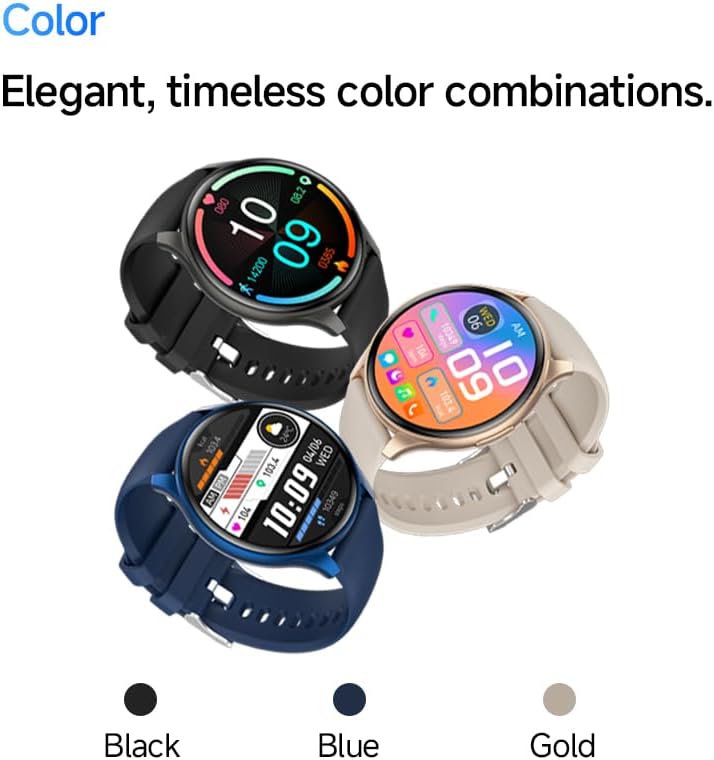
Image: The SLuB ZW60 Smartwatch in various color options (Black, Blue, Gold), highlighting its round display and overall design.
Што ў скрынцы
Пасля адкрыцця ўпакоўкі пераканайцеся, што ўсе наступныя рэчы наяўныя:
- SLuB ZW60 Smartwatch
- Магнітны зарадны кабель
- Кіраўніцтва карыстальніка (гэты дакумент)

Image: Contents of the SLuB ZW60 Smartwatch package, showing the smartwatch, its magnetic charging cable, and the printed user manual.
Настройка
1. Зарадка разумнага гадзінніка
Before initial use, fully charge your SLuB ZW60 Smartwatch. Connect the magnetic charging cable to the charging contacts on the back of the watch and plug the USB end into a standard USB power adapter (not included) or a computer's USB port. The watch display will indicate charging status. A full charge typically takes approximately 2 hours.
2. App Installation: H Band
To unlock the full functionality of your smartwatch, download and install the dedicated "H Band" application on your smartphone. Пошук "H Band" in your device's app store (Google Play Store for Android or Apple App Store for iOS).

Image: The smartwatch screen showing a grid of colorful application icons, illustrating the "H Band" app integration and multi-menu screen options.
3. Спарванне Bluetooth
- Пераканайцеся, што ваш разумны гадзіннік зараджаны і ўключаны.
- Уключыце Bluetooth на вашым смартфоне.
- Адкрыйце праграму «H Band».
- Follow the in-app instructions to search for and connect to your SLuB ZW60 Smartwatch. The app will guide you through the pairing process.
- Пацвердзіце запыт на спалучэнне як на смартфоне, так і на смарт-гадзінніку, калі будзе прапанавана.
Once paired, the smartwatch will synchronize data with the app and enable features like call notifications and message alerts.
Інструкцыя па эксплуатацыі
Базавая навігацыя
- Сэнсарны экран: Правядзіце пальцам улева, управа, уверх або ўніз, каб перамяшчацца па меню і экранах. Націсніце, каб выбраць элемент.
- Бакавая кнопка: Typically used to wake the screen, return to the home screen, or access the app menu. Refer to the on-screen prompts for specific functions.
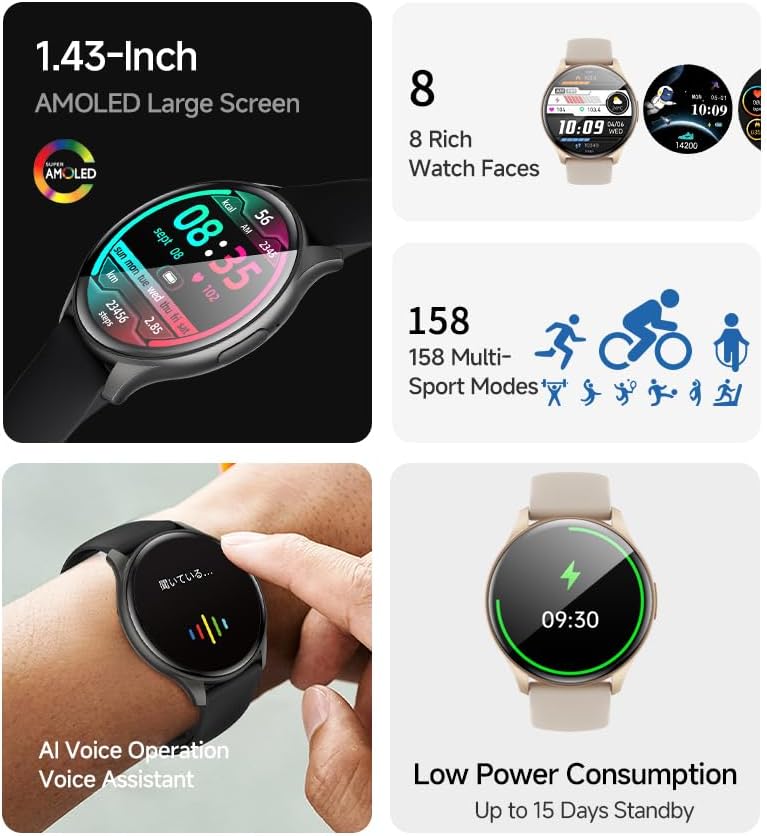
Выява: Прэзентацыя разумных гадзіннікаўasing its 1.43-inch AMOLED display with a customizable watch face, and visual cues for its 158 multi-sport modes, AI voice operation, and low power consumption.
Функцыя выкліку
With the smartwatch connected to your smartphone via Bluetooth, you can make and receive calls directly from your wrist. The built-in speaker and microphone allow for hands-free communication.
- Здзяйсненне званкоў: Каб пачаць званок, адкрыйце панэль набору нумара або спіс кантактаў на вашым разумным гадзінніку.
- Прыём званкоў: When a call comes in, the smartwatch will display the caller ID. Tap the green icon to answer or the red icon to reject.
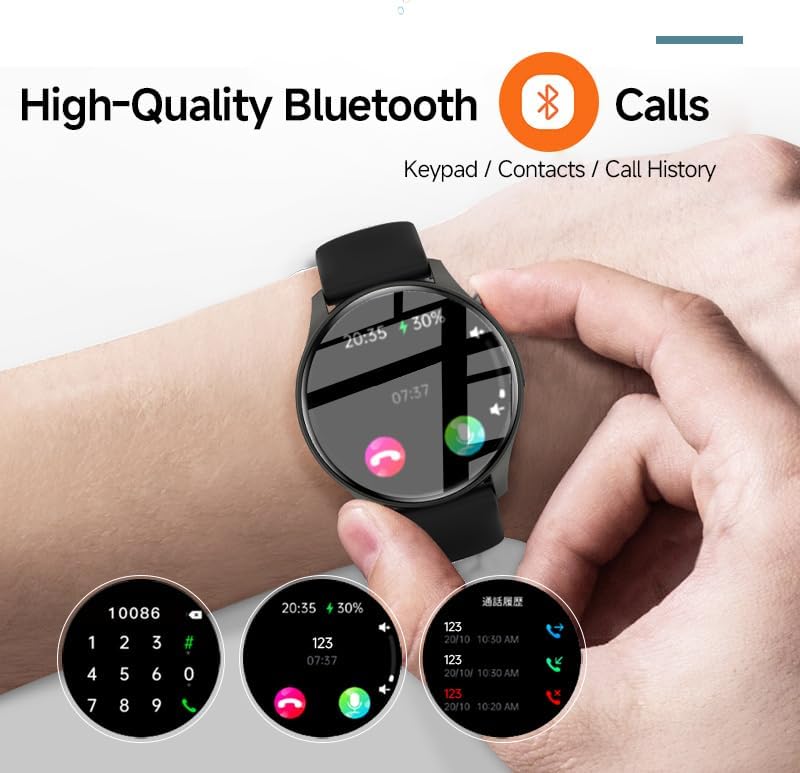
Image: The smartwatch screen showing the Bluetooth calling feature, including a numeric keypad for dialing, recent call history, and contact access.
Апавяшчэнні аб паведамленнях
Once paired with your smartphone, the smartwatch can display notifications from various apps, including emails, social media, and messaging services. This allows you to stay informed without needing to check your phone constantly.
- Ensure app notifications are enabled in your smartphone's settings and within the "H Band" app.
- Правядзіце пальцам уніз па цыферблаце гадзінніка, каб view нядаўнія апавяшчэнні.

Image: The smartwatch showing a message notification, indicating its ability to sync alerts from popular communication applications like WeChat, LINE, and others.
Health Management Functions
The SLuB ZW60 Smartwatch is equipped with multiple sensors to monitor various health metrics. Access these features through the watch menu or the "H Band" app.
- Маніторынг сардэчнага рытму: Continuously or periodically measures your heart rate.
- Маніторынг сну: Адсочвае вашы рэжымы сну, у тым ліку глыбокі сон, лёгкі сон і час абуджэння.
- Calorie Consumption: Estimates calories burned based on activity levels.
- Дадзеныя практыкаванняў: Records steps, distance, and other activity metrics.
Disclaimer: The data provided by these functions is for general wellness and fitness purposes only and should not be used for medical diagnosis or treatment.

Image: The smartwatch illustrating its 24-hour health management capabilities, including heart rate, body temperature, and sleep quality monitoring.
Спартыўныя рэжымы
The smartwatch supports over 150 sports modes, allowing you to accurately track your workouts. Common modes include running, cycling, badminton, basketball, and football.
- Абярыце патрэбны від спорту ў спартыўным меню гадзінніка.
- The watch will record duration, calories burned, and other relevant metrics for your activity.
- Review detailed statistics in the "H Band" app after your workout.
Кіраванне музычным плэерам
Control music playback on your connected smartphone directly from your smartwatch. You can play, pause, skip tracks, and adjust volume.
ІІ Галасавы памочнік
Utilize the integrated AI Voice Assistant for quick commands and information retrieval. Activate the assistant via the watch interface and speak your commands.
Наладжвальныя цыферблаты
Choose from a variety of pre-installed watch faces or customize your own through the "H Band" app to match your style and display preferred information.
Тэхнічнае абслугоўванне
Чыстка вашага смарт-гадзінніка
Рэгулярная чыстка дапамагае падтрымліваць знешні выгляд і функцыянальнасць вашай прылады.
- Працярыце экран і корпус мяккай тканінай без ворса.
- Для ўстойлівага бруду злёгку ачысціцеampпрамыйце тканіну вадой. Пазбягайце выкарыстання агрэсіўных хімічных рэчываў або абразіўных матэрыялаў.
- Перад зарадкай пераканайцеся, што кантакты зараднай прылады чыстыя і сухія.
Воданепранікальнасць (IP67)
The SLuB ZW60 Smartwatch is rated IP67, meaning it is dust-tight and can withstand immersion in water up to 1 meter (3.3 feet) for up to 30 minutes. This makes it suitable for daily use, such as washing hands or light rain exposure.
- НЕ use the watch for swimming, diving, or showering with hot water.
- Пазбягайце exposing the watch to high-pressure water or steam.
- If the watch gets wet, dry it thoroughly before charging or operating.
Парады па тэрміне службы батарэі
- Паменшыць яркасць экрана.
- Адключыце непатрэбныя апавяшчэнні.
- Абмяжуйце бесперапынны маніторынг пульса, калі ён не патрэбны.
- Ensure the "H Band" app is running efficiently in the background on your phone.
Ліквідацыю непаладак
| праблема | Магчымае рашэнне |
|---|---|
| Гадзіннік не ўключаецца. | Пераканайцеся, што гадзіннік цалкам зараджаны. Падключыце яго да зараднай прылады як мінімум на 30 хвілін. |
| Немагчыма спалучыць са смартфонам. |
|
| Апавяшчэнні не паступаюць. |
|
| Недакладныя дадзеныя пра здароўе. |
|
| Экран не рэагуе. | Паспрабуйце перазагрузіць гадзіннік, націснуўшы і ўтрымліваючы бакавую кнопку, пакуль ён не выключыцца, а затым зноў уключыце яго. |
Тэхнічныя характарыстыкі
| Асаблівасць | Дэталь |
|---|---|
| Назва мадэлі | ZW60 |
| Марка | SLuB |
| Памер экрана | 1.43 цалі |
| Тып дысплея | AMOLED |
| Сувязь | Bluetooth 5.3 |
| Воданепранікальнасць | IP67 (пыла- і воданепранікальнасць) |
| Памеры прадукту | 1.77 х 0.43 х 1.97 цалі |
| Вага прадмета | 3.23 унцыі (91.5 грама) |
| Тэрмін службы батарэі | Up to 15 Days Standby |
| Сумяшчальнае прыкладанне | Н-дыяпазон |
| Вытворца | SLuB |
Гарантыя і падтрымка
For warranty information and technical support, please refer to the documentation included with your purchase or contact SLuB customer service. Contact details can typically be found on the manufacturer's official website or within the "H Band" application.
Інтэрнэт-рэсурсы: For the latest updates, FAQs, and additional support, visit the official SLuB webсайт.