
1. Уводзіны
Thank you for choosing the RUJIXU Large Digital Kitchen Scale. This precision instrument is designed for accurate weighing in various settings, from home kitchens to commercial environments. With a maximum capacity of 30kg (66lb) and multiple functions including tare, unit conversion, price computing, and counting, this scale offers versatility and reliability. Please read this manual thoroughly before use to ensure proper operation and longevity of your device.
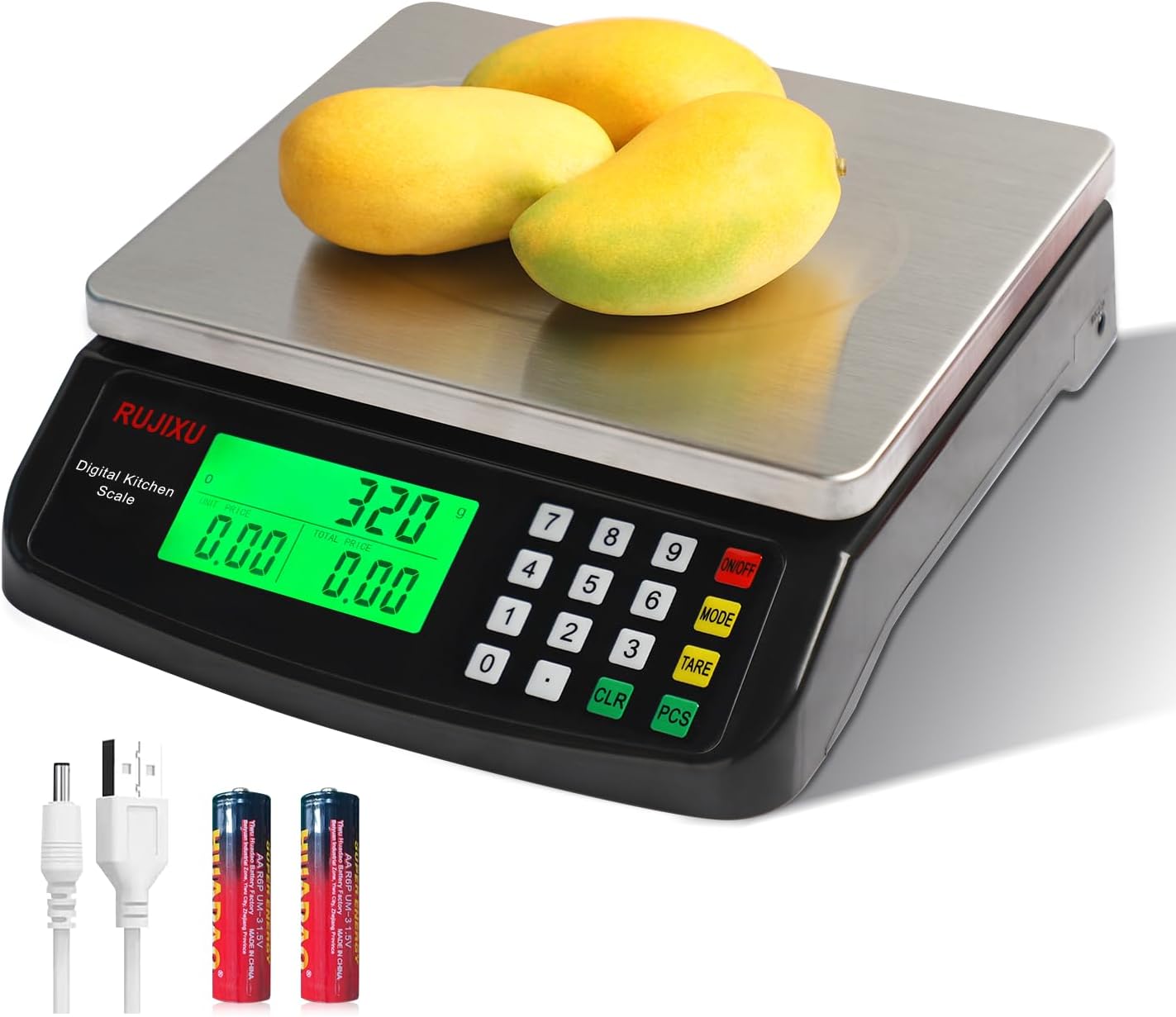
Image 1.1: RUJIXU Large Digital Kitchen Scale (Model DT-580)
2. Кампаненты і характарыстыкі прадукту
2.1 Асноўныя магчымасці
- Высокая ёмістасць: Weighs items from 3g up to 30kg (66lb).
- Некалькі адзінак: Supports grams (G), kilograms (KG), pounds (LB), and ounces (OZ).
- Функцыя тары: Allows subtraction of container weight for net measurements.
- Counting Function (PCS): Enables counting of small, identical items.
- Price Computing: Calculates price based on weight and unit price input.
- ВК-дысплей з падсветкай: Provides clear and easy-to-read measurements, even in varying light conditions.
- Трывалая канструкцыя: Features a stainless steel platform and ABS plastic frame.
- Двайны блок харчавання: Operates with an AC power adapter or 2x 1.5V AA batteries (not included).
- Аўтаматычнае выключэнне: Automatically shuts off after 120 seconds of inactivity to conserve power.
2.2 Памеры

Image 2.1: Scale Dimensions
The scale features a stainless steel weighing surface measuring approximately 7 inches by 8.7 inches (18cm by 22cm). The overall product dimensions are 9.8 x 9 x 2.5 inches (24.9 x 22.9 x 6.4 cm).
3. Настройка
3.1 Распакаванне
Carefully remove all components from the packaging. Ensure that the scale, AC power adapter, and user manual are present.
3.2 Крыніца харчавання
The scale can be powered by either the included AC power adapter or two 1.5V AA batteries (not included).
- Магутнасць пераменнага току: Connect the AC power adapter to the scale's power input port and then plug it into a standard electrical outlet.
- Магутнасць батарэі: Open the battery compartment on the underside of the scale and insert two 1.5V AA batteries, observing the correct polarity.
Заўвага: The two power sources cannot be used simultaneously. If both are connected, the scale will prioritize AC power.

Image 3.1: Power Supply Modes
3.3 Размяшчэнне
Place the scale on a firm, flat, and stable surface to ensure accurate readings. Avoid placing it near strong electromagnetic fields, vibrations, or extreme temperature changes.
4. Аперацыя
4.1 Уключэнне/выключэнне
- Каб уключыць вагі, націсніце кнопку ВКЛ/ВЫКЛ button. The display will light up and show "0.000".
- Каб выключыць вагі, націсніце і ўтрымлівайце ВКЛ/ВЫКЛ кнопку некалькі секунд, пакуль дысплей не выключыцца.
4.2 Пераключэнне блокаў
The scale supports four units of measurement: grams (G), kilograms (KG), pounds (LB), and ounces (OZ).
- Уключыўшы шалі, націсніце кнопку РЭЖЫМ button to cycle through the available units. The selected unit will be displayed on the LCD screen.

Image 4.1: Unit Switching
4.3 Функцыя тары
The tare function allows you to subtract the weight of a container, so you only measure the net weight of its contents.
- Place the empty container on the weighing platform. The display will show the container's weight.
- Націсніце СКАРА кнопка. На дысплеі будзе паказана «0.000».
- Add the items you wish to weigh into the container. The display will now show only the weight of the items.

Image 4.2: Tare Function Steps
4.4 Counting Function (PCS)
The PCS function is useful for counting small, identical items such as screws, coins, or beads.
- Turn on the scale and ensure it reads "0.000".
- Націсніце і ўтрымлівайце шт button for approximately 5 seconds. The display will show a sample size (e.g., "25").
- Use the number pad to enter the quantity of items you will use as a sample (e.g., "10", "20", "50", "100").
- Змесціце сample quantity of items on the platform.
- Націсніце шт button again to confirm the sample. The scale is now calibrated for counting.
- Выдаліце sample and place the bulk quantity of items you wish to count on the platform. The display will show the total count.
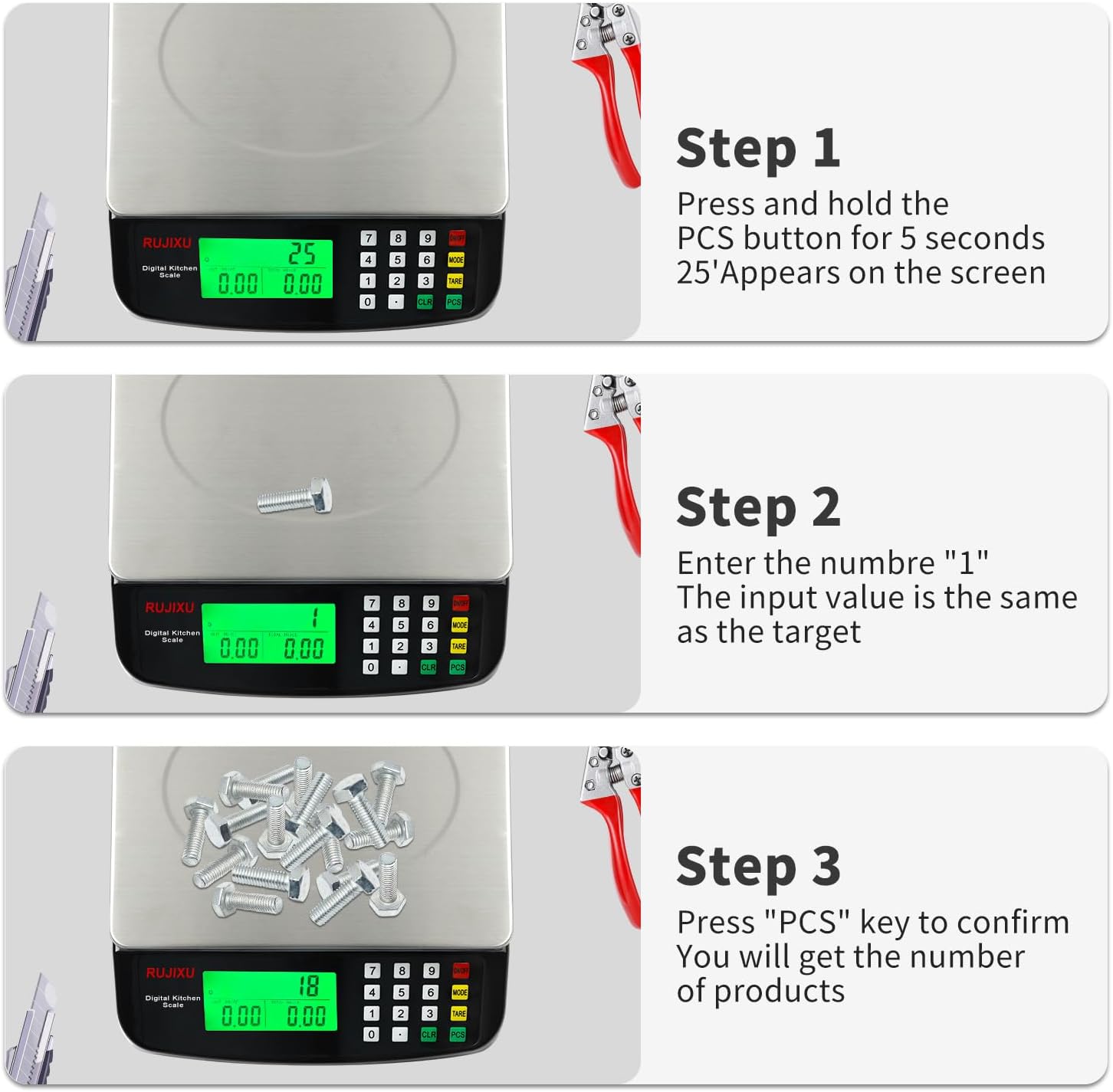
Image 4.3: Counting Function Steps
4.5 Price Computing Function
This function allows you to calculate the total price of items based on their weight and a set unit price.
- Turn on the scale and ensure it reads "0.000".
- Place the item(s) to be weighed on the platform. The scale will display the weight.
- Using the number pad, enter the unit price (e.g., price per KG or LB).
- Вагі аўтаматычна разлічаць і адлюструюць агульны кошт.

Image 4.4: Price Computing in Use
4.6 Функцыя аўтаматычнага выключэння
To conserve battery life, the scale is equipped with an automatic shut-off feature. If no operation is performed for approximately 120 seconds, the scale will power down.
5. Тэхнічнае абслугоўванне
5.1 Ачыстка
The stainless steel platform and ABS plastic body are designed for easy cleaning.
- Працярыце паверхню вагаў мяккай губкайamp тканіна.
- For stubborn stains, a mild detergent can be used.
- Do not immerse the scale in water or use abrasive cleaners, as this can damage the electronic components.
- Перад захоўваннем або наступным выкарыстаннем пераканайцеся, што шалі цалкам высахлі.

Image 5.1: Food-Grade Stainless Steel Platform
5.2 Захоўванне
Store the scale in a cool, dry place away from direct sunlight and extreme temperatures. If storing for an extended period, remove the batteries to prevent leakage.
6. Выпраўленне непаладак
- Шкала не ўключаецца:
- Check if the AC adapter is securely plugged in.
- If using batteries, ensure they are inserted correctly with the right polarity and are not depleted. Replace if necessary.
- Няправільныя паказанні:
- Ensure the scale is placed on a flat, stable, and level surface.
- Avoid placing the scale near sources of vibration or drafts.
- Make sure no objects are touching the scale or platform during weighing.
- Recalibrate the scale if possible (refer to specific instructions if available, otherwise, turn off and on).
- Ensure the weight limit (30kg/66lb) is not exceeded.
- Дысплей цьмяны або нечытэльны:
- Check battery level if operating on batteries.
- Ensure the scale is not in direct sunlight or extremely bright conditions that might wash out the display. The LCD is designed for full view, but extreme glare can still affect visibility.
- "EEEE" or "O-Ld" error message:
- This indicates an overload. Remove items from the platform immediately to prevent damage.

Image 6.1: Improved LCD Display Visibility
7. Тэхнічныя характарыстыкі
| Асаблівасць | Дэталь |
|---|---|
| Мадэль прадукту | DT-580 |
| Адзінка | G, KG, LB, OZ |
| Максімальная грузападымальнасць | 30 кг / 66 фунта |
| Мінімальная вага | 2г-3г |
| Дакладныя вымярэнні | 1g |
| Асаблівасці | Tare function, Price Calculator, Accurate Counting |
| Экран дысплея | Поўны view LCD display (7.5x3.8cm) |
| Аўтаматычнае адключэнне | 120 seconds automatic shut-off when no operation |
| Рэкамендуемае выкарыстанне | Food baking, market business, cooking meal |
| Food Scale Size | 24 × 21.6 × 6.5 cm (9.8 x 9 x 2.5 inches) |
| Stainless Weighing Surface | 21.6 × 17.5 cm (8.5 x 6.9 inches) |
| Вага прадмета | 1.16 кг (2.55 фунта) |
| Food Scale Material | АБС-пластык і нержавеючая сталь |
| Электразабеспячэнне | AC6V Power Adapter, 2x 1.5V AA battery (Batteries not included) |
| Пакет уключае | 1x Kitchen Scale, 1x Power Adapter, 1x User Manual |

Image 7.1: Product Specifications Table