
Уводзіны
Thank you for choosing the KLIM K7 Cassette Tape Player and MP3 Converter. This device allows you to enjoy your classic cassette tapes and convert them into digital MP3 files for modern playback. It features a built-in microphone for recording, an integrated speaker, and a rechargeable battery for portability. This manual provides detailed instructions for setup, operation, and maintenance of your KLIM K7.
Прадукт скончаныview
Асноўныя характарыстыкі
- Cassette to MP3 Converter: Effortlessly convert cassette tapes to digital MP3 files directly onto an SD card.
- Партатыўны дызайн: Lightweight and compact for on-the-go listening.
- Убудаваны мікрафон: Record audio directly to the SD card.
- Убудаваны дынамік: Share your audio without external devices.
- Акумулятарная батарэя: Integrated 1000mAh battery provides extended playback.
- SD Card Player: Прайграць MP3 files захоўваецца на SD-карце.
- Гняздо для навушнікаў 3.5 мм: For private listening with included earphones.
Кампаненты прылады і элементы кіравання
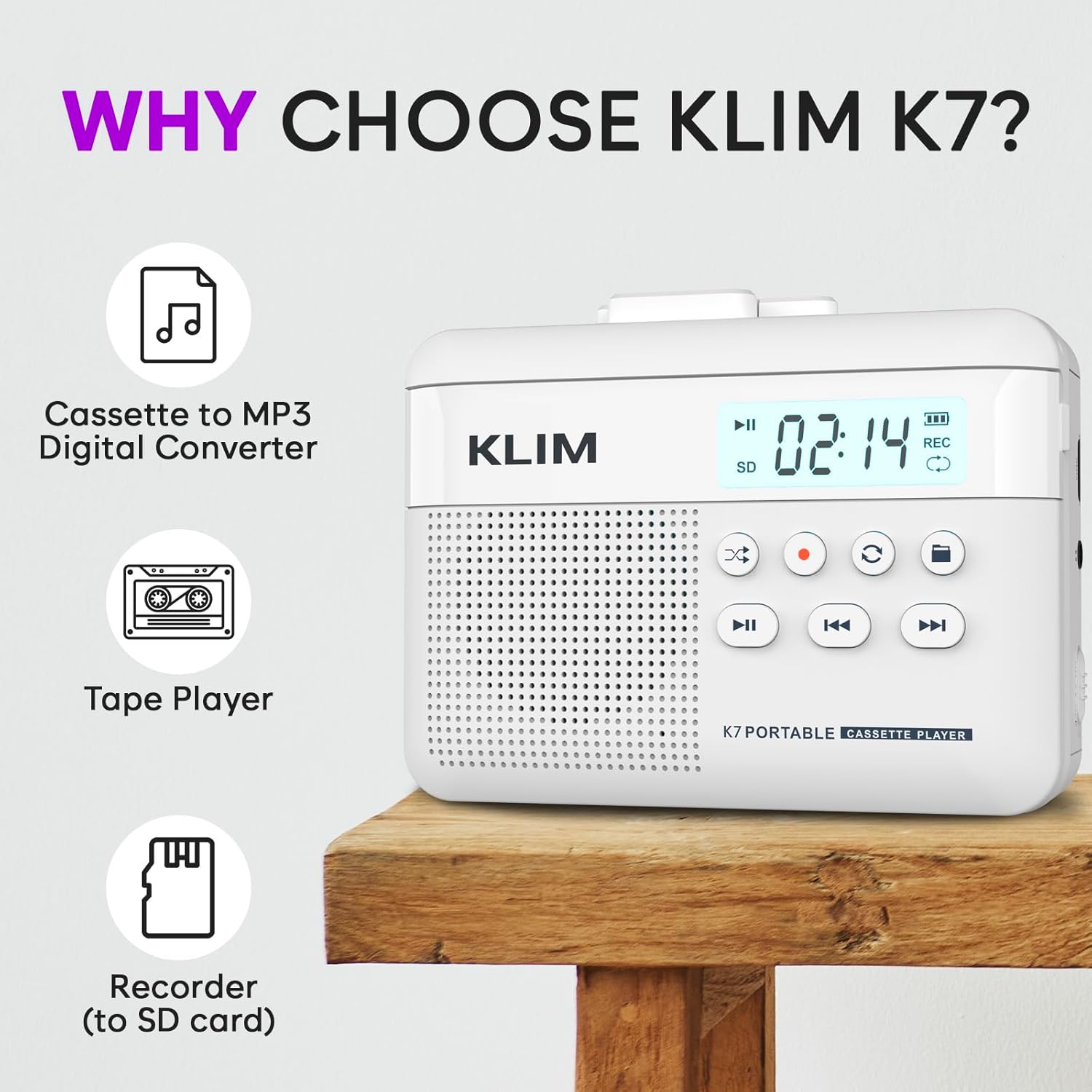
Малюнак 1: Фронт view of the KLIM K7 Cassette Player, showing the speaker grille, LCD display, and control buttons (Play/Pause, Rewind, Fast Forward, Stop, Record, Mode, Folder, Loop).
- ВК-дысплей: Shows track number, recording status, and battery level.
- Дакладчык: Убудаваны дынамік для прайгравання аўдыё.
- Play/Pause Button (►▮): Пачынае альбо прыпыняе прайграванне.
- Rewind Button (◀◀): Rewinds the cassette tape or navigates backward through MP3 tracks.
- Fast Forward Button (►►): Fast forwards the cassette tape or navigates forward through MP3 tracks.
- Stop Button (■): Спыняе прайграванне або запіс.
- Record Button (●): Initiates or stops recording.
- Кнопка рэжыму (↻): Switches between cassette playback and SD card MP3 playback.
- Folder Button (🖿): Navigates through folders on the SD card.
- Loop Button (⟳): Паўтарае бягучую кампазіцыю або ўсе кампазіцыі.

Малюнак 2: Збоку view of the KLIM K7 Cassette Player, highlighting the SD card slot, 3.5mm headphone jack, and On/Off switch.
- Слот для SD-карты: Insert your Micro SD card here for recording and MP3 playback.
- Гняздо для навушнікаў 3.5 мм: Connect the included earphones or other standard headphones.
- Перамыкач уключэння/выключэння: Уключае або выключае прыладу.
- Рэгулятар гучнасці: Рэгулюе ўзровень выхаднога гуку.

Малюнак 3: Топ view of the KLIM K7 Cassette Player with the cassette compartment open, showing the tape mechanism.
- Касетны адсек: Insert your cassette tapes here.
- Cassette Door Release: Адкрывае адсек для касеты.
Настройка
1. Зарадка акумулятара
Before first use, fully charge the KLIM K7. The device comes with a 1000mAh rechargeable battery.
- Locate the Type-C USB charging port on the side of the device.
- Connect the included Type-C USB cable to the charging port and the other end to a USB power adapter (not included) or a computer's USB port.
- The charging indicator on the LCD display will show charging status. A full charge typically takes approximately 2 hours.

Малюнак 4: The KLIM K7 connected to a Type-C USB cable for charging.
2. Устаўка SD-карты
An SD card (16GB included) is required for converting tapes to MP3 and for recording with the built-in microphone.
- Locate the SD card slot on the side of the device (refer to Figure 2).
- Акуратна ўстаўце карту Micro SD у слот залацістымі кантактамі ўніз, пакуль яна не зафіксуецца са шчоўкам.
- To remove, push the SD card inward until it clicks, then release, and it will eject.

Малюнак 5: Inserting the Micro SD card into the KLIM K7.
3. Inserting a Cassette Tape
- Press the Cassette Door Release button to open the cassette compartment.
- Insert your cassette tape with the open side facing upwards and the tape reels aligned with the player's mechanism.
- Шчыльна зачыніце дзверцы адсека для касеты да пстрычкі.
Інструкцыя па эксплуатацыі
1. Прайграванне касет
- Ensure the device is powered on using the On/Off switch.
- Insert a cassette tape as described in the Setup section.
- Націсніце Play/Pause (►▮) кнопку, каб пачаць прайграванне.
- Адрэгулюйце гучнасць з дапамогай рэгулятара гучнасці.
- Выкарыстоўвайце Перамотка назад (◀◀) і Хуткая перамотка наперад (►►) кнопкі для навігацыі па стужцы.
- Націсніце Стоп (■) кнопку, каб спыніць прайграванне.
2. Converting Cassette Tapes to MP3
The KLIM K7 allows direct conversion of cassette audio to MP3 files on the inserted SD card, without needing a computer or additional software.
- Ensure an SD card is inserted and the device is powered on.
- Insert the cassette tape you wish to convert.
- Націсніце Play/Pause (►▮) button to start playing the tape.
- Доўгі націск у Record (●) button. The 'REC' indicator on the LCD display will illuminate, indicating that recording has started.
- Каб спыніць запіс, націсніце Record (●) button again. The 'REC' indicator will turn off. The recorded audio will be saved as an MP3 file на SD-карце.
- You can then remove the SD card and use the included SD card reader to transfer the MP3 files to a computer or other device.

Малюнак 6: Visual guide for converting cassette audio to MP3 files.
3. Using the Built-in Microphone for Recording
The KLIM K7 can also record audio directly from its built-in microphone to the SD card.
- Ensure an SD card is inserted and the device is powered on.
- Націсніце Mode (↻) button until the device is in SD card mode (no cassette playing).
- Доўгі націск у Record (●) button. The 'REC' indicator will light up, and the device will start recording audio from its microphone.
- Каб спыніць запіс, націсніце Record (●) button again. The 'REC' indicator will turn off, and the recording will be saved as an MP3 file.

Малюнак 7: Using the KLIM K7's built-in microphone for recording.
4. Playing MP3 Files from SD Card
- Ensure an SD card with MP3 files is inserted and the device is powered on.
- Націсніце Mode (↻) button to switch to SD card playback mode. The LCD display will show track information.
- Націсніце Play/Pause (►▮) кнопку, каб пачаць прайграванне.
- Выкарыстоўвайце Перамотка назад (◀◀) і Хуткая перамотка наперад (►►) кнопкі для пропуску трэкаў.
- The Folder (🖿) button allows navigation through different folders on the SD card.
- The Loop (⟳) button can be used to repeat the current track or all tracks.
- Адрэгулюйце гучнасць з дапамогай рэгулятара гучнасці.
- Націсніце Стоп (■) кнопку, каб спыніць прайграванне.

Малюнак 8: Enjoying audio with the KLIM K7 and included earphones.
Тэхнічнае абслугоўванне
Proper maintenance ensures the longevity and optimal performance of your KLIM K7.
- Уборка: Для чысткі вонкавага боку прылады выкарыстоўвайце мяккую сухую тканіну. Не выкарыстоўвайце вадкія ачышчальнікі або растваральнікі.
- Касетны адсек: Перыядычна чысціце галоўкі стужкі і прыціскныя ролікі ватным тампонам, злёгку працёртымampened with isopropyl alcohol to prevent audio quality degradation. Ensure the device is off and dry before use.
- захоўванне: Захоўвайце прыладу ў прахалодным, сухім месцы, удалечыні ад прамых сонечных прамянёў і экстрэмальных тэмператур.
- Сыход за батарэяй: Для працяглага захоўвання зараджайце акумулятар прыкладна да 50% кожныя некалькі месяцаў, каб падтрымліваць яго ў працоўным стане.
Ліквідацыю непаладак
If you encounter any issues with your KLIM K7, please refer to the following common solutions:
| праблема | Магчымая прычына | Рашэнне |
|---|---|---|
| Прылада не ўключаецца. | Акумулятар разраджаны. | Charge the device using the provided Type-C USB cable. |
| No sound during cassette playback. | Volume is too low or headphones are not connected properly. | Increase the volume. Ensure headphones are fully plugged into the 3.5mm jack. |
| Recording to MP3 fails or produces no file. | SD card is full, not inserted correctly, or corrupted. | Check SD card insertion. Ensure sufficient space on the SD card. Try reformatting the SD card (this will erase all data). |
| Poor audio quality from cassette. | Dirty tape heads or worn-out cassette tape. | Clean the tape heads and pinch rollers. Try a different cassette tape to determine if the issue is with the tape itself. |
| Прылада завісае або перастае рэагаваць. | Часовы збой праграмнага забеспячэння. | Turn the device off and then on again. If the issue persists, allow the battery to fully discharge and then recharge. |
Тэхнічныя характарыстыкі
- Памеры прадукту: 4.76 х 3.61 х 1.56 цалі
- Вага прадмета: 9.9 унцыі
- акумулятар: 1 літый-іённы акумулятар (у камплекце), 1000 мАг
- Час зарадкі: Прыкладна 2 гадзіны
- захоўванне: Падтрымка карты Micro SD (16 ГБ у камплекце)
- Аўдыявыхад: Built-in speaker, 3.5mm headphone jack
- Фармат запісу: MP3

Малюнак 9: Dimensions of the KLIM K7 Cassette Player.
Гарантыя і падтрымка
KLIM is committed to producing quality electronics. The KLIM K7 Cassette Tape Player comes with a Гарантыя на 5 год. If you encounter any problems with your device, please contact KLIM customer support for assistance.
Дадатковыя планы абароны могуць быць даступныя для куплі:
- 2-гадовы план абароны: 3.99 долараў ЗША (аднаразова)
- 3-гадовы план абароны: 5.99 долараў ЗША (аднаразова)
- NEW Complete Protect: $16.99 (monthly)
Каб атрымаць дадатковую падтрымку, наведайце KLIM Store on Amazon.