
1. Уводзіны
The FREEWOLF A2 is a transparent wireless gaming mouse designed for versatility and performance. It features dual-mode connectivity (2.4G wireless and Bluetooth 5.0), a PixArt 3212 optical sensor with adjustable DPI, a built-in rechargeable battery with a digital display, and customizable RGB backlighting. Its ergonomic design ensures comfort during extended use across various operating systems like Windows, Mac, and Linux.

Image 1.1: The FREEWOLF A2 Transparent Wireless Gaming Mouse, showcasing its transparent shell and internal components.
2. Змесціва ўпакоўкі
Калі ласка, пераканайцеся, што ўсе прадметы прысутнічаюць у камплекце:
- FREEWOLF A2 Wireless Gaming Mouse
- USB-прыёмнік (адаптар 2.4G)
- Зарадны кабель USB-C
- Кіраўніцтва карыстальніка (гэты дакумент)
3. Прадукт скончыўсяview
Familiarize yourself with the various components and features of your FREEWOLF A2 mouse.

Image 3.1: Exploded diagram illustrating the internal components of the FREEWOLF A2 mouse, including the transparent shell, battery, PCB board, and switches.

Малюнак 3.2: Зверху ўніз view of the FREEWOLF A2 mouse with key components labeled, including the 2.4G receiver storage, DPI switch, power switch, and dimensions.
Асноўныя характарыстыкі:
- Двухрэжымнае падключэнне: 2.4G Wireless and Bluetooth 5.0.
- PixArt 3212 Sensor: High sensitivity and accuracy.
- Рэгуляваны DPI: 5 levels up to 4000 DPI.
- Акумулятарная батарэя: Built-in 400 mAh battery with USB-C charging.
- Лічбавы экран: Адлюстроўвае працэнт батарэіtage and DPI level.
- RGB-падсветка: Наладжвальныя светлавыя эфекты.
- Эрганамічны дызайн: Comfortable for various grip styles.
4. Настройка
4.1. Зарадка мышы
Before first use, it is recommended to fully charge the mouse. Connect the provided USB-C charging cable to the mouse's charging port and the other end to a USB power source (e.g., computer USB port, USB wall adapter). The digital screen will display the battery percentage падчас зарадкі.
Note: The USB-C cable is for charging only and does not provide a wired connection for mouse operation.

Image 4.1: Close-up of the FREEWOLF A2 mouse showing the digital screen displaying battery percentage.
4.2. Падключэнне праз бесправадную сетку 2.4G
- Знайдзіце USB-прыёмнік (адаптар), які знаходзіцца ў адсеку на ніжняй частцы мышы.
- Падключыце USB-прыёмнік да вольнага порта USB на вашым кампутары.
- Slide the power switch on the underside of the mouse to the '2.4G' position.
- The mouse should connect automatically. Your computer will typically install the necessary drivers.
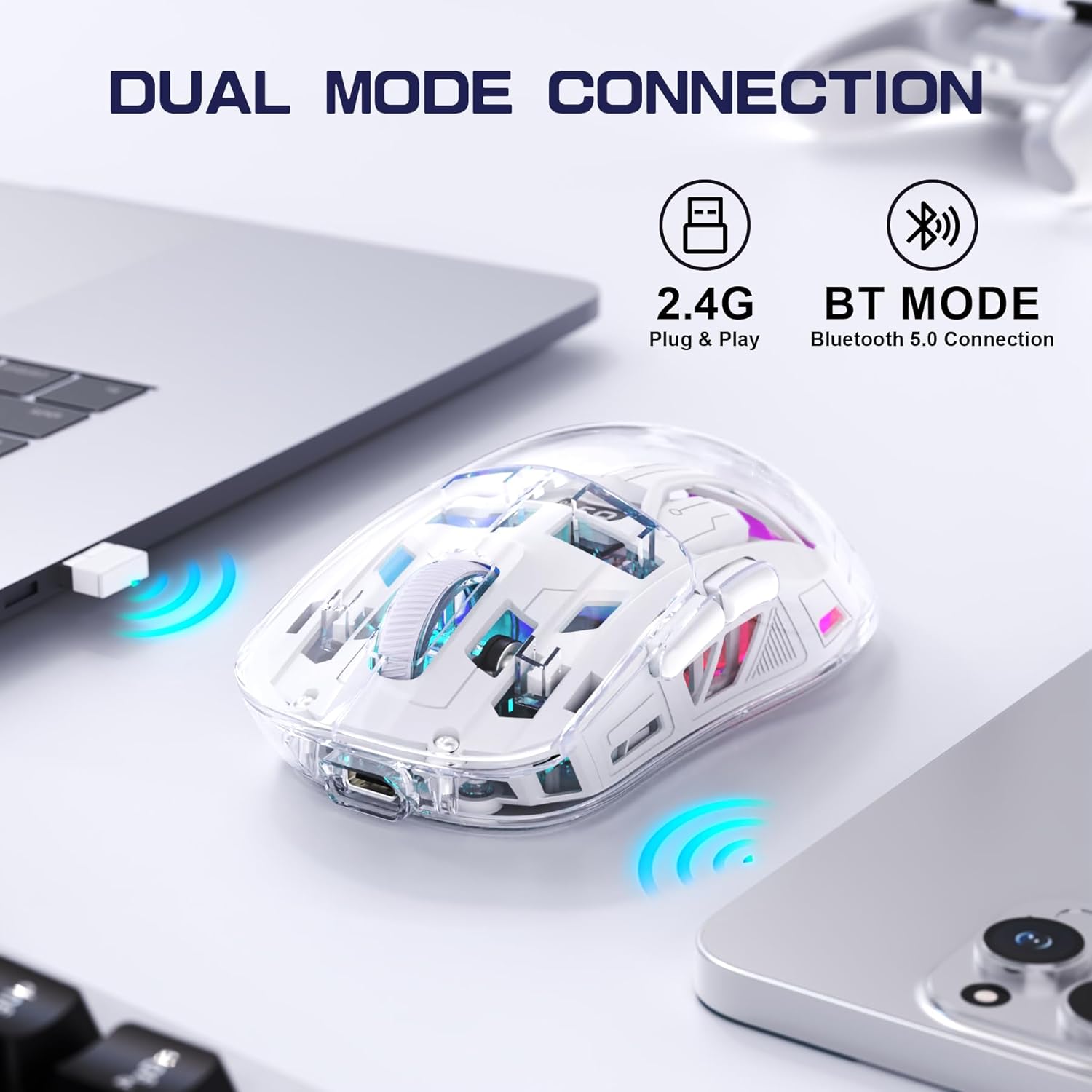
Image 4.2: The FREEWOLF A2 mouse connected to a laptop via its 2.4G wireless USB receiver.
4.3. Connecting via Bluetooth 5.0
- Slide the power switch on the underside of the mouse to the 'BT' (Bluetooth) position.
- На вашым камп'ютары або прыладзе адкрыйце налады Bluetooth.
- Пошук new devices. The mouse should appear as 'FREEWOLF A2' or similar.
- Select the mouse to pair. Follow any on-screen prompts.
5. Інструкцыя па эксплуатацыі
5.1. Рэгуляванне DPI
The mouse features 5 adjustable DPI levels (1200-4000 DPI) to suit different tasks and preferences. To change the DPI, press the DPI button located on the underside of the mouse. The digital screen will briefly display the current DPI setting.

Image 5.1: Diagram illustrating the 5 adjustable DPI levels (1200, 1600, 2000, 2400, 4000) available on the FREEWOLF A2 mouse.
5.2. Кіраванне падсветкай RGB
The FREEWOLF A2 mouse features vibrant RGB backlighting. To cycle through different lighting effects or turn the backlight off, press and hold the scroll wheel button for a few seconds.

Image 5.2: Two FREEWOLF A2 mice on a desk, showcasing their cool RGB lighting effects in a low-light environment.
5.3. Дысплей батарэі
The integrated digital screen on the mouse continuously displays the current battery percentage, allowing you to monitor power levels and recharge as needed.
5.4. Эрганамічны дызайн
The mouse is designed to conform to various hand grip styles (Palm Grip, Fingertip Grip, Claw Grip), reducing discomfort during prolonged use.
Image 5.3: A hand demonstrating a comfortable grip on the FREEWOLF A2 mouse, highlighting its ergonomic design.
6. Тэхнічнае абслугоўванне
- Уборка: Для чысткі мышы выкарыстоўвайце мяккую сухую тканіну. Пазбягайце выкарыстання агрэсіўных хімічных рэчываў або абразіўных матэрыялаў.
- захоўванне: When not in use, store the mouse in a cool, dry place. If storing for an extended period, ensure the mouse is fully charged and turn off the power.
- Сыход за батарэяй: To prolong battery life, avoid fully discharging the mouse frequently. Recharge when the battery level is low.
7. Выпраўленне непаладак
- Мышка не рэагуе:
- Пераканайцеся, што мыш уключана і выбраны правільны рэжым падключэння (2.4G або BT).
- Check battery level on the digital screen and recharge if necessary.
- For 2.4G mode, ensure the USB receiver is securely plugged into a working USB port. Try a different USB port.
- For Bluetooth mode, ensure Bluetooth is enabled on your device and the mouse is paired correctly. Try unpairing and re-pairing.
- Перазагрузіце камп'ютар або прыладу.
- Cursor movement is erratic or frozen:
- Ачысціце аптычны датчык на ніжняй частцы мышы.
- Пераканайцеся, што вы карыстаецеся мышшу на адпаведнай паверхні (не моцна бліскучай або празрыстай).
- Праверце перашкоды ад іншых бесправадных прылад.
- Adjust DPI settings to see if it resolves the issue.
- RGB backlight not working:
- Пераканайцеся, што мыш мае дастатковы зарад батарэі.
- Press and hold the scroll wheel button to cycle through lighting modes or turn the backlight on/off.
- Праблемы з зарадкай:
- Ensure the USB-C cable is properly connected to both the mouse and the power source.
- Паспрабуйце іншы кабель USB-C або адаптар сілкавання.
- Пераканайцеся, што крыніца харчавання працуе.
8. Тэхнічныя характарыстыкі
| Асаблівасць | Дэталь |
|---|---|
| Нумар мадэлі | A2 |
| Тэхналогія падлучэння | Бесправадная сувязь 2.4G, Bluetooth 5.0 |
| Тэхналогія выяўлення руху | Аптычны (PixArt 3212) |
| Рэгуляваны DPI | 1200-4000 (5 levels) |
| Ёмістасць батарэі | 400 мАг (убудаваны) |
| Порт для зарадкі | USB-C |
| Асаблівасці | Ergonomic Design, LED Lights (RGB), Portable, Rechargeable, Digital Battery Display |
| Памеры прадукту | 6.89 х 4.53 х 0.04 цалі |
| Вага прадмета | 4.9 унцыі |
| Вытворца | ВОЛЬНЫ ВОЎК |
9. Гарантыя і падтрымка
Specific warranty information for the FREEWOLF A2 Transparent Wireless Gaming Mouse is not provided in the available product data. Please refer to the product packaging or the retailer's webсайт для атрымання падрабязнай інфармацыі аб гарантыйным пакеце.
For technical support or further assistance, please contact the manufacturer or your point of purchase. Contact information may be available on the product packaging or the official FREEWOLF webсайт.