
1. Уводзіны
The IMIKI FRAME LITE ST2 is a versatile smartwatch designed for daily use, offering a blend of style and functionality. It features a 1.96-inch IPS display, Bluetooth connectivity, and various health monitoring capabilities. This manual provides essential information for operating and maintaining your device.
2. Змесціва ўпакоўкі
Калі ласка, пераканайцеся, што ўсе прадметы прысутнічаюць у вашай упакоўцы:
- IMIKI FRAME LITE ST2 Smartwatch
- Магнітны зарадны кабель
- Кіраўніцтва карыстальніка
3. Прылада скончанаview
Азнаёмцеся з асноўнымі кампанентамі вашага разумнага гадзінніка.
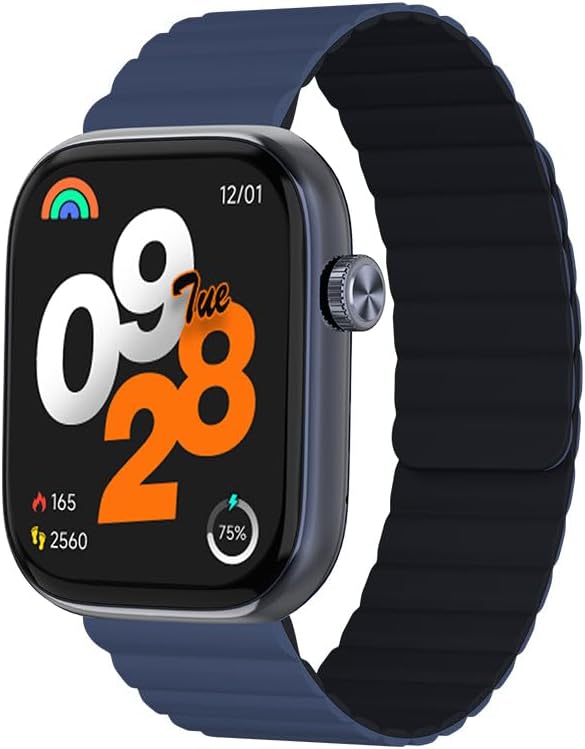
Малюнак 1: Фронт view of the IMIKI FRAME LITE ST2 Smartwatch, displaying the time, date, and activity metrics on its 1.96-inch IPS screen. The watch features a blue case and a blue magnetic strap.

Малюнак 2: Збоку view of the IMIKI FRAME LITE ST2 Smartwatch, highlighting its slim profile and the integrated crown button for navigation and control.
4. Настройка
4.1 Зарадка разумнага гадзінніка
Before initial use, fully charge your IMIKI FRAME LITE ST2 Smartwatch.
- Падключыце магнітны зарадны кабель да зарадных кропак на задняй панэлі смарт-гадзінніка.
- Падключыце USB-кабель да стандартнага USB-адаптара харчавання (не ўваходзіць у камплект) або да USB-порта кампутара.
- The watch display will indicate charging status. A full charge takes approximately 2 hours.
A fully charged 250 mAh battery provides up to 15 days of typical use or 5 days of intensive use.
4.2 Усталёўка дапаможнага прыкладання
To unlock the full features of your smartwatch, download and install the companion application on your smartphone.
- Scan the QR code provided in the quick start guide or search for the official IMIKI app in the Apple App Store (for iOS) or Google Play Store (for Android).
- Усталюйце праграму на свой смартфон.
- Выконвайце інструкцыі на экране, каб стварыць уліковы запіс і наладзіць свой прафесійныfile.
4.3 Спалучэнне са смартфонам
Ensure Bluetooth is enabled on your smartphone and the smartwatch is sufficiently charged.
- Open the IMIKI companion app on your smartphone.
- Перайдзіце ў раздзел «Прылада» або «Дадаць прыладу» ў праграме.
- The app will search for available devices. Select 'IMIKI FRAME LITE ST2' from the list.
- Пацвердзіце запыт на спалучэнне як на смартфоне, так і на смарт-гадзінніку, калі будзе прапанавана.
- Once paired, the smartwatch will synchronize data with your phone.
5. Кіраванне разумным гадзіннікам
5.1 Асноўная навігацыя
- Сэнсарны экран: Правядзіце пальцам улева, управа, уверх або ўніз, каб перамяшчацца па меню і апавяшчэннях. Націсніце, каб выбраць элементы.
- Бакавая кнопка/Каронка: Press to wake the screen, return to the home screen, or access the app list. Rotate (if applicable) to scroll through lists.
5.2 Кіраванне выклікамі
With Bluetooth 5.3 connectivity, you can manage calls directly from your smartwatch when paired with your smartphone.
- Адказ на званкі: Tap the green icon on the watch screen when an incoming call is displayed.
- Адхіленне званкоў: Націсніце на чырвоны значок, каб адхіліць уваходны званок.
- Галасавы памочнік: Access your smartphone's voice assistant directly from the watch for hands-free commands.
5.3 Маніторынг здароўя і фізічнай формы
The IMIKI FRAME LITE ST2 is equipped with sensors to track your health and fitness activities.
- Маніторынг сардэчнага рытму: The optical sensor continuously monitors your heart rate. View дадзеныя ў рэжыме рэальнага часу на гадзінніку або ў дадатку.
- Вымярэнне ўзроўню кіслароду ў крыві (SpO2): Measure your blood oxygen saturation levels. Ensure the watch is worn snugly on your wrist for accurate readings.
- Рэжымы трэніровак: Choose from 105 supported workout modes to track specific activities. The watch records statistics such as duration, calories burned, and heart rate during exercise.
- Адсочванне сну: Monitor your sleep patterns, including deep sleep, light sleep, and wake times.
5.4 Налада
Personalize your smartwatch experience through the companion app.
- Гадзіннік: Select from a variety of watch faces or create custom ones using the app.
- Налады апавяшчэнняў: Manage which app notifications appear on your smartwatch.
6. Тэхнічнае абслугоўванне
6.1 Ачыстка
Regular cleaning helps maintain the smartwatch's appearance and functionality.
- Працярыце экран і корпус гадзінніка мяккай тканінай без ворса.
- Для ўстойлівага бруду злёгку ачысціцеampпрамыйце тканіну вадой. Пазбягайце выкарыстання агрэсіўных хімічных рэчываў або абразіўных матэрыялаў.
- Перыядычна чысціце зарадныя кантакты, каб забяспечыць належную зарадку.
6.2 Воданепранікальнасць
The IMIKI FRAME LITE ST2 has an IP68 water resistance rating, meaning it is protected against dust ingress and can withstand immersion in water up to 1.5 meters for 30 minutes. It is suitable for daily use, such as hand washing or light rain. However, it is not recommended for swimming, diving, or exposure to high-pressure water.
6.3 Захоўванне
When not in use for extended periods, store the smartwatch in a cool, dry place. Ensure it has some charge to prevent deep discharge of the battery.
7. Выпраўленне непаладак
Калі ў вас узніклі праблемы са разумным гадзіннікам, звярніцеся да наступных распаўсюджаных рашэнняў:
- Гадзіннік не ўключаецца: Пераканайцеся, што гадзіннік цалкам зараджаны. Падключыце яго да зараднай прылады як мінімум на 10 хвілін.
- Немагчыма спалучыць прыладу са смартфонам:
- Пераканайцеся, што Bluetooth уключаны на вашым тэлефоне.
- Пераканайцеся, што гадзіннік знаходзіцца ў зоне дзеяння вашага тэлефона.
- Перазапусціце разумныя гадзіны і смартфон.
- Ачысціце кэш Bluetooth на вашым тэлефоне (калі ёсць).
- Недакладныя дадзеныя пра здароўе: Пераканайцеся, што гадзіннік шчыльна прылягае да запясця, не занадта туга і не занадта свабодна. Ачысціце датчык на задняй панэлі гадзінніка.
- Апавяшчэнні не з'яўляюцца: Check notification settings in the companion app and on your smartphone. Ensure the app is running in the background.
- Экран не рэагуе: Try restarting the smartwatch by pressing and holding the side button for several seconds.
8. Тэхнічныя характарыстыкі
| Асаблівасць | Спецыфікацыя |
|---|---|
| Марка | ІМІКІ |
| Назва мадэлі | IMIKI FRAME LITE ST2 |
| Памер экрана | 1.96 цалі |
| Тып дысплея | IPS |
| Тэхналогія падлучэння | Bluetooth 5.3 |
| Сумяшчальныя прылады | Смартфон (Android і iOS) |
| Ёмістасць батарэі | 250 мАг |
| Тыповы тэрмін службы батарэі пры выкарыстанні | Да 15 дзён |
| Intensive Usage Battery Life | Да 5 дзён |
| Час зарадкі | Прыкладна 2 гадзіны |
| Рэйтынг воданепранікальнасці | IP68 |
| Маніторынг здароўя | Blood Oxygen, Heart Rate |
| Рэжымы трэніровак | 105 |
| Тып раменьчыка | Магнітныя |
9. Гарантыя і падтрымка
For warranty information and customer support, please refer to the warranty card included in your product packaging or visit the official IMIKI webсайт. Захоўвайце чэк аб куплі як пацверджанне пакупкі.
If you require further assistance or have questions not covered in this manual, please contact IMIKI customer service through their official channels.