
1. Прадукт скончыўсяview
The Riokko YM119 OBD2 Scanner is a diagnostic tool designed for car owners to easily read and clear engine fault codes. It provides real-time data, freeze frame information, and supports various diagnostic functions for OBDII/EOBD compliant vehicles manufactured since 1996. Its intuitive interface and compact design make it suitable for both professional technicians and home users.

Figure 1.1: Riokko YM119 OBD2 Scanner. This image shows the main diagnostic tool with its color screen, control buttons, and the attached OBDII connector cable.
2. Усталёўка і першае выкарыстанне
2.1 Змест пакета
- Riokko YM119 OBD2 Scanner Unit
- Кіраўніцтва карыстальніка (гэты дакумент)
2.2 Падключэнне сканера
- Locate the vehicle's Data Link Connector (DLC). This is typically located under the dashboard on the driver's side.
- Ensure the vehicle's ignition is turned ON (engine can be off or running, depending on the test).
- Plug the OBDII connector of the YM119 scanner firmly into the vehicle's DLC. The scanner will power on automatically.
2.3 Выбар мовы
The YM119 supports 13 national languages. To change the language:
- From the main menu, navigate to "Setting" using the arrow keys.
- Націсніце OK button to enter the Setting menu.
- Select "Language" and choose your preferred language from the list.
- Прэса OK каб пацвердзіць свой выбар.
3. Кіраванне сканерам
3.1 кнопкі навігацыі
- ВЫХОД: Returns to the previous screen or main menu.
- Стрэлкі УВЕРХ/УНІЗ: Перамяшчайцеся па параметрах меню.
- Стрэлкі НАЛЕВА/НАПРАВА: Navigate through data screens or adjust settings.
- OK: Пацвярджае выбар або пераходзіць у падменю.
- BAT: Initiates the battery voltagэлектронны тэст.

Figure 3.1: Main Menu and Professional Functions. This image illustrates the scanner's main menu interface and highlights its key diagnostic capabilities such as Engine Fault Diagnostics, Quick Clear Fault Code, Real-time Data Stream, and Battery Life Test.
3.2 Дыягнастычныя функцыі
From the main menu, select "Diagnosis" to access the primary diagnostic functions.

Figure 3.2: OBD II Diagnostic Test Items. This image shows the comprehensive list of diagnostic tests available on the scanner, from reading and erasing codes to advanced sensor and component tests.
3.2.1 Чытайце коды
This function retrieves Diagnostic Trouble Codes (DTCs) from the vehicle's computer. These codes indicate specific issues detected by the vehicle's onboard diagnostic system.
- Select "Read Codes" from the Diagnosis menu.
- The scanner will display any stored, pending, or permanent DTCs.
- Выкарыстоўвайце УВЕРХ/УНІЗ arrows to scroll through the codes.
- For detailed information on a specific code, use the "DTC Lib" function or refer to a reliable automotive repair database.
3.2.2 Выразныя коды
This function erases DTCs from the vehicle's computer and turns off the Malfunction Indicator Lamp (MIL), also known as the Check Engine Light. Note: Clearing codes does not fix the underlying problem. The MIL will illuminate again if the fault persists.

Figure 3.3: Check and Turn Off Engine Light. This image demonstrates the scanner's ability to diagnose and clear engine fault codes, effectively turning off the Check Engine Light on the vehicle's dashboard.
- Select "Erase Codes" from the Diagnosis menu.
- Пацвердзіце дзеянне, калі будзе прапанавана.
- The MIL should turn off.
3.2.3 Real-time Data (Live Data Stream)
View real-time sensor data from the vehicle's engine control unit (ECU). This data can be displayed in text or graphical format, allowing for dynamic monitoring of vehicle performance.
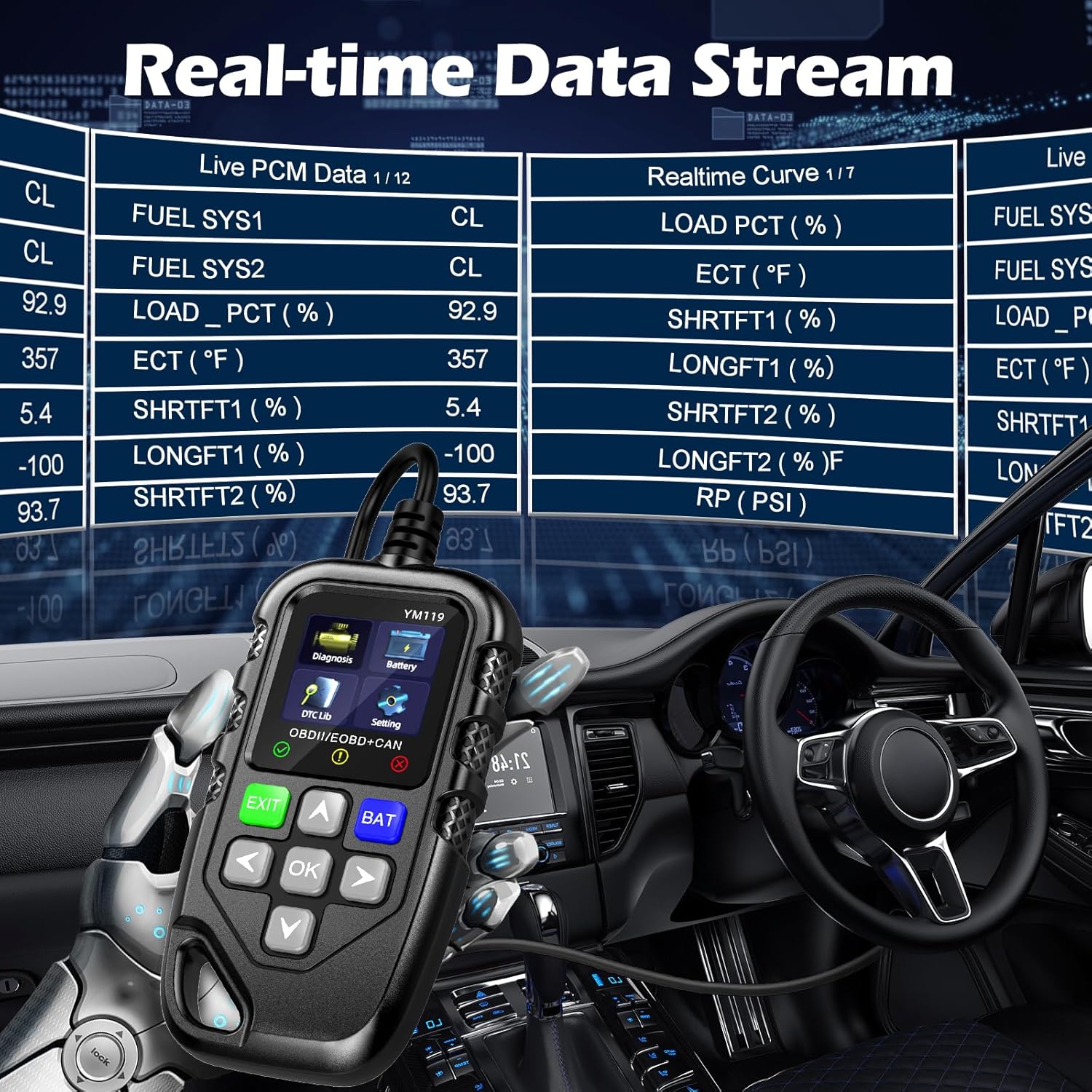
Figure 3.4: Real-time Data Stream. This image shows the scanner's capability to display live engine data, including various sensor readings and their corresponding real-time curves, aiding in dynamic vehicle diagnostics.
- Select "Live Data" or "Realtime Curve" from the Diagnosis menu.
- Выкарыстоўвайце УВЕРХ/УНІЗ arrows to scroll through different data parameters.
- Выкарыстоўвайце НАЛЕВЫ/ПРАВЫ arrows to switch between text and graph views (if available for the parameter).
3.2.4 Freeze Frame Data
When an emission-related fault occurs, the vehicle's computer records a snapshot of operating conditions at the time of the fault. This "freeze frame" data helps in diagnosing intermittent problems.
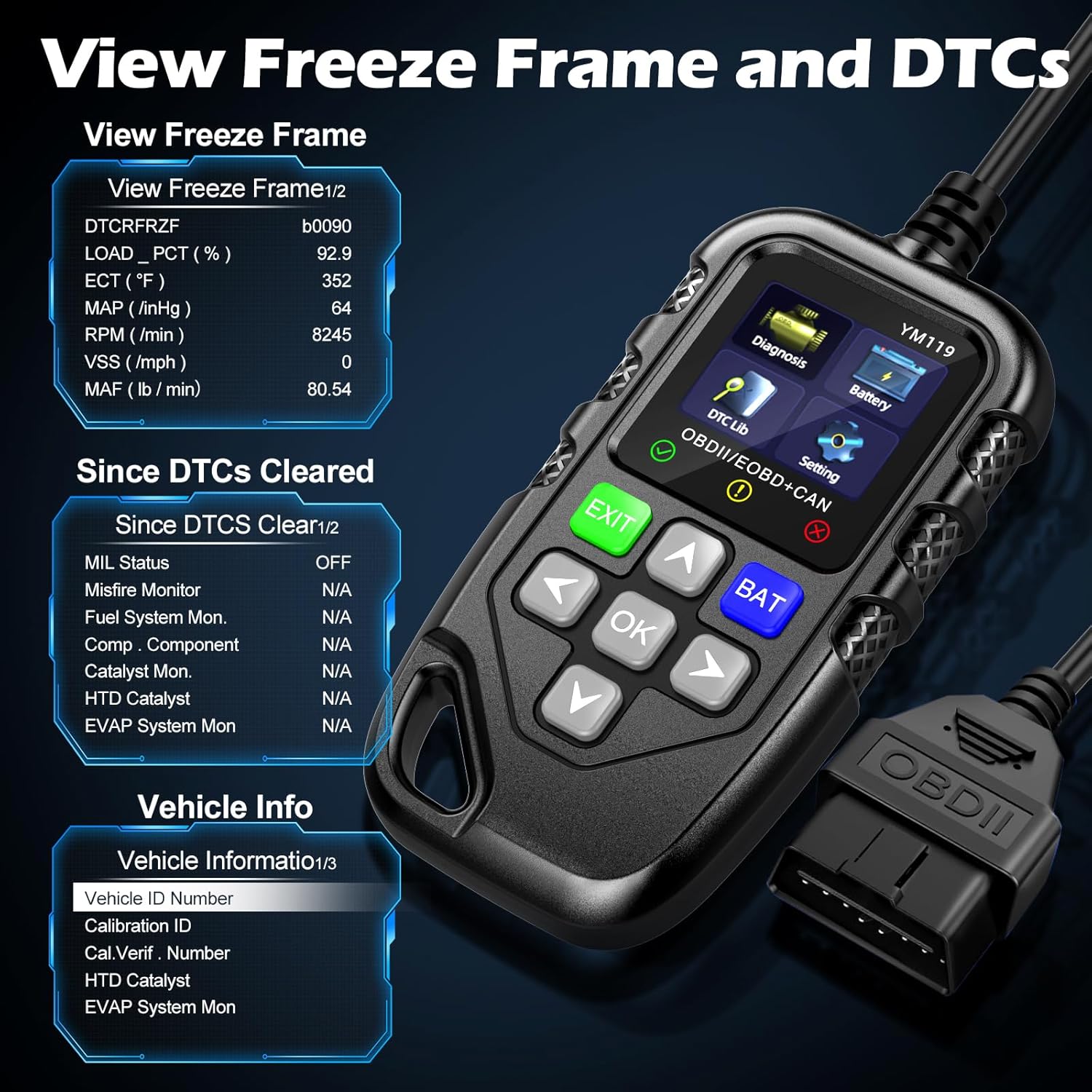
Малюнак 3.5: View Freeze Frame and DTCs. This image displays the scanner's ability to capture and show freeze frame data, which provides a snapshot of engine conditions at the moment a fault code was set, aiding in diagnosis.
- Выберыце "View Freeze Frame" from the Diagnosis menu.
- Review the recorded parameters.
3.2.5 DTC Query (DTC Lib)
The built-in DTC Library allows you to look up definitions for generic (P0, P2, P34, B0, C0, U0) and manufacturer-specific (P1, P30-P33, B1, C1, U1) codes.
- From the main menu, select "DTC Lib".
- Enter the DTC code using the arrow keys and OK кнопка.
- The scanner will display the definition of the code.
3.2.6 Гатоўнасць I/M
This function checks the readiness of the emission-related monitoring systems on the vehicle. It's useful for determining if the vehicle is ready for an emissions test.
- Select "I/M Readiness" from the Diagnosis menu.
- The scanner will display the status of various monitors (e.g., Misfire Monitor, Fuel System Monitor). "OK" indicates the monitor has completed its test, "INC" indicates incomplete, and "N/A" indicates not applicable.
3.2.7 Акумулятар Voltagе тэст
The YM119 can perform a basic battery voltage test to assess the vehicle's battery health.

Figure 3.6: Estimate Battery Life Test. This image shows the scanner's dedicated function for monitoring and assessing the vehicle's battery voltage and overall health.
- From the main menu, select "Battery" or press the БАТ кнопка.
- Сканер пакажа бягучы ўзровень зарада батарэіtage.
3.2.8 Інфармацыя аб транспартным сродку
This function retrieves the Vehicle Identification Number (VIN), Calibration ID (CALID), and Calibration Verification Number (CVN) of the vehicle.
- Select "Vehicle Info" from the Diagnosis menu.
- The scanner will display the available vehicle information.
4. Тэхнічнае абслугоўванне
4.1 Ачыстка прылады
To maintain the scanner's performance and appearance:
- Працярыце прыладу мяккай дamp тканіна.
- Не выкарыстоўвайце абразіўныя ачышчальнікі або растваральнікі.
- Перад захоўваннем пераканайцеся, што прылада сухая.
4.2 Захоўванне
Store the scanner in a clean, dry environment away from extreme temperatures and direct sunlight. Keep the OBDII connector free from dust and debris.
5. Выпраўленне непаладак
| праблема | Магчымая прычына | Рашэнне |
|---|---|---|
| Сканер не ўключаецца. |
|
|
| Паведамленне «Памылка злучэння» або «Памылка сувязі». |
|
|
| Engine light reappears after clearing codes. | Underlying fault has not been repaired. | Clearing codes only turns off the light; it does not fix the problem. Diagnose and repair the underlying issue before clearing codes again. |
| Inaccurate or missing data readings. |
|
|
6. Тэхнічныя характарыстыкі
| Асаблівасць | Дэталь |
|---|---|
| Нумар мадэлі | AE0004L (YM119) |
| Марка | Riokko |
| Памер экрана | 2.8 цалі |
| Пратаколы, якія падтрымліваюцца | Nine standard OBDII/EOBD protocols |
| Падтрымліваюцца мовы | 13 нацыянальныя мовы |
| Вага прадмета | 7.8 унцыі (прыблізна 221 грамаў) |
| Памеры ўпакоўкі | 8.11 х 5.35 х 1.14 цалі (прыблізна 20.6 х 13.6 х 2.9 см) |
| Першая даступная дата | 16 кастрычніка 2024 г |
7. Гарантыя і падтрымка
7.1 Інфармацыя аб гарантыі
The Riokko YM119 OBD2 Scanner comes with a Гарантыя 3 год з дня пакупкі. Гэтая гарантыя распаўсюджваецца на дэфекты матэрыялаў і вырабу пры звычайным выкарыстанні.
7.2 Палітыка вяртання
A 30-дзённая палітыка вяртання без пытанняў is offered for your purchase. Please refer to your retailer's specific return instructions.
7.3 Падтрымка кліентаў
For technical assistance, warranty claims, or any other inquiries, please contact Riokko customer service. Кругласутачная служба падтрымкі кліентаў гатовы дапамагчы вам.
Please visit the official Riokko webсайт або звярніцеся да ўпакоўкі прадукту, каб атрымаць найноўшую кантактную інфармацыю.