
BT4
Pro 4 TWS Wireless Headphones User Manual
Model: BT4 | Brand: Generic
Прадукт скончаныview
The Pro 4 TWS Wireless Headphones are designed to provide a high-quality audio experience with the convenience of wireless technology. These earbuds feature Bluetooth 5.0 for stable connectivity, an IPX7 waterproof rating for durability, and a built-in microphone for clear calls. The ergonomic design ensures a comfortable and secure fit for extended use.

Image: The black protective storage case included with the Pro 4 TWS Wireless Headphones. This compact case helps protect your earbuds when not in use.

Image: The Pro 4 TWS Wireless Earbuds resting inside their open charging case. The earbuds are white with black tips, and the case is also white.
Што ўключана
- Pro 4 TWS Wireless Earbuds (Left and Right)
- Чахол для зарадкі
- Protective Case (Black, as shown in product images)
- Кіраўніцтва карыстальніка (гэты дакумент)
- Charging Cable (not explicitly mentioned but standard for earbuds)
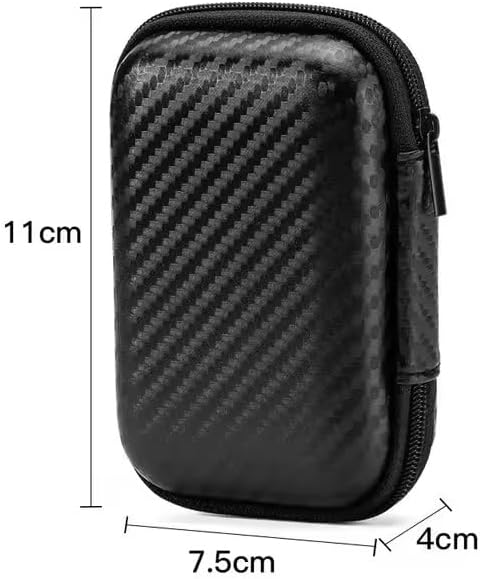
Image: A visual representation of the protective storage case with its dimensions: approximately 11cm in height, 7.5cm in width, and 4cm in depth. This illustrates the compact size of the included accessory.
Кіраўніцтва па ўстаноўцы
1. Пачатковая зарадка
Before first use, ensure both the earbuds and the charging case are fully charged. Place the earbuds into the charging case and connect the charging case to a power source using the provided charging cable. The indicator light on the case will show charging status.
2. Спалучэнне з прыладай
- Адкрыйце зарадны кейс. Навушнікі аўтаматычна пяройдуць у рэжым спалучэння.
- На вашай прыладзе (смартфоне, планшэце, ноўтбуку) перайдзіце ў налады Bluetooth.
- Пошук available devices and select "Pro 4 TWS" (or similar name) from the list.
- Пасля падключэння галасавая падказка пацвердзіць паспяховае спалучэнне.
Note: If pairing fails, ensure the earbuds are charged and within range of your device. You may need to "forget" previous pairings on your device and try again.

Image: The Pro 4 TWS earbuds shown with a smartphone, illustrating the touch control feature for connection. A blue light effect indicates active connection or touch interaction.
Інструкцыя па эксплуатацыі
Сэнсарныя элементы кіравання
The Pro 4 TWS headphones feature intuitive touch controls on each earbud. Specific functions may vary slightly, but common controls include:
- Адзін націск: Прайграванне/прыпыненне музыкі, адказ/завяршэнне выкліку.
- Двойчы націск (левы навушнік): Папярэдні трэк.
- Двойчы націск (правы навушнік): Наступны трэк.
- Трайны кран: Актывуйце галасавога памочніка (Siri, Google Assistant).
- Доўгі націск: Адхіліць званок.
Нашэнне навушнікаў
Gently insert each earbud into your ear canal. Rotate slightly until you achieve a comfortable and secure fit. The ergonomic design is intended to keep them stable during various activities.

Image: A woman wearing the Pro 4 TWS earbuds, highlighting their ergonomic design and comfortable fit within the ear. The image emphasizes that the earbuds are designed to stay securely in place.
Тэхнічнае абслугоўванне і догляд
- Уборка: Выкарыстоўвайце мяккую, сухую тканіну без ворса для чысткі навушнікаў і зараднага футляра. Не выкарыстоўвайце агрэсіўныя хімічныя рэчывы або абразіўныя матэрыялы.
- Воданепранікальнасць: The earbuds have an IPX7 waterproof rating, meaning they are resistant to sweat and rain. Do not submerge them in water or expose them to strong jets of water. Ensure they are dry before placing them back in the charging case.
- захоўванне: When not in use, store the earbuds in their charging case, preferably within the included protective case, to prevent damage and keep them clean.
- Сыход за батарэяй: Каб падоўжыць тэрмін службы батарэі, не разраджайце навушнікі і зарадны футляр цалкам. Рэгулярна зараджайце іх, нават калі яны не выкарыстоўваюцца пастаянна.
Ліквідацыю непаладак
| праблема | Магчымае рашэнне |
|---|---|
| Навушнікі не спалучаюцца |
|
| Ніякага гуку з аднаго навушніка |
|
| Дрэнная якасць гуку |
|
| Праблемы з зарадкай |
|
Тэхнічныя характарыстыкі
| Асаблівасць | Дэталь |
|---|---|
| Нумар мадэлі | BT4 |
| Тэхналогія падлучэння | Бесправадны, Bluetooth |
| Версія Bluetooth | 5.0 |
| Далёкасць бесправадной сувязі | Да 33 футаў (прыблізна 10 метраў) |
| Воданепранікальнасць | IPX7 (Resistant to sweat and rain) |
| Мікрафон | Built-in, High-Quality |
| Метад кантролю | Пульт дыстанцыйнага кіравання (сэнсарнае кіраванне) |
| Размяшчэнне вушэй | У вуха |
| Матэрыял | Сілікон, пластык |
| Уключаныя кампаненты | Ахоўны футляр |
| Сумяшчальныя прылады | Smartphones, Tablets, Laptops, Desktops, Smart Speakers, Cars (with Bluetooth capabilities) |

Image: A diagram highlighting the upgraded Bluetooth 5.0 chip, emphasizing features like HD Voice, Quick Connect, and Stable Reception, which contribute to high-fidelity sound quality and anti-interference.

Выява: Выбухнула view of the earbud's internal components, specifically showcasing the high-quality dynamic unit and balanced adjustment technology designed to deliver rich sound effects.
Гарантыя і падтрымка
For warranty information and customer support, please refer to the documentation provided at the time of purchase or contact the seller directly. The product is manufactured by "wireless earphone".
Каб атрымаць дадатковую дапамогу, вы таксама можаце наведаць старонку прадукту на Amazon: Pro 4 TWS Wireless Headphones on Amazon.
Ask a question about this manual
Ask about setup, troubleshooting, compatibility, parts, safety, or missing instructions. Manuals+ will review the question and use this page’s manual context to help answer it.